
Important Safety Information
Please read this manual thoroughly before operating the Supfine 3D Vibration Plate. Retain this manual for future reference.
- Consult a physician before starting any new exercise program, especially if you have pre-existing health conditions.
- Do not exceed the maximum user weight of 120 kg (264 lbs).
- Ensure the device is placed on a stable, level surface during use.
- Keep children and pets away from the device during operation.
- Do not use the device if you are pregnant, have a pacemaker, or suffer from severe osteoporosis, epilepsy, or acute thrombosis.
- Unplug the device from the power outlet when not in use or before cleaning.
- Do not immerse the device in water or expose it to excessive moisture.
- Use only the provided power cord and accessories.
Package Contents
Verify that all items are present in the package:
- 1 x Supfine 3D Vibration Plate
- 2 x Resistance Bands
- 1 x Remote Control
- 1 x User Manual
- 1 x Power Cord (European plug)

This image shows the Supfine 3D Vibration Plate, its two resistance bands, and the remote control. The plate is red and black, designed for home fitness.
Setup Instructions
- Unpacking: Carefully remove all components from the packaging.
- Placement: Place the vibration plate on a firm, level, and non-slip surface. Ensure there is sufficient space around the device for safe exercise.
- Power Connection: Locate the power input port on the rear of the device. Connect the power cord to the device and then plug it into a suitable 220V/50Hz or 110V/60Hz electrical outlet.
- Main Power Switch: Turn on the main power switch located on the rear of the device. The LCD display on the plate should illuminate.
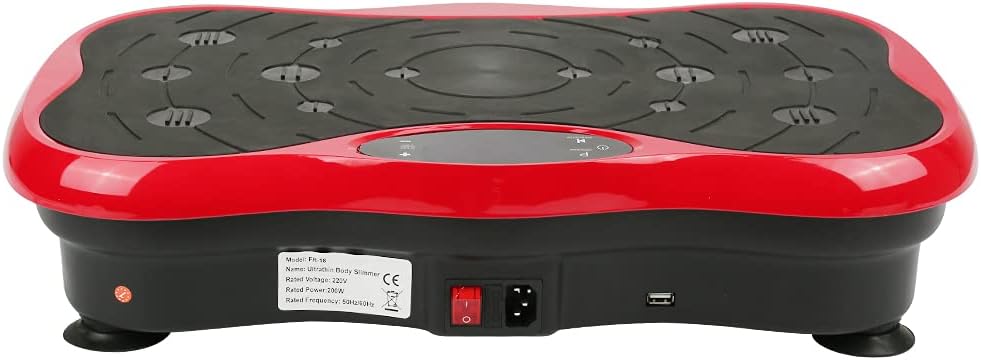
The rear view of the vibration plate, showing the main power switch, power input port, and a USB port. The model number 'A80007' and electrical specifications are also visible on a label.
Operating Instructions
Using the Control Panel and Remote Control
The vibration plate can be operated using the integrated control panel on the device or the included remote control.
- Power Button: Press to turn the device on or off.
- Program (P) Button: Cycle through the 5 pre-set vibration modes (P1-P5).
- Speed/Level Buttons (+/-): Adjust the vibration intensity from level 0 to 95.
- Start/Stop Button: Begin or pause the vibration.
Exercise Guidance
The vibration plate offers 95 adjustable levels and 5 vibration modes (P1-P5). You can select different intensities or choose a free training mode based on your fitness needs. Placing your feet in different zones on the plate allows for targeted effects.

A top-down view of the vibration plate, highlighting the textured surface and marked zones for different foot placements to vary exercise intensity. The central display shows 'P' for Program and 'SPEED LEVEL'.
- Low Intensity: Place feet closer to the center of the plate.
- Medium Intensity: Place feet slightly wider than the center.
- High Intensity: Place feet towards the outer edges of the plate.
Using Resistance Bands
Attach the resistance bands to the designated hooks on the sides of the vibration plate. These bands provide additional upper body and arm exercises during your vibration training.
Recommended Usage
Regular use for 10-15 minutes per day can contribute to fat burning, muscle training, and improved blood circulation. The device is suitable for various exercises targeting the abdomen, legs, and glutes.

A user is shown sitting on the Supfine 3D Vibration Plate, demonstrating a possible exercise position.

A user is depicted in a meditative or stretching pose on the Supfine 3D Vibration Plate, illustrating its versatility.

This image shows a user performing leg raises while seated next to the Supfine 3D Vibration Plate.
Maintenance
- Cleaning: Wipe the surface of the vibration plate with a soft, damp cloth after each use. Do not use abrasive cleaners or solvents.
- Storage: Store the device in a cool, dry place away from direct sunlight and extreme temperatures.
- Inspection: Periodically check the power cord and resistance bands for any signs of wear or damage. If damage is found, discontinue use and contact customer support.
Troubleshooting
| Problem | Possible Cause | Solution |
|---|---|---|
| Device does not power on. | Power cord not properly connected. Main power switch is off. Power outlet issue. | Ensure power cord is securely plugged in. Turn on the main power switch on the rear. Test the outlet with another device. |
| No vibration. | Device is paused. Speed level is set to 0. | Press the Start button. Increase the speed level using the '+' button. |
| Remote control not working. | Batteries are dead or incorrectly inserted. Obstruction between remote and device. | Replace batteries in the remote control. Ensure clear line of sight to the device's receiver. |
Product Specifications
| Model Number | A80007 |
| Dimensions (L x W x H) | 53 x 35 x 12 cm (20.9 x 13.8 x 4.7 inches) |
| Item Weight | 9.8 kg (21.6 lbs) |
| Maximum Load Capacity | 120 kg (264 lbs) |
| Rated Power | 200 W |
| Rated Voltage | 110V/50Hz, 220V/60Hz |
| Vibration Modes | 5 (P1-P5) |
| Vibration Levels | 95 |
| Display Type | LCD |
| Control Type | Remote Control |
| Material | Acrylonitrile Butadiene Styrene (ABS), Plastic |
| Color | Black/Red |

This image displays a side view of the Supfine 3D Vibration Plate, indicating its dimensions: 53 cm length, 35 cm width, and 12 cm height.
Warranty and Support
This product comes with a standard manufacturer's warranty. For specific warranty details, please refer to the documentation provided at the time of purchase or contact your retailer.
If you encounter any issues or have questions regarding your Supfine 3D Vibration Plate, please contact the seller or manufacturer's customer support for assistance. Please have your product model number (A80007) and ASIN (B09F97Y1W8) ready when contacting support.