
WARM TECH WTCHMO2003TL-WI
WARM TECH WTCHMO2003TL-WI Ceramic Wall Heater User Manual
Model: WTCHMO2003TL-WI | Brand: WARM TECH
1. Introduction
Thank you for choosing the WARM TECH WTCHMO2003TL-WI Ceramic Wall Heater. This manual provides essential information for the safe and efficient operation of your new heater. Please read it thoroughly before installation and use, and retain it for future reference.
This ceramic wall heater is designed to provide efficient heating for indoor spaces such as bathrooms and living rooms. It features two heating power settings (1000W and 2000W), a fan-only mode, a digital LED temperature display, remote control, and WiFi connectivity via the Tuya Smart app.
2. Important Safety Instructions
WARNING: To reduce the risk of fire, electric shock, or injury, observe the following safety precautions:
- Read all instructions before using this heater.
- This heater is hot when in use. To avoid burns, do not let bare skin touch hot surfaces.
- Extreme caution is necessary when any heater is used by or near children or invalids and whenever the heater is left operating and unattended.
- Do not operate any heater with a damaged cord or plug or after the heater malfunctions, has been dropped or damaged in any manner.
- Do not use outdoors. This heater is for indoor use only.
- Do not run cord under carpeting. Do not cover cord with throw rugs, runners, or similar coverings. Arrange cord away from traffic area and where it will not be tripped over.
- To disconnect heater, turn controls to OFF, then remove plug from outlet.
- Do not insert or allow foreign objects to enter any ventilation or exhaust opening as this may cause an electric shock or fire, or damage the heater.
- To prevent a possible fire, do not block air intakes or exhaust in any manner. Do not use on soft surfaces, like a bed, where openings may become blocked.
- A heater has hot and arcing or sparking parts inside. Do not use it in areas where gasoline, paint, or flammable liquids are used or stored.
- Use this heater only as described in this manual. Any other use not recommended by the manufacturer may cause fire, electric shock, or injury to persons.
- Always plug heaters directly into a wall outlet/receptacle. Never use with an extension cord or relocatable power tap (outlet/power strip).
- Ensure the power supply voltage matches the rating label on the heater.
- The heater has an IP22 protection rating, making it suitable for use in bathrooms, but it should not be directly exposed to water splashes. Always follow local electrical codes for bathroom installations.
3. Package Contents
Verify that all components are present and in good condition:
- WARM TECH WTCHMO2003TL-WI Ceramic Wall Heater
- Remote Control
- Mounting Hardware (screws, wall anchors)
- User Manual (this document)

Image: Overview of the WARM TECH WTCHMO2003TL-WI Ceramic Wall Heater, highlighting its features and included remote control.
4. Specifications
| Feature | Specification |
|---|---|
| Model Number | WTCHMO2003TL-WI |
| Brand | WARM TECH |
| Power Output | 1000W / 2000W |
| Number of Speeds | 3 (including fan mode) |
| Special Feature | Remote Control, WiFi Connectivity (Tuya App), Digital LED Display |
| Form Factor | Wall-mounted |
| Indoor/Outdoor Use | Indoor |
| Power Source | Electric (Corded) |
| Heating Method | Convection |
| Room Type | Bathroom, Living Room |
| Protection Rating | IP22 |
| Cable Length | 150 cm |
| Dimensions (L x H x D) | 54.2 cm x 18.7 cm x 12.3 cm |
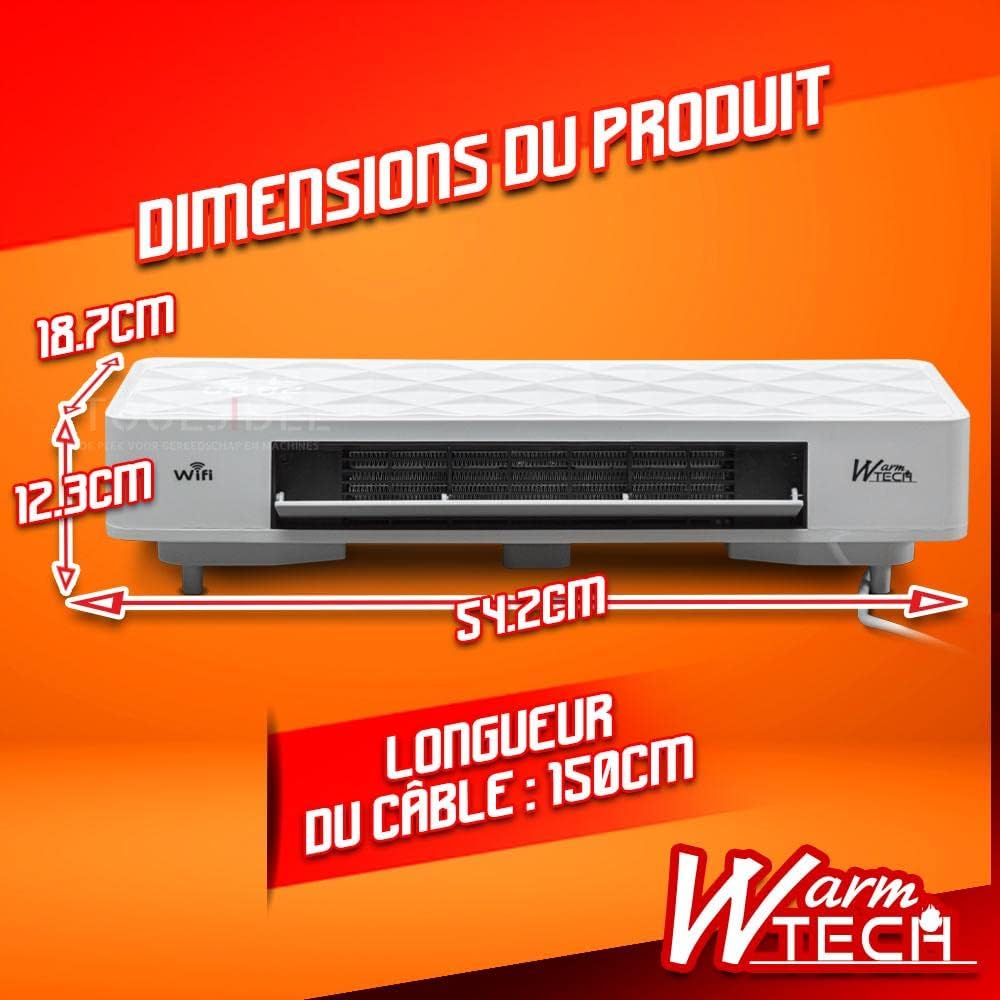
Image: Product dimensions and cable length.
5. Setup and Installation
5.1 Choosing a Location
- Select a wall location that is clear of obstructions and at least 1 meter (3 feet) away from flammable materials such as curtains, furniture, or bedding.
- Ensure the wall can support the weight of the heater.
- For bathroom installation, ensure compliance with local electrical codes and maintain a safe distance from water sources. The IP22 rating protects against vertically falling water drops and objects larger than 12.5mm.
- Ensure the power cord can reach a suitable electrical outlet without requiring an extension cord.
5.2 Wall Mounting
- Carefully unpack the heater and all accessories.
- Using the provided mounting template (if included) or by measuring the mounting holes on the back of the heater, mark the drilling points on the wall. Ensure the marks are level.
- Drill holes at the marked points. Insert the wall anchors into the drilled holes.
- Secure the mounting bracket (if separate) or the heater directly to the wall using the provided screws. Ensure it is firmly attached.
- Once mounted, plug the heater into a grounded electrical outlet.

Image: Example of the heater mounted on a wall.
5.3 WiFi Connection (Tuya Smart App)
- Download the "Tuya Smart" app from your smartphone's app store (iOS or Android).
- Register or log in to your Tuya Smart account.
- Ensure your heater is plugged in and powered on.
- In the Tuya Smart app, tap "+" to add a device. Follow the on-screen instructions to connect your heater to your home WiFi network. This typically involves putting the heater into pairing mode (refer to the heater's display or specific button combinations for this, usually indicated by a flashing WiFi icon).
- Once connected, you can control the heater remotely via the app.

Image: Remote control and Tuya Smart app interface for WiFi control.
6. Operating Instructions
6.1 Control Panel and Display
The heater features a digital LED display showing temperature and time. Buttons on the unit or the remote control allow for various settings.

Image: Digital LED display.
6.2 Using the Remote Control
The remote control allows convenient operation of the heater from a distance.

Image: Remote control for the heater.
- Power Button: Turns the heater ON or OFF.
- Mode Button: Cycles through heating modes (1000W, 2000W) and fan-only mode.
- Temperature Adjustment (+/-): Increases or decreases the desired temperature setting.
- Timer Button: Sets the operating timer.
- Swing Button: Activates or deactivates the oscillation (swing) function for wider heat distribution.

Image: Heater swing function.
6.3 Using the Tuya Smart App
Once connected to WiFi, the Tuya Smart app provides advanced control features:
- Remote ON/OFF.
- Temperature setting and monitoring.
- Mode selection (1000W, 2000W, Fan).
- Scheduling and timer functions.
- Integration with voice assistants (e.g., Alexa, Google Assistant) via Tuya Smart Life skill/action.
7. Maintenance
Regular maintenance ensures optimal performance and longevity of your heater.
7.1 Cleaning
- Always unplug the heater and allow it to cool completely before cleaning.
- Wipe the exterior surfaces with a soft, damp cloth. Do not use abrasive cleaners or solvents.
- Use a vacuum cleaner with a brush attachment to remove dust from the air intake and exhaust grilles.
- Ensure no water enters the interior of the heater.
7.2 Storage
If storing the heater for an extended period, clean it thoroughly and store it in a cool, dry place, preferably in its original packaging.
8. Troubleshooting
| Problem | Possible Cause | Solution |
|---|---|---|
| Heater does not turn on. | No power supply; Power button not pressed; Overheat protection activated. | Check power cord connection and wall outlet; Press the power button; Unplug, wait 30 minutes, then plug back in. |
| Heater produces cold air only. | Fan-only mode selected; Temperature setting too low. | Select a heating mode (1000W or 2000W); Increase the desired temperature setting. |
| WiFi connection fails. | Incorrect WiFi password; Heater too far from router; Router issues; Heater not in pairing mode. | Verify WiFi password; Move heater closer to router; Restart router; Follow app instructions to put heater in pairing mode. |
| Remote control not working. | Batteries depleted; Obstruction between remote and heater. | Replace remote control batteries; Ensure clear line of sight to the heater's receiver. |
| Heater is noisy. | Normal fan operation; Dust accumulation. | Some fan noise is normal. Clean air grilles to remove dust. If noise is excessive or unusual, contact support. |
9. Warranty and Customer Support
WARM TECH products are manufactured to high-quality standards. For warranty information, technical support, or service inquiries, please refer to the warranty card included with your product or contact WARM TECH customer service directly. Please have your model number (WTCHMO2003TL-WI) and purchase date available when contacting support.
You can find contact information on the official WARM TECH website or through your retailer.
Ask a question about this manual
Ask about setup, troubleshooting, compatibility, parts, safety, or missing instructions. Manuals+ will review the question and use this page’s manual context to help answer it.