
Introduction
The Loraffe 4-in-1 Ultrasonic Rodent Repellent is designed to deter rodents from indoor spaces using a combination of ultrasonic frequencies, impulse waves, predator sounds, and LED strobe lights. This device provides a multi-faceted approach to pest control, creating an uncomfortable environment for mice and rats without the use of harmful chemicals or traps.
Product Overview
The Loraffe 4-in-1 Rodent Repellent integrates multiple technologies to maximize its effectiveness. Understanding its components and features is key to optimal performance.
Key Features:
- 4-in-1 Repelling Technology: Emits ultrasonic frequencies, impulse waves, predator sounds, and utilizes LED strobe lights.
- 12 High-Intensity LED Strobe Lights: Arranged in 3 groups on a triangular plate to target rodents' vision. Features a dusk-to-dawn sensor for automatic operation in low light.
- Three Speakers: Delivers a combination of high-frequency ultrasounds, impulse waves, and predator sounds.
- Customizable Sound Modes: Four selectable modes: TEST, ULTRA, DUO, and TRIO.
- Adjustable Volume Control: Allows adjustment of predator sound frequencies.
- Plug-and-Play Design: Easy to use with 110-220V outlets for indoor spaces.
Component Identification:
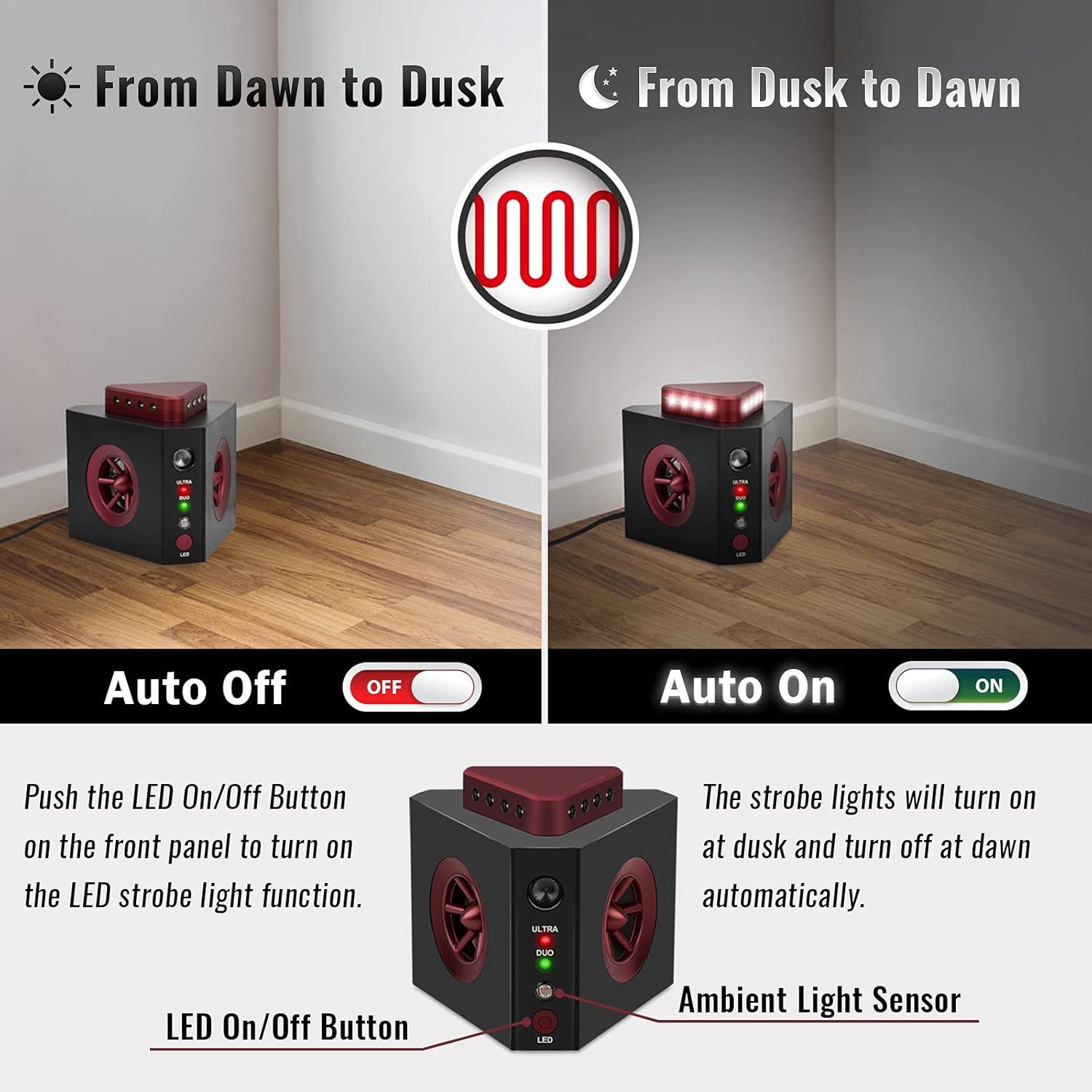
Image: Front and Back view of the Loraffe 4-in-1 Ultrasonic Rodent Repellent. The front shows LED Strobe Lights, Impulse Transducer, Ultrasound Speaker, Audio Speaker (Predator Sounds), ULTRA Mode Indicator Light (Red), DUO Mode Indicator Light (Green), Ambient Light Sensor, and LED On/Off Button. The back shows LED Strobe Lights, Power Port (AC 100-240V Input), Sound Mode Switch, and Volume Adjuster (Predator Sounds).

Image: Small and compact design of the repellent, showing dimensions of approximately 4.33 inches (width), 3.94 inches (height), and 3.74 inches (depth).
Setup
- Unpack the Device: Carefully remove the repellent from its packaging.
- Choose a Location: Select an indoor area where rodent activity is observed or suspected. Ensure the chosen location is free from obstructions that could block the emitted sounds and lights.
- Plug In: Connect the power adapter to the device's Power Port and then plug the adapter into a standard 110-220V AC electrical outlet. The device will power on automatically.
- Initial Placement: For best results, place the unit in an open area, away from soft materials like carpets or furniture that can absorb ultrasonic waves. Avoid placing it behind large objects.
Operation
Sound Modes:
Use the Sound Mode Switch on the back of the device to select one of the four operating modes:
- TEST Mode: Emits a loud, high-pitched sound audible to humans. This mode is for testing the ultrasonic speaker function and should only be used briefly.
- ULTRA Mode: Activates the ultrasonic speaker, emitting high-frequency sounds inaudible to most humans but irritating to rodents. The red ULTRA indicator light will illuminate.
- DUO Mode: Activates both the ultrasonic speaker and the impulse transducer, emitting both ultrasonic and impulse waves. The green DUO indicator light will illuminate.
- TRIO Mode: Activates the ultrasonic speaker, impulse transducer, and the audio speaker (predator sounds). This mode combines all three sound deterrents.

Image: Illustration of the TEST mode, indicating very loud high-pitched sounds from the ultrasound speaker.

Image: A chart illustrating the Ultrasound Frequency Range (18,000Hz to 65,000Hz for the repellent, within rodent hearing range) and Audio Noise Level (up to 100dB for predator sounds). A warning indicates that pets may also be affected by the emitted sounds.
Volume Control:
The Volume Adjuster on the back of the device controls the loudness of the predator sounds when in TRIO mode. Rotate the knob to increase or decrease the volume as needed. This does not affect ultrasonic or impulse wave intensity.
LED Strobe Lights:
The device features 12 high-intensity LED strobe lights. Press the LED On/Off Button on the front panel to activate or deactivate the strobe light function. When activated, the lights will automatically turn on at dusk and turn off at dawn, thanks to the built-in ambient light sensor.

Image: Illustration demonstrating the LED strobe light function. The LED On/Off Button controls the function, and the Ambient Light Sensor enables automatic activation at dusk and deactivation at dawn.

Image: The repellent placed near a car in a dark garage, with its 12 high-intensity LED strobe lights active, designed to disturb rodents' eyesight.
Placement Guidelines
Proper placement is crucial for the effectiveness of the repellent:
- Indoor Use Only: This device is designed for indoor environments such as homes, kitchens, garages, basements, attics, warehouses, barns, and RVs.
- Unobstructed Path: Ensure the front of the device, where the speakers and lights are located, faces an open area. Ultrasonic waves do not penetrate walls or solid objects.
- Avoid Soft Surfaces: Carpets, curtains, and upholstered furniture can absorb ultrasonic waves, reducing their effectiveness.
- Multiple Units: For larger areas or rooms with many obstructions, consider using multiple units to ensure comprehensive coverage.
- Height: Place the unit close to the floor or at the height where rodent activity is most common.

Image: The repellent emitting Predator Sounds (audible), Impulse Attack Waves (inaudible), and Ultrasound Waves (inaudible) from its three different speakers to maximize rodent repelling results.
Important Safety Information
- Indoor Use Only: Do not expose the device to water or high humidity.
- Children and Pets: Keep out of reach of small children. While generally safe for most household pets, some pets (e.g., hamsters, guinea pigs, pet rats) may be affected by the ultrasonic frequencies or predator sounds. Monitor pets for signs of distress.
- Seizure Warning: The flashing LED lights may potentially trigger seizures for people and pets with photosensitive epilepsy. Exercise caution and consider deactivating the LED function if this is a concern.
- Power Supply: Use only the provided power adapter.
- Maintenance: Unplug the device before cleaning. Clean with a dry, soft cloth. Do not use harsh chemicals or abrasive cleaners.
Troubleshooting
| Problem | Possible Cause | Solution |
|---|---|---|
| Device not powering on. | No power to the outlet; power adapter not connected properly; faulty unit. | Check the power outlet with another device. Ensure the power adapter is securely plugged into both the device and the outlet. If issues persist, contact customer support. |
| Reduced effectiveness. | Obstructions blocking signals; incorrect placement; rodents have adapted. | Relocate the device to an open area. Ensure no furniture or soft materials are absorbing the waves. Try switching between different sound modes (ULTRA, DUO, TRIO) to prevent adaptation. Allow several weeks for full effect. |
| LED strobe lights not working. | LED function is off; ambient light is too bright. | Press the LED On/Off Button to activate. Ensure the room is dark enough for the dusk-to-dawn sensor to activate the lights. |
| Predator sounds are too loud/quiet. | Volume adjuster setting. | Adjust the Volume Adjuster knob on the back of the device to your desired level. |
Specifications
| Feature | Detail |
|---|---|
| Brand | Loraffe |
| Model Number | ZN666C2P1 |
| Color | Black |
| Style | Modern |
| Number of Pieces | 2 |
| Is Electric | Yes |
| Target Species | Mouse, Rat |
| Unit Count | 2 Count |
| Package Dimensions | 7.24 x 5.16 x 4.37 inches |
| Item Weight | 1.26 pounds |
| Manufacturer | Loraffe |
Warranty and Support
Loraffe provides a 1-year warranty for this product, covering manufacturing defects from the date of purchase. If you experience any issues or have questions regarding your device, please contact Loraffe customer support through the retailer's platform or the official Loraffe website for assistance.
Please retain your proof of purchase for warranty claims.