1. Introduction and Overview
The Welch Allyn MacroView Plus iExaminer Set is an advanced otoscope system designed for enhanced ear examination and digital image capture. This set combines the MacroView Plus otoscope with the iExaminer Kit, allowing for integration with smartphones to save and share tympanic membrane images.
Key features include SureColor LED illumination for accurate tissue color rendition, a wide observation field, Durashock technology for durability, and compatibility with the iExaminer Pro app.

Image 1.1: The MacroView Plus iExaminer Set attached to a smartphone. Please note that the handle and smartphone are sold separately.
2. Setup
- Charge the Power Handle: If using the optional USB rechargeable lithium handle (model 719-3), ensure it is fully charged before use. The MacroView Plus is also compatible with existing Welch Allyn 3.5V power sources.
- Attach the MacroView Plus Head: Securely attach the MacroView Plus otoscope head to the power handle.
- Install iExaminer Kit: Attach the iExaminer adapter to the MacroView Plus otoscope head.
- Mount Smartphone: Carefully mount your compatible iPhone or Android smartphone onto the iExaminer adapter.
- Download iExaminer Pro App: Download the free iExaminer Pro app from your smartphone's respective app store (App Store for iPhone, Google Play Store for Android).
- Select Specula: Choose an appropriate LumiView Clear Specula for the examination and attach it to the otoscope head.

Image 2.1: The MacroView Plus otoscope head shown with various sizes of LumiView Clear Specula, which enhance the observation field.
3. Operating Instructions
3.1 General Examination
- Turn on the power handle to illuminate the otoscope.
- Gently insert the specula into the patient's ear canal.
- Observe the tympanic membrane and ear canal through the otoscope's lens. The MacroView Plus offers approximately 5x magnification and a wide observation field, about 3 times larger than traditional diagnostic otoscopes (model 20000).
- The focus-free design minimizes the need for focal adjustment during examination.
3.2 Using the iExaminer Pro App
- Launch the iExaminer Pro app on your smartphone.
- The app will display the live view from the otoscope.
- Use the app's interface to capture still images or record video of the examination.
- Images and videos of the tympanic membrane can be saved directly to your smartphone and shared as needed.

Image 3.1: Proper usage of the MacroView Plus iExaminer Set during an ear examination.

Image 3.2: Visual representation of the wider observation field provided by the MacroView Plus with SureColor LED technology.
4. Maintenance
- Cleaning: Clean the otoscope head and specula according to standard medical device cleaning protocols. Ensure the lens is free of debris for clear viewing.
- LED Bulb Life: The SureColor LED bulb has an approximate lifespan of 1,000 hours, reducing the need for frequent bulb replacement.
- Battery Care: If using the rechargeable handle, ensure it is regularly charged to maintain optimal performance. The design ensures consistent brightness throughout the battery's charge duration, unlike older models where brightness might dim.
- Durability: The device incorporates Durashock technology, providing enhanced impact resistance. Handle the device with care to prolong its lifespan.

Image 4.1: Durashock technology provides robust impact resistance for the device.
5. Troubleshooting
- No Illumination: Ensure the power handle is turned on and fully charged. If using a non-rechargeable handle, check the batteries.
- Unclear View: Check if the specula or otoscope lens is dirty or fogged. Clean as necessary. Ensure the specula is properly attached.
- iExaminer App Not Connecting/Displaying Image: Verify that your smartphone is correctly mounted on the iExaminer adapter. Restart the iExaminer Pro app and ensure your phone's camera access is granted to the app.
- Device Malfunction: If the device is not functioning as expected after checking the above, refer to the warranty information for support.
6. Specifications
| Feature | Description |
|---|---|
| Model Number | 238-3 |
| iExaminer Digital Compatibility | Yes |
| Dimensions (H x W x D) | 7 cm x 4.5 cm x 5.5 cm |
| Weight | 115 g |
| Pneumatic Otoscopy | Possible |
| Illumination Type | Annular Fiber Optic |
| Bulb Type | SureColor™ LED |
| Bulb Life | Approx. 1,000 hours |
| Observation Field | Approx. 3 times wider than standard diagnostic otoscope 20000 |
| Magnification | Approx. 5x |
| Focus | Focus-free design, minimal adjustment needed |
| Total Light Output | 5200 lux, 2.5 times brighter than conventional halogen scopes |
| Color Rendition | CRI: 95 standard, R9:90 standard, Color Temperature: 3400 K–4500 K |
| Power Handle Optimization | Optimized for 719-3 Lithium-ion rechargeable handle; maintains brightness throughout battery charge, no color change due to dimming. |
| Medical Device Notification Number | 13B2X00086000030 |
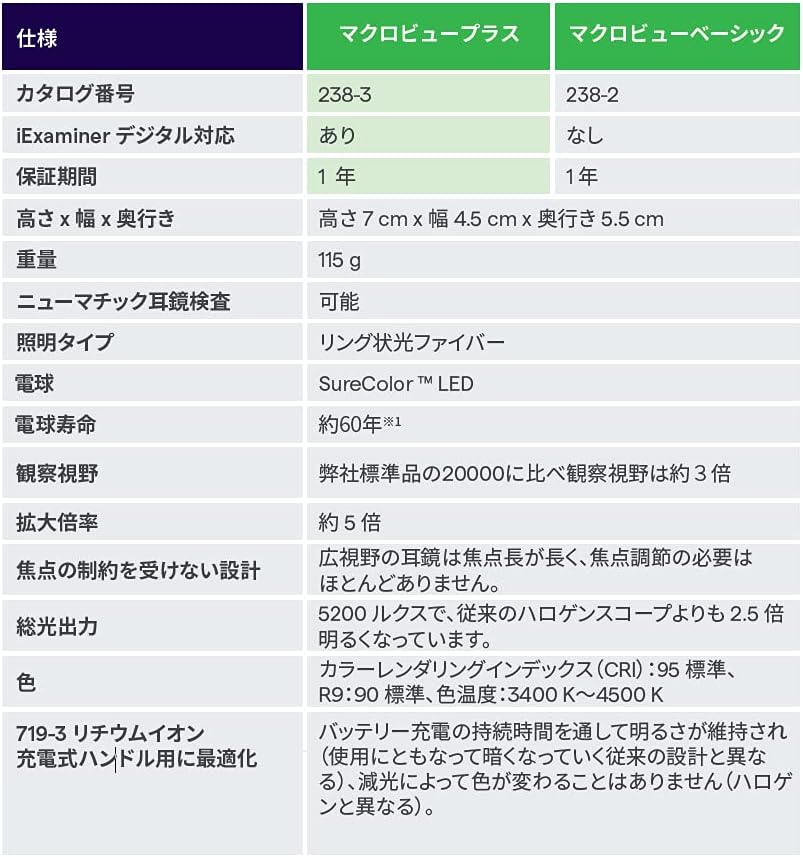
Image 6.1: Comprehensive specifications for the MacroView Plus and MacroView Basic models.
7. Warranty and Support
The Welch Allyn MacroView Plus iExaminer Set comes with a 1-year warranty provided by Welch Allyn Japan Co., Ltd.
For technical support, service, or warranty claims, please contact your local Welch Allyn representative or authorized distributor. Ensure you have your model number (238-3+11840-IEX) and purchase information available when contacting support.