
1. Introduction
Thank you for choosing the WDH-416S Dehumidifier. This manual provides essential information for the safe and efficient operation, maintenance, and troubleshooting of your appliance. Please read it thoroughly before use and keep it for future reference.

Figure 1: Front view of the WDH-416S Dehumidifier.
2. Safety Information
To ensure safe operation, always adhere to the following guidelines:
- Read all instructions before operating the appliance.
- Ensure the power supply matches the specifications on the rating label.
- Do not operate the dehumidifier with a damaged cord or plug.
- Keep the appliance away from heat sources, flammable materials, and direct sunlight.
- Do not block air inlets or outlets.
- Always place the unit on a stable, level surface.
- Unplug the unit before cleaning or performing any maintenance.
- This appliance is designed for domestic use.
- The WDH-416S is optimized for use in cooler conditions, with air exiting approximately 3 degrees warmer than incoming air below 18°C.
- The product is TÜV "GS" tested for safety.
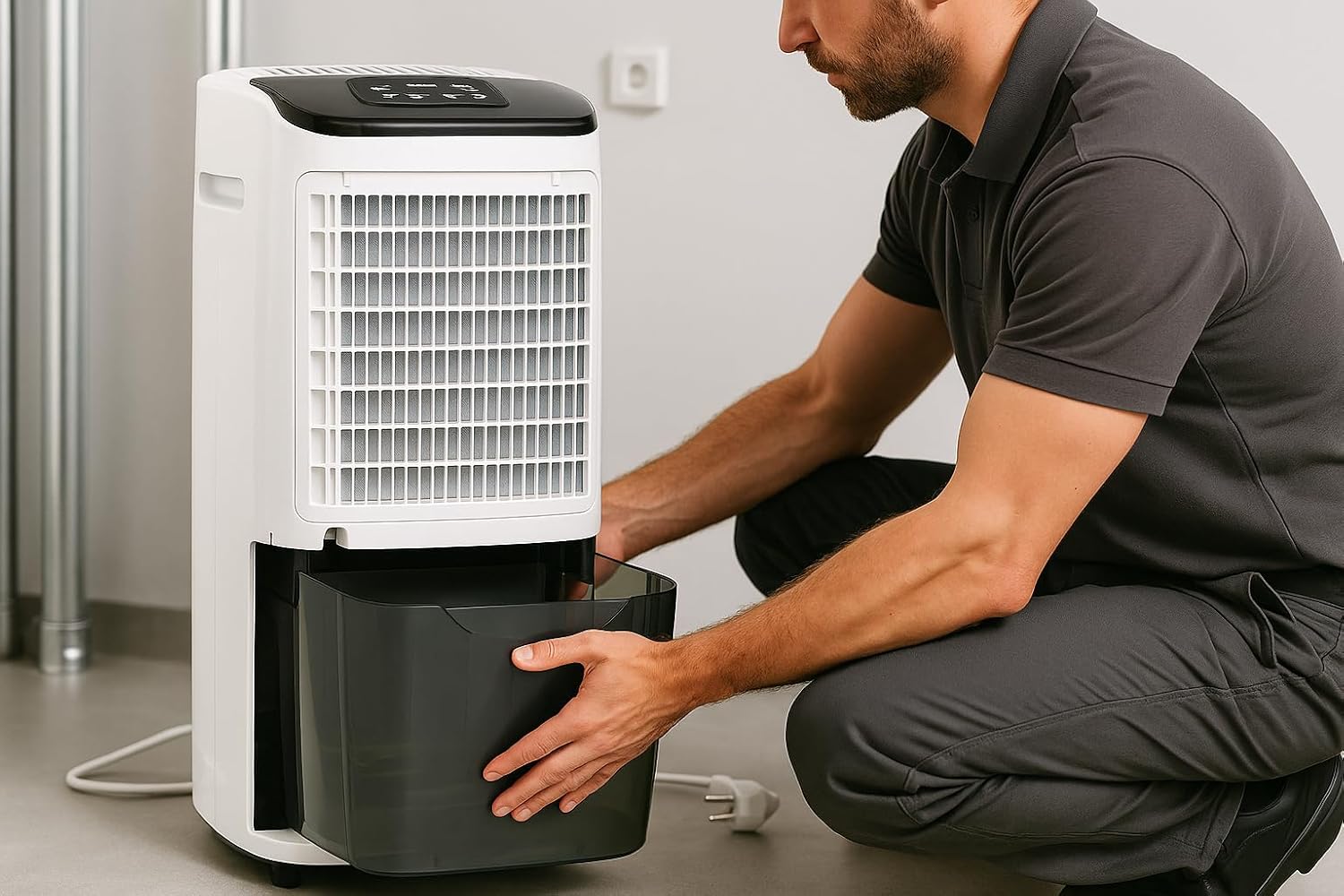
Figure 2: Intertek GS safety certification logo.
3. Setup and Installation
3.1 Unpacking
Carefully remove the dehumidifier from its packaging. Retain the packaging for future storage or transport.
3.2 Placement
- Place the dehumidifier on a firm, level surface.
- Ensure there is at least 20 cm (8 inches) of space around the unit for proper airflow.
- The unit is equipped with transport handles and castors for easy mobility.

Figure 3: Side view illustrating the integrated handles and castors for easy movement.
3.3 Power Connection
Plug the power cord into a suitable electrical outlet. Ensure the outlet meets the power requirements of the unit.
3.4 Continuous Drainage (Optional)
For continuous operation without emptying the water tank, a hose can be connected for permanent condensate drainage. Refer to the diagram below for connection details.

Figure 4: Rear view with the water tank removed, showing the continuous drainage connection point.
4. Operating Instructions
4.1 Control Panel Overview

Figure 5: Detailed view of the WDH-416S control panel.
The control panel features a digital display and various buttons for setting the dehumidifier's functions:
- Digital Display: Shows current humidity, timer settings, and status.
- Humidity Setting Buttons (40%, 50%, 60%, 70%, CNT): Allows selection of desired humidity levels or continuous operation (CNT).
- Fan Speed Buttons (HI, LO): Adjusts fan speed between high and low.
- Power Button: Turns the unit on or off.
- Timer Button: Sets the automatic on/off timer (1-24 hours).
- TEMP Button: Displays the current room temperature.
- AIR CLEAN Button: Activates the air cleaning function (if available).
4.2 Powering On/Off
Press the Power Button to turn the dehumidifier on or off.
4.3 Setting Desired Humidity
Press the humidity setting buttons (40%, 50%, 60%, 70%) to select your desired relative humidity level. The unit will automatically operate to maintain this level. Select CNT (Continuous) for non-stop dehumidification.
The automatic function ensures the unit stops when the target humidity is reached and restarts when humidity rises.
4.4 Adjusting Fan Speed
Press HI for high fan speed or LO for low fan speed.
4.5 Using the Timer Function
Press the Timer Button to set an automatic shut-off or start time between 1 and 24 hours.
5. Maintenance
Regular maintenance ensures optimal performance and longevity of your dehumidifier.
5.1 Cleaning the Air Filter
The WDH-416S is equipped with a washable, antibacterial air filter. Clean the filter regularly (e.g., every two weeks) to prevent dust buildup and maintain efficiency.
- Unplug the dehumidifier from the power outlet.
- Remove the air filter from the back of the unit.
- Wash the filter with lukewarm water and a mild detergent.
- Rinse thoroughly and allow it to air dry completely before reinserting.

Figure 6: Rear view of the dehumidifier, highlighting the removable air filter.
5.2 Emptying the Water Tank
When the water tank is full, the unit will automatically shut off and an indicator light will illuminate. The transparent tank allows for easy monitoring of the water level.
- Gently pull out the water tank from the front of the unit.
- Carefully empty the collected water.
- Slide the tank back into its position until it clicks securely.

Figure 7: Demonstrating the removal of the water collection tank.
5.3 General Cleaning
Wipe the exterior of the unit with a soft, damp cloth. Do not use abrasive cleaners or solvents.
6. Troubleshooting
If you encounter issues with your dehumidifier, refer to the following common problems and solutions:
| Problem | Possible Cause | Solution |
|---|---|---|
| Unit does not turn on. | No power supply. | Check if the power cord is securely plugged in and the outlet is functional. |
| Dehumidifier not collecting water. | Air filter is clogged. Room temperature is too low. Humidity setting is too high. | Clean the air filter. Ensure room temperature is above 5°C. Lower the desired humidity setting. |
| Unit stops unexpectedly. | Water tank is full. Desired humidity level reached. | Empty the water tank. The unit will resume operation automatically if humidity rises. |
| Unusual noise during operation. | Unit not on a level surface. Obstruction in fan. | Place the unit on a flat, stable surface. Check for and remove any obstructions. |
| No settings saved after power outage. | This model features power failure memory. | The unit should resume operation with previous settings after a power interruption. |
7. Technical Specifications
The following table outlines the key technical specifications for the WDH-416S Dehumidifier:
| Feature | Specification |
|---|---|
| Model Number | WDH-416S |
| Dehumidification Capacity | Up to 20 liters/day |
| Max Power Consumption | 415 Watts (Average: 260 Watts) |
| Water Tank Volume | 3.5 Liters |
| Recommended Room Size | Up to 40 m² |
| Dimensions (L x W x H) | 23.6 x 31 x 55.3 cm |
| Weight | 15.6 kg |
| Fan Speeds | 2 (High, Low) |
| Special Features | Digital Display, Timer, Automatic Defrost, Power Failure Memory, GS Certified |
| Noise Level | Max. 49 dB(A) |

Figure 8: Visual summary of key technical specifications.
8. Warranty and Support
For warranty information or technical support, please refer to the purchase documentation or contact your retailer. Keep your proof of purchase for any warranty claims.
For further assistance, you may visit the official WDH brand store: WDH Brand Store