
1. Introduction
The FIFISH V6 Expert M200 is a professional-grade, compact, and operational remotely operated vehicle (ROV) designed for underwater exploration, inspection, and photography. It offers advanced features such as omnidirectional movement, 4K UHD camera capabilities, and multi-tool integration, making it a versatile tool for various aquatic missions.
2. What's in the Box
The standard FIFISH V6 Expert M200 package includes the following components:
- FIFISH V6 Expert ROV
- 660ft Tether Reel
- Remote Controller
- ROV Charger
- Controller Charger
- Industrial Case Packaging

3. Setup
Follow these steps for initial setup of your FIFISH V6 Expert M200:
- Charge Batteries: Fully charge the ROV and remote controller batteries using the provided chargers. The ROV battery can reach 90% capacity in approximately 1 hour.
- Insert Micro SD Card: The ROV comes with a 128GB Micro SD card. Ensure it is securely inserted into the quick plug compartment for data storage.
- Connect Tether: Securely connect the tether from the tether reel to the ROV. Ensure the connection is tight to prevent water ingress.
- Connect Remote Controller: Attach your smartphone or tablet to the remote controller. Connect the tether from the reel to the remote controller.
- Power On: Power on the remote controller and then the ROV.
- App Connection: Open the FIFISH app on your smart device. Ensure both the remote controller and ROV show a 'Connected' status within the app.

4. Operating
The FIFISH V6 Expert M200 offers intuitive controls and advanced features for precise underwater operation:
4.1 Movement and Maneuverability
The ROV features patented omnidirectional movement and 360° maneuverability, allowing it to navigate every angle with precision. Its six thrusters provide stable and dynamic control.
4.2 Camera and Lighting
Equipped with a 4K UHD camera, 166° ultra-wide field of view, and 6000 lumen LED lights, the V6 Expert delivers vivid and vibrant visuals even in turbid and dark environments. It supports 240 FPS slow-motion filming and color-enhancing algorithms.

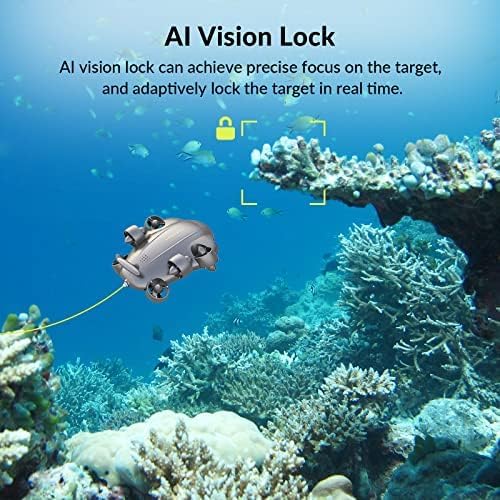
4.3 AI Vision Lock
The AI Vision Lock function allows the ROV to achieve precise focus on a target and adaptively lock onto it in real-time, ensuring stable and clear footage of moving subjects.
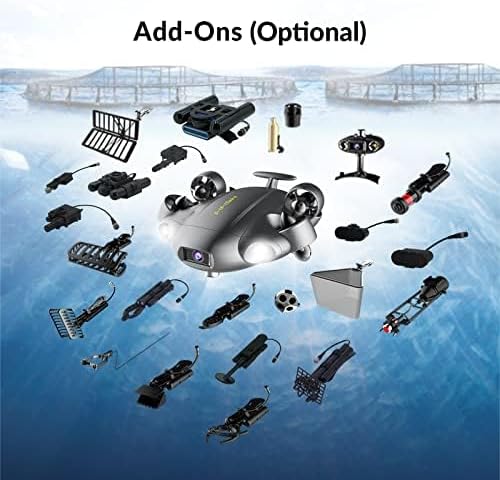
4.4 Multi-Tool Integration
The V6 Expert's Q-interface and accessory port allow for integration with over 20 professional-level and industry-specific tools, expanding its capabilities for various tasks such as inspection, navigation, sampling, measuring, and grappling.
5. Maintenance
Proper maintenance ensures the longevity and optimal performance of your FIFISH V6 Expert M200:
- Cleaning: After each use, rinse the ROV, tether, and remote controller with fresh water. Ensure all salt and debris are removed.
- Drying: Thoroughly dry all components before storage. Pay special attention to connectors and battery compartments.
- Storage: Store the ROV and accessories in the industrial case in a cool, dry place away from direct sunlight.
- Battery Care: Do not overcharge or completely discharge the batteries. Store them with a partial charge if not used for extended periods.
- Propeller Inspection: Regularly check propellers for any entanglement or damage. Clean as necessary.
6. Troubleshooting
If you encounter issues with your FIFISH V6 Expert M200, refer to the following common problems and solutions:
| Problem | Possible Cause | Solution |
|---|---|---|
| ROV not powering on | Low battery; improper connection | Charge ROV battery; ensure tether is securely connected. |
| No video feed in app | Disconnected app; damaged tether | Verify app shows 'Connected'; inspect tether for damage. |
| Poor maneuverability | Propeller entanglement; motor issue | Check and clear propellers; contact support if motors are faulty. |
| Short battery life | Battery degradation; heavy usage | Ensure full charge; consider optional Onshore Power Supply System for extended use. |
7. Specifications
| Feature | Specification |
|---|---|
| Brand | FIFISH |
| Model Name | FIFISH V6E M200 |
| Color | M200 |
| Video Capture Resolution | 4K |
| Connectivity Technology | Wi-Fi |
| Item Weight | 13.02 Kilograms (28.6 pounds) |
| Battery Capacity | 14400 Milliamp Hours |
| Working Time | Up to 6 hours |
| Fast Charging | 90% capacity in 1 hour |
| Video Capture Format | MP4 |
| Maximum Range | 200 Meters (660ft tether) |
| Material | Aluminum |
| Optical Sensor Technology | CMOS |
| Product Dimensions | 29.5 x 20 x 11.6 inches |
8. Warranty & Support
The FIFISH V6 Expert M200 comes with a standard warranty. For any product problems or technical assistance, please contact customer service. They aim to reply to your message within 24 hours and provide solutions.
You may also consider purchasing extended protection plans for additional coverage:
- 2-Year Protection Plan
- 3-Year Protection Plan
- Complete Protect (monthly plan covering eligible past and future purchases)
For further details, please refer to the official FIFISH website or your purchase documentation.


