Introduction
This manual provides comprehensive instructions for the installation, operation, and maintenance of your SCS Sentinel VisioKit 4.3 Video Intercom System. Please read this manual carefully before using the product to ensure proper function and safety.
The VisioKit 4.3 is a 2-wire wired video intercom system designed to enhance the security and convenience of your home or workplace. It features a 4.3-inch indoor monitor and a robust, weatherproof outdoor door station.
Package Contents
Before beginning installation, please verify that all components are present in the package:
- 1 x Indoor Monitor (4.3-inch screen)
- 1 x Outdoor Door Station with integrated visor
- 1 x Power Supply Transformer
- Vandal-proof mounting screws
- 1 x Installation and User Manual

Figure 1: VisioKit 4.3 product packaging showing the indoor monitor and outdoor unit.
Setup and Installation
The VisioKit 4.3 uses a 2-wire system for simplified connection. Professional installation is recommended for optimal performance and safety.
1. Outdoor Door Station Installation
Choose a suitable location for the outdoor unit, typically near your main entrance. Ensure it is at a height that allows visitors to be clearly seen on the monitor. The unit is weatherproof (IP55 rated).
- Mark the drilling points on the wall using the mounting bracket as a template.
- Drill holes and insert wall plugs if necessary.
- Connect the 2-wire cable from the indoor monitor to the designated terminals on the outdoor unit. Ensure a secure, non-polarity connection.
- Mount the outdoor unit securely using the provided vandal-proof screws.

Figure 2: Outdoor door station mounted on a wall, showing the camera, speaker, microphone, and illuminated nameplate.
2. Indoor Monitor Installation
Select a convenient indoor location for the monitor, such as a hallway or living area, where you can easily view and operate it.
- Mount the indoor monitor bracket to the wall.
- Connect the 2-wire cable from the outdoor unit to the indoor monitor.
- Connect the power supply transformer to the indoor monitor and plug it into a standard electrical outlet.
- Secure the indoor monitor onto its bracket.
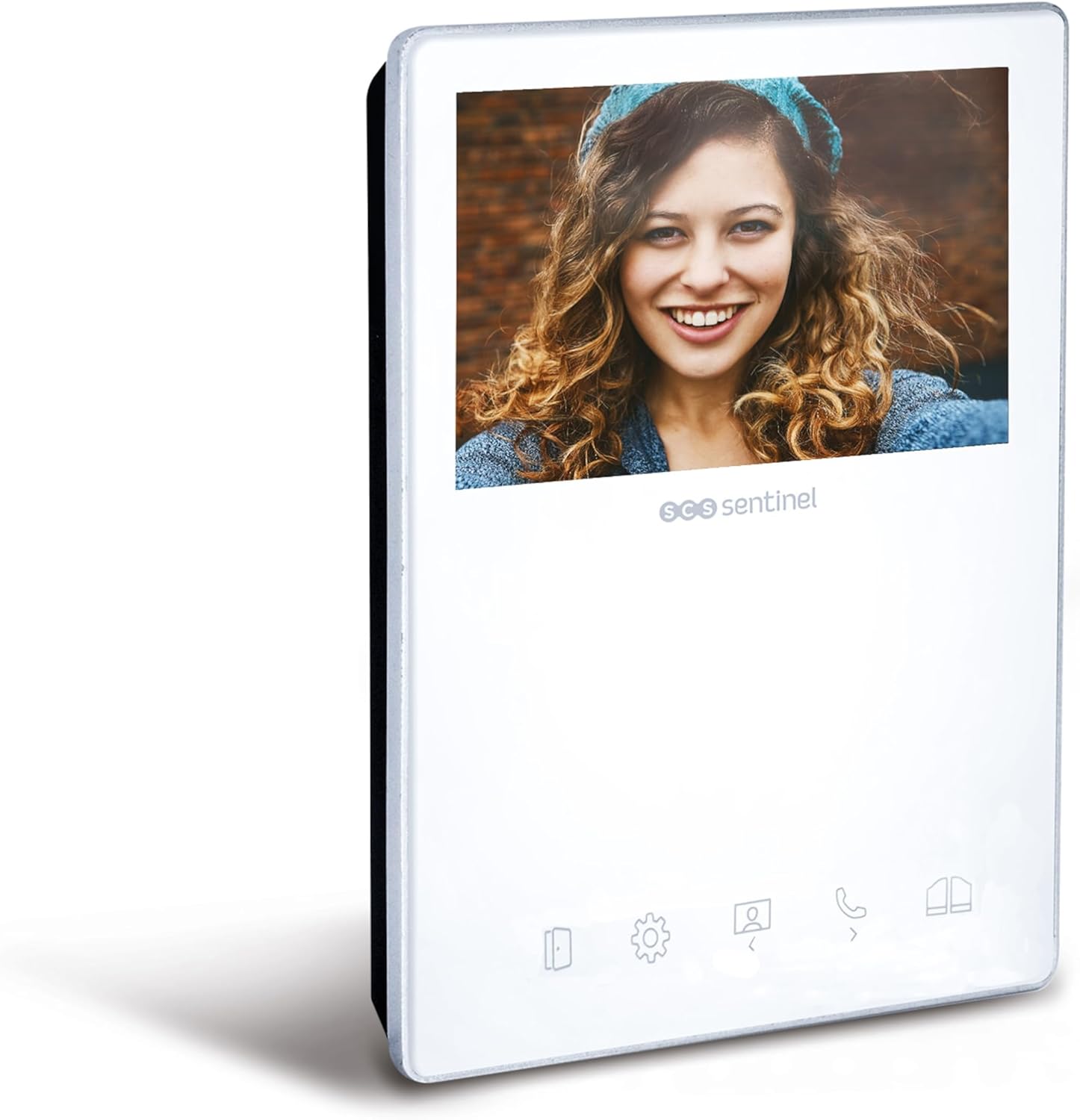
Figure 3: Indoor monitor with 4.3-inch screen and touch-sensitive buttons.

Figure 4: The complete VisioKit 4.3 system, showing both the indoor monitor and outdoor door station.
Operating Instructions
Receiving a Call
When a visitor presses the doorbell button on the outdoor unit, the indoor monitor will ring and display the visitor's image. You can choose from 10 different melodies.
- To answer the call and speak to the visitor, press the Answer button (typically represented by a phone icon) on the monitor.
- To open the door, press the Door Release button (typically represented by a key icon).
- To open a gate (if connected), press the Gate Release button (typically represented by a gate icon).
- To end the conversation, press the Hang Up button.
Monitoring Function
You can view the outdoor area at any time, even without a visitor pressing the doorbell.
- Press the Monitor button (typically represented by an eye or camera icon) on the indoor unit to activate the camera feed from the outdoor station.
- Press the button again to turn off the monitoring function.
Adjusting Settings
The indoor monitor features touch-sensitive buttons for easy navigation and setting adjustments.
- Access the settings menu by pressing the Settings button (typically a gear icon).
- Adjust brightness, contrast, and color settings for the display.
- Select your preferred doorbell melody from the 10 available options.
- Adjust the volume of the doorbell and conversation.
Maintenance
Regular maintenance ensures the longevity and optimal performance of your VisioKit 4.3 system.
- Cleaning: Use a soft, damp cloth to clean the indoor monitor and outdoor unit. Do not use abrasive cleaners or solvents.
- Outdoor Unit: Periodically check the outdoor unit for any obstructions to the camera lens or microphone/speaker openings. Ensure the protective visor is clear.
- Cabling: Inspect visible cabling for any signs of wear or damage.
- Power Supply: Ensure the power supply transformer is securely plugged in and not damaged.
Troubleshooting
| Problem | Possible Cause | Solution |
|---|---|---|
| No image on indoor monitor. |
|
|
| No sound or poor sound quality. |
|
|
| Door/Gate release not working. |
|
|
Specifications
- Model: PVF0051
- Brand: SCS Sentinel
- Wiring System: 2-wire
- Indoor Monitor Screen Size: 4.3 inches
- Screen Type: Color display
- Control Type: Touch-sensitive buttons
- Outdoor Unit Protection: IP55 (Weatherproof)
- Mounting Type: Surface-mounted
- Melodies: 10 selectable melodies
- Functions: Door opening, Gate opening, Monitoring
- Dimensions (Product): 15 x 11.6 x 1.7 cm (approximate for monitor)
- Weight (Product): 1 Kilogram
- Power Supply: Included transformer
Warranty and Support
SCS Sentinel guarantees the reliability of its innovative technical products, designed for easy installation and use, combining comfort and security.
For technical assistance, our dedicated support team based in France is available to help you with product installation and provide expert, personalized advice. Your satisfaction is our priority.
Please refer to your purchase documentation for specific warranty terms and contact information for technical support.


