
Introduction
This manual provides comprehensive instructions for the operation, maintenance, and troubleshooting of your findtime Men's Digital Pedometer Sport Watch, Model MS1. Please read this manual carefully to ensure proper use and to maximize the lifespan of your watch.

Figure 1: Front view of the findtime Men's Digital Pedometer Sport Watch. This image displays the watch's digital display, buttons, and red silicone band.
Product Features
- Pedometer Function: Accurately records steps and calorie consumption.
- Digital Display: Clear FSTN semitransparent mirror for easy readability.
- Water Resistance: 50M (164FT) water resistant, suitable for hand washing, cold showering, and swimming. Not suitable for hot water or steam. Do not press buttons underwater.
- Sport Functions: Includes alarm, stopwatch, countdown timer, EL backlight, 12/24 hour format, calendar, and shockproof design.
- Durable Construction: ABS case and stainless steel bottom cover with a comfortable TPU watch band.

Figure 2: Visual representation of key features including sport step, calorie record, sport mileage, countdown, FSTN screen, dual city time, lightweight, luminous display, week display, 50M waterproof, shockproof, hour report, low voltage detection, dual mode time, alarm mode, and stopwatch timing.
Setup and Initial Use
1. Unpacking
Carefully remove the watch from its packaging. Ensure all components are present: 1x Digital watch, 1x User manual, 1x Watch Box.
2. Time Setting
- Press the MODE button repeatedly until the time setting mode is displayed (usually indicated by flashing digits).
- Use the SET button to cycle through hours, minutes, seconds, year, month, and day.
- Use the UP and DOWN buttons to adjust the values.
- Press MODE again to confirm and exit time setting.
3. Pedometer Calibration (if applicable)
Some models may require initial calibration for step accuracy. Refer to the specific instructions in the included paper manual for detailed steps on setting stride length or weight if your model supports it. This watch automatically tracks steps and calories.

Figure 3: The watch being worn by a runner, demonstrating its non-Bluetooth pedometer function for tracking steps, calories, and distance.
Operating Instructions
Mode Navigation
Press the MODE button to cycle through different functions: Time Mode, Pedometer Mode, Alarm Mode, Stopwatch Mode, Countdown Mode.
Pedometer Mode
- In Pedometer Mode, the watch displays your current step count and estimated calorie burn.
- The watch automatically resets daily.
Stopwatch Mode
- Enter Stopwatch Mode by pressing MODE.
- Press START to begin timing.
- Press START again to pause.
- Press RESET to clear the stopwatch.
Alarm Mode
- Enter Alarm Mode by pressing MODE.
- Use SET to select the hour or minute to adjust.
- Use UP and DOWN to set the alarm time.
- Press MODE to confirm.
- To activate/deactivate the alarm, press UP while in Alarm Mode.
Countdown Mode
- Enter Countdown Mode by pressing MODE.
- Use SET to select the hour, minute, or second to adjust.
- Use UP and DOWN to set the countdown duration.
- Press START to begin the countdown.
- Press START again to pause.
- Press RESET to reset the countdown.
EL Backlight
Press the LIGHT button to illuminate the display in low-light conditions.
Maintenance and Care
- Cleaning: Clean the watch strap regularly with a soft, damp cloth. Avoid harsh chemicals.
- Water Resistance: While the watch is 50M water resistant, avoid exposing it to hot water or steam (e.g., hot showers, saunas) as this can compromise the seals. Do not press any buttons while the watch is submerged in water.
- Storage: Store the watch in a cool, dry place away from direct sunlight and extreme temperatures.
- Battery: The watch uses a standard watch battery. When the display dims or functions become erratic, it may be time for a battery replacement. It is recommended to have the battery replaced by a qualified watch technician to ensure water resistance is maintained.

Figure 4: The watch submerged in water, illustrating its 50M water resistance suitable for hand washing, cold baths, and rain exposure.
Troubleshooting
| Problem | Possible Cause | Solution |
|---|---|---|
| Display is dim or blank. | Low battery. | Replace the battery. |
| Watch not keeping accurate time. | Incorrect time setting; low battery. | Reset the time; replace the battery. |
| Pedometer not counting steps accurately. | Watch not worn correctly; unusual movement patterns. | Ensure watch is worn snugly on the wrist; walk naturally. |
| Mist or droplets inside watch surface. | Moisture ingress. | Contact manufacturer immediately for maintenance to prevent corrosion. |
Specifications
| Feature | Detail |
|---|---|
| Model Number | MS1 |
| Case Diameter | 44mm / 1.73 inches |
| Case Thickness | 15mm / 0.59 inches |
| Weight | 48g / 1.69oz |
| Movement | Quartz |
| Band Material | Silicone (TPU) |
| Body Material | ABS |
| Water Resistance Depth | 50M / 164FT |
| Clasp Type | Buckle |
| Display Type | Digital (FSTN Semitransparent Screen) |
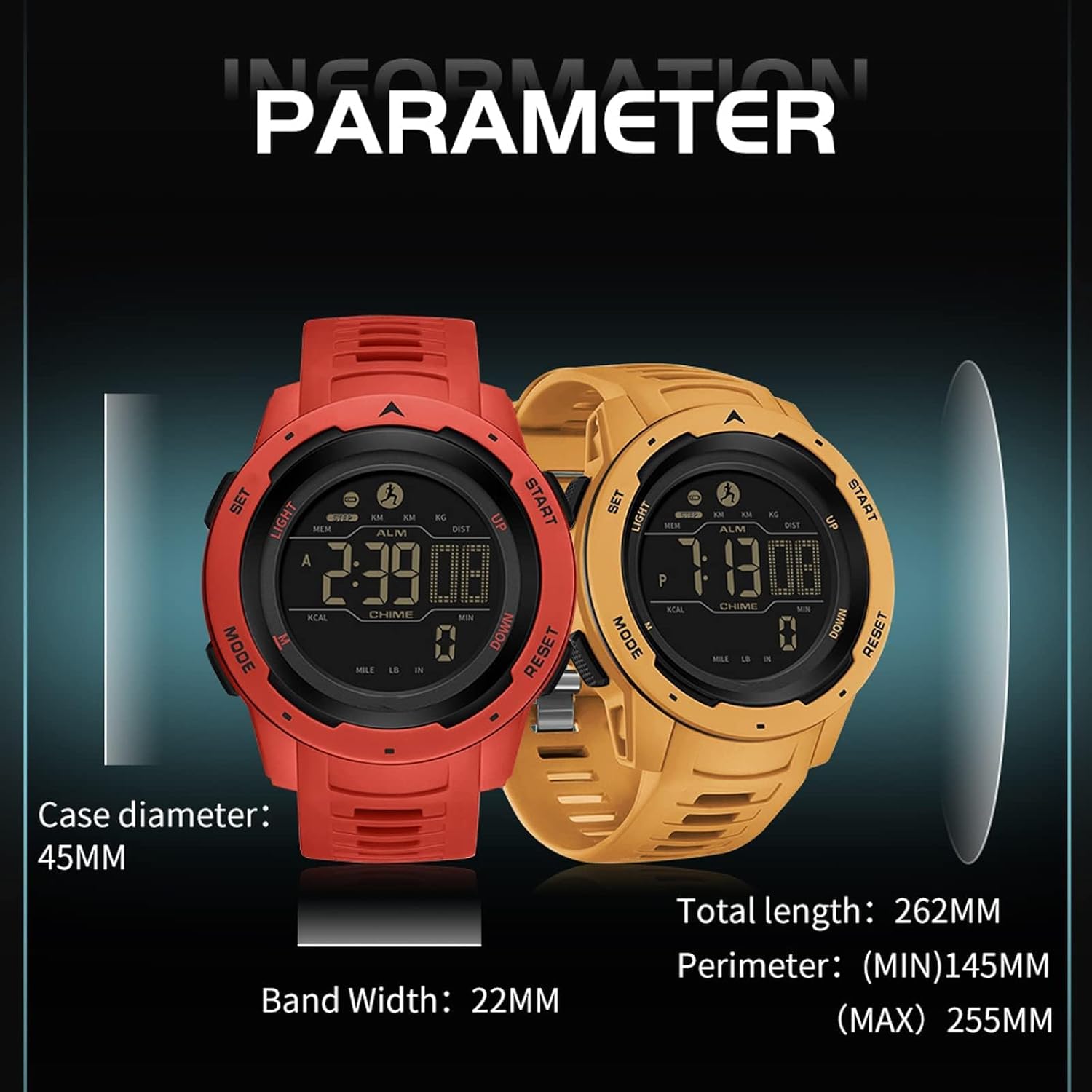
Figure 5: Detailed dimensions of the watch, including case diameter (45mm), total length (262mm), band width (22mm), and perimeter (min 145mm, max 255mm). Note: Case diameter in product description is 44mm, image says 45mm. The table uses 44mm as per product description.
Warranty and Support
The findtime Men's Digital Pedometer Sport Watch comes with a 12-month warranty from the date of purchase. This warranty covers manufacturing defects under normal use.
For warranty claims, technical support, or any questions regarding your watch, please contact findtime customer service through the retailer where you purchased the product or visit the official findtime store on Amazon: findtime Amazon Store.
Please retain your proof of purchase for warranty validation.