
1. Introduction
Thank you for choosing the IHOUONE A3-P Wireless Outdoor Security Camera. This manual provides essential information for setting up, operating, and maintaining your security camera. Please read it thoroughly before use to ensure optimal performance and safety.
The IHOUONE A3-P is a solar-powered, 100% wireless outdoor security camera designed for continuous surveillance. It features 1080P Full HD video, advanced night vision, PIR human detection, two-way audio, and robust weather resistance.
2. What's in the Box
- IHOUONE A3-P Wireless Outdoor Security Camera
- Solar Panel
- Mounting Bracket and Screws
- USB Charging Cable
- User Manual
Note: The camera only supports 2.4G Wi-Fi and does not support 5G Wi-Fi networks.

Figure 2.1: IHOUONE A3-P Camera and Solar Panel
3. Product Features
- 100% Wireless & Solar Powered: Equipped with a 5000 mAh rechargeable battery and a solar panel for continuous power supply, eliminating the need for frequent charging.
- 1080P Full HD & Advanced Night Vision: Captures clear 1920*1080P video. Features upgraded infrared night vision technology for clear surveillance even in low-light conditions.
- PIR Human Detection: Advanced AI Person-Detection and Passive Infrared (PIR) technology reduce false alarms by up to 99%, focusing on relevant motion events.
- Two-Way Audio: Built-in microphone and speaker allow for real-time communication with visitors or to deter intruders.
- IP65 Weatherproof: Designed to withstand various weather conditions, suitable for outdoor installation.
- Secure Data Encryption: Utilizes financial-level encryption technology to protect your privacy and data from unauthorized access.
- Easy Installation: Features a magnetic mount for flexible placement and simple installation.
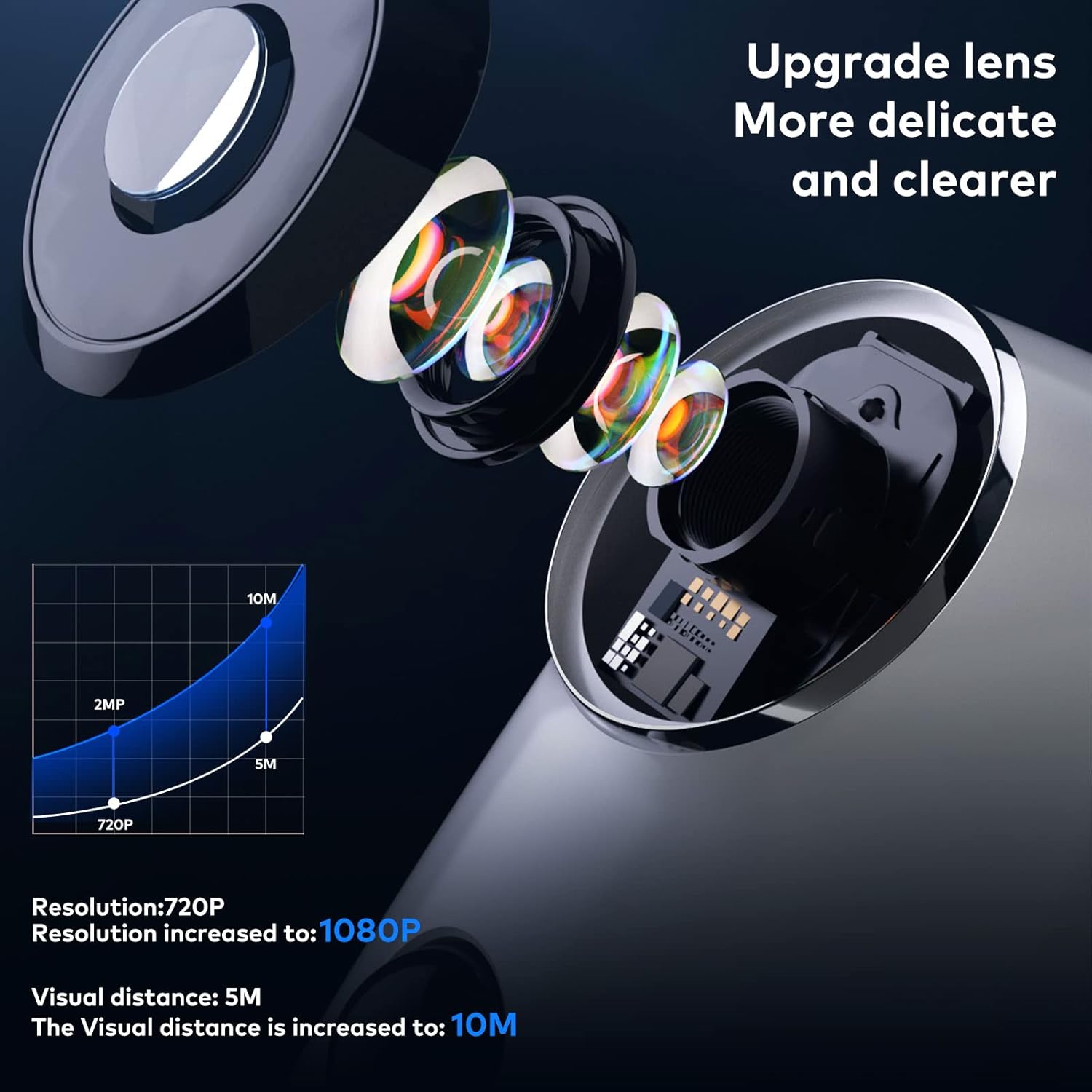
Figure 3.1: Upgraded Lens for Enhanced Clarity

Figure 3.2: Advanced Night Vision Technology

Figure 3.3: PIR Human Detection Technology
4. Setup Guide
4.1 Initial Charging
Before first use, fully charge the camera using the provided USB cable. The camera has a built-in 5000 mAh rechargeable battery.
4.2 App Download and Account Creation
- Download the Adorcam app from the Google Play Store or Apple App Store.
- Register for a new account or log in if you already have one.
4.3 Connecting to Wi-Fi
- Ensure your smartphone is connected to a 2.4GHz Wi-Fi network. The camera does not support 5G Wi-Fi.
- Follow the in-app instructions to add your new camera. This typically involves scanning a QR code displayed on your phone with the camera.
4.4 Mounting the Camera
The IHOUONE A3-P camera comes with a magnetic mount for flexible installation. Choose a location that provides the desired viewing angle and receives adequate sunlight for the solar panel.
- Secure the mounting bracket to a wall or surface using the provided screws.
- Attach the solar panel to a location with direct sunlight, ensuring it is connected to the camera via the 8.2-foot extension cord.
- Magnetically attach the camera to the mounting bracket. Adjust the angle for optimal coverage.

Figure 4.1: Camera and Solar Panel Installation

Figure 4.2: Flexible Placement with Extension Cord
5. Operating Instructions
5.1 Live View
Open the Adorcam app and select your camera to view the live feed. You can monitor your property in real-time from anywhere.
5.2 Two-Way Audio
While in live view, tap the microphone icon in the app to speak through the camera's speaker. This allows for direct communication with anyone near the camera.
5.3 Motion Detection Alerts
The camera will send instant notifications to your smartphone when motion is detected. You can customize motion detection sensitivity and zones within the app to minimize unwanted alerts.
5.4 Night Vision
The camera automatically switches to night vision mode in low-light conditions, providing clear black and white video up to 32 feet.
5.5 Local Storage
Insert a Micro SD card (not included) into the designated slot on the camera to store recorded video locally. The camera supports continuous recording or event-triggered recording based on your settings.
Video 5.1: Demonstration of the IHOUONE Wireless Security Camera in action.
6. Maintenance
6.1 Charging
While the solar panel provides continuous power, ensure it receives sufficient direct sunlight. In periods of prolonged cloudy weather or high usage, the camera's battery may deplete. You can manually charge the camera using the USB cable if needed.
6.2 Cleaning
Periodically clean the camera lens and solar panel with a soft, damp cloth to ensure clear image quality and efficient solar charging. Avoid using harsh chemicals.
6.3 Firmware Updates
Regularly check the Adorcam app for firmware updates. Keeping your camera's firmware up-to-date ensures optimal performance, security, and access to new features.
7. Troubleshooting
- Camera not connecting to Wi-Fi: Ensure your Wi-Fi is 2.4GHz. Check Wi-Fi signal strength at the camera's location. Restart your router and the camera.
- Frequent false alarms: Adjust the PIR detection sensitivity in the app. Ensure the camera is not pointed at areas with constant movement (e.g., busy roads, swaying trees) if not desired.
- Poor night vision: Ensure the camera lens is clean and there are no obstructions. Check for strong light sources directly in the camera's view at night, which can interfere with infrared.
- Battery draining quickly: Verify the solar panel is clean and receiving direct sunlight for several hours daily. Reduce motion detection frequency or recording duration in the app.
- Two-way audio issues: Check your phone's microphone and speaker settings. Ensure the camera's microphone and speaker are not obstructed.
8. Specifications
| Feature | Specification |
|---|---|
| Model Number | A3-P |
| Power Source | Battery Powered (5000 mAh Lithium Polymer) |
| Connectivity Protocol | Wi-Fi (2.4GHz only) |
| Video Capture Resolution | 1080p (1920x1080 Pixels) |
| Night Vision Range | 32 Feet |
| Field Of View | 130 Degrees |
| International Protection Rating | IP65 |
| Operating Temperature | Up to 50 Degrees Celsius |
| Control Method | App (Adorcam) |
| Item Dimensions (L x W x H) | 2.56 x 2.17 x 4.33 inches |
| Item Weight | 1.08 pounds |
9. Warranty and Support
For warranty information and technical support, please refer to the official IHOUONE website or contact customer service through the Adorcam app. Keep your purchase receipt for warranty claims.
For further assistance, you may visit the IHOUONE Store on Amazon.