
1. Introduction
This manual provides detailed instructions for the safe and effective use of your MHAZDZE Christmas Laser Lights Projector, Model MOD01RGB. Please read this manual thoroughly before operating the device and retain it for future reference. This projector is designed to create a festive atmosphere with its moving RGB laser lights, suitable for outdoor garden and holiday decorations.

Figure 1: MHAZDZE Christmas Laser Lights Projector in use.
2. Product Features
- Moving & Static Modes: The projector offers Red, Green, and Blue (RGB) laser colors, which can combine to create 7 different color combinations. Users can select between moving or static projection modes.
- Remote Control: A remote control is included for convenient operation. Functions include adjusting rotating speed, step speed, flash frequency, and setting a timer (2H, 3H, 4H, 5H, 6H).
- Weather Resistance: Constructed with high-quality aluminum alloy, the projector boasts an IP65 waterproof rating, ensuring durability against snow, rain, dust, and intense sunlight.
- Wide Coverage: Capable of covering approximately 3,541 square feet from a distance of 40 feet, allowing for extensive coverage of exterior walls, lawns, trees, and roofs.
- Easy Installation: Designed for plug-and-play operation, the unit can be easily installed in the ground.

Figure 2: Weather resistance of the projector.
3. Package Contents
Please verify that all items listed below are included in your package:
- 1 x Laser Projector Unit
- 1 x Ground Stake
- 1 x Power Adapter (5V 1000mA)
- 1 x Remote Control (with 1 CR2 battery included)
- 1 x User Manual (this document)

Figure 3: Package contents.
4. Safety Information
WARNING: This is a Class II laser product. Avoid direct eye exposure to the laser beam.
- Do not look directly into the laser light source.
- Ensure the product is installed in a location where direct eye contact with the laser beam is unlikely.
- Keep the device out of reach of children.
- Use only the provided power adapter. Using an incompatible adapter may damage the product or pose a safety risk.
- Ensure the power connection is secure and protected from water, despite the product's waterproof rating.
- Do not attempt to open or modify the product. This will void the warranty and may result in injury.
- If the product is damaged, discontinue use immediately and contact customer support.
5. Setup
5.1 Installation Methods
The projector offers versatile installation options:
- Ground Mount: Attach the ground stake to the projector. Insert the stake firmly into the ground in your desired projection area.
- Tabletop Placement: The projector can be placed on a flat surface without the ground stake.
- Wall-Mounted: (Optional, mounting hardware not included) Secure the projector to a wall using appropriate screws and anchors.

Figure 4: Installation methods.
5.2 Connecting Power
Once the projector is positioned, connect the power adapter to the projector's power input and then plug the adapter into a standard electrical outlet. The projector will automatically turn on and begin its default auto-run mode.
6. Operating Instructions
Use the included remote control to manage the projector's functions. Ensure the remote has a clear line of sight to the projector for optimal performance.
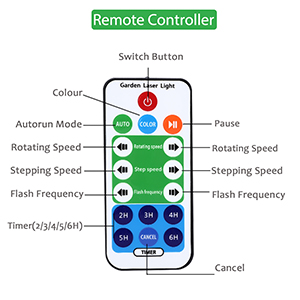
Figure 5: Remote Control Functions.
6.1 Remote Control Functions
| Button | Function |
|---|---|
| Power (Red Button) | Turns the projector On or Off. |
| AUTO | Activates the automatic mode, cycling through various patterns and colors. |
| COLOR | Cycles through available color combinations (Red, Green, Blue, Red+Green, Red+Blue, Green+Blue, Red+Green+Blue). |
| Pause | Pauses the current projection, making it static. Press again to resume movement. |
| Rotating Speed (+/-) | Adjusts the speed of the rotating patterns. |
| Step Speed (+/-) | Adjusts the speed of the stepping patterns. |
| Flash Frequency (+/-) | Adjusts the flashing speed of the laser dots. |
| Timer (2H, 3H, 4H, 5H, 6H) | Sets the projector to automatically turn off after the selected duration (e.g., 2 hours). |
| CANCEL (Timer) | Cancels any active timer setting. |
6.2 Important Note on Settings
The projector's custom settings (color, speed, flash) may reset to default auto-run mode if the power is disconnected. Timer settings, however, are generally retained until canceled or power is removed.
Video 1: Official product video demonstrating the outdoor waterproof laser projector.
7. Maintenance
7.1 Cleaning
- Ensure the projector is unplugged before cleaning.
- Wipe the exterior of the projector with a soft, damp cloth.
- Gently clean the laser lens with a soft, dry cloth to maintain clear projection. Do not use abrasive cleaners or solvents.
7.2 Storage
When not in use for extended periods, store the projector in a cool, dry place, away from direct sunlight and extreme temperatures. It is recommended to store it in its original packaging to protect it from dust and damage.
7.3 Remote Control Battery Replacement
The remote control uses one CR2 battery. If the remote control stops responding, replace the battery with a new CR2 battery, ensuring correct polarity.
8. Troubleshooting
| Problem | Possible Cause | Solution |
|---|---|---|
| Projector does not turn on. | No power supply or faulty connection. | Ensure the power adapter is securely plugged into both the projector and a working electrical outlet. Check if the outlet has power. |
| Remote control is not working. | Dead battery or obstruction. | Replace the CR2 battery in the remote control. Ensure there is a clear line of sight between the remote and the projector. |
| Laser projection is dim or unclear. | Dirty lens or excessive ambient light. | Clean the laser lens with a soft, dry cloth. Ensure the projection area is sufficiently dark for optimal visibility. |
| Settings reset after unplugging. | Normal operation for some settings. | This is expected behavior for certain settings. Reapply desired settings using the remote control after plugging in. |
9. Specifications
| Feature | Detail |
|---|---|
| Model Number | MOD01RGB |
| Color | Red, Green, Blue |
| Material | Aluminum |
| Finish Type | Laser |
| Light Source Type | Light Emitting Diode |
| Power Source | Corded Electric |
| Voltage | 5 Volts |
| Brightness | 100 candela |
| Mounting Type | Ground Mount |
| Item Weight | 15.52 ounces |
| Batteries Required | 1 CR2 battery (included for remote) |
| Waterproof Rating | IP65 |
| Manufacturer | SHENZHEN BETTERLIFE PHOTOELECTRIC TECHNOLOGY CO., LTD |
10. Warranty and Support
For warranty information or technical support, please refer to the product packaging or contact the seller directly through your purchase platform. Keep your purchase receipt as proof of purchase.