
1. Introduction and Overview
The Fall Guardian 1000 Monitor and Bed Sensor Pad system is designed to provide an automatic alert to caregivers when a fall-risk patient attempts to leave their bed. This system offers an easy-to-operate, reliable, and economical solution for healthcare facilities and in-home care environments.
The system includes one Fall Protection Monitor 1000, measuring approximately 5" x 3.25" x 1", and one 10" x 30" weight-sensing bed sensor pad. When a patient starts to sit up, the pressure change on the pad triggers an alarm, alerting the caregiver. The caregiver can then press the reset button on the monitor to silence the alarm and assist the patient.
The Fall Protection Monitor 1000 is always active once a battery is installed and features a status light and a low battery indicator for continuous monitoring.
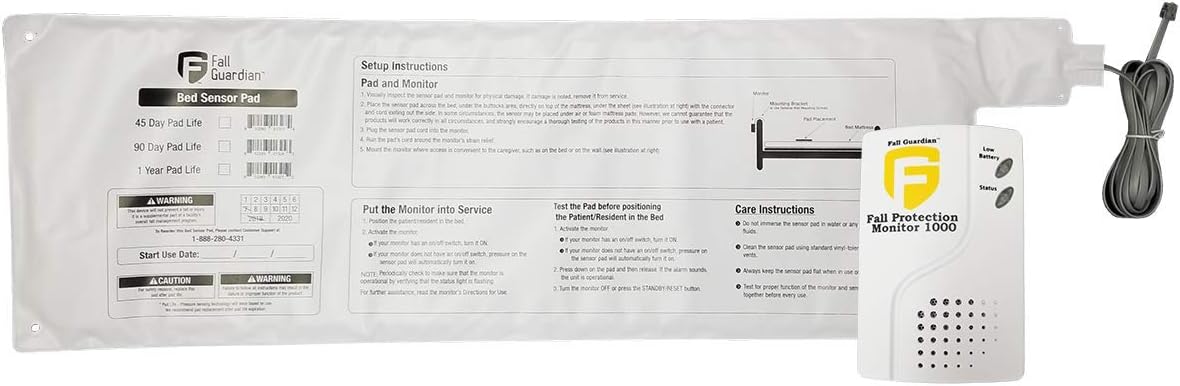
Image 1: The Fall Guardian 1000 Monitor and Bed Sensor Pad, illustrating the complete system.
2. Package Contents
Please verify that all items are present in your package:
- 1 x Fall Protection Monitor 1000
- 1 x 10" x 30" Weight Sensing Bed Pad
- Note: One 9-Volt battery is required for the monitor (not included).
3. Safety Information
Read all instructions before use. Failure to follow these instructions could result in injury or improper operation.
- Visually inspect the sensor pad and monitor for any damage before each use. Do not use if components are damaged.
- This device is an aid for caregivers and does not replace direct supervision of the patient.
- Ensure the monitor is placed in a location where the caregiver can hear the alarm clearly.
- Keep the sensor pad and monitor dry. Do not immerse in water or other liquids.
- Use only a 9-Volt battery for the monitor. Replace the battery promptly when the low battery indicator illuminates.
- Keep the cord of the sensor pad clear of potential entanglement hazards.
4. Setup Instructions
Follow these steps to set up your Fall Guardian system:
- Inspect Components: Visually inspect the bed sensor pad and the monitor for any signs of damage. If any component is damaged, do not proceed with setup and contact support.
- Install Battery: Open the battery compartment on the back of the Fall Protection Monitor 1000 and insert one 9-Volt battery, ensuring correct polarity. Close the compartment securely.
- Position Bed Sensor Pad: Place the 10" x 30" bed sensor pad on the bed, under the fitted sheet. Position the pad approximately at shoulder height of the patient when they are lying down. Ensure the pad lies flat and is not folded or creased.
- Connect Pad to Monitor: Route the sensor pad's cord around the mattress to prevent entanglement. Plug the cord securely into the designated port on the Fall Protection Monitor 1000.
- Mount Monitor: Mount the monitor in a convenient location, such as on the bed rail or an adjacent wall, ensuring it is easily accessible to the caregiver and within reach of the sensor pad cord.
- Test the System:
- Ensure the patient is not in bed.
- If your monitor has an on/off switch, turn it ON. (Note: The Fall Guardian 1000 Monitor does not have an on/off switch; it activates automatically upon battery insertion and pad connection.)
- Apply pressure to the sensor pad (e.g., by pressing down with your hand) and then release. The alarm should sound.
- Press the 'Reset' button on the monitor to silence the alarm. The system is now ready for use.

Image 2: The bed sensor pad, showing visual cues for proper placement and connection.
5. Operating Instructions
The Fall Guardian 1000 Monitor is designed for straightforward operation:
- Automatic Activation: Once the battery is installed and the sensor pad is connected, the monitor is always on and ready to detect pressure changes.
- Alarm Trigger: When a patient attempts to sit up or exit the bed, the change in pressure on the bed sensor pad will trigger an audible alarm from the monitor.
- Silencing and Resetting: To silence the alarm and reset the system, press the 'Reset' button located on the monitor. This prepares the system for the next use.
- Status Indicators: The monitor features a status light to indicate operational readiness and a low battery indicator. Replace the 9-Volt battery when the low battery indicator illuminates to ensure continuous protection.

Image 3: Close-up view of the Fall Guardian 1000 Monitor, highlighting the status and low battery indicators.
6. Maintenance
Proper maintenance ensures the longevity and reliability of your Fall Guardian system:
- Cleaning the Sensor Pad: Clean the bed sensor pad using standard vinyl-safe cleaning wipes. Do not use abrasive cleaners or immerse the pad in water or any other liquids.
- Cleaning the Monitor: Wipe the monitor with a soft, dry cloth. Avoid using liquid cleaners directly on the monitor.
- Battery Replacement: Replace the 9-Volt battery in the monitor as soon as the low battery indicator illuminates. Always dispose of used batteries responsibly.
- Storage: When not in use, store the sensor pad and monitor together in a dry, cool place. Avoid folding the sensor pad tightly to prevent damage.
- Regular Checks: Periodically check the connection between the sensor pad and the monitor to ensure it is secure.
7. Troubleshooting
If you encounter issues with your Fall Guardian system, refer to the following common problems and solutions:
| Problem | Possible Cause | Solution |
|---|---|---|
| Alarm does not sound when patient attempts to exit bed. |
|
|
| False alarms (alarm sounds without patient movement). |
|
|
| Low battery indicator light is on. | Battery is running low. | Replace the 9-Volt battery immediately to ensure continuous operation. |
8. Specifications
| Product Name | Fall Guardian 1000 Monitor and Bed Sensor Pad System |
| Model Number | 1000 Monitor |
| Brand | Fall Guardian |
| Manufacturer | Smart Caregiver Corporation |
| Monitor Dimensions | Approximately 5" x 3.25" x 1" |
| Bed Sensor Pad Dimensions | 10" x 30" |
| Power Source | 1 x 9-Volt battery (not included) |
| UPC | 812293013366 |
| Date First Available | August 26, 2021 |
9. Warranty Information
The Fall Guardian system components are covered by the following warranties:
- Fall Protection Monitor 1000: 1-year warranty from the date of purchase.
- 10" x 30" Bed Sensor Pad: 90-day warranty from the date of purchase.
For warranty claims or detailed warranty terms, please contact Smart Caregiver Corporation directly. Proof of purchase may be required.
10. Support and Contact Information
For technical assistance, troubleshooting not covered in this manual, or general inquiries, please contact the manufacturer:
Manufacturer: Smart Caregiver Corporation
Please refer to the product packaging or the manufacturer's official website for the most current contact details and support resources.
You can also visit the Fall Guardian brand page on Amazon for more information.