
1. Introduction
This manual provides instructions for the WINFLIKE Replacement Remote Control, model WL-MBE138-X3308-030-S1-210831. This remote is designed to replace original remote controls for various Android TV Box models, offering a direct and easy-to-use solution without complex setup.

Figure 1: Front view of the WINFLIKE Replacement Remote Control. The remote is black with a brushed texture, featuring a red power button, blue navigation pad, and various function keys.
2. Package Contents
The package contains the following items:
- 1 x WINFLIKE Replacement Remote Control (Model: WL-MBE138-X3308-030-S1-210831)
Note: Batteries and user manual are not included in the package.
3. Setup
The WINFLIKE Replacement Remote Control is designed for immediate use with compatible Android TV Box models. No programming or pairing is required.
3.1 Battery Installation
- Locate the battery compartment on the back of the remote control.
- Slide open the battery compartment cover.
- Insert two (2) AAA alkaline batteries, ensuring correct polarity (+ and -) as indicated inside the compartment.
- Close the battery compartment cover securely.
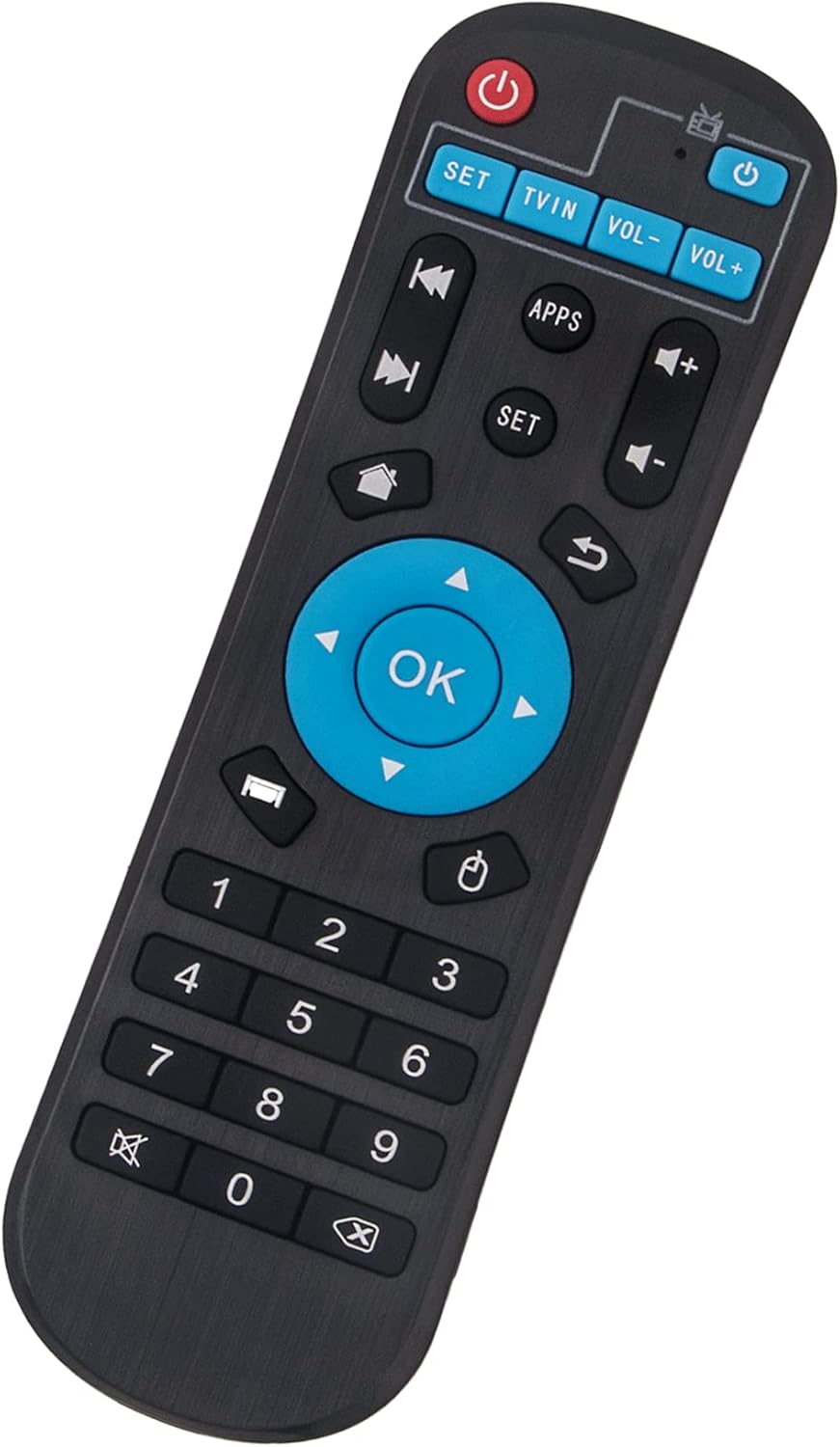
Figure 2: Back view of the remote control, illustrating the location of the battery compartment.
Once batteries are installed, the remote control is ready for operation.
4. Operating Instructions
This remote control provides full functionality for compatible Android TV Box models. Point the remote control directly at your Android TV Box for optimal performance.
4.1 Key Functions Overview
Figure 3: Front view of the remote control, highlighting various buttons and their typical functions.
| Button | Description |
|---|---|
| Power (Red) | Turns the Android TV Box on or off. |
| Power (Blue) | May control TV power or switch input, depending on TV Box model. |
| SET | Accesses settings menu or specific functions. |
| TV/IN | Switches TV input source. |
| VOL- / VOL+ | Adjusts volume down or up. |
| Navigation Pad (Up, Down, Left, Right, OK) | Navigates through menus and confirms selections. |
| APPS | Opens the applications menu. |
| Home (House icon) | Returns to the main home screen. |
| Back (Arrow icon) | Goes back to the previous screen or menu. |
| Mute (Speaker with X) | Mutes or unmutes audio. |
| Number Pad (0-9) | For direct input of numbers or channel selection. |
| Media Control (Play/Pause, Fast Forward, Rewind) | Controls media playback. |
| Mouse/Cursor (Mouse icon) | Activates or deactivates mouse cursor mode (if supported by TV Box). |
| Menu (Three lines icon) | Opens context-sensitive menus. |
5. Compatible Android TV Box Models
This remote control is compatible with a wide range of Android TV Box models, including but not limited to:
- T95 H616
- T95 Max
- T95 MAX+
- T95 K
- T95 Q
- T95 Mini
- T95Z-K-V-U-W
- T9
- T95 Super
- Q Plus
- Q+
- HK1
- MX10
- X88
- X96
- TX6
- TX3
- MX1
- H500
- H96
- T95H Smart TV streaming box
Compatibility may vary slightly depending on the specific firmware version of your Android TV Box. For best results, ensure your TV Box is running its original software.
6. Maintenance
To ensure the longevity and proper functioning of your remote control, follow these maintenance guidelines:
- Cleaning: Use a soft, dry cloth to clean the remote control. Do not use liquid cleaners, aerosols, or harsh chemicals, as these may damage the surface or internal components.
- Battery Replacement: Replace batteries when the remote's response becomes sluggish or inconsistent. Always replace both batteries at the same time with new AAA alkaline batteries.
- Storage: Store the remote control in a cool, dry place away from direct sunlight and extreme temperatures.
- Avoid Drops: Protect the remote from physical impact, as drops can damage internal circuitry.
7. Troubleshooting
If you encounter issues with your WINFLIKE Replacement Remote Control, refer to the following troubleshooting steps:
| Problem | Possible Cause / Solution |
|---|---|
| Remote is not responding. |
|
| Some buttons are not working. |
|
| Remote range is reduced. |
|
8. Specifications
| Feature | Detail |
|---|---|
| Brand | WINFLIKE |
| Model Number | WL-MBE138-X3308-030-S1-210831 |
| Color | Black |
| Connectivity Technology | Infrared (IR) |
| Compatible Devices | Android TV Boxes (specific models listed in Section 5), Television |
| Special Features | Easy to Use, No Programming Required |
| Power Source | 2 x AAA Batteries (not included) |
| Maximum Range | Approximately 33 feet (10 meters) |
9. Warranty and Support
For any questions or issues regarding your WINFLIKE Replacement Remote Control, please contact the seller or manufacturer for assistance. Refer to your purchase documentation for specific warranty terms and contact information.
The product description states: "Please contact us at any time if you have any problem with our product or service."