
Introduction
This manual provides comprehensive instructions for the setup, operation, and maintenance of your DYON Movie Smart 49 XT 4K Ultra HD Smart TV. The DYON Movie Smart 49 XT is designed to deliver a cinematic experience with its 4K Ultra HD resolution. It features an integrated smart portal offering access to various applications such as Prime Video, Netflix, and YouTube. The TV includes a triple tuner for digital reception via antenna (DVB-T2), satellite (DVB-S2), and cable (DVB-C), along with a CI+ interface for pay-TV programs.

Image: Front view of the DYON Movie Smart 49 XT 4K UHD Smart TV, displaying a vibrant abstract image and logos for Netflix, Prime Video, YouTube, ARD, ZDF, and Screencast at the bottom.
Setup
1. Unpacking and Placement
- Carefully remove the TV from its packaging.
- Place the TV on a stable, flat surface or mount it on a wall using a compatible VESA wall mount (not included).
- Ensure adequate ventilation around the TV.
2. Remote Control Setup
- Open the battery compartment on the back of the remote control.
- Insert 2 AAA batteries, ensuring correct polarity (+/-).
- Close the battery compartment.

Image: Close-up of the DYON Movie Smart 49 XT remote control, highlighting dedicated buttons for Prime Video, Netflix, and YouTube.
3. Connecting External Devices
- HDMI Devices: Connect Blu-ray players, game consoles, or other HDMI devices to the HDMI ports (3 available, 1 with ARC/CEC).
- USB Devices: Connect USB storage devices for media playback or software updates to the USB ports (2 available).
- Antenna/Cable: Connect your DVB-T2 or DVB-C antenna/cable to the appropriate input.
- Satellite: Connect your DVB-S2 satellite dish to the satellite input.
- LAN: For a wired internet connection, connect an Ethernet cable to the LAN port.
- CI+ Module: Insert your CI+ module and smart card (if required for pay-TV) into the CI+ slot.
4. Initial Power-On and First-Time Setup
- Connect the power cord to the TV and a wall outlet.
- Press the power button on the remote control or the TV.
- Follow the on-screen instructions to select your language, country, and perform an automatic channel scan for DVB-T2, DVB-S2, or DVB-C.
- Configure your Wi-Fi connection or confirm the wired LAN connection.
Operating Instructions
1. Basic TV Functions
- Power On/Off: Use the red power button on the remote.
- Volume Control: Use the VOL +/- buttons.
- Channel Selection: Use the CH +/- buttons or numeric keypad.
- Source Selection: Press the SOURCE button to switch between inputs (HDMI, DVB-T2, DVB-S2, DVB-C, AV).
- Menu Navigation: Use the arrow keys and OK button to navigate menus.
2. Smart TV Features
Your DYON Movie Smart 49 XT provides access to a smart portal with various applications.
- Dedicated App Buttons: The remote control features direct access buttons for Netflix and Prime Video. Pressing these buttons will launch the respective application directly.
- YouTube: A dedicated button for YouTube is also available for quick access to video content.
- HbbTV: Access interactive services and catch-up TV from broadcasters by pressing the red button when available on a compatible channel.
- Other Apps: Navigate to the smart portal to find other pre-installed applications.
3. Electronic Program Guide (EPG)
Press the EPG button on your remote to view the Electronic Program Guide, which displays program schedules for digital channels.
4. Hotel Mode
The TV includes a Hotel Mode feature, which allows for customization of settings for use in hospitality environments. Refer to the advanced settings menu for configuration options.
Maintenance
1. Cleaning the TV
- Always unplug the TV from the power outlet before cleaning.
- Use a soft, dry, lint-free cloth to gently wipe the screen and cabinet.
- For stubborn marks, lightly dampen the cloth with water or a mild, non-abrasive screen cleaner. Never spray cleaner directly onto the screen.
- Avoid using alcohol, benzene, thinners, or other volatile substances, as they may damage the TV's finish.
2. Software Updates
Periodically check for software updates through the TV's settings menu to ensure optimal performance and access to the latest features. Updates can often be performed via the internet connection.
Troubleshooting
If you encounter issues with your TV, please refer to the following common solutions before contacting support.
- No Power:
- Ensure the power cord is securely plugged into both the TV and a working wall outlet.
- Check if the power outlet is functional by plugging in another device.
- Press the power button on the TV itself, not just the remote.
- No Picture/Sound:
- Verify that the correct input source is selected (e.g., HDMI 1, DVB-T2).
- Check all cable connections (HDMI, antenna, satellite) for looseness or damage.
- Ensure the volume is not muted or set to minimum.
- Remote Control Not Working:
- Replace the batteries with new AAA batteries, ensuring correct polarity.
- Ensure there are no obstructions between the remote and the TV's IR sensor.
- Smart Features Not Loading/Internet Issues:
- Check your internet connection (Wi-Fi or LAN). Ensure your router is working correctly.
- Restart the TV by unplugging it from the power outlet for a few minutes, then plugging it back in.
- Verify network settings in the TV's menu.
- Poor Picture Quality:
- Check antenna/cable/satellite connections.
- Adjust picture settings (brightness, contrast, sharpness) in the TV menu.
- Ensure the source content is of high quality (e.g., 4K content for 4K resolution).
Specifications
Below are the technical specifications for the DYON Movie Smart 49 XT TV.
| Feature | Specification |
|---|---|
| Brand | DYON |
| Model Name | Movie Smart 49 XT |
| Item Model Number | D800192 |
| Screen Size | 49 Inches (123 cm) |
| Display Resolution | 4K Ultra HD (3840 x 2160 pixels) |
| Connectivity Technology | HDMI, USB, LAN, Wi-Fi |
| HDMI Ports | 3 (1 with ARC/CEC) |
| USB Ports | 2 |
| Tuner Type | HD Triple Tuner (DVB-C, DVB-S2, DVB-T2) |
| Smart Features | Prime Video, Netflix, HbbTV, YouTube, ARD-ZDF Mediathek |
| CI+ Interface | Yes |
| Electronic Program Guide (EPG) | Yes |
| Hotel Mode | Yes |
| Aspect Ratio | 1.77:1 |
| Item Weight | 11000 Grams |
| Model Year | 2022 |
| Signal Format | Digital (HDMI, USB, DVB-T2, DVB-C, DVB-S2) and Analog |
| Speaker Description | Stereo Speakers |
| Remote Control Batteries | 2 AAA (Alkaline) |
| Mounting Type | Wall Mount |
| Minimum Guaranteed Product Support | 3 Years |
| General Warranty (Supplier) | 1 Year |
| Spare Parts Availability | Information not available |
| Software Updates Guaranteed Until | Information not available |

Image: Packaging of the DYON Movie Smart 49 XT, showing key features and specifications in multiple languages, including 4K Ultra HD, DVB-T2, DVB-S2, DVB-C, LAN, Wi-Fi, CI+, HDMI, USB, and Hotel Mode.

Image: Product data sheet for the DYON Movie Smart 49 XT, detailing technical parameters such as energy efficiency class (G), power consumption, screen resolution, and tuner types.
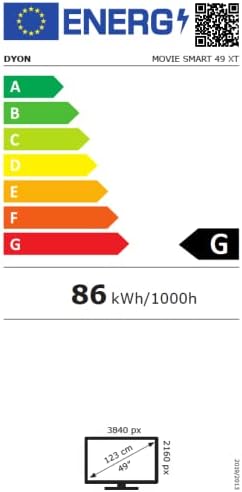
Image: Energy efficiency label for the DYON Movie Smart 49 XT, indicating an energy efficiency class of G and energy consumption of 86 kWh/1000h.
Warranty and Support
Warranty Information
The DYON Movie Smart 49 XT comes with a minimum guaranteed product support period of 3 years. The general warranty offered by the supplier is 1 year. Please retain your proof of purchase for warranty claims.
Customer Support
For further assistance, technical support, or warranty inquiries, please contact your retailer or the manufacturer directly. Refer to the product packaging or the manufacturer's official website for contact details.