
1. Introduction
Thank you for choosing the GUZARE GR305 Marine Audio System. This package includes a waterproof marine stereo receiver, a pair of 6.5-inch marine speakers, and a white marine antenna. This manual provides essential information for the proper installation, operation, and maintenance of your new audio system. Please read it thoroughly before use.
2. What's Included
The GUZARE GR305 Marine Audio System package contains the following components:
- 1 x GUZARE Marine Gauge Style Bluetooth USB AUX AM/FM Radio Receiver (Model: GR305)
- 1 Pair (2 PCS) x GUZARE 240W 6.5-inch Boat Yacht Speakers (Model: GR-065W)
- 1 x Car Marine Rubber Radio FM AM Antenna (White, Model: GA-056W)

Image: Contents of the GUZARE GR305 Marine Audio System package, showing the receiver, two speakers, and the antenna.
3. Product Features
This marine audio system is designed for durability and high-quality sound in marine environments.
- Waterproof & Weatherproof: IP66 water-resistant rating with front panel UV coating and conformal coated PC board for protection against harsh marine conditions.
- High Power Output: Built-in 72 x 4 Watts peak amplifier (28 x 4 RMS) with high voltage-protection system.
- Versatile Media Playback: Bluetooth streaming, USB port for MP3 files, AUX input, AM/FM radio tuner, and NOAA Weather Band tuner.
- 6.5-inch Marine Speakers: 2-way full-range audio with 240 Watt max power, 85Hz-20Khz frequency response, and 4 Ohms impedance. Features a low-profile design and 1.0-inch Aluminum voice coil.
- Flexible Marine Antenna: 15.7-inch (400mm) mast with a 180-degree swivel base for maximum mobility and easy adjustment.
- Standard Gauge Style Receiver: Designed to fit in a standard gauge (tachometer) opening for easy integration into your dashboard.

Image: The GUZARE GR305 marine stereo receiver installed in a boat dashboard, highlighting its IPX6 water splashing protection and fit in a standard gauge opening.

Image: Technical specifications for the GUZARE 6.5-inch marine speakers, including power output, speaker size, frequency response, impedance, and magnet size.
4. Setup and Installation
Proper installation is crucial for optimal performance and longevity of your marine audio system. It is recommended to have this system installed by a qualified professional.
4.1. Installation Steps Overview
Follow these general steps for installation:
- Set up the receiver indoors to familiarize yourself with its connections.
- Obtain sufficient speaker wire for your installation.
- Mount the speakers according to the provided instructions.
- Place your speakers in desired locations.
- Connect wires to the speakers.
- Connect the main wiring harness to the amplifier (if using an external amplifier) or directly to the receiver.

Image: A visual guide showing six steps for easy installation of the marine audio system, including receiver setup, speaker wiring, and amplifier connection.
4.2. Product Dimensions
Ensure adequate space and proper cut-out sizes for installation.
- Receiver (GR305): 3.72-inch cutout mounting diameter, 4.45-inch diameter top plate, 2.76-inch mounting depth (not including top plate), 3.74-inch depth (including top plate).
- Speakers (GR-065W): 7-inch diameter, 5-inch cut-out diameter, 3.14-inch total depth, 2.27-inch mounting depth.
- Antenna (GA-056W): 15.7-inch (400mm) mast, 54.5-inch (1385mm) cable.
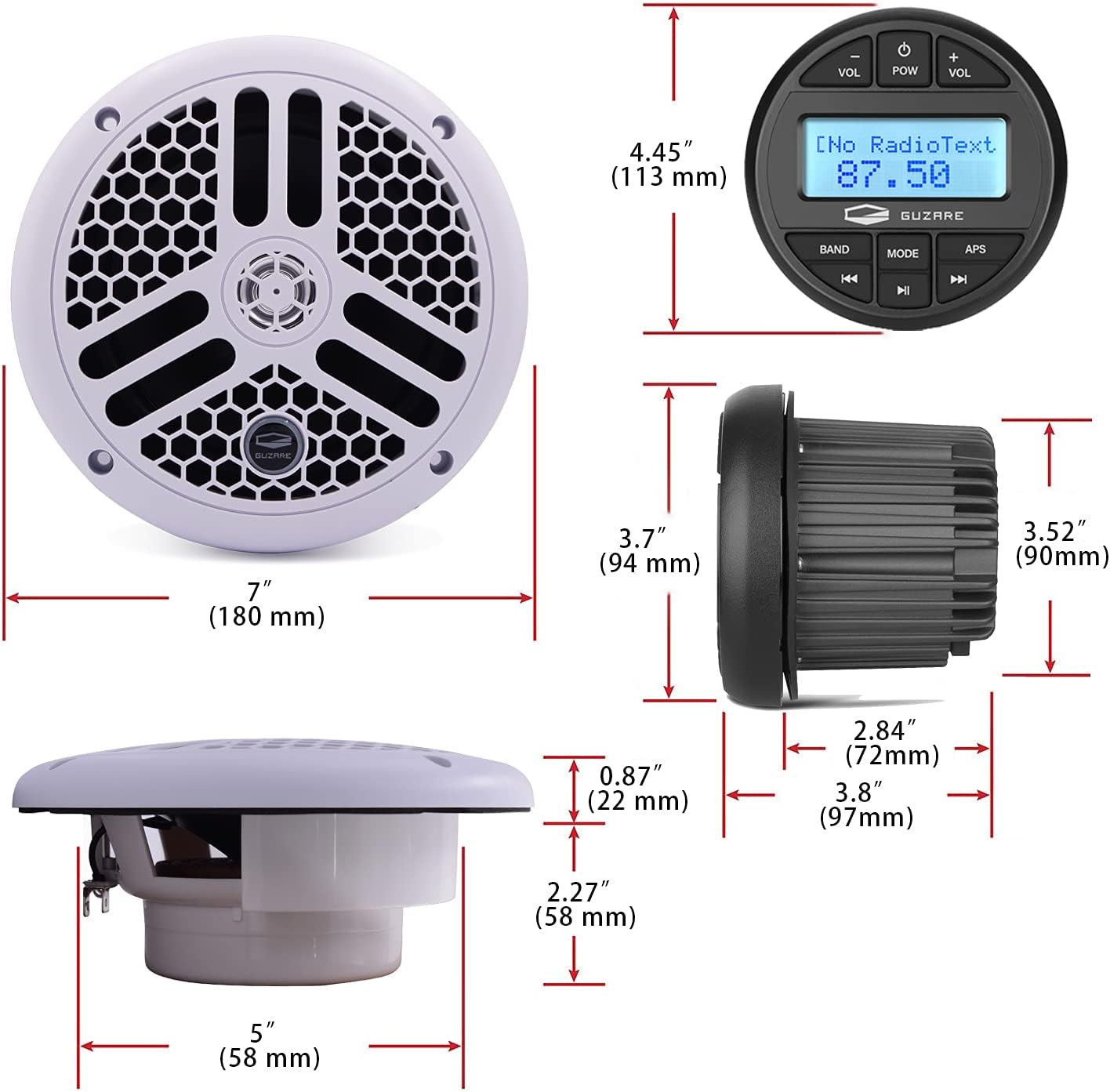
Image: Detailed dimensional drawings for both the GUZARE GR305 marine stereo receiver and the 6.5-inch marine speakers, showing various measurements in inches and millimeters.

Image: Dimensional drawing of the GUZARE marine antenna, indicating mast size (450mm / 16.7 inches) and cable size (1385mm / 54.5 inches).
4.3. Wiring Connections
The receiver features various input and output connections. Refer to the wiring diagram for proper connection to your boat's electrical system and audio components.
Image: A detailed view of the GUZARE GR305 receiver's rear connections, illustrating AUX-IN, RCA OUT, ISO connector, USB port, Antenna input, and Remote Control wiring.
4.4. Installation Demonstration Video
Video: This video demonstrates the unboxing of the GR305 marine stereo, showing its components and initial wiring connections. It also briefly covers basic operational features like FM radio, Bluetooth pairing, and USB playback.
5. Operating Instructions
5.1. Power On/Off
Press the POW button to turn the unit on or off.
5.2. Mode Selection
Press the MODE button to cycle through available audio sources: FM, AM, Bluetooth (BT), USB, and AUX-IN.
5.3. Volume Control
Use the VOL + and VOL - buttons to adjust the audio volume.
5.4. AM/FM Radio Operation
- Band Selection: Press the BAND button to switch between FM1, FM2, FM3, AM1, and AM2 bands.
- Tuning: Use the Previous/Next Track buttons (|<< / >>|) to manually tune or seek stations.
- Automatic Preset Store (APS): Press and hold the APS button to automatically scan and store strong stations into presets.
5.5. Bluetooth Pairing and Streaming
To connect your Bluetooth device:
- Select BT mode on the receiver. The display will show "BT streaming" and "NOT CONN".
- Enable Bluetooth on your mobile device and search for available devices.
- Select "GR305" from the list. Once connected, the display will show "CONN. OK" and then "PLAYING".
- You can control playback (play/pause, skip tracks) using the receiver's buttons or your connected device.
5.6. USB Playback
Insert a USB flash drive containing MP3 files into the USB port. The receiver will automatically switch to USB mode and begin playback. Use the Previous/Next Track buttons to navigate tracks.
5.7. AUX Input
Connect an external audio device (e.g., smartphone, MP3 player) to the AUX-IN port using a 3.5mm audio cable. Select AUX-IN mode on the receiver to play audio from the connected device.
5.8. Audio Controls
Press the MODE button repeatedly while in FM/AM mode to access various audio settings such as Bass (BAS), Balance (BAL), Fader (FAD), Loudness (LOUD), and Area (AREA EUR/USA). Use the VOL + / VOL - buttons to adjust these settings.
5.9. Operational Demonstration Video
Video: This video showcases the GUZARE marine stereo receiver's key functions, including Bluetooth A2DP streaming, AM/FM tuner operation, MP3 file playback via USB, and various audio controls. It also demonstrates the IP66 waterproofing by showing water being poured over the unit.
6. Maintenance
To ensure the longevity and optimal performance of your GUZARE Marine Audio System, follow these maintenance guidelines:
- Cleaning: Regularly wipe down the receiver and speakers with a soft, damp cloth. Avoid using harsh chemicals or abrasive cleaners, as these can damage the waterproof seals and finish.
- Waterproofing Care: Although the receiver is IP66 rated, avoid directing high-pressure water jets directly at the unit. Ensure all covers (e.g., USB port cover) are securely closed when not in use to maintain water resistance.
- Connection Checks: Periodically inspect all wiring connections for corrosion or looseness. Clean any corroded terminals and ensure connections are secure to prevent signal loss or electrical issues.
- Antenna Care: Keep the antenna mast clean. The flexible mast can be adjusted, but avoid excessive force or bending beyond its natural range.
7. Troubleshooting
If you encounter issues with your audio system, refer to the following common problems and solutions:
| Problem | Possible Cause | Solution |
|---|---|---|
| No power to the receiver. | Blown fuse, loose power connection, vehicle battery issue. | Check the inline fuse and replace if necessary. Verify all power and ground connections are secure. Check vehicle battery voltage. |
| No sound from speakers. | Volume too low, incorrect source selected, speaker wires disconnected, mute activated. | Increase volume. Select the correct audio source. Check speaker wire connections. Deactivate mute function. |
| Bluetooth not connecting. | Receiver not in BT mode, device not discoverable, too far from receiver. | Ensure receiver is in BT mode. Make sure Bluetooth is enabled on your device and it's in pairing mode. Move device closer to the receiver. |
| USB drive not recognized or playing. | Unsupported file format, corrupted USB drive, incorrect USB connection. | Ensure files are in MP3 format. Try a different USB drive. Reinsert the USB drive firmly. |
| Poor radio reception. | Antenna not connected, damaged antenna, poor signal area. | Check antenna connection. Inspect antenna for damage. Try adjusting antenna position. |
8. Specifications
Detailed technical specifications for the GUZARE GR305 Marine Audio System:
| Feature | Specification |
|---|---|
| Brand | GUZARE |
| Model | GR305 (Receiver), GR-065W (Speakers), GA-056W (Antenna) |
| Water Resistance Level | IP66 (Receiver) |
| Speaker Maximum Output Power | 240 Watts (per pair) |
| Receiver Peak Power | 72 x 4 Watts |
| Receiver RMS Power | 28 x 4 Watts |
| Connectivity Technology | Auxiliary, Bluetooth, RCA, USB |
| Audio Output Mode | Stereo |
| Speaker Type | 2-Way Full Range |
| Speaker Size | 6.5 Inches |
| Speaker Impedance | 4 Ohms |
| Speaker Frequency Response | 85Hz-20Khz |
| Bluetooth Range | 10 Meters |
| Compatible Devices | Smartphone, Tablet, Speaker, Personal Computer |
| Compatible Vehicle Type | Boat, UTV |
| Antenna Mast Size | 15.7 inches (400mm) |
| Antenna Cable Size | 54.5 inches (1385mm) |
9. Warranty Information
This GUZARE product is covered by a Limited 1-Year Warranty from the date of purchase. This warranty covers manufacturing defects and workmanship under normal use. It does not cover damage caused by improper installation, accident, misuse, abuse, negligence, unauthorized modification, or normal wear and tear. Please retain your proof of purchase for warranty claims.
10. Customer Support
For technical assistance, troubleshooting beyond this manual, or warranty inquiries, please contact GUZARE customer support through the retailer where the product was purchased or visit the official GUZARE website for contact information.


