
Introduction
Welcome to your new Discovery Kids Sound Machine Alarm Clock with Stars Projection! This versatile device combines an alarm clock, a soothing sound machine, and a captivating star projector to create an ideal environment for sleep and waking. Please read this manual carefully to ensure proper setup and operation.

Image: The Discovery Kids Sound Machine Alarm Clock, a white cube-shaped device with a blue digital display and control buttons, projecting stars onto a dark ceiling.
Setup
1. Battery Installation
- The unit requires 4 AA batteries (not included).
- Locate the battery compartment on the bottom of the unit.
- Open the compartment cover and insert the batteries, ensuring correct polarity (+/-).
- Close the battery compartment cover securely.
2. Setting Time and Date
- Press the 'SET' button to enter time setting mode.
- Use the 'UP' and 'DOWN' arrow buttons to adjust the hour, then press 'SET' to confirm.
- Repeat this process for minutes, month, day, and year.
- The display will show the current time, date, and indoor temperature.
3. Setting Alarm
- Press the 'ALARM' button to enter alarm setting mode.
- Use the 'UP' and 'DOWN' arrow buttons to set the desired alarm time, then press 'ALARM' to confirm.
- You can choose from 4 different alarm sounds.
4. Setting Temperature Unit
- Press the 'C/F' button to toggle between Celsius and Fahrenheit temperature display.

Image: A close-up view of the alarm clock's control panel, showing buttons for Home, Set, Stars, Volume, 12h/24h, Alarm, Sounds, Timer, and C/F, along with the digital display showing time, date, and temperature.
Operating Instructions
1. Using Nature Sounds
- Press the 'SOUNDS' button to cycle through the 6 calming nature sound tracks.
- Press the 'SOUNDS' button repeatedly to select your desired sound.
- To turn off the sound, press the 'SOUNDS' button until no sound is playing.
2. Adjusting Volume
- Use the 'VOLUME' up and down arrow buttons to increase or decrease the sound volume.
3. Activating Star Projection
- Press the 'STARS' button to activate the colorful star projection feature.
- The projector is located on the top of the unit and can be adjusted to direct the stars onto a wall or ceiling.
- Press the 'STARS' button again to turn off the projection.

Image: A dark room with colorful stars projected onto the ceiling and wall from the alarm clock, creating a soothing ambiance.
4. Using Timer Function
- Press the 'TIMER' button to set a sleep timer for the sounds or projection.
- The timer can be set for various durations, allowing the unit to automatically turn off.
5. Snooze/Dim/Sleep Function
- The large button in the middle serves multiple purposes:
- Snooze: When the alarm sounds, press this button to activate snooze.
- Dim: Press and hold to dim the display brightness.
- Sleep: Press to activate a sleep mode for sounds/projection.
Video: A seller demonstrates the features of the Discovery Kids Sound Machine Alarm Clock, highlighting its projection and sound capabilities. The video shows the clock displaying time and date, and the projection of stars on a surface.
Features
- Alarm Clock Functionality: Features an alarm clock with timer and snooze functions for waking up on time.
- Projection Clock Display: Displays time and date with colorful star projections on the wall or ceiling.
- Nature Sounds: Comes with 6 calming nature sound tracks to help soothe and lullaby children to sleep.
- Temperature Display: Displays indoor temperature for parents to monitor and control the environment.
- Portable Battery Power: Operates on 4 AA batteries for indoor or outdoor use.

Image: A child sleeping peacefully in bed, with the Discovery Kids Sound Machine Alarm Clock on a nightstand projecting a starry sky onto the wall above.
Maintenance
1. Cleaning
- Wipe the unit with a soft, dry cloth.
- Do not use abrasive cleaners or solvents.
2. Battery Care
- Remove batteries if the unit will not be used for an extended period.
- Replace all 4 AA batteries at the same time; do not mix old and new batteries.
Troubleshooting
- Unit not turning on: Check if batteries are inserted correctly and are not depleted. Replace if necessary.
- Projection is dim or unclear: Ensure the room is sufficiently dark. Adjust the projector's angle and focus.
- Sound not working: Check the volume level. Ensure a sound track is selected.
- Alarm not sounding: Verify the alarm time is set correctly and the alarm is activated.
Specifications
| Feature | Detail |
|---|---|
| Brand | Discovery Kids |
| Color | White |
| Display Type | Digital |
| Special Feature | Alarm, Projection Clock, Temperature Display |
| Product Dimensions | 4.5"W x 3.9"H |
| Power Source | Battery Powered (4 AA batteries required) |
| Material | Acrylonitrile Butadiene Styrene (ABS) |
| Item Weight | 10.6 ounces |
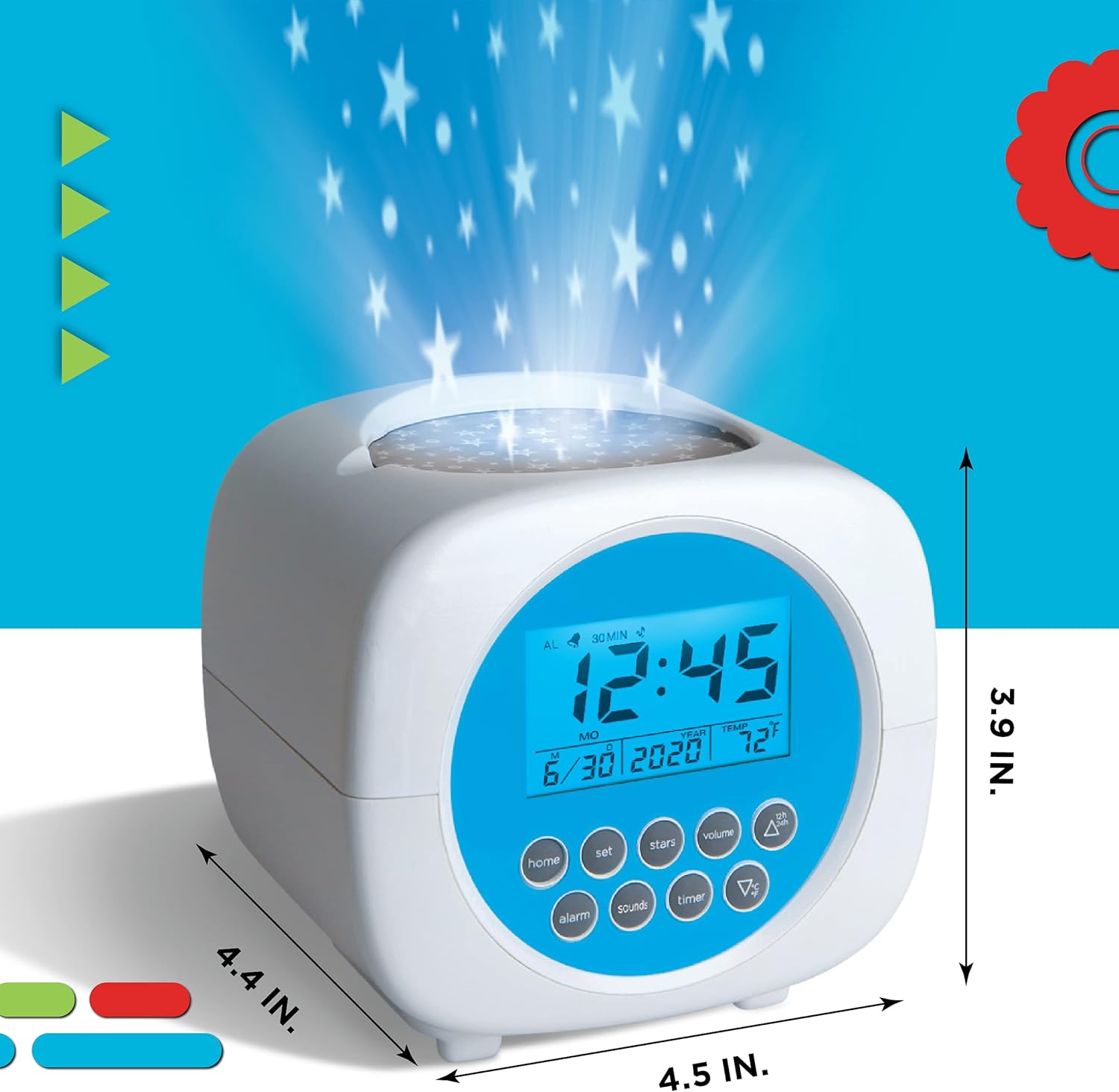
Image: The Discovery Kids Sound Machine Alarm Clock shown with its dimensions: 4.4 inches in depth, 4.5 inches in width, and 3.9 inches in height.
Warranty and Support
For warranty information or technical support, please refer to the product packaging or contact Discovery Kids customer service directly. Keep your purchase receipt for any warranty claims.