
Introduction
This manual provides comprehensive instructions for the installation, operation, and maintenance of your eleacc H901 Car Stereo. This double-din unit features a 7-inch full touch HD capacitive screen, offering seamless integration with Apple CarPlay and Android Auto, along with Bluetooth connectivity, backup camera support, steering wheel controls, subwoofer output, mirror link functionality, and AM/FM radio. Please read this manual thoroughly before using the product to ensure proper functionality and safety.
Important Safety Information
- Firmware Updates: Do not attempt to update the device firmware yourself unless specifically instructed by eleacc support. Incorrect firmware can render the unit inoperable.
- Power Supply: This car stereo is designed for a 12V DC power supply. If installing in a truck, ensure the vehicle's voltage is below 14V to prevent damage.
- Wiring: Verify your car's plug port. A specific wire harness may be required for direct connection to avoid cutting original vehicle wires. It is recommended to test the unit's functionality before full installation into the dashboard.
- Power On Issues: If the device does not power on, confirm all wiring connections are correct. Refer to the installation section for details. If issues persist, contact eleacc customer support for assistance.
- Screen Damage: In case of a cracked screen upon arrival, immediately contact eleacc customer support for a replacement.
Package Contents
Upon opening the package, please verify that all the following items are included:
- 7" Touchscreen Car Stereo (H901)
- Rear View Camera
- User Manual
- 16-pin wire harness
- Camera wire & 8
- Movable mounting bracket set
- Trim ring

Image: The eleacc H901 Car Stereo package contents, showing the main head unit, rear view camera, wiring harnesses, mounting brackets, and user manual.
Product Overview
The eleacc H901 is a versatile car stereo designed to enhance your in-car entertainment and connectivity. It features a responsive 7-inch HD capacitive touchscreen with a resolution of 1024 x 600, supporting up to 1080P video playback.

Image: Front view of the eleacc H901 Car Stereo, showcasing its main unit, external microphone, and included backup camera.
Key Features:
- Apple CarPlay & Android Auto: Connect your smartphone via USB for access to navigation, music, calls, and messages through the stereo's interface.
- Bluetooth Connectivity: Enjoy hands-free calling and wireless audio streaming. An external microphone is included for enhanced call clarity.
- High-Definition Display: 7-inch HD capacitive touchscreen (1024x600 resolution) for clear visuals and responsive touch control.
- Phone Mirror Link: Sync your smartphone screen to the stereo display for viewing content like videos (compatible with phone pixels less than 1920x1080).
- Backup Camera Support: Includes a rear view camera with a 9-meter cable for easier and safer parking. Supports CVBS signal input.
- Steering Wheel Controls: Compatible with certain car models for convenient control of the stereo without taking hands off the wheel.
- Subwoofer Output: Supports 2.1-channel audio with dedicated subwoofer output for enhanced bass.
- AM/FM Radio: Built-in tuner for radio reception.
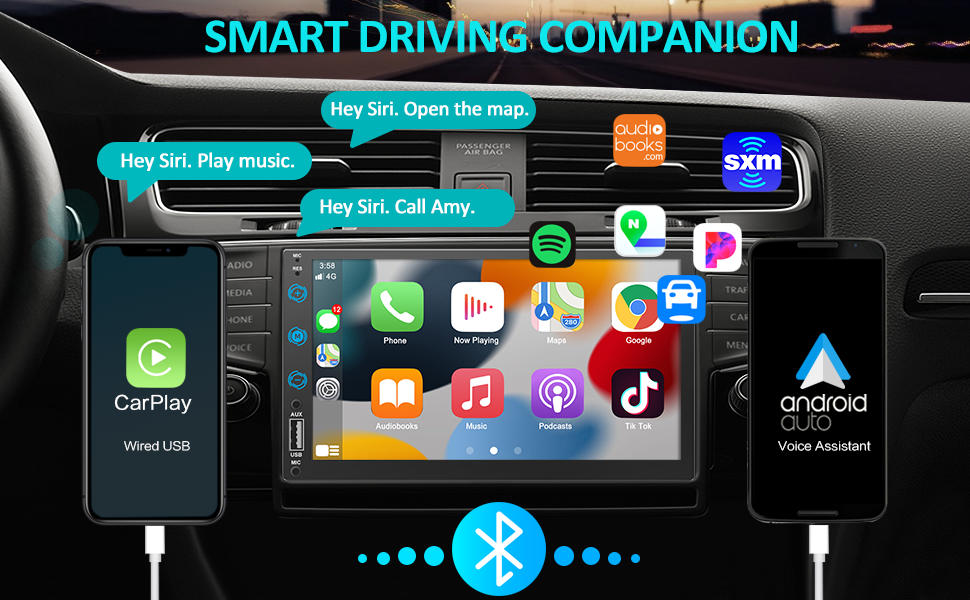
Image: Overview of the eleacc H901's key functionalities, including fast boot, smartphone integration (CarPlay/Android Auto), enhanced microphone, and navigation capabilities.
Installation
Product Dimensions:
The eleacc H901 is a standard double-din size unit. Its panel dimensions are approximately 7.047 inches (width) x 4.055 inches (height) with a depth of 4.33 inches. Please measure your vehicle's dashboard opening to ensure compatibility. A suitable dash kit or modification may be required if the opening does not match.

Image: Detailed dimensions of the eleacc H901 car stereo and its rear connections, confirming its double-din standard size.
Wiring Diagram:
Proper wiring is crucial for the stereo's functionality. Refer to the diagram below for connecting the power, speakers, camera, and other accessories. Ensure all connections are secure before powering on the unit.

Image: Comprehensive wiring diagram for the eleacc H901, illustrating connections for audio output, video input, power, and control signals.
Note on Steering Wheel Controls (SWC): The SWC and CLOCK wires may need to be swapped if the settings are not saved. Connect the red wire (ACC) & yellow wire (Battery+) together, and the Steering Wheel Learning wires (Yellow to positive, Red to key control) separately.
Initial Setup
- Power On: After successful installation and wiring, turn on your vehicle's ignition. The stereo should power on automatically.
- Language Settings: Navigate to the system settings menu to select your preferred language.
- Time and Date: Adjust the time and date settings as needed.
- Bluetooth Pairing:
- On the stereo, go to the Bluetooth menu.
- Enable Bluetooth on your smartphone and search for available devices.
- Select "eleacc H901" (or similar name) from the list on your phone.
- Confirm the pairing code on both devices if prompted.
Operating Instructions
Apple CarPlay & Android Auto
Connect your iPhone or Android smartphone to the stereo's USB port. The system will automatically detect your device and launch the respective CarPlay or Android Auto interface. This allows you to use compatible apps for navigation, music, calls, and messages directly from the stereo's touchscreen.
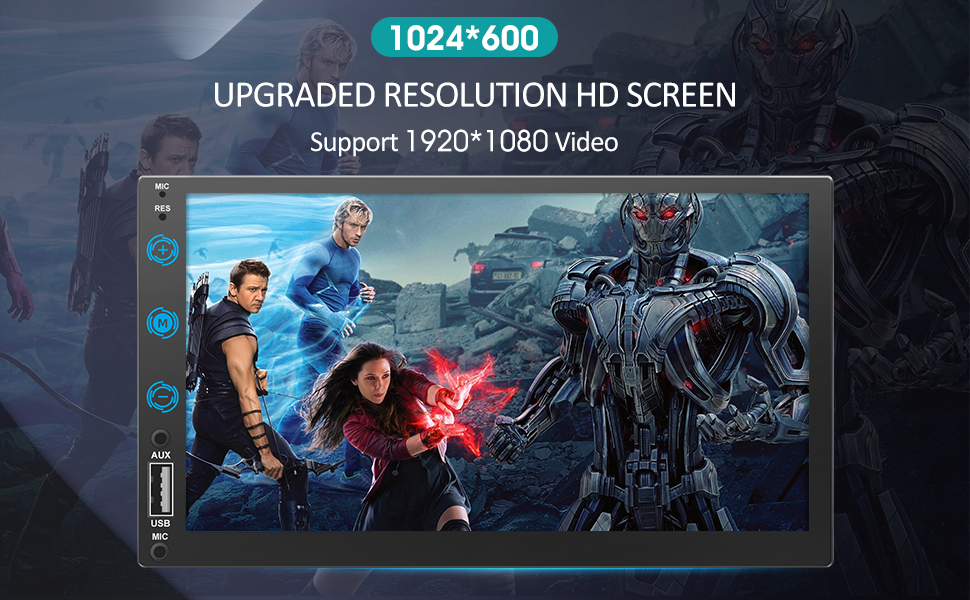
Image: The eleacc H901 screen showing the Apple CarPlay interface, providing access to essential smartphone functions.
Bluetooth Hands-free Calling & Audio Streaming
Once paired, you can make and receive calls directly through the stereo. The included external microphone ensures clear voice transmission. You can also stream audio wirelessly from your Bluetooth-enabled device to the car stereo.

Image: Illustration demonstrating the improved call quality with the eleacc H901's microphone system and its support for subwoofer output.
AM/FM Radio
Access the radio function from the main menu. You can manually tune to stations or use the auto-scan feature to find available frequencies. Save your favorite stations for quick access.

Image: The eleacc H901's radio interface, showing frequency tuning and options for USB and AUX input.
Phone Mirror Link
The Mirror Link feature allows you to display your smartphone's screen directly on the car stereo. This is useful for viewing videos or other content. Ensure your phone's pixel resolution is less than 1920 x 1080 for optimal compatibility.
Backup Camera Functionality
When the vehicle is shifted into reverse, the stereo will automatically display the feed from the included rear view camera. The camera provides an HD night-vision image for improved visibility during parking maneuvers. The 9-meter cable ensures sufficient length for most installations.

Image: Illustration of the backup camera system, including its connection to the stereo and key features like wide viewing angle, night vision, and high definition.
Steering Wheel Controls
If your vehicle supports steering wheel controls, you can configure them to operate the eleacc H901. This allows for safe and convenient control of volume, track changes, and other functions without diverting attention from the road. Refer to the wiring diagram in the Installation section for SWC connections.
Subwoofer Output
The stereo supports 2.1-channel audio, providing dedicated outputs for connecting an external subwoofer. This allows for enhanced bass response and a more immersive audio experience.
Maintenance
- Screen Cleaning: Use a soft, lint-free cloth to gently wipe the touchscreen. For stubborn smudges, slightly dampen the cloth with water or a screen-safe cleaner. Avoid abrasive materials or harsh chemicals.
- General Cleaning: Keep the unit free from dust and debris. Use a soft brush or compressed air to clean vents and button areas.
- Software Updates: Only perform software updates provided directly by eleacc. Follow instructions carefully to avoid damaging the unit.
Troubleshooting
| Problem | Possible Cause | Solution |
|---|---|---|
| Unit does not power on. | Incorrect wiring; Blown fuse; Insufficient power supply. | Check all power connections (ACC, Battery+, Ground). Verify vehicle's fuse box and the stereo's inline fuse. Ensure 12V DC power supply. Test the unit before full installation. |
| No sound from speakers. | Speaker wires incorrectly connected; Volume too low; Mute function active; Incorrect audio source. | Check speaker wiring connections. Increase volume. Deactivate mute. Select correct audio source (e.g., Radio, Bluetooth, USB). |
| Bluetooth connection issues. | Device not in pairing mode; Stereo not discoverable; Interference. | Ensure both devices are in pairing mode. Delete previous pairings and re-attempt. Move closer to the stereo. Restart both devices. |
| Backup camera not displaying. | Camera not connected; Reverse trigger wire not connected; Incorrect camera signal type. | Verify camera video input (CVBS) and reverse trigger wire connection. Ensure camera is powered. |
| Touchscreen unresponsive or inaccurate. | Screen dirty; Software glitch; Physical damage. | Clean the screen. Restart the unit. If screen is cracked, contact support for replacement. |
| Apple CarPlay/Android Auto not launching. | Incorrect USB cable; Phone not compatible; USB port issue. | Use a high-quality, data-enabled USB cable. Ensure your phone's OS is up to date. Try a different USB port if available. |
For issues not listed here, or if troubleshooting steps do not resolve the problem, please contact eleacc customer support.
Specifications
| Feature | Detail |
|---|---|
| Brand | eleacc |
| Model Number | H901 |
| Screen Size | 7 Inches |
| Screen Resolution | 1024 x 600 pixels |
| Supported Video Playback | Up to 1080P |
| Connectivity Technology | Bluetooth, USB |
| Controller Type | Android (for Android Auto), iOS (for Apple CarPlay) |
| Special Features | Apple CarPlay, Android Auto, Mirror Link, Backup Camera Support, Steering Wheel Controls, Subwoofer Output, External Microphone |
| Audio Output Mode | Stereo (2.1 channel with subwoofer support) |
| Product Dimensions | 4.33 x 7.05 x 4.05 inches (H x W x D) |
| Item Weight | 2.51 pounds |
| Power Supply Voltage | 12V DC |
Warranty and Support
For warranty information, technical support, or any inquiries regarding your eleacc H901 Car Stereo, please contact eleacc customer support directly. Refer to the contact information provided with your purchase or visit the official eleacc website for assistance.
Please retain your proof of purchase for warranty claims.


