
WISTEK 20c6e477-1277-4be5-926f-65393abaa0d4
WISTEK Bluetooth Tire Pressure Monitoring System for Motorcycles
Model: 20c6e477-1277-4be5-926f-65393abaa0d4
Introduction
Thank you for choosing the WISTEK Bluetooth TPMS with 2 external sensors. This system is designed to monitor your motorcycle's tire pressure and temperature in real-time via a smartphone application. It features 5 alarm modes to enhance your riding safety by providing timely alerts for potential tire issues. Maintaining correct tire pressure not only saves fuel and extends tire life but also significantly contributes to overall safety. This manual provides comprehensive instructions for installation, operation, and maintenance of your TPMS.
Key Features
- Dynamic Monitoring: Real-time monitoring of all tire pressure and temperature to improve fuel efficiency, prolong tire life, and ensure driver safety.
- High Accuracy Sensors: Equipped with 2 waterproof, anti-corrosion, and anti-theft TPMS sensors, suitable for all weather conditions. Provides high sensitivity and accurate measurements.
- Long Battery Life: External motorcycle TPMS sensors feature 5 distinct alarm modes and offer a long-lasting battery life of approximately 3 to 5 years.
- Easy APP Operation: Supports Bluetooth 4.0 and operates via a dedicated smartphone application compatible with both iOS and Android devices. Note: The app may request location permission for Bluetooth scanning, which is a standard Android system requirement for Bluetooth TPMS.
- Simple Setup: Quick and straightforward installation process, typically completed within 10 minutes.
Package Contents
Please verify that all items are present in your package:
- 2 x WISTEK External TPMS Sensors
- 2 x Anti-theft Screws
- 1 x Installation Wrench
- 1 x User Manual

Image: Contents of the WISTEK Bluetooth TPMS package, showing the two sensors, installation tool, and product box.
Installation Guide
The WISTEK TPMS is designed for easy installation. Follow these steps to set up your external sensors:
- Prepare Valve: Remove the existing tire valve cap. Screw the anti-theft nuts onto the tire valve stem.
- Install Sensor: Install the external sensor onto the tire valve. Ensure each sensor is installed on its corresponding tire (e.g., front sensor on front tire, rear sensor on rear tire), as each sensor has a unique ID code.
- Secure Sensor: Hold the sensor firmly and tighten the anti-theft nut against the sensor by turning it counter-clockwise.
- Final Tightening: Use the provided wrench to further tighten the anti-theft nut, securing the sensor in place and preventing unauthorized removal.
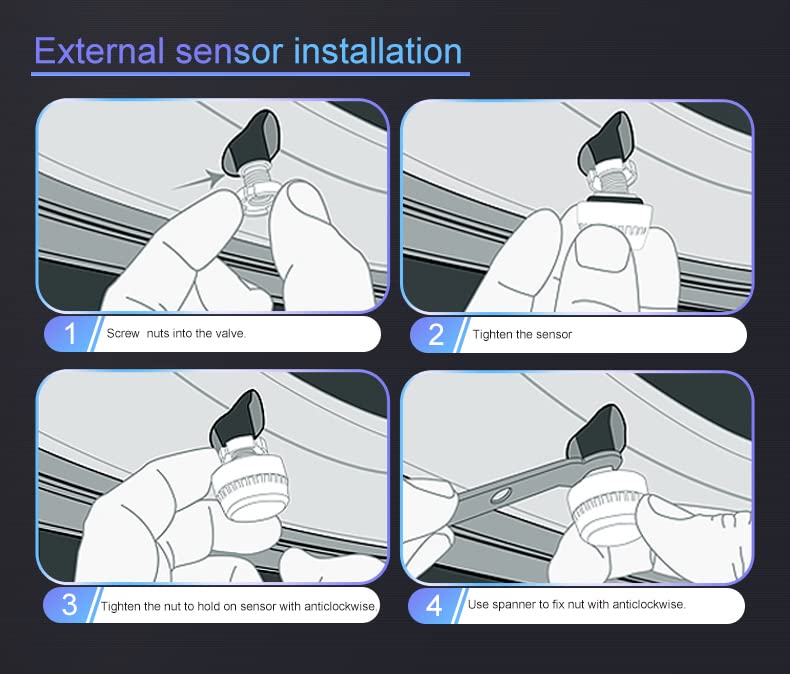
Image: Visual guide demonstrating the four steps for installing the external TPMS sensors on a motorcycle tire valve.
Important Note: Please ensure the sensor is installed on the corresponding tire valve as per its unique ID code for accurate readings and proper system function.
App Operation and Setup
The WISTEK TPMS operates via a dedicated smartphone application. Follow these instructions to download, set up, and use the app:
1. App Download and Installation
Search for "MotorCare" in your device's app store (Apple App Store for iOS or Google Play Store for Android) and download the application. Once downloaded, open the app.
Video: Demonstrates the process of downloading and opening the "MotorCare" app on a smartphone, showing initial app permissions.
2. Initial App Permissions
Upon first opening, the app will request certain permissions, such as notifications, Bluetooth access, and potentially location access (required by Android for Bluetooth scanning). Please grant these permissions for full functionality.
3. Connecting Sensors
Ensure your phone's Bluetooth is enabled. The app will automatically search for and connect to the WISTEK TPMS sensors. You can view real-time temperature and pressure readings for both front and rear tires on the main screen.

Image: Screenshot of the MotorCare app's main interface, displaying current tire temperature and pressure for front and rear tires, along with a "Low Pressure" alert.
4. Adjusting Settings
Navigate to the "System Settings" within the app to customize various parameters, including:
- Language Setting
- Vibration Warning (On/Off)
- Temperature Unit (°C/°F)
- Pressure Unit (Psi/Kpa/Bar)
- Pressure Warning Upper Limit
- Pressure Warning Lower Limit
- Temperature Warning Upper Limit
- Electricity Warning Lower Limit (for sensor battery)

Image: Screenshot of the MotorCare app's system settings, showing options to adjust units, alarm thresholds for pressure and temperature, and other preferences.
You can also reset settings to default values if needed.
Safety Features and Alarm Modes
The WISTEK TPMS is equipped with 5 alarm modes to alert you to potential tire issues, ensuring your safety on the road:
- High Pressure Alarm: Alerts when tire pressure exceeds the set upper limit.
- Low Pressure Alarm: Alerts when tire pressure drops below the set lower limit.
- High Temperature Alarm: Alerts when tire temperature exceeds the set upper limit, indicating potential overheating.
- Fast Leak Alarm: Alerts rapidly in case of a sudden and significant drop in tire pressure.
- Sensor Low Battery Alarm: Notifies you when a sensor's battery is running low, prompting replacement.
These alarms provide critical information, allowing you to take necessary precautions and address tire issues promptly.
Specifications
| Feature | Detail |
|---|---|
| Brand | WISTEK |
| Model Number | 20c6e477-1277-4be5-926f-65393abaa0d4 |
| Measuring Range (Pressure) | 36.2 Psi (2.5 Bar) to 200 Psi (13.8 Bar) |
| Measuring Range (Temperature) | Up to 176°F (80°C) |
| Mounting Type | Tire Valve Mount (External) |
| Output Type | Digital |
| Connectivity | Bluetooth 4.0 |
| Sensor Battery Life | Approx. 3-5 Years |
| Package Dimensions | 4.02 x 3.94 x 1.26 inches |
| Item Weight | 3.21 ounces |
Troubleshooting
If you encounter issues with your WISTEK TPMS, consider the following common solutions:
- No Sensor Readings:
- Ensure Bluetooth is enabled on your smartphone.
- Verify that the "MotorCare" app has Bluetooth and location permissions granted.
- Check if sensors are correctly installed and tightened on the valve stems.
- Confirm sensor batteries are not depleted. Replace if necessary.
- Restart the app or your smartphone.
- Inaccurate Readings:
- Ensure sensors are installed on the correct tires (front/rear).
- Recalibrate the sensors if the app provides such an option, or re-pair them.
- Compare readings with a reliable manual tire pressure gauge. If discrepancies persist, contact support.
- App Crashing/Freezing:
- Ensure your app is updated to the latest version.
- Clear the app's cache or reinstall the app.
- Ensure your smartphone's operating system is up to date.
- Alarms Not Functioning:
- Check the alarm threshold settings in the app to ensure they are configured appropriately for your motorcycle's tires.
- Verify that app notifications are enabled in your phone's system settings.
For persistent issues not resolved by these steps, please refer to the support section.
Warranty and Support
WISTEK offers a 1-year 100% Satisfaction Guarantee for this product. If you experience any issues with the sensors or the system, please contact WISTEK customer support for assistance. They are committed to providing full support, including sensor replacement or refunds if necessary.
For further assistance, please visit the official WISTEK website or contact their customer service through the contact information provided with your product packaging.
Ask a question about this manual
Ask about setup, troubleshooting, compatibility, parts, safety, or missing instructions. Manuals+ will review the question and use this page’s manual context to help answer it.