Introduction
This manual provides comprehensive instructions for the safe and efficient installation, operation, and maintenance of your Pholiten Extra Tall Single Monitor Desk Mount Stand. Designed for monitors ranging from 13 to 27 inches and supporting up to 22 lbs, this mount enhances your workspace ergonomics and frees up desk space.
Proper installation and adjustment are crucial for optimal performance and user comfort. Please read this manual thoroughly before proceeding with installation.
Safety Information
WARNING: Failure to follow these safety instructions may result in property damage or personal injury.
- Ensure your desk surface is sturdy enough to support the combined weight of the mount and your monitor.
- Do not install this mount on desks made of Particle Board (PB), Medium-Density Fiberboard (MDF), or GLASS, as these materials may not provide adequate support.
- Verify that your monitor's weight and VESA pattern are compatible with this mount (Max 22 lbs, VESA 75x75mm or 100x100mm).
- Keep all small parts away from children to prevent choking hazards.
- Tighten all screws securely, but do not overtighten to avoid stripping threads.
- Always use two people for lifting and positioning heavy monitors during installation.
Package Contents
Please check that all components are present and undamaged. If any parts are missing or damaged, contact customer support.
| Component | Quantity | Description |
|---|---|---|
| Pole (47-inch) | 1 | Main vertical support for the monitor arm. |
| Monitor Arm | 1 | Adjustable arm for monitor attachment. |
| Desk Clamp Assembly | 1 | For securing the pole to the desk edge. |
| Grommet Mount Base | 1 | Alternative mounting option for desks with a grommet hole. |
| VESA Plate | 1 | Attaches to the back of the monitor. |
| Hardware Kit | 1 set | Includes various screws, washers, and Allen wrenches. |
| Cable Management Clips | Set | For organizing monitor cables along the arm and pole. |
 Image: Overview of the Pholiten Extra Tall Single Monitor Desk Mount Stand, showing the pole, arm, and desk clamp.
Setup and Installation
This monitor mount offers two installation methods: Desk Clamp and Grommet Mount. Choose the method best suited for your desk.
Method 1: Desk Clamp Installation
- Attach Desk Clamp to Pole: Secure the desk clamp assembly to the bottom of the 47-inch pole using the provided screws. Ensure it is firmly attached.
 Image: Close-up view of the desk clamp mechanism.
 - Secure Pole to Desk: Position the clamp on the edge of your desk. Tighten the clamp screw until the pole is securely fastened to the desk. Ensure the desk thickness is compatible with the clamp's range.
- Attach Monitor Arm to Pole: Slide the monitor arm onto the pole at your desired height. Use the provided Allen wrench to tighten the arm's collar screw, securing it in place.
 Image: Detail of the monitor arm's attachment point on the vertical pole.
 - Attach VESA Plate to Monitor: Carefully place your monitor face down on a soft, clean surface. Attach the VESA plate to the back of your monitor using the appropriate screws and washers from the hardware kit. Ensure the screws are not too long, which could damage the monitor.
 Image: Close-up of the VESA mounting plate.
 - Mount Monitor to Arm: With assistance, carefully lift the monitor and slide the VESA plate onto the monitor arm's mounting head. Secure it with the locking screw or mechanism.
 Image: Animated demonstration of attaching the VESA plate to the monitor arm.
Method 2: Grommet Mount Installation (Optional)
- Prepare Grommet Hole: Ensure your desk has a grommet hole of appropriate size. If not, you may need to drill one (consult a professional if unsure).
- Assemble Grommet Base: Attach the grommet mount base to the bottom of the 47-inch pole.
- Secure Pole to Desk: Insert the pole through the grommet hole. From underneath the desk, secure the base plate and tighten the nut until the pole is stable.
- Attach Monitor Arm and Monitor: Follow steps 3-5 from the Desk Clamp Installation section to attach the monitor arm and your monitor.
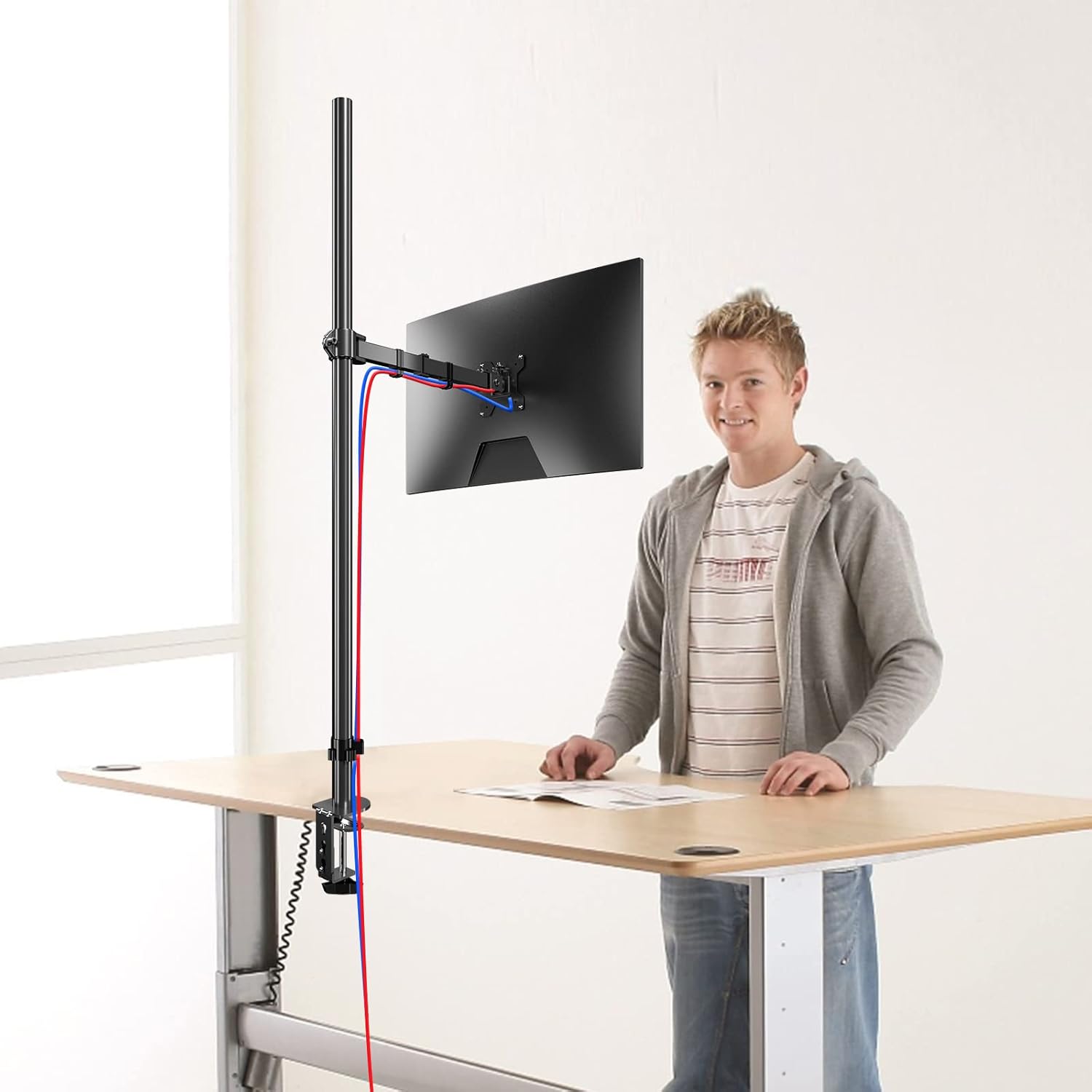 Image: A user demonstrating the monitor mount in a standing desk setup, highlighting cable routing.
Operating Instructions
Once installed, the Pholiten monitor mount allows for various adjustments to achieve an ergonomic viewing position.
- Height Adjustment: To change the monitor's height, loosen the collar screw on the pole, slide the arm to the desired position, and re-tighten the screw.
- Tilt Adjustment: The monitor can be tilted up or down by ±90 degrees. Loosen the tilt knob on the VESA plate, adjust the angle, and re-tighten.
- Swivel Adjustment: The monitor arm can swivel ±90 degrees horizontally along the pole.
- Rotation: Rotate your monitor 360 degrees to switch between landscape and portrait orientations.
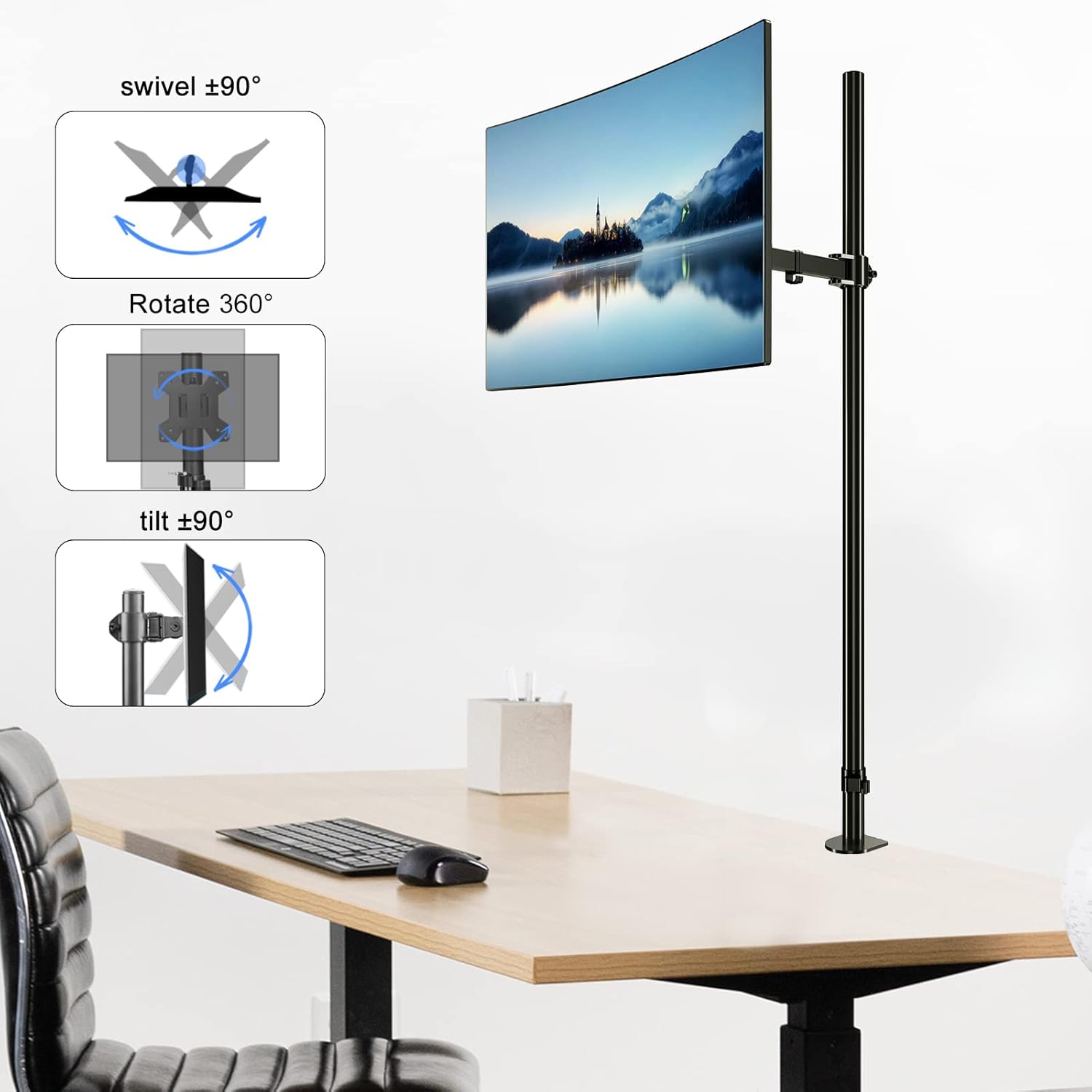 Image: Visual guide illustrating the swivel, rotation, and tilt capabilities of the monitor mount.
Cable Management
Utilize the included cable management clips to route your monitor and power cables neatly along the arm and down the pole. This helps maintain a clean and organized workspace.
Maintenance
- Cleaning: Wipe the mount with a soft, damp cloth. Avoid abrasive cleaners or solvents.
- Periodic Checks: Periodically check all screws and connections to ensure they remain tight and secure. Re-tighten if necessary.
- Lubrication: No lubrication is required for the moving parts.
Troubleshooting
| Problem | Possible Cause | Solution |
|---|---|---|
| Monitor sags or does not hold position. | Arm tension is too loose. | Adjust the tension screw on the arm (refer to installation steps for location). |
| Mount feels unstable. | Desk clamp or grommet mount is not tightened sufficiently. | Re-tighten the desk clamp or grommet mount screw. Ensure the desk surface is suitable. |
| Monitor cannot be attached to VESA plate. | Incorrect VESA pattern or screw size. | Verify your monitor's VESA pattern (75x75mm or 100x100mm). Use the correct screws and spacers from the hardware kit. |
| Difficulty adjusting monitor. | Adjustment points are too tight. | Slightly loosen the relevant adjustment screws (tilt, swivel) to allow movement, then re-tighten to hold position. |
Specifications
- Model Number: MD91221
- Brand: Pholiten
- Compatible Screen Sizes: 13 to 27 inches
- Weight Capacity: Up to 22 lbs (10 kg)
- VESA Compatibility: 75x75mm, 100x100mm
- Pole Height: 47 inches (1200mm)
- Material: Alloy Steel
- Color: Black
- Movement Type: Tilt, Swivel, Rotate
- Tilt Angle: ±90 Degrees
- Swivel Angle: ±90 Degrees
- Rotation: 360 Degrees
- Mounting Type: Desk Clamp or Grommet Mount
- Item Weight: Approximately 7.98 pounds
- Package Dimensions: 17.52 x 6.97 x 3.82 inches
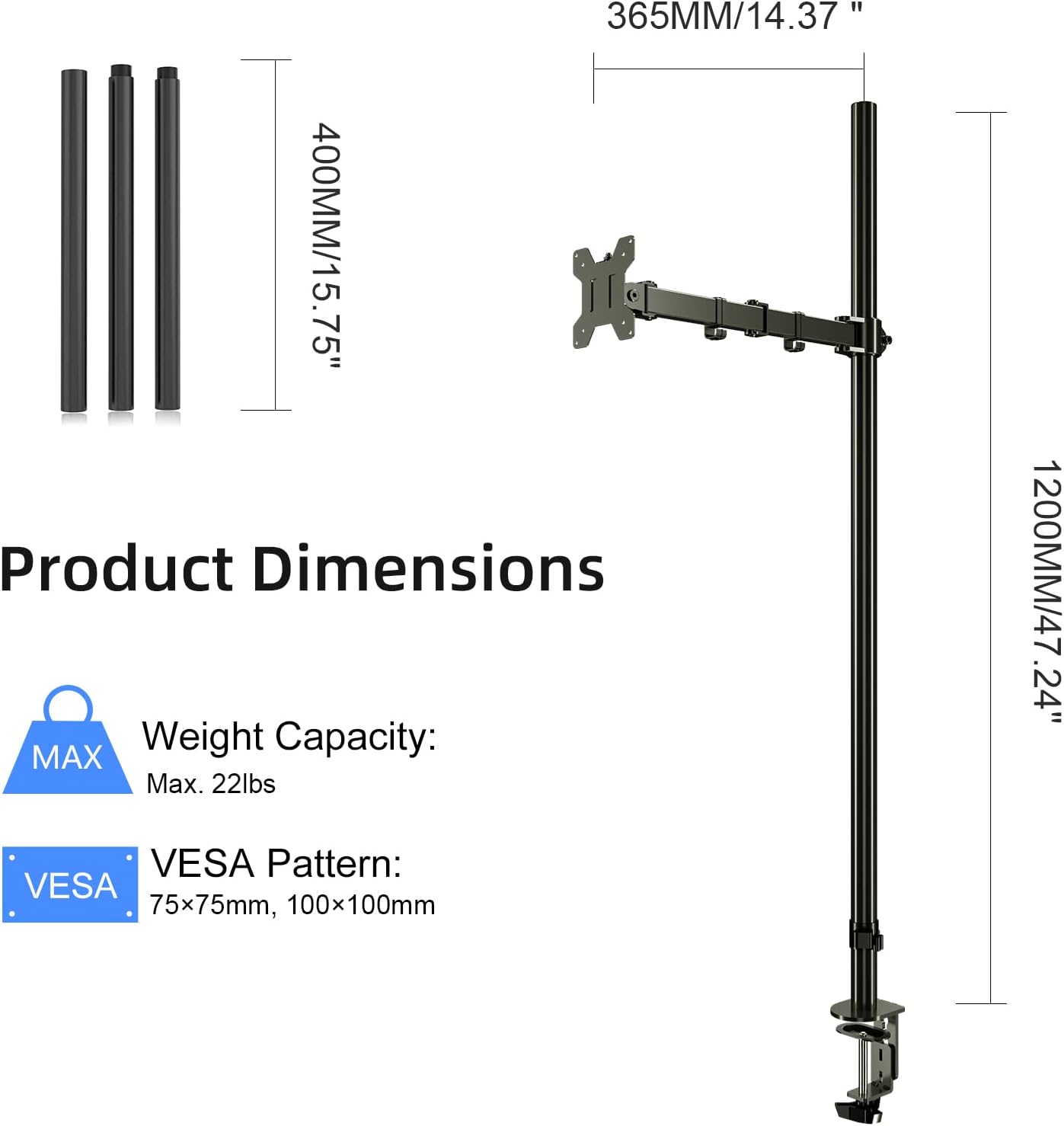 Image: Detailed product dimensions, weight capacity, and VESA compatibility.
Warranty and Support
For warranty information or technical support, please refer to the product packaging or contact Pholiten customer service directly. Keep your purchase receipt for warranty claims.
For further assistance, visit the official Pholiten store on Amazon: Pholiten Store.