
1. Introduction
Thank you for choosing the YIQIEDEY 13 Gallon Automatic Stainless Steel Trash Can. This modern, touch-free waste bin is designed to provide convenience and hygiene in your home or office. Featuring a motion sensor for automatic lid opening and closing, a fingerprint-resistant stainless steel exterior, and an odor-absorbing filter, this trash can offers a clean and efficient waste disposal solution. Please read this manual carefully before use to ensure proper operation and maintenance.
2. Important Safety Information
- Do not immerse the lid assembly in water or any other liquid.
- Do not force the lid open or closed manually when the sensor is active, as this may damage the gears.
- Keep the sensor area clean and unobstructed for optimal performance.
- Use only the recommended battery type and ensure correct polarity during installation.
- Keep out of reach of children to prevent accidental injury or misuse.
- Avoid placing the trash can in direct sunlight or in areas with extreme temperatures.
3. Package Contents
Please check the package to ensure all components are present:
- 1 x Stainless Steel Trash Can Body
- 1 x Automatic Sensor Lid
- 1 x Removable Liner Ring
- 1 x User Manual
4. Setup Instructions
4.1 Battery Installation
- Locate the battery compartment on the underside of the sensor lid.
- Open the battery compartment cover.
- Insert the required batteries (typically 4x AA, not included) according to the polarity indicators (+/-).
- Close the battery compartment cover securely.
4.2 Placing the Trash Bag
Follow these steps to properly install a trash bag:
- Remove the removable liner ring from the top of the trash can body.
- Insert a large enough garbage bag through the liner ring, ensuring the bag edge is outside the ring.
- Place the liner ring with the bag into the trash can body, tucking the bag's excess into the can.
- Close the trash can lid by placing it back onto the body.

Image: Trash bag installation steps.
5. Operating Instructions
5.1 Power On/Off
Locate the power switch on the back of the sensor lid. Flip the switch to the 'ON' position to activate the automatic sensing mode. Flip to 'OFF' to disable the sensor and use manual mode.

Image: Power switch and manual operation features.
5.2 Automatic Sensor Operation
With the power switch in the 'ON' position:
- Opening: Gently wave your hand or knee within 5.9 inches (15 cm) of the sensor area on the lid. The lid will open automatically in approximately 0.3 seconds.
- Closing: The lid will remain open for 7 seconds. After 7 seconds of no activity in the sensor area, the lid will automatically close slowly and quietly due to its hydraulic slow-down mechanism.

Image: Smart sensing operation.
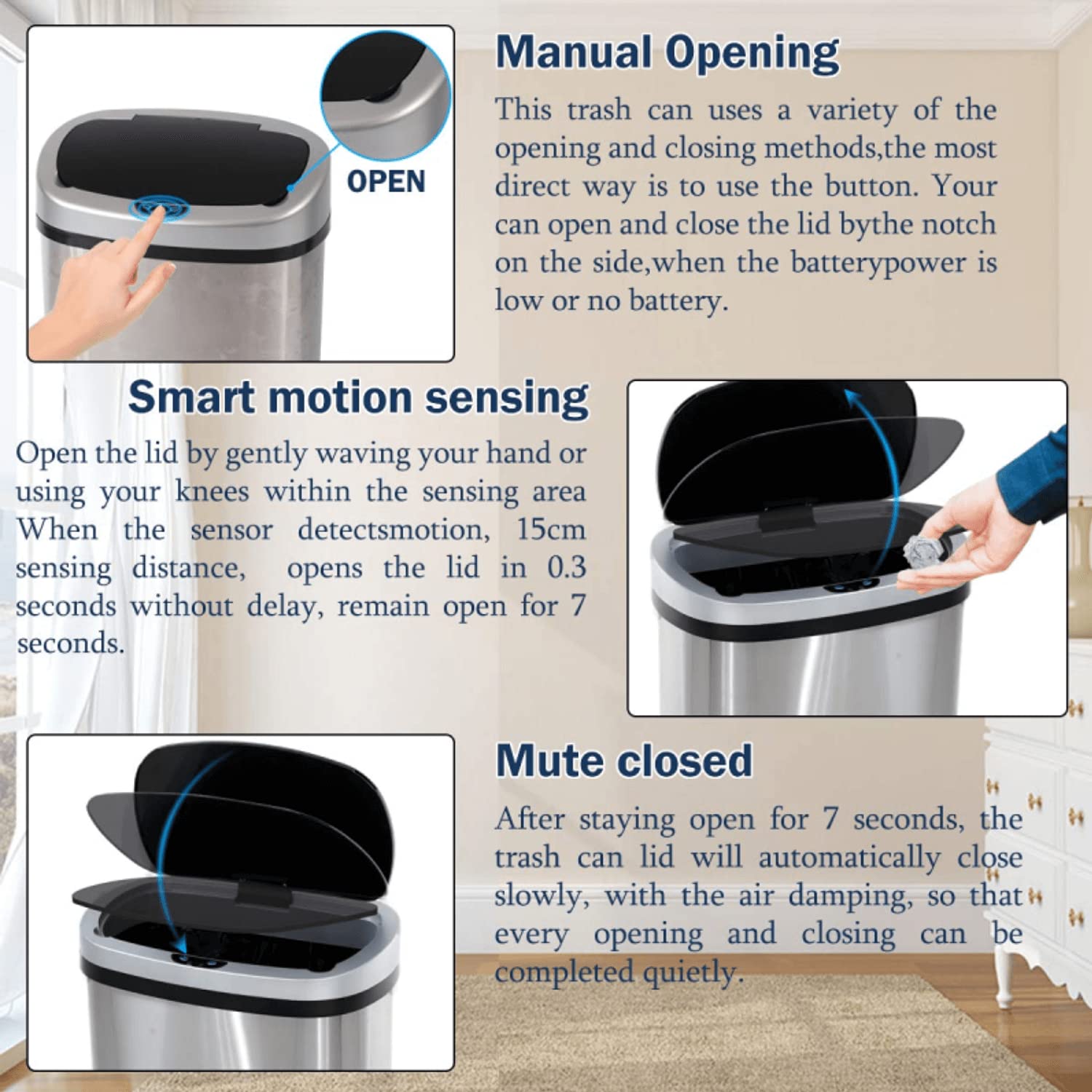
Image: Manual and automatic lid operation details.
5.3 Manual Operation
If the batteries are low, depleted, or the power switch is in the 'OFF' position, you can operate the lid manually:
- Open/Close Buttons: Press the 'OPEN' button on the lid to open it, and the 'CLOSE' button to close it.
- Manual Lift: You can also gently lift the lid by hand using the notch on the side.
6. Maintenance
6.1 Cleaning the Exterior
The brushed stainless steel exterior is fingerprint-resistant and easy to clean:
- Wipe the surface with a soft, damp cloth and a mild detergent.
- Avoid abrasive cleaners or scouring pads, as these can scratch the finish.
- Dry thoroughly with a soft, clean cloth to prevent water spots.

Image: Fingerprint-resistant surface.
6.2 Cleaning the Interior
The interior of the bin has a durable plastic liner that can be removed for easy cleaning:
- Remove the lid and the liner ring.
- Wipe the interior with a damp cloth and mild detergent.
- Rinse and dry completely before reassembling.
6.3 Odor Filter
The trash can includes a natural activated carbon odor filter to absorb and neutralize garbage odors. Replace the filter periodically (e.g., every 3-6 months) for optimal odor control. Refer to the product packaging or manufacturer's website for replacement filter availability.
7. Troubleshooting
| Problem | Possible Cause | Solution |
|---|---|---|
| Lid does not open automatically. |
|
|
| Lid opens or closes slowly. | Batteries are low. | Replace batteries. |
| Lid does not close completely. | Obstruction in the lid's path. | Remove any obstructions. |
| Unpleasant odors persist. | Odor filter needs replacement. | Replace the activated carbon odor filter. |
8. Specifications
| Brand | YIQIEDEY |
| Model Number | GL-TC-1350R-SS |
| Capacity | 13 Gallons (approx. 50 Liters) |
| Material | Stainless Steel (Brushed Finish) |
| Color | Silver |
| Opening Mechanism | Motion-Sensor, Manual Buttons |
| Product Dimensions (LxWxH) | 16.1" x 11.37" x 25.31" |
| Item Weight | 7.5 Pounds |
| Power Source | Batteries (not included) |
| Special Features | Automatic, Sensor, Odor Filter, Fingerprint Resistant, Quiet Close |

Image: Product dimensions.
9. Warranty and Support
For warranty information or technical support, please refer to the product packaging or contact YIQIEDEY customer service. Keep your purchase receipt as proof of purchase.