
1. Introduction
This manual provides comprehensive instructions for the safe and effective operation, setup, and maintenance of your Sachtler FSB 6 MK II Fluid Head. The FSB 6 MK II is engineered for precision movement, offering finely calibrated levels of drag and counterbalance to achieve optimal camera stability and smooth shots. Its robust design ensures reliability under various operating conditions.
2. Safety Information
- Always ensure the fluid head is securely mounted to a stable tripod before attaching any camera equipment.
- Verify that all locks (pan, tilt, camera plate) are engaged when transporting the setup or leaving it unattended.
- Do not exceed the maximum payload capacity of the fluid head. Refer to the specifications section for details.
- Avoid exposing the fluid head to extreme temperatures, moisture, or corrosive substances.
- Perform regular checks for any signs of wear or damage. Do not operate if damage is detected.
3. Product Overview and Components
The Sachtler FSB 6 MK II Fluid Head features several key components designed for intuitive control and stable camera support.
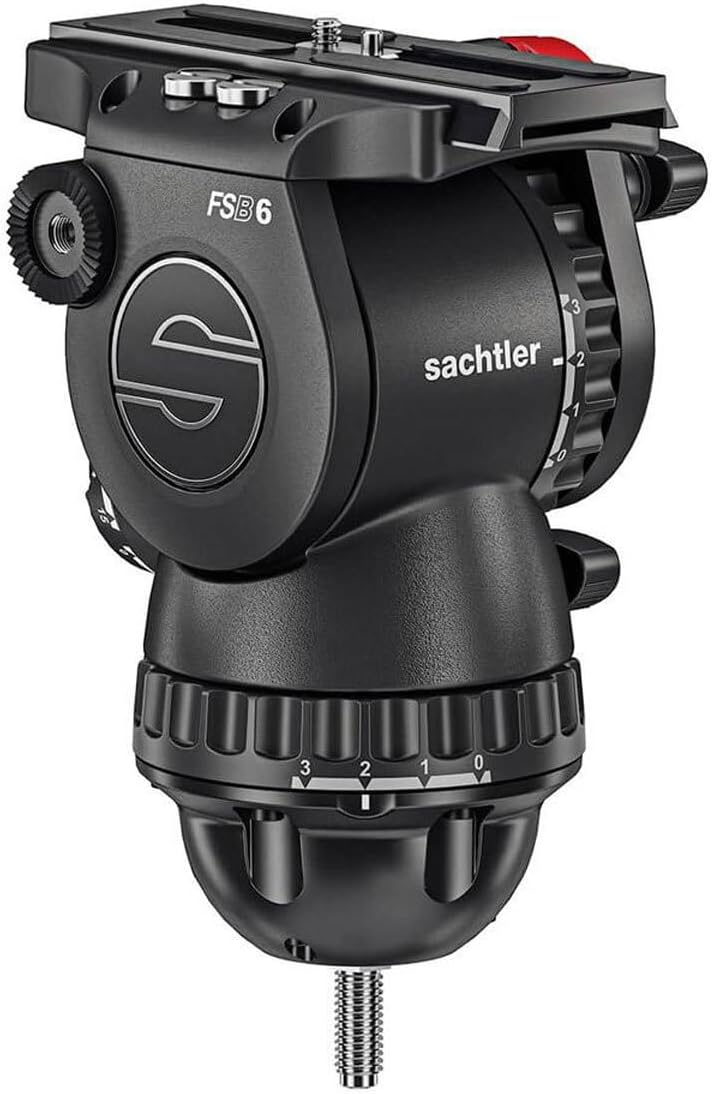
Figure 3.1: Front view of the Sachtler FSB 6 MK II Fluid Head, showing the main body, pan base, and camera plate.

Figure 3.2: Close-up of the camera plate area, including the sideload mechanism, red camera plate lock, and drag adjustment knobs.
- Camera Plate: Quick-release plate for attaching the camera.
- Sideload Mechanism: Allows for quick and secure camera attachment from the side.
- Tilt Lock: Lever to secure the tilt movement.
- Pan Lock: Knob to secure the pan movement.
- Drag Adjustment (Pan & Tilt): Dials to set the resistance for smooth camera movements.
- Counterbalance Knob: Adjusts the spring tension to balance the camera's weight.
- Pan Bar Mount: Receptacle for attaching the pan bar.
4. Setup
4.1 Mounting the Fluid Head to a Tripod
- Ensure your tripod is stable and its legs are fully extended and locked.
- Place the fluid head's base onto the tripod's bowl or flat base.
- Secure the fluid head using the tripod's locking mechanism (e.g., bowl clamp or mounting screw). Ensure it is tightened firmly to prevent rotation.

Figure 4.1: The Sachtler FSB 6 MK II Fluid Head securely mounted on a compatible tripod, ready for camera attachment.
4.2 Attaching the Camera
- Remove the camera plate from the fluid head by releasing the camera plate lock (often a red lever or button).
- Attach the camera plate to the bottom of your camera using the provided camera screw. Ensure it is tight to prevent camera rotation on the plate.
- With the camera plate lock on the fluid head in the open position, slide the camera (with attached plate) into the sideload mechanism until it clicks into place.
- Engage the camera plate lock to secure the camera firmly. Gently test the camera's stability before proceeding.
5. Operating Instructions
5.1 Adjusting Counterbalance
The counterbalance system helps to prevent the camera from tipping forward or backward, ensuring smooth tilt movements. Adjust the counterbalance knob (typically a large dial on the side of the head) until the camera remains stable at any tilt angle when the tilt lock is disengaged.
- Turn the counterbalance knob to increase or decrease the spring tension.
- Start with a lower setting and gradually increase until the camera is balanced.
5.2 Setting Drag (Pan and Tilt)
Drag controls the resistance of pan and tilt movements, allowing for smooth, controlled camera motion. The FSB 6 MK II offers multiple drag settings.
- Locate the pan and tilt drag adjustment dials.
- Rotate the dials to select the desired level of resistance. A higher number typically indicates more drag.
- Experiment with different settings to find the optimal feel for your shot.
5.3 Using Pan and Tilt Locks
The pan and tilt locks are used to secure the camera in a fixed position.
- To lock a movement, turn the corresponding lock knob clockwise until secure.
- To unlock, turn the knob counter-clockwise.
- Always unlock before attempting to pan or tilt the camera.
6. Maintenance
- Cleaning: Use a soft, dry cloth to wipe down the fluid head after each use. For stubborn dirt, a slightly damp cloth with mild soap can be used, followed by thorough drying. Avoid harsh chemicals or abrasive materials.
- Storage: Store the fluid head in a clean, dry environment, preferably in its original packaging or a protective case, away from direct sunlight and extreme temperatures.
- Inspection: Periodically inspect all moving parts, screws, and levers for proper function and tightness. Do not attempt to lubricate internal mechanisms unless specifically instructed by Sachtler.
7. Troubleshooting
| Problem | Possible Cause | Solution |
|---|---|---|
| Camera not balancing correctly. | Incorrect counterbalance setting. | Adjust the counterbalance knob until the camera is stable at all tilt angles. Ensure the camera is centered on the plate. |
| Pan or tilt movements are stiff or jerky. | Drag setting too high; pan/tilt locks engaged. | Reduce the drag setting. Ensure pan and tilt locks are fully disengaged. |
| Camera feels loose on the fluid head. | Camera plate not fully secured; camera screw loose. | Ensure the camera plate lock is engaged. Tighten the camera screw on the camera plate. |
8. Specifications
- Model: S2065-0001
- Brand: Sachtler
- Product Dimensions: 19.69 x 9.84 x 9.84 inches
- Item Weight: 7.35 pounds (3.33 kg)
- Color: Black
- Manufacturer: Sachtler
9. Warranty and Support
For warranty information, technical support, or service inquiries, please refer to the official Sachtler website or contact your authorized Sachtler dealer. Keep your purchase receipt as proof of purchase.
Official Sachtler Store: Visit the Sachtler Store on Amazon


