
1. Introduction
The AURSINC NanoVNA-H4 is a compact, handheld vector network analyzer designed for precise RF measurements. It features a 4-inch LCD display, a 1950mAh internal battery, and can also be powered via USB. With its latest HW 4.3 version, it includes an SD card port for convenient data storage and an improved frequency algorithm supporting measurements up to 1.5GHz. This manual provides essential information for operating your NanoVNA-H4 and its accompanying accessories.

Image: The NanoVNA-H4 unit shown with its various accessories, including RF cables and calibration components.
2. Package Contents
Please verify that all items listed below are included in your package:
- NanoVNA-H4 Host (with 1950mAh battery) x1
- USB Type-C Data Cable x1
- 30mm SMA Male to Male RG174 RF Cable x2
- SMA Simple Calibration Kit (OPEN/LOAD/SHORT) x1
- SMA Female to Female Connector x1
- RF Coax SMA Male to UHF Female SO-239 Cable x2 (60cm/2ft)
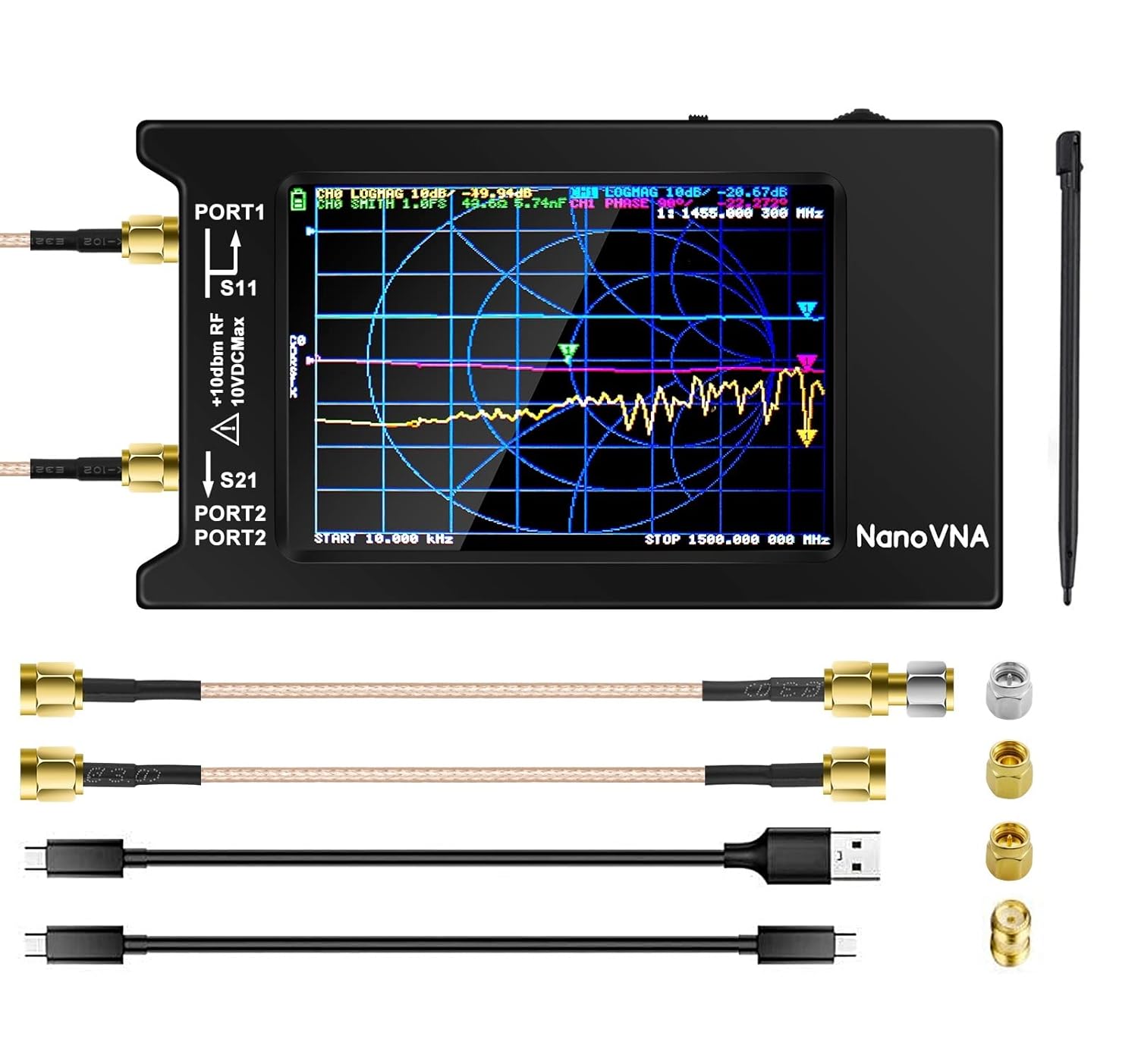
Image: A detailed view of the NanoVNA-H4 and its complete set of included accessories.
3. Setup
- Powering On: The NanoVNA-H4 can be powered by its internal 1950mAh battery or via the USB Type-C cable connected to a power source (e.g., computer, USB wall adapter).
- SD Card Insertion: The device features a new SD card port for data storage. Insert a compatible MicroSD card (up to 32GB, low-speed, SPI mode recommended) into the slot. The SD card is not included in the package.
- Connecting Cables: Connect the appropriate SMA male to male RG174 RF cables to the PORT1 (S11) and PORT2 (S21) connectors on the NanoVNA-H4 for your measurement setup. Use the SMA female to female connector if needed for adapter purposes.

Image: Close-up of the NanoVNA-H4 highlighting the SD card slot and the hardware version 4.3 label. For more information, visit nanovna.com.

Image: A cross-section diagram illustrating the internal structure of an RG316 coaxial cable, showing its inner conductor, insulation, outer conductor, and jacket.
4. Operating Instructions
The NanoVNA-H4 is designed for intuitive operation with its 4-inch LCD display. Key operational aspects include:
- Frequency Range: Supports measurements from 10KHz up to 1.5GHz.
- Dynamic Range:
- 50KHz-300MHz: Better than 70dB
- 300MHz-900MHz: Better than 60dB
- 900MHz-1.5GHz: Better than 40dB
- Antenna Performance Measurement: The primary function is for antenna performance analysis, measuring S11 and S21 parameters. For S12 and S22 measurements, manual swapping of transceiver port wiring is required.
- Time Display: Hardware version 4.3 includes an added time display function for convenience.

Image: A user holding the NanoVNA-H4 and interacting with its screen using a stylus, demonstrating its portable and user-friendly design.
5. Calibration
Calibration is a critical step to ensure accurate measurements with your NanoVNA-H4. It should be performed whenever the frequency range to be measured is changed.
The included SMA simple calibration kit consists of OPEN, LOAD, and SHORT standards. Follow the on-screen instructions for calibration. Once calibration is successfully completed and the error has been corrected, the calibration status display on the screen will show CnDRSTX, where 'n' represents the data number being loaded.

Image: The NanoVNA-H4 display showing the calibration menu, with the Open, Short, and Load calibration standards depicted below.
6. PC Control and Data Management
The NanoVNA-H4 can be connected to a computer for advanced control, data display, and analysis using the NanoVNASaver software. This multiplatform tool allows you to:
- Extract measurement data for display on a larger screen.
- Save data to Touchstone (.snp) files, compatible with various radio design and simulation software.
- Perform sweep frequency spans in segments to gain more than 101 data points.
- Save measurement data or screenshots directly to a MicroSD card at any time for quick field tests.

Image: The NanoVNA-H4 connected via USB to a laptop, displaying the NanoVNASaver software interface with measurement data.

Image: The NanoVNA-H4 connected to a circuit board, with the measurement results displayed on a laptop screen, illustrating its use in electronic design and testing.
7. Specifications
| Model | NanoVNA-H4 |
| Frequency Range | 10KHz - 1.5GHz |
| Display | 4-inch LCD |
| Battery Capacity | 1950mAh |
| Power Source | Internal Battery or USB Type-C |
| Hardware Version | 4.3 |
| SD Card Support | Up to 32GB (low-speed, SPI mode) |
| Dynamic Range (50K-300MHz) | >70dB |
| Dynamic Range (300M-900MHz) | >60dB |
| Dynamic Range (900M-1.5GHz) | >40dB |
| Antenna Cable Type | RG316 Coaxial Copper Low-Loss |
| Antenna Cable Length | 60cm / 2ft |
| Antenna Cable Impedance | 50 Ohm |
| Antenna Cable Adapter | SMA Male to SO-239 (UHF Female) |
8. Troubleshooting
If you encounter issues with your NanoVNA-H4, consider the following common troubleshooting steps:
- No Power: Ensure the battery is charged or the USB-C cable is securely connected to a working power source.
- Inaccurate Readings: Perform a calibration as described in Section 5. Check all cable connections for tightness and proper seating. Ensure the correct frequency range is selected for your measurement.
- PC Connection Issues: Verify the USB-C cable is functional and properly connected. Ensure NanoVNASaver software is correctly installed and updated on your computer.
- SD Card Not Recognized: Check if the SD card is inserted correctly. Ensure it is a low-speed, SPI mode compatible card and formatted correctly (e.g., FAT32).
9. Warranty and Support
AURSINC is committed to providing high-quality products and excellent customer service.
- Exchange or Return: You are eligible for an exchange or return within 30 days of purchase.
- Warranty: The NanoVNA-H4 comes with a 365-day warranty from the date of purchase.
- Customer Service: Our customer service team is available to assist you within 24 hours for any questions or concerns.

Image: A graphic detailing AURSINC's commitment to service, including 30-day exchange/return, 365-day warranty, and 24-hour customer service.
For further assistance, please visit the official AURSINC store or contact our customer support.


