
Product Overview
The LG TONE Free FP5 earbuds offer a premium audio experience with Active Noise Cancellation. Designed for comfort and versatility, these earbuds reduce background noise, making them suitable for various environments. They feature a contoured design for a secure fit and are equipped with Meridian sound technology for clear audio.
What's in the Box
- LG TONE Free FP5 Earbuds
- Charging Case
- Extra Ear Gels (Small, Medium, Large)
- USB-C Charging Cable
- Warranty Card
Setup Guide
1. Charging the Earbuds and Case
To ensure optimal performance, fully charge the earbuds and the charging case before first use.
 Image: The LG TONE Free FP5 earbuds resting in their charging case, with the case lid closed, showing the compact design.
 Image: The LG TONE Free FP5 earbuds placed inside their open charging case, illustrating how they fit for charging.
Connect the USB-C charging cable to the charging port on the case and to a power source. The indicator light on the case will show the charging status. A full charge for the earbuds provides up to 8 hours of playtime, and the charging case provides an additional 14 hours. A quick 5-minute charge can provide up to 1 hour of playtime.
2. Pairing with a Device
The LG TONE Free FP5 earbuds utilize Bluetooth 5.0 for wireless connectivity.
- Ensure the charging case is open with both earbuds inside.
- On your device (smartphone, tablet, etc.), enable Bluetooth.
- Select "LG TONE-FP5" from the list of available Bluetooth devices.
- Once connected, the earbuds are ready for use.
For subsequent uses, the earbuds will automatically connect to the last paired device when removed from the case.
Operating Instructions
Wearing the Earbuds
Select the ear gels that provide the most comfortable and secure fit for your ears. Proper fit is crucial for optimal sound quality and Active Noise Cancellation performance.
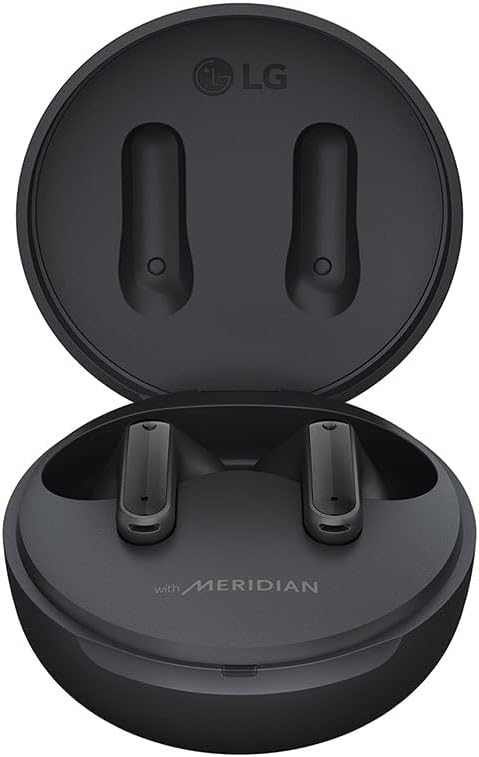 Image: A close-up view of the left and right LG TONE Free FP5 earbuds, highlighting the 'L' and 'R' indicators for correct placement.
Insert the earbuds into your ears, ensuring a snug fit. The ergonomic contoured design is intended to conform to the shape of your ear.
Touch Controls
The LG TONE Free FP5 earbuds feature touch controls for various functions:
- Play/Pause: Single tap on either earbud.
- Next Track: Double tap on the right earbud.
- Previous Track: Double tap on the left earbud.
- Answer/End Call: Single tap on either earbud.
- Reject Call: Touch and hold either earbud.
- Activate Voice Assistant: Triple tap on either earbud.
- Toggle ANC/Ambient Mode: Touch and hold either earbud (customizable via app).
Active Noise Cancellation (ANC) and Ambient Sound Mode
The earbuds feature Active Noise Cancellation to reduce external noise and Ambient Sound Mode to allow you to hear your surroundings.
 Image: A graphic demonstrating the functionality of Enhanced Active Noise Cancellation, showing how it blocks external sound, and the options for Ambient Mode and Chat Mode.
To switch between ANC and Ambient Sound Mode, touch and hold the touch sensor on either earbud. This function can be customized using the LG TONE Free app. Ambient Mode has two settings: Listening Mode and Conversation Mode, which can be adjusted via the app.
Sound Customization
The LG TONE Free FP5 earbuds incorporate Meridian Hi-Fi sound technology. You can customize the sound profile using the LG TONE Free app, which offers various equalizer presets (e.g., Immersive, Natural) and the ability to create custom EQ settings.
Maintenance and Care
Cleaning the Earbuds and Case
Regular cleaning helps maintain sound quality and hygiene.
- Wipe the earbuds and charging case with a soft, dry cloth.
- Remove ear gels and clean them with mild soap and water if necessary. Ensure they are completely dry before reattaching.
- Gently clean the mesh and charging contacts with a dry cotton swab. Avoid using sharp objects.
Water Resistance
The earbuds are rated IPX4 water resistant, meaning they can withstand splashes from any direction. They are suitable for workouts or light rain. The charging case is not water resistant. Do not charge the earbuds while wet.
 Image: A visual representation of the LG TONE Free FP5 earbuds' IPX4 water resistance, showing them with water splashes.
Storage
Store the earbuds in their charging case when not in use to protect them and keep them charged. Avoid exposing the earbuds or case to extreme temperatures or direct sunlight.
Troubleshooting
Common Issues and Solutions
| Problem | Possible Cause | Solution |
|---|---|---|
| Earbuds not pairing. | Earbuds not in pairing mode; device Bluetooth off; interference. | Ensure case is open and earbuds are inside. Turn device Bluetooth off and on. Move closer to the device. |
| No sound or low volume. | Incorrect earbud fit; low battery; device volume too low. | Adjust earbud fit and try different ear gels. Charge earbuds. Increase device volume. |
| Active Noise Cancellation not effective. | Improper fit; ANC not activated. | Ensure earbuds are snugly fitted. Activate ANC via touch control or app. |
| Earbuds disconnect frequently. | Distance from device; interference; low battery. | Stay within Bluetooth range (10 meters). Charge earbuds. Avoid strong electromagnetic interference. |
Resetting the Earbuds
If issues persist, a factory reset may resolve them. Refer to the LG TONE Free app or the official LG support website for specific reset instructions for your model.
Technical Specifications
- Model Name: TONE-FP5
- Connectivity: Bluetooth 5.0, USB
- Bluetooth Range: Up to 10 meters (33 feet)
- Battery Life (Earbuds): Up to 8 hours (ANC off)
- Battery Life (with Charging Case): Up to 22 hours (ANC off)
- Charging Time (Case): Approximately 1.5 hours
- Water Resistance: IPX4 (earbuds only)
- Audio Driver Type: Dynamic Driver
- Frequency Range: 20 Hz - 20,000 Hz
- Control Type: Touch
- Weight: 52 Grams (total)
- Dimensions (Product): 1.12 x 0.84 x 0.92 inches (earbud)
- Material: Silicone (ear gels, case)
Warranty and Support
LG Electronics provides a limited warranty for the TONE-FP5 earbuds. Please refer to the included warranty card for detailed terms and conditions, including coverage period and claim procedures.
For further assistance, product registration, or to download the LG TONE Free app, visit the official LG support website or contact LG customer service.
Online Support: LG Support Website
User Manual (PDF): Download PDF