
1. Introduction
Thank you for choosing the GeowFiiTech M2 4K Night Vision Binoculars. This device is designed to provide enhanced vision in low-light and complete darkness conditions, making it ideal for various outdoor activities such as hunting, caving, fishing, camping, and wildlife observation. This manual provides detailed instructions for setup, operation, maintenance, and troubleshooting to ensure optimal performance and longevity of your device.
2. Package Contents
Please verify that all items listed below are included in your package:
- 1x GeowFiiTech M2 4K Night Vision Binoculars
- 1x 32GB Memory Card (pre-installed)
- 1x USB Data Transfer/Charging Cable (Type-C)
- 1x Neck Strap
- 1x Storage Bag
- 1x Cleaning Cloth
- 1x Multi-language User Manual
3. Product Overview
The GeowFiiTech M2 is a compact and powerful night vision device featuring a 2.4-inch IPS TFT screen, a self-developed 25mm multi-coated objective lens, and an 850nm IR illuminator. It supports 4K video recording and 40M photo capture, providing clear visuals up to 984ft (300m) in complete darkness.

Figure 3.1: GeowFiiTech M2 4K Night Vision Binoculars, showcasing its compact size.
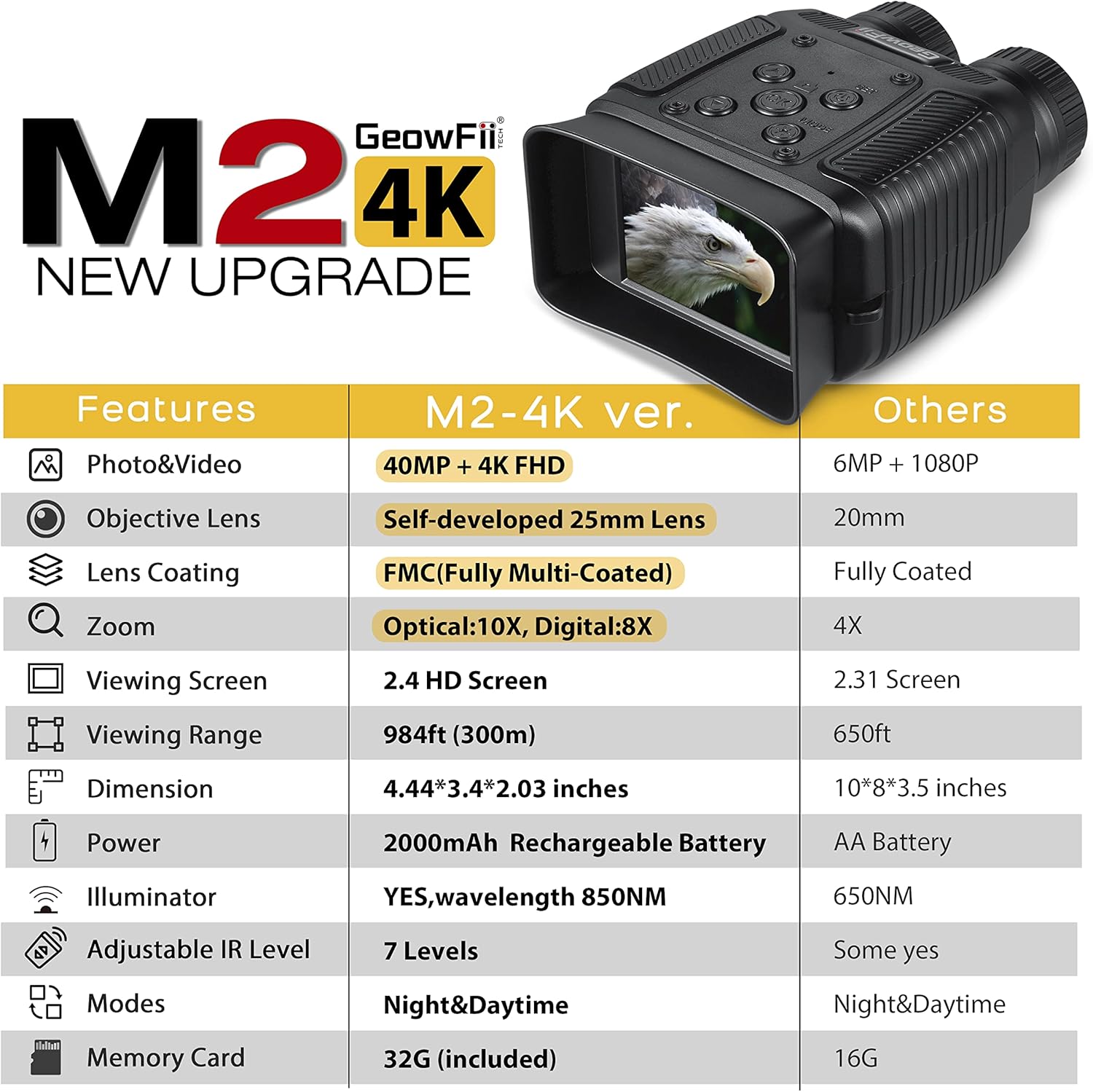
Figure 3.2: Front and top view of the GeowFiiTech M2, highlighting the objective lenses and control buttons.
4. Setup
4.1 Charging the Battery
The device comes with a built-in 2000mAh rechargeable battery. Before first use, fully charge the device using the provided USB Type-C cable. Connect the cable to the device's charging port and a compatible USB power source (e.g., power bank, car charger, or computer USB port). The charging indicator will show the charging status. A full charge provides up to 10 hours of operating time.

Figure 4.1: Location of the charging port and battery compartment on the GeowFiiTech M2.
4.2 Memory Card Installation
A 32GB memory card is pre-installed in the device. If you need to re-install or replace the card, ensure the device is powered off. Locate the memory card slot, insert the card with the gold contacts facing down until it clicks into place. To remove, gently push the card until it ejects.
5. Operating Instructions
5.1 Power On/Off
Press and hold the power button (usually located on the top panel) for a few seconds to turn the device on or off. The screen will illuminate upon power-on.
5.2 Mode Selection
The device supports both day and night vision modes. Use the mode button to switch between these settings. In night mode, the infrared illuminator will activate.
5.3 Zoom Function
The M2 features 8x digital zoom and a 10x magnifying lens. Use the zoom buttons (typically '+' and '-' buttons) to adjust the magnification level. After zooming, adjust the focus ring for a clear display.
Video 5.1: Official product video demonstrating the features and digital zoom capabilities of the GeowFiiTech M2 Night Vision Binoculars.
5.4 Focus Adjustment
Rotate the objective lens focus ring to achieve a sharp image on the screen. This is crucial for clear viewing, especially after adjusting the zoom.
5.5 Photo and Video Recording
To capture photos or record videos, select the desired mode (photo or video) using the mode button. Press the shutter/record button to take a picture or start/stop video recording. The device supports 40M photos and 4K FHD videos.
6. Night Vision Features
The M2 utilizes an 850nm IR illuminator with 7 adjustable levels to enhance visibility in complete darkness. Adjust the IR level to suit your viewing environment for optimal clarity. The effective viewing range is up to 984ft (300m).

Figure 6.1: Visual representation of different infrared (IR) levels and their effect on night vision clarity.
7. Battery Information
The integrated 2000mAh rechargeable battery offers extended use. For best performance, ensure the battery is fully charged before each use. The device can be conveniently charged using any standard USB power source, eliminating the need for disposable AA batteries.
8. Media Management
All captured photos and videos are saved to the internal 32GB memory card. To review media, use the device's playback function. For transferring files to a computer or mobile phone, connect the device using the provided USB cable. The audio of recorded videos is set off by default for a quieter observing experience, but audio reception is valid and can be checked upon transfer to another device.
9. Maintenance
To maintain the performance and lifespan of your night vision binoculars, follow these guidelines:
- Use the provided cleaning cloth to gently wipe the lenses and screen. Avoid abrasive materials.
- Store the device in the provided storage bag when not in use to protect it from dust and scratches.
- Avoid exposing the device to extreme temperatures or direct sunlight for prolonged periods.
- The device is waterproof, but avoid submerging it in water.
10. Troubleshooting
| Problem | Solution |
|---|---|
| No audio on recorded videos | Audio is set off by default for a quieter experience. Transfer videos to a computer or mobile phone to check audio. |
| Night vision not working through windows | Infrared (IR) beams will reflect off glass, preventing clear vision through windows. This is normal operation. |
| Memory card read error | Try reinstalling the memory card. If the issue persists, contact customer service. |
| Received a used product | Contact customer service immediately for a replacement. The manufacturer sends only new inventory to Amazon warehouses. |
11. Specifications
| Feature | Detail |
|---|---|
| Model | M2 |
| Item Package Dimensions L x W x H | 5.47 x 4.69 x 3.43 inches |
| Package Weight | 0.46 Kilograms |
| Item Dimensions LxWxH | 4.45 x 3.41 x 0.04 inches |
| Item Weight | 0.5 Pounds |
| Brand Name | GeowFiiTech |
| Color | 4K BLACK |
| Manufacturer | GeowFiiTech |
| Sport Type | Hunting |
| Special Feature | Waterproof |
| Objective Lens Diameter | 25 Millimeters |
| Magnification Maximum | 8X Digital Zoom |
| Battery | 2000mAh Rechargeable |
| Viewing Range | 984ft (300m) |
| Screen | 2.4" IPS TFT |
| Photo Resolution | 40M |
| Video Resolution | 4K FHD |
| IR Illuminator | 850nm, 7 gears adjustment |
12. Warranty and Support
GeowFiiTech is committed to providing high-quality products and excellent customer service. If you encounter any issues or have questions regarding your M2 Night Vision Binoculars, please do not hesitate to contact our customer support team. We aim to respond and offer good solutions within 24 hours to ensure your complete satisfaction.
For support, please refer to the contact information provided in your purchase documentation or visit the official GeowFiiTech store online.