
Yealink WH62 Mono UC
Yealink WH62 Mono UC Headset User Manual
Model: WH62 Mono UC
1. Introduction
This manual provides detailed instructions for the setup, operation, maintenance, and troubleshooting of your Yealink WH62 Mono UC Headset. The Yealink WH62 is a professional wireless headset designed for unified communication environments, offering clear audio and comfortable wearing for extended periods.
2. Package Contents
Please verify that all items are present in your package:
- Yealink WH62 Mono UC Headset
- WHB620 Charging Base
- USB Connection Cable
3. Product Overview
The Yealink WH62 Mono UC Headset consists of a monaural headset and a dedicated charging base, designed for seamless integration with various communication platforms.

Figure 3.1: Yealink WH62 Mono UC Headset on its charging base.

Figure 3.2: Side view of the headset on its charging base.
Key Features:
- Monaural Design: Allows awareness of surroundings while on calls.
- Wireless Connectivity: Provides freedom of movement.
- Noise-Canceling Microphone: Reduces background noise for clear voice transmission.
- Comfortable Wearing: Features soft leather ear cushions and a breathable design for extended use.
- Adjustable Microphone: The microphone boom is 330° adjustable for optimal positioning.
- Replaceable Cushions: Ear cushions are designed for easy replacement.

Figure 3.3: Illustration of the noise-canceling microphone's function.

Figure 3.4: Headset features for all-day wearing comfort.
4. Setup
Follow these steps to set up your Yealink WH62 Mono UC Headset:
- Connect the Base: Connect the charging base to your computer or IP phone using the provided USB cable. Ensure the connection is secure.
- Place Headset on Base: Place the headset onto the charging cradle of the base. The headset will begin charging automatically.
- Power On: The base will power on automatically when connected. The headset will power on when removed from the base after initial charge.
- Initial Pairing: The headset and base are pre-paired from the factory. If re-pairing is needed, refer to the troubleshooting section or the full user guide available on the Yealink support website.
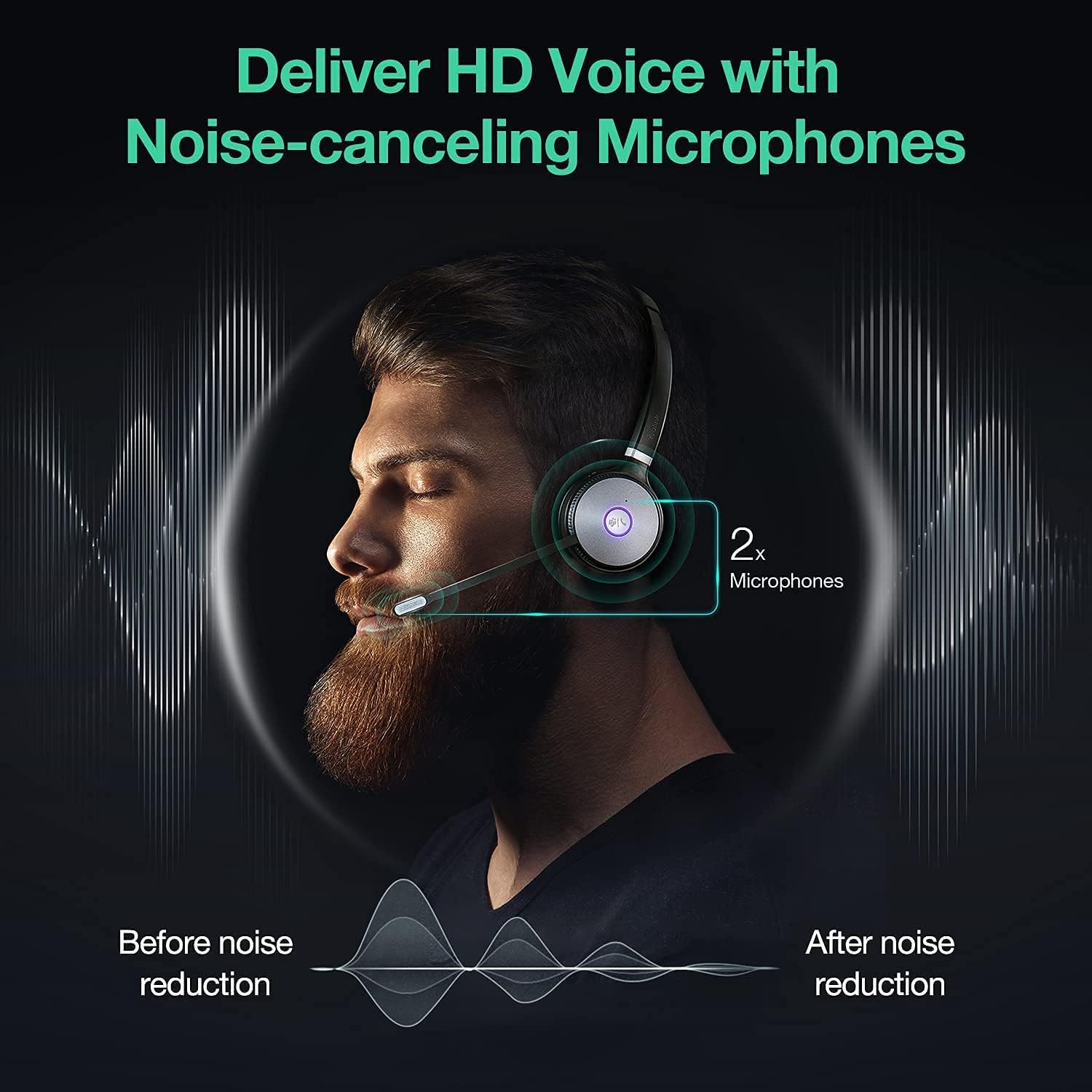
Figure 4.1: Headset base showing connection points and controls.
5. Operation
The Yealink WH62 Mono UC Headset provides intuitive controls for managing your calls and audio.
Call Control:
- Answer/End Call: Press the call control button on the headset or the corresponding button on the base.
- Mute/Unmute: Flip the microphone boom up to mute and down to unmute, or press the mute button on the headset/base.
- Volume Adjustment: Use the volume up/down buttons on the headset.
UC Platform Integration:
The headset is optimized for various Unified Communications platforms, including Microsoft Teams, Zoom, RingCentral, 8x8, and Vonage. For a unified experience, ensure your UC application is updated to the latest version.

Figure 5.1: Broad compatibility with mainstream UC applications.
6. Compatibility
The Yealink WH62 Mono UC Headset is designed for broad compatibility with various devices and platforms:
- Compatible Devices: Deskphones, PCs, IP phones.
- UC Platforms: Teams, Zoom, RingCentral, 8x8, Vonage, Avaya, Broadsoft, CounterPath, CoreDial, Google, Metaswitch, Microsoft.
Yealink IP Phone Compatibility:
Specific Yealink IP phone models are compatible with the WH62 headset, with varying levels of functionality depending on the phone's firmware version.
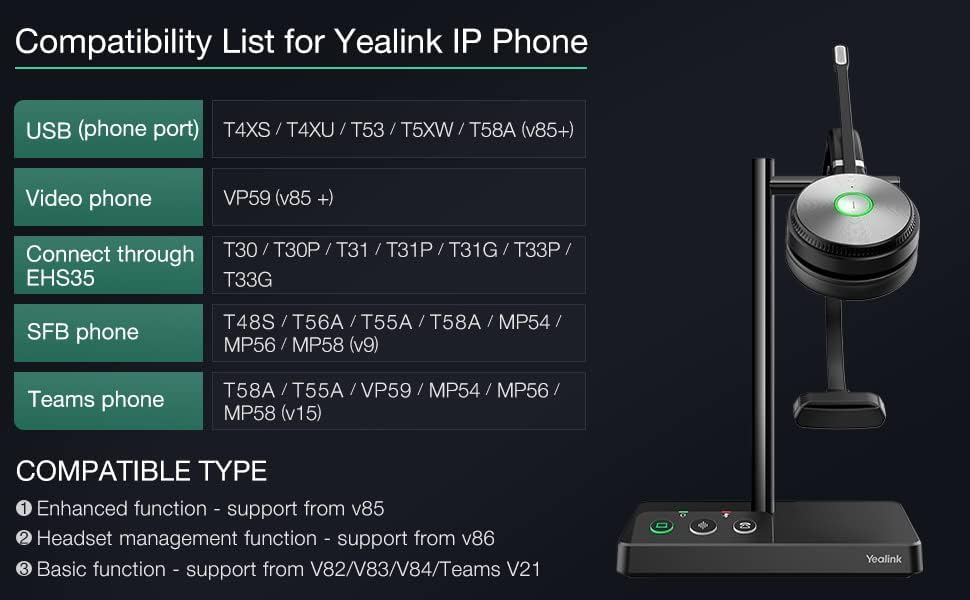
Figure 6.1: Compatibility list for Yealink IP Phones.
7. Maintenance
Proper maintenance ensures the longevity and optimal performance of your headset.
Cleaning:
- Wipe the headset and base with a soft, dry, lint-free cloth.
- Do not use harsh chemicals, cleaning solvents, or strong detergents.
- Avoid getting moisture into any openings.
Storage:
- Store the headset on its charging base when not in use to ensure it is always charged.
- Keep the device in a cool, dry place, away from extreme temperatures and direct sunlight.
8. Troubleshooting
If you encounter issues with your Yealink WH62 Mono UC Headset, refer to the common problems and solutions below:
| Problem | Possible Cause | Solution |
|---|---|---|
| No audio from headset | Headset not powered on or not connected to base. Volume too low. | Ensure headset is charged and placed correctly on base. Increase headset volume. Check PC/phone audio settings. |
| Microphone not working | Microphone muted. Microphone boom not positioned correctly. | Unmute the microphone. Adjust the microphone boom closer to your mouth. Check UC application microphone settings. |
| Cannot connect to PC/phone | USB cable loose or faulty. Driver issues. | Ensure USB cable is securely connected. Try a different USB port. Reinstall headset drivers if necessary. |
| Poor sound quality | Interference. Low battery. | Move closer to the base. Ensure no other wireless devices are causing interference. Recharge the headset. |
| Headset not charging | Headset not properly seated on base. Base not powered. | Ensure headset is correctly aligned on the charging pins. Verify the base is connected to a power source. |
For more detailed troubleshooting or advanced issues, please visit the official Yealink support website.
9. Specifications
Below are the technical specifications for the Yealink WH62 Mono UC Headset:
| Feature | Detail |
|---|---|
| Model Name | Yealink WH62 Mono UC |
| Connectivity Technology | Wireless |
| Wireless Communication Technology | Bluetooth |
| Headphones Jack | USB |
| Control Type | Media Control, Touch |
| Battery Life | 14 Hours |
| Audio Driver Type | Dynamic Driver |
| Frequency Range | Approximately 20 Hz - 20,000 Hz |
| Noise Control | Active Noise Cancellation |
| Ear Placement | Over Ear |
| Form Factor | Over Ear |
| Material | Plastic (Headset), Nylon or leather (Carrying Case) |
| Color | Black |
| Item Weight | 1 pounds (16 ounces) |
| Product Dimensions | 11 x 9 x 5 inches |
| Manufacturer | Yealink |
| Item Model Number | 1308005 |
| UPC | 841885105059, 841885105769 |
10. Warranty and Support
For information regarding product warranty, please refer to the warranty card included with your purchase or visit the official Yealink website. Yealink provides comprehensive support for its products.
For technical assistance, FAQs, and additional resources, please visit the Yealink Store on Amazon or the official Yealink support portal.
Ask a question about this manual
Ask about setup, troubleshooting, compatibility, parts, safety, or missing instructions. Manuals+ will review the question and use this page’s manual context to help answer it.