
1. Introduction
The ULANZI ST-06S Phone Tripod Mount is a versatile accessory designed to securely hold your smartphone for various photography and videography applications. It features adjustable angles, multiple mounting options, and broad compatibility with most smartphones.

Image 1.1: The ULANZI ST-06S Phone Tripod Mount, showcasing its compact design and cold shoe mount.
2. Product Features
- Adjustable Z-axis Angle: Allows for pitch angle adjustment without a separate ball head.
- Dual Cold Shoe Mounts: Two standard cold shoe mounts for attaching accessories like microphones or LED lights.
- 1/4" Screw Hole: Standard 1/4" screw hole at the base for mounting on tripods, selfie sticks, or stabilizers.
- 360° Rotation: Enables quick switching between portrait and landscape modes.
- Secure Phone Grip: Features a push-and-lock mechanism with thick non-slip silicone pads for stable phone retention.
- Wide Compatibility: Supports smartphones with widths between 2.36 inches and 3.54 inches.

Image 2.1: Detailed view of the ULANZI ST-06S components, including cold shoe mounts, lock button, Z-axis design, and 1/4" screw.
3. Setup Instructions
3.1 Attaching to a Tripod or Hot Shoe
- Locate the 1/4" screw hole at the bottom of the ULANZI ST-06S mount.
- Align the screw hole with the 1/4" screw on your tripod, monopod, or selfie stick.
- Rotate the mount clockwise onto the screw until it is securely fastened.
- Alternatively, for camera hot shoe mounting, slide the cold shoe base of the ST-06S into the camera's hot shoe slot and tighten the locking wheel if available.

Image 3.1: Illustration of attaching the ULANZI ST-06S to a tripod using the 1/4" screw hole.
3.2 Inserting Your Smartphone
- Press the red lock button on the side of the phone clamp to release the grip.
- Gently pull the top jaw of the clamp upwards to open it.
- Place your smartphone between the two jaws, ensuring it is centered.
- Release the top jaw, allowing it to securely clamp your phone. The non-slip silicone pads will protect your device.

Image 3.2: Demonstrating the adjustable phone clamp mechanism for inserting a smartphone.

Image 3.3: Close-up of the non-slip silicone pads designed to protect the smartphone.
4. Operating Instructions
4.1 Adjusting Phone Orientation (360° Rotation)
The ULANZI ST-06S allows for seamless rotation between portrait and landscape modes:
- With your phone securely clamped, gently rotate the phone holder section to achieve your desired orientation.
- The 360° rotating design provides flexibility for various shooting angles.
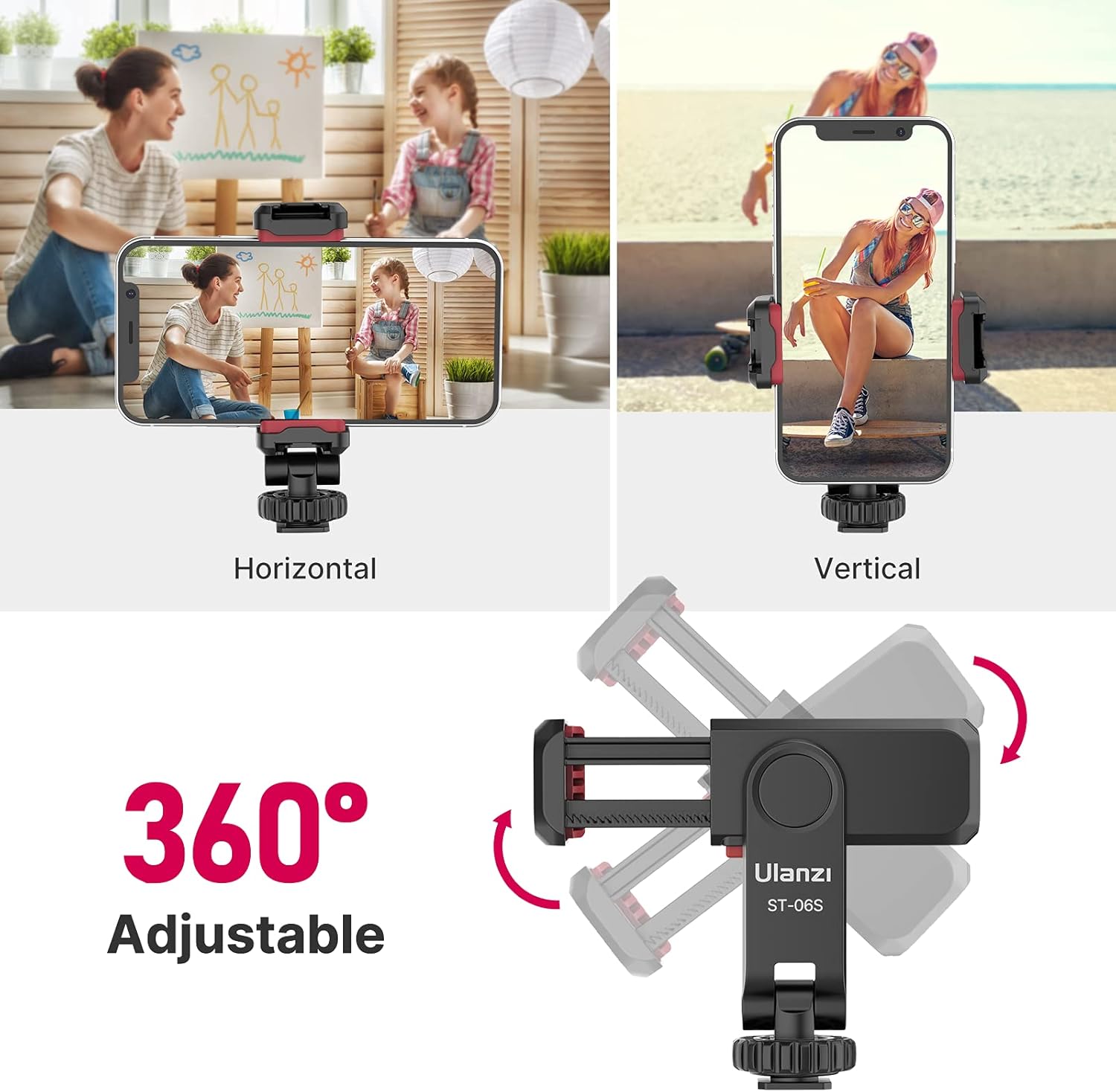
Image 4.1: Visual representation of the 360° rotation capability for horizontal and vertical phone positioning.
4.2 Adjusting Pitch Angle (Z-axis)
The unique Z-axis design allows you to adjust the pitch angle of your phone:
- Gently tilt the phone holder forward or backward to adjust the vertical angle.
- This feature is useful for achieving specific camera angles without needing a separate ball head on your tripod.

Image 4.2: Illustration of the flexible Z-axis adjustment for tilting the phone.
4.3 Using Cold Shoe Mounts
The two cold shoe mounts allow you to attach external accessories:
- Identify the cold shoe slots on the top and side of the phone clamp.
- Slide compatible accessories, such as a microphone or LED video light, into these slots until they are secure.

Image 4.3: The ULANZI ST-06S with a smartphone, demonstrating the use of its two cold shoe mounts for attaching external accessories like a microphone and an LED light.
5. Maintenance
- Cleaning: Wipe the mount with a soft, dry cloth to remove dust and debris. Avoid using harsh chemicals or abrasive materials.
- Storage: Store the mount in a cool, dry place away from direct sunlight and extreme temperatures when not in use.
- Inspection: Periodically check all moving parts and screws to ensure they are secure. Do not overtighten.
6. Troubleshooting
| Problem | Possible Cause | Solution |
|---|---|---|
| Phone not held securely. | Phone width outside compatibility range (2.36" - 3.54"). Lock button not fully engaged. | Ensure phone width is within specified range. Press the red lock button firmly until the clamp is secure. |
| Difficulty rotating phone holder. | Dust or debris in the rotation mechanism. | Clean the rotating joint with a soft cloth. Apply minimal force; the rotation should be smooth but firm. |
| Mount feels loose on tripod/camera. | 1/4" screw or cold shoe not fully tightened. | Ensure the 1/4" screw is tightened securely to the tripod. If using the cold shoe, ensure it is fully inserted and the locking wheel (if present on the camera) is tightened. |
| Accessories not fitting cold shoe. | Accessory is not standard cold shoe compatible. | Verify that your accessory is designed for standard cold shoe mounts. |
7. Specifications
| Feature | Detail |
|---|---|
| Model | ST-06S |
| Material | Plastic |
| Product Dimensions | 1.54"D x 1.89"W x 4.65"H (3.9cm x 4.8cm x 11.8cm) |
| Item Weight | 1.94 ounces (55 grams) |
| Phone Compatibility | 2.36 inches to 3.54 inches (6cm to 9cm) wide |
| Mounting Options | 1/4" screw hole, Cold Shoe base |
| Accessory Mounts | 2 Cold Shoe Mounts |
| Rotation | 360° for horizontal/vertical orientation |
| Adjustable Angle | Z-axis pitch adjustment |
8. Warranty and Support
For warranty information and customer support, please refer to the official ULANZI website or contact the retailer where you purchased the product. Keep your proof of purchase for any warranty claims.
For frequently asked questions, you may also refer to the ULANZI support resources online.

Image 8.1: ULANZI's Frequently Asked Questions section, which may provide additional support.


