
Introduction
This manual provides comprehensive instructions for the installation, operation, and maintenance of your Banda Audioparts 4-Channel Vehicle Audio Bass Amplifier, Model 2000.41OHMGREEN. This Class D amplifier is designed to deliver high-powered audio performance for your vehicle's sound system. Please read this manual thoroughly before installation and use to ensure proper function and safety.
Safety Information
- Professional Installation Recommended: Due to the complexity of vehicle electrical systems, professional installation is highly recommended.
- Electrical Hazard: Always disconnect the vehicle's battery before making any electrical connections to prevent electric shock or damage to the amplifier and vehicle.
- Proper Wiring: Ensure all wiring is correctly sized and fused according to specifications to prevent overheating and fire hazards.
- Heat Dissipation: Mount the amplifier in a location that allows for adequate airflow to prevent overheating. Avoid mounting in enclosed spaces without ventilation.
- Water and Moisture: Do not expose the amplifier to water or excessive moisture.
- Secure Mounting: Securely mount the amplifier to prevent it from becoming a projectile in the event of a sudden stop or accident.
Product Overview
The Banda Audioparts 2000.41OHMGREEN is a 4-channel Class D amplifier designed for robust audio performance. It features a compact design and advanced circuitry for efficient power delivery.
Key Features:
- Class D amplifier technology for high efficiency.
- 4-channel output, bridgeable for higher power.
- Integrated Subsonic Filter and Low Pass Filter for precise sound tuning.
- LED indicators for power, clipping, low voltage, and fuse status.
- RCA connectors for distortion-free signal transfer.
LED Indicators:
- Blue LED: Indicates the amplifier is powered on and functioning.
- Red LED: Illuminates to indicate output distortion (clipping). Reduce input gain if this LED is active.
- Yellow LED: Indicates low voltage battery. Check vehicle's charging system.
- Constant (Red/Yellow): If either Red or Yellow LED stays constant, it may indicate an output short circuit or a blown/missing fuse.
Amplifier Views:
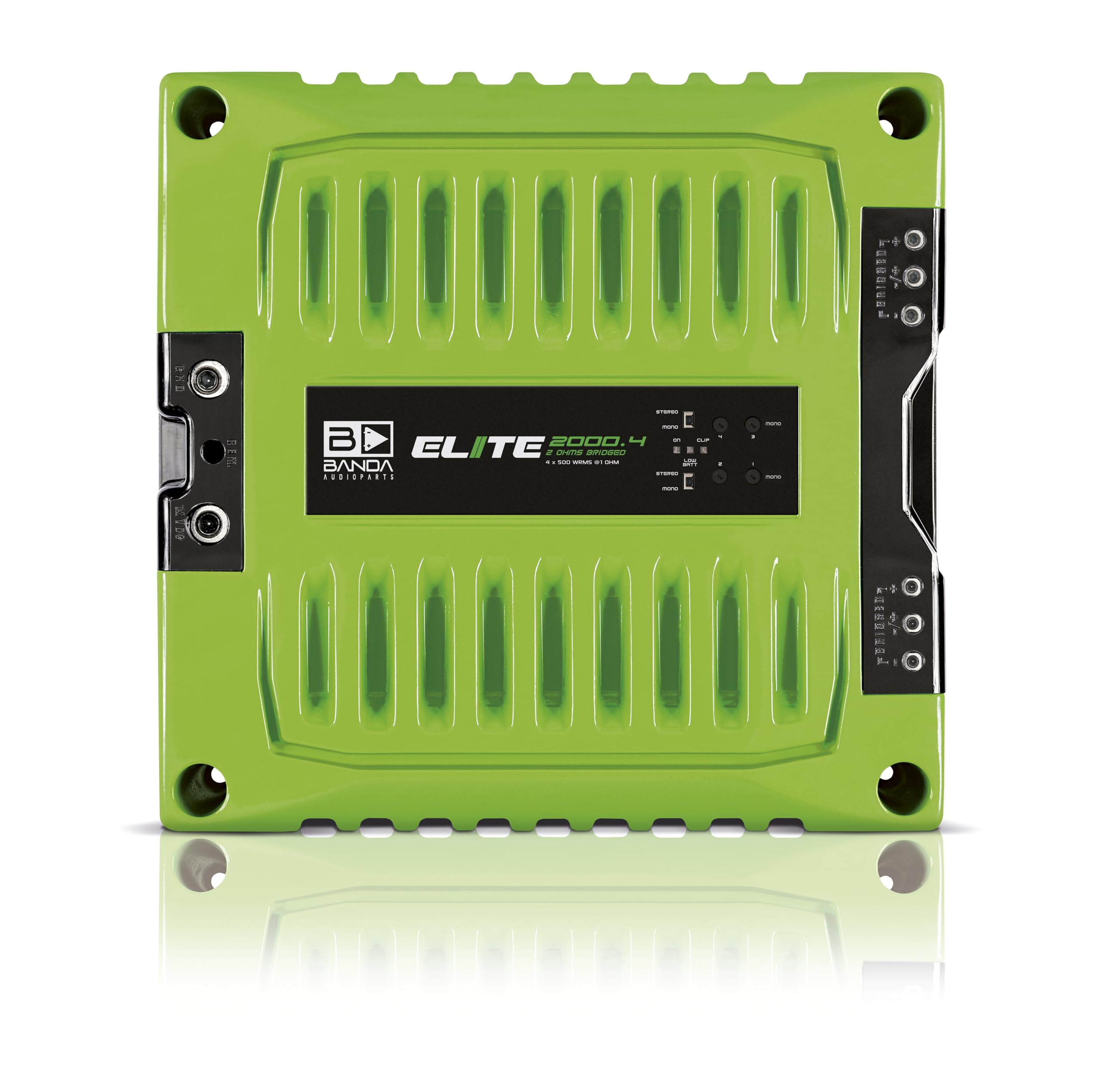
Front view of the Banda Audioparts 4-Channel Amplifier, showcasing the top panel and branding.

Rear view of the amplifier, displaying the RCA inputs, gain controls, and filter switches.

Side view of the amplifier, highlighting the power, ground, and remote terminals.
Specifications
| Parameter | Value |
|---|---|
| Total Power 14.4V @ 1 Ohm | 4 x 600 WRMS |
| Total Power 14.4V @ 2 Ohms | 4 x 400 WRMS |
| Total Power 14.4V Bridged @ 2 Ohms | 2 x 1250 WRMS |
| Total Power 12.6V @ 1 Ohm | 4 x 500 WRMS |
| Total Power 12.6V @ 2 Ohms | 4 x 300 WRMS |
| Total Power 12.6V Bridged @ 2 Ohms | 2 x 1000 WRMS |
| Efficiency @ 2 Ohms | 81% |
| Efficiency @ 1 Ohm | 76% |
| Input Voltage | 9 - 15V |
| Input Impedance | 100K Ohms |
| THD+Noise | 0.10% |
| Input Sensitivity | 220mV - 4V |
| Signal to Noise Ratio (SNR) | 80dB |
| Frequency Response | 5Hz to 22kHz (-3dBs) |
| High Pass Filter (HPF) | 20 to 90Hz @ 12dB/octave Linkwitz-Riley |
| Low Pass Filter (LPF) | 90 to 20kHz @ 12dB/octave Linkwitz-Riley |
| Recommended Fuse | 100 A |
| Current at Rest | 1A |
| Average Current Draw (Sinusoidal) | 210 A |
| Average Current Draw (Music) | 100 A |
| Power Wire Gauge (min. Recommended) | 21mm² / 4 AWG |
| Speaker Wire Gauge (min. Recommended) | 2 x 2.5mm² / 2 x 13 AWG |
| Product Dimensions (H x W x D) | 2.2 x 8.4 x 9.7 inches (approx. 56 x 213 x 246 mm) |
| Item Weight | 3.3 lbs (approx. 1.5 kg) |
| Model Number | 2000.41OHMGREEN |
Setup & Installation
Careful installation is crucial for optimal performance and safety. Ensure the vehicle's battery is disconnected before beginning.
Mounting Location:
Choose a dry, well-ventilated location away from direct sunlight and heat sources. Ensure sufficient space around the amplifier for air circulation to prevent overheating. Secure the amplifier firmly to a solid surface using appropriate hardware.
Wiring Connections:
- Power (B+): Connect a 4 AWG (21mm²) power cable directly from the positive terminal of the vehicle's battery to the amplifier's B+ terminal. Install a 100A fuse within 18 inches (45 cm) of the battery.
- Ground (GND): Connect a 4 AWG (21mm²) ground cable from the amplifier's GND terminal to a clean, unpainted metal surface on the vehicle's chassis. Ensure a solid, low-resistance connection.
- Remote (REM): Connect a remote turn-on wire from your head unit's remote output to the amplifier's REM terminal. This wire turns the amplifier on and off with your head unit.
- RCA Input: Connect RCA cables from your head unit's pre-amp outputs to the amplifier's RCA input jacks.
- Speaker Output: Connect your speakers to the amplifier's speaker terminals using 13 AWG (2.5mm²) speaker wire. Ensure correct polarity (+ to + and - to -) for each speaker. For bridged operation, refer to the diagram on the amplifier or consult a professional.
Detailed view of the amplifier's rear panel, illustrating RCA input and speaker output terminals.
Operating Instructions
Once installed, follow these steps to configure and operate your amplifier:
- Initial Power-Up: Reconnect the vehicle's battery. Turn on your head unit. The blue LED on the amplifier should illuminate, indicating it is powered on.
- Gain Adjustment: Set the head unit volume to about 75% of its maximum. Slowly increase the amplifier's gain control (Input Sensitivity) until you hear distortion or the red clipping LED illuminates. Then, reduce the gain slightly until the distortion disappears or the red LED turns off. This ensures maximum clean output.
- Filter Settings:
- HPF (High Pass Filter): Use this to block low frequencies from reaching your speakers, typically for full-range or mid-range speakers. Adjust the frequency knob between 20Hz and 90Hz.
- LPF (Low Pass Filter): Use this to allow only low frequencies to pass, typically for subwoofers. Adjust the frequency knob between 90Hz and 20kHz.
- Sound Testing: Play various types of music to fine-tune the gain and filter settings for optimal sound quality.
Maintenance
Your Banda Audioparts amplifier is designed for reliable operation with minimal maintenance. Follow these guidelines to ensure its longevity:
- Cleaning: Periodically wipe the amplifier's exterior with a soft, dry cloth. Do not use harsh chemicals or abrasive cleaners.
- Connection Checks: Annually, inspect all power, ground, remote, and speaker connections to ensure they are secure and free from corrosion. Loose connections can cause performance issues or damage.
- Ventilation: Ensure that the amplifier's cooling fins and fan (if present) are free from dust and obstructions to maintain proper heat dissipation.
Troubleshooting
If you experience issues with your amplifier, refer to the following common problems and solutions:
| Problem | Possible Cause | Solution |
|---|---|---|
| No Power (Blue LED Off) | Blown fuse, loose power/ground/remote wire, no remote signal. | Check the in-line fuse near the battery. Verify all power, ground, and remote connections are secure. Ensure head unit is on and sending a remote signal. |
| No Sound Output | Loose RCA cables, incorrect gain settings, speaker wires disconnected, amplifier in protection mode. | Check RCA connections at both amplifier and head unit. Adjust gain. Verify speaker wire connections and polarity. If amplifier is hot, allow it to cool. |
| Distorted Sound (Red LED On) | Gain set too high, poor quality input signal, speaker impedance mismatch. | Reduce the amplifier's gain (Input Sensitivity). Check head unit output for distortion. Verify speaker impedance matches amplifier's capabilities. |
| Amplifier Overheating | Insufficient ventilation, impedance too low, prolonged high output. | Ensure adequate airflow around the amplifier. Check speaker impedance. Reduce volume or gain. |
| Yellow LED On (Low Voltage) | Vehicle battery voltage too low, insufficient power wire gauge. | Check vehicle's battery and charging system. Ensure power wire gauge meets recommendations. |
Warranty & Support
Banda Audioparts products are manufactured to high-quality standards. For specific warranty information and technical support, please refer to the warranty card included with your product or visit the official Banda Audioparts website. Do not attempt to repair the amplifier yourself, as this may void your warranty and cause further damage.