
1. Product Overview
The BOSSIN Big and Tall Gaming Chair, Model MSG-TP-NE-FT00, is designed to provide comfort and support for extended periods of sitting, whether for gaming, office work, or relaxation. This ergonomic chair features a high back, large seat, and a robust construction to accommodate users up to 400 lbs. Key features include an adjustable backrest, retractable footrest, and lumbar support with a massage function.
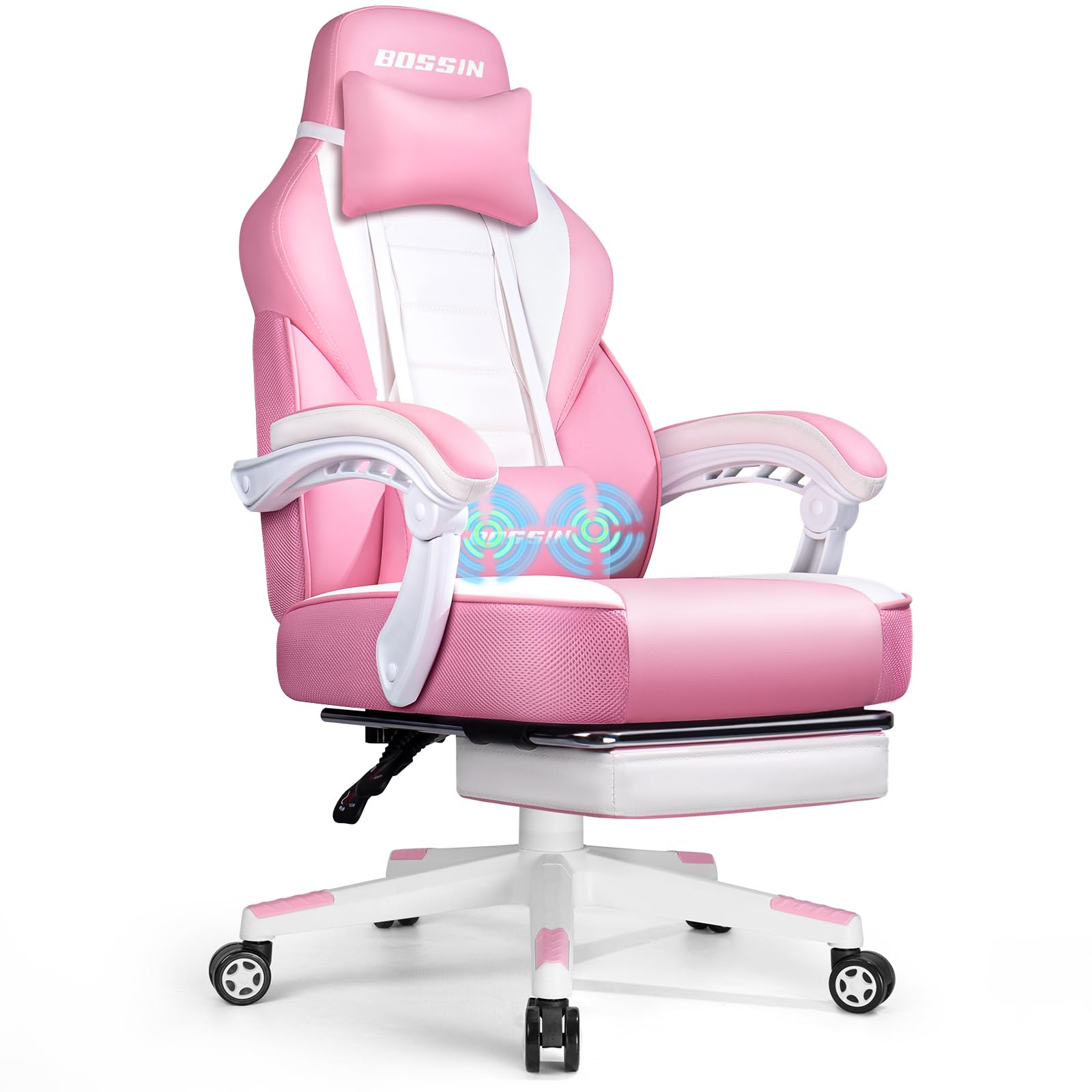
Figure 1: BOSSIN Big and Tall Gaming Chair (Pink variant shown).
2. Product Features
- Ergonomic Design: Features a built-in, fully adjustable lumbar curve that aligns with the spine for optimal posture and comfort during long sessions.
- Integrated Footrest: A retractable footrest allows users to extend their legs for relaxation, easily storable when not in use.
- Durable Construction: Constructed with a stronger metal frame, thick cushioning, and skin-friendly, wear-resistant PU leather for long-lasting use.
- Adjustable Components: Includes padded armrests, a Class 3 gas lift for height adjustment, and a reclining backrest with multiple locking positions.
- Massage Function: The lumbar pillow includes a vibrating massage function for added comfort, powered via USB.

Figure 2: High-quality materials including soft cushion and premium PU leather, highlighting the design.

Figure 3: The chair's comfort is enhanced by a larger seat and a footrest for relaxation.
3. Package Contents
The package includes all necessary components and hardware for assembly. Please ensure all parts are present before beginning assembly.
- Seat Base
- Backrest
- Armrests (2)
- Star Base
- Casters (5)
- Gas Lift Cylinder
- Gas Lift Cover
- Mechanism Plate
- Lumbar Pillow with Massage Function
- Headrest Pillow
- Retractable Footrest Assembly
- Hardware Pack (screws, washers, Allen wrench)
- Instruction Manual
4. Setup and Assembly
Assembly of the BOSSIN Gaming Chair is designed to be straightforward. Follow the included directions exactly for optimal results. An Allen wrench is provided in the hardware pack.
- Attach the casters to the star base by pushing them firmly into the holes until they click into place.
- Insert the gas lift cylinder into the center hole of the star base, then place the gas lift cover over it.
- Secure the mechanism plate to the underside of the seat base using the provided screws. Ensure the 'FRONT' arrow on the mechanism points towards the front of the seat.
- Attach the armrests to the seat base using the designated screws.
- Connect the backrest to the seat base and armrests using the remaining screws.
- Place the assembled seat onto the gas lift cylinder.
- Attach the headrest pillow and lumbar pillow to the backrest using their adjustable straps. The lumbar pillow's USB cable can be connected to a power source for the massage function.
- Slide the retractable footrest assembly into the designated slots under the seat.
Video 1: Detailed overview of the BOSSIN Gaming Chair's ergonomic features, including lumbar support, headrest, and footrest, demonstrating its assembly and functionality.
5. Operating Instructions
5.1 Adjusting Seat Height
To adjust the seat height, locate the lever on the right side under the seat. Pull the lever upwards while lifting your weight off the seat to raise it. To lower the seat, pull the lever upwards while remaining seated.
5.2 Reclining the Backrest
The backrest can be reclined to various angles. Locate the lever on the left side under the seat. Pull the lever upwards to unlock the backrest, then lean back to your desired angle. Release the lever to lock the backrest in position.
5.3 Using the Retractable Footrest
To use the footrest, pull it out from underneath the seat. Extend it to your preferred length. To store it, push it back underneath the seat until it is fully retracted.

Figure 4: Detailed view of the retractable footrest and adjustable lumbar support pillow.
5.4 Lumbar Support and Headrest Adjustment
Both the lumbar pillow and headrest pillow are adjustable. They are attached with elastic straps that allow you to slide them up or down the backrest to find the most comfortable position for your neck and lower back.
5.5 Swivel Function
The chair features a 360-degree swivel function, allowing for easy rotation without moving the base.
5.6 Massage Function
The lumbar pillow is equipped with a USB-powered vibrating massage function. Connect the USB cable to any compatible USB power source (e.g., computer, power bank, wall adapter) to activate the massage. Disconnect when not in use.

Figure 5: The chair's multi-functional adjustments, including recline and footrest extension, for various comfort positions.
6. Maintenance
- Cleaning: Wipe clean with a soft, damp cloth. Avoid harsh chemicals or abrasive cleaners that may damage the PU leather.
- Regular Checks: Periodically check all screws and bolts to ensure they are tight. Retighten if necessary to maintain stability and safety.
- Caster Care: Keep casters free of hair and debris to ensure smooth movement.
- Avoid Overloading: Do not exceed the maximum weight recommendation of 400 lbs.
7. Troubleshooting
- Chair Squeaks: Check and tighten all screws. Applying a small amount of lubricant to moving parts (e.g., gas lift, mechanism) may help.
- Difficulty Adjusting Height: Ensure the gas lift lever is fully engaged. If the chair does not raise, the gas lift cylinder may need replacement.
- Chair Wobbles: Verify that all connections are securely tightened, especially the mechanism plate to the seat and the backrest to the seat. Ensure the casters are fully inserted into the star base.
- Footrest Not Extending/Retracting Smoothly: Check for any obstructions in the sliding mechanism. Clean the rails if necessary.
8. Specifications

Figure 6: Detailed dimensions of the BOSSIN Gaming Chair.
| Feature | Detail |
|---|---|
| Model Name | MSG-TP-NE-FT00 |
| Brand | BOSSIN |
| Color | Pink (variant shown) |
| Material | Faux Leather, Foam |
| Product Dimensions | 24"D x 27.2"W x 52.9"H |
| Maximum Weight Recommendation | 400 Pounds |
| Special Features | Adjustable, Durable, Footrest, Massage, Ergonomic |
| Reclining Position Count | 3 |
| Item Weight | 47 pounds |
9. Safety Information
- Ensure the chair is assembled correctly and all fasteners are tightened before use.
- Do not stand on the chair or use it as a step stool.
- Do not exceed the maximum weight capacity of 400 lbs.
- Use caution when swiveling and moving the chair on its omni-directional wheels to prevent tipping.
- Keep fingers and clothing clear of moving parts during adjustment.
10. Warranty and Support
For warranty information, technical support, or any inquiries regarding your BOSSIN Gaming Chair, please refer to the contact details provided in your product packaging or visit the official BOSSIN website. Please retain your proof of purchase for warranty claims.