
1. Introduction
The UURig R094 Multi-Functional Super Clamp is a versatile and robust mounting accessory designed for securely attaching various photographic and video equipment. It features a strong clamp mechanism and an adjustable ball head, providing flexible positioning for cameras, monitors, lights, microphones, and other compatible devices. This manual provides essential information for the proper setup, operation, and maintenance of your R094 Super Clamp.

Image 1.1: UURig R094 Super Clamp with various application examples.
The clamp is constructed from durable aluminum alloy, ensuring stability and longevity. Its design incorporates anti-slip pads and a tooth pattern on the ball head for enhanced grip and secure locking. The clamp can open up to 60mm, accommodating a wide range of surfaces such as poles, tables, branches, and railings.
2. Setup
Follow these steps to set up your UURig R094 Super Clamp and attach your equipment:
- Unpack the Clamp: Carefully remove the R094 Super Clamp from its packaging. Inspect for any visible damage.
- Identify Mounting Surface: Choose a stable surface for mounting. The clamp can attach to objects with a thickness between 13mm and 60mm.
- Attach the Clamp:
- Loosen the large T-wrench knob on the side of the clamp by turning it counter-clockwise.
- Position the clamp jaws around your desired surface (e.g., a table edge, pole, or railing).
- Tighten the T-wrench knob clockwise until the clamp is firmly secured. Ensure the anti-slip pads are making full contact with the surface to prevent movement.
- Attach Your Device:
- The R094 features a 1/4-inch screw on the top ball head and a 3/8-inch screw hole on the side of the ball head arm.
- For devices with a 1/4-inch thread (e.g., most cameras, monitors, LED lights), screw the device onto the 1/4-inch screw on the top ball head.
- For accessories requiring a 3/8-inch connection, utilize the 3/8-inch screw hole.
- Ensure your device is securely fastened to prevent accidental detachment.

Image 2.1: Universal usage and clamping range of the R094 Super Clamp.
3. Operating
The R094 Super Clamp offers flexible positioning through its 360-degree rotatable ball head. Follow these instructions for optimal use:
- Adjusting the Ball Head:
- The central knob on the ball head arm controls the angle and rotation of the attached device.
- Turn the central knob counter-clockwise to loosen the ball head, allowing for 360-degree rotation and tilt adjustments.
- Once the desired angle is achieved, turn the central knob clockwise to firmly lock the ball head in place. The integrated tooth pattern design helps prevent slipping.
- Securing Your Device: Always ensure both the clamp and the ball head are fully tightened before leaving your equipment unattended. Periodically check the tightness during use, especially in environments with vibration or movement.

Image 3.1: Details of the 360-degree rotatable ball head and clamp features.

Image 3.2: Adjustable angle capability of the R094 Super Clamp, ensuring no slipping.
4. Maintenance
Proper maintenance ensures the longevity and reliable performance of your UURig R094 Super Clamp:
- Cleaning: Wipe the clamp with a soft, dry cloth after each use to remove dust, dirt, or moisture. For stubborn grime, a slightly damp cloth can be used, followed by immediate drying. Avoid harsh chemicals or abrasive materials.
- Inspection: Regularly inspect all moving parts, screws, and knobs for any signs of wear, damage, or loosening. Ensure the anti-slip pads are intact and providing adequate grip.
- Storage: Store the clamp in a clean, dry environment away from extreme temperatures and direct sunlight.
5. Troubleshooting
If you encounter issues with your UURig R094 Super Clamp, refer to the following common problems and solutions:
- Problem: The clamp is not holding securely or slips.
Solution:- Ensure the T-wrench knob is fully tightened.
- Verify that the clamping surface is within the 13-60mm range and is not excessively smooth or oily.
- Check if the anti-slip pads are clean and intact. Clean them if necessary.
- Avoid over-tightening, which can damage the clamp or the mounting surface.
- Problem: The attached device rotates or changes angle after being set.
Solution:- Ensure the central knob on the ball head arm is fully tightened clockwise.
- Verify that the device is securely screwed onto the 1/4-inch or 3/8-inch mount.
- The ball head has a tooth pattern design for enhanced grip; ensure it is engaged properly when tightened.
- Problem: Clamp feels loose or wobbly.
Solution:- Re-tighten all knobs and screws.
- Inspect the clamp for any signs of structural damage. If damaged, discontinue use.
6. Specifications
| Feature | Detail |
|---|---|
| Brand | UURig |
| Model Number | R094 |
| Product Dimensions | 3.94 x 4.33 x 1.57 inches (10 x 11 x 4 cm) |
| Item Weight | 7.8 ounces (221 grams) |
| Material | Aluminum Alloy |
| Load-bearing Capacity | 1.5 KG |
| Clamping Distance | 13mm - 60mm |
| Mounting Points | 1/4-inch screw, 3/8-inch screw hole |
| Rotation | 360-degree adjustable ball head |
| Compatible Devices | Cameras, Monitors, Smartphones (with adapter), LED Lights, Microphones, DJI OSMO 360/OSMO Pocket 3/Insta 360 x 5/Sony/Canon/Nikon/Fujifilm, iPhone/Olympus/Pentax/Panasonic/Kodak/GoPro |
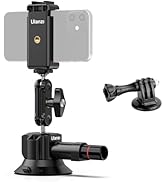
Image 6.1: Technical parameters and dimensions of the R094 Super Clamp.
7. Warranty and Support
For warranty information or technical support regarding your UURig R094 Multi-Functional Super Clamp, please refer to the product packaging or contact UURig customer service directly. Contact details can typically be found on the official UURig website or through your point of purchase.