
1. Product Overview
The SOCOTRAN T82 is a rechargeable two-way radio designed for reliable communication. It features Bluetooth earpiece connectivity, NOAA weather alerts (US version), SOS function, vibration alerts, and a built-in flashlight. This manual provides instructions for proper setup, operation, and maintenance of your walkie talkies.

Image: SOCOTRAN T82 walkie talkie highlighting features like weather warning, super vibration, wireless earpiece, flashlight, long standby time, charging cable, CTCSS/DCS, and dual channel monitor.
2. What's in the Box
Upon opening the package, verify that all the following items are included:
- Rechargeable Walkie Talkies (2 units)
- Bluetooth Earpieces and Mic (2 units)
- Rechargeable Batteries (2 units)
- Charging Docks (2 units)
- USB Charging Cables (2 units)
- Belt Clips (2 units)

Image: The package contents of the SOCOTRAN T82 walkie talkies, including two radios, two charging docks, two Bluetooth earpieces, and charging cables.
3. Setup
3.1 Battery Installation
- Ensure the walkie talkie is powered off.
- Locate the battery compartment cover on the back of the unit.
- Slide the cover down or unclip it to open.
- Insert the rechargeable Lithium Ion battery, ensuring the contacts align correctly.
- Replace the battery compartment cover and secure it.

Image: Diagram showing multiple charging modes for the walkie talkie, including AA battery use and USB charging, with a focus on battery installation.
3.2 Initial Charging
Before first use, fully charge the walkie talkies and Bluetooth earpieces.
- Connect the USB charging cable to the charging dock and a power source.
- Place the walkie talkie into the charging dock. The charging indicator will illuminate.
- For Bluetooth earpieces, connect the micro-USB cable directly to the earpiece charging port.
- Charging is complete when the indicator light changes or turns off.
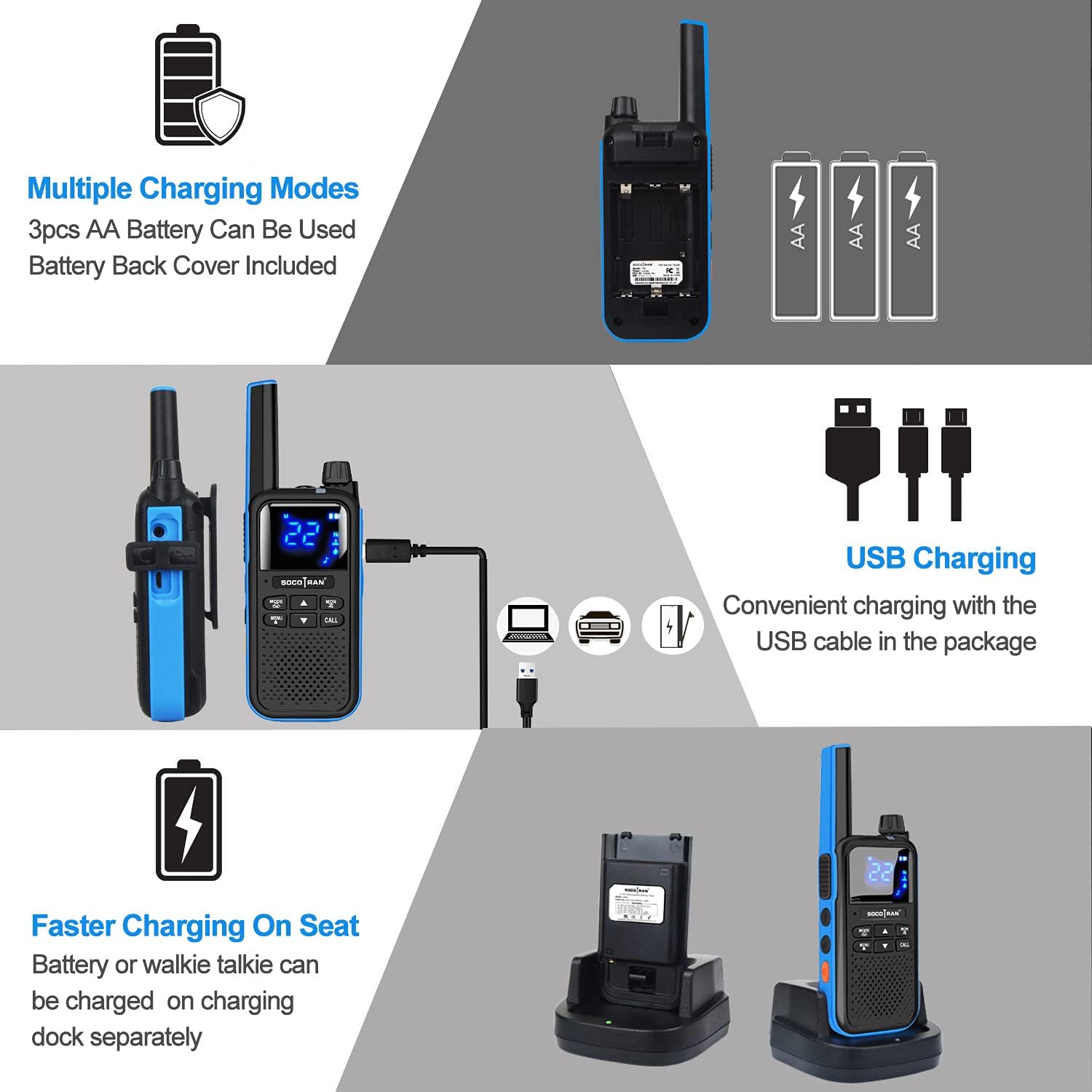
Image: Two SOCOTRAN T82 walkie talkies being charged via USB cables, with two Bluetooth earpieces shown nearby.
3.3 Powering On/Off
To power on or off the walkie talkie, rotate the upper knob clockwise to turn on and counter-clockwise to turn off. A voice prompt will confirm the action.
3.4 Bluetooth Earpiece Pairing
The walkie talkie comes with two wireless Bluetooth earpieces that can be paired for hands-free operation. The Bluetooth headset supports a 10-meter call range.
- Ensure both the walkie talkie and the Bluetooth earpiece are charged.
- Turn on the walkie talkie.
- Activate pairing mode on the Bluetooth earpiece (refer to earpiece specific instructions, usually by holding a multi-function button).
- On the walkie talkie, navigate to the Bluetooth pairing menu (consult the on-screen display and menu buttons).
- Select the earpiece from the list of available devices to pair.
- A confirmation tone or indicator light will show successful pairing.

Image: Close-up of the Bluetooth earpiece with labels for hanging ear hook, silicone ear caps, USB charging port, multi-function button, and volume controls.
Video: This video demonstrates the unboxing and basic setup of the SOCOTRAN T82 walkie talkies, including powering on, battery installation, and pairing with the Bluetooth earpieces. It also highlights features like call tones and privacy codes.
4. Operating Instructions
4.1 Channel Selection
The SOCOTRAN T82 supports 22 FRS channels (US version) or 16 channels (EU version). To change channels:
- Press the MENU button to enter the menu.
- Use the Up/Down arrow buttons to navigate to the channel selection option.
- Press MENU again to confirm, then use Up/Down to select your desired channel.
- Press MENU to save the selection or CALL to exit without saving.
4.2 Transmitting and Receiving
- To transmit, press and hold the PTT (Push-To-Talk) button on the side of the walkie talkie. Speak clearly into the microphone.
- Release the PTT button to receive.
- Ensure all walkie talkies are on the same channel and privacy code for communication.
4.3 Privacy Codes (CTCSS/DCS)
The T82 offers 155 sets of CTCSS (Continuous Tone-Coded Squelch System) and DCS (Digitally Coded Squelch) privacy codes to minimize interference from other users on the same channel.
- Press the MENU button.
- Navigate to the CTCSS or DCS setting using the Up/Down arrow buttons.
- Press MENU again, then use Up/Down to select a privacy code.
- Press MENU to save. All radios in your group must use the same channel and privacy code.
4.4 NOAA Weather Alert (US Version)
The US version of the T82 includes NOAA weather warnings to keep you informed of severe weather conditions.
- To activate NOAA weather alerts, access the menu and locate the NOAA feature.
- Enable the weather alert function. The radio will monitor NOAA weather channels and alert you to broadcasts.

Image: A red SOCOTRAN T82 walkie talkie in an outdoor setting, illustrating its NOAA Weather Radio feature with a cloud and rain icon.
4.5 Other Features
- Vibration Alert: The walkie talkie can be set to vibrate for incoming calls, useful in noisy environments or when discretion is required.
- Flashlight: A built-in LED flashlight provides illumination in low-light conditions. Activate it via a dedicated button or menu option.
- SOS Function: For emergencies, the SOS function can transmit an alert signal. Refer to the menu for activation.
- VOX (Voice Operated Exchange): Allows hands-free transmission when using a compatible headset, activating the microphone when you speak.
- Dual Channel Monitor: Enables monitoring of two channels simultaneously.
5. Maintenance
5.1 General Care
- Keep the walkie talkie dry. Avoid exposure to rain, moisture, or liquids.
- Clean the unit with a soft, damp cloth. Do not use harsh chemicals or abrasive cleaners.
- Avoid extreme temperatures. Do not store in hot or cold environments.
- Handle with care. Do not drop or subject the unit to strong impacts.
5.2 Battery Care
- Use only the specified rechargeable Lithium Ion batteries.
- If the unit will not be used for an extended period, remove the batteries.
- Dispose of batteries according to local regulations. Do not incinerate.
6. Troubleshooting
| Problem | Possible Cause | Solution |
|---|---|---|
| No power | Battery low or not installed correctly. | Charge the battery or re-install it correctly. |
| Cannot communicate with other radios | Different channels or privacy codes. Out of range. | Ensure all radios are on the same channel and privacy code. Move closer to other radios. |
| Bluetooth earpiece not pairing | Earpiece not in pairing mode. Out of range. Interference. | Ensure earpiece is in pairing mode. Move earpiece closer to radio. Try re-pairing in a different location. |
| Poor sound quality / Static | Weak signal. Interference. VOX sensitivity too high (for earpiece). | Move to an area with better signal. Adjust VOX sensitivity if using earpiece. Check for obstructions. |
| Short battery life | Battery not fully charged. Old battery. Frequent transmission. | Ensure full charge. Consider replacing old batteries. Reduce transmission time. |
7. Specifications
| Feature | Detail |
|---|---|
| Brand | SOCOTRAN |
| Model Number | T82 (based on video title, original model number is placeholder) |
| Item Weight | 1.56 pounds |
| Product Dimensions | 4.33 x 2.2 x 1.2 inches |
| Batteries | 2 Lithium Ion batteries required (included) |
| Number of Channels | 22 (FRS) |
| Special Feature | Rechargeable |
| Frequency Range | 300 MHz - 3 GHz (UHF range) |
| Talking Range Maximum | 5 Mile |
| Water Resistance Level | Waterproof |
| Compatible Devices | Other FRS two-way radios, Bluetooth devices |
8. Warranty and Support
For warranty information and customer support, please refer to the documentation included with your purchase or contact SOCOTRAN customer service directly. Protection plans may be available for extended coverage.
- 2-Year Protection Plan: Available for purchase.
- 3-Year Protection Plan: Available for purchase.
- Complete Protect: Monthly plan covering eligible past and future purchases.