
1. Introduction
This manual provides essential instructions for the setup, operation, and maintenance of your Geesio BN59-01329A / BN59-01330A Voice Remote Control. This remote is designed as a replacement or secondary control for various Samsung QLED UHD Smart TV models. Please read this manual thoroughly before use to ensure optimal performance and longevity of your device.
2. Product Overview and Features
The Geesio Voice Remote Control offers a seamless experience for navigating your Samsung Smart TV. It includes a protective silicone case for enhanced durability and grip.

Image 2.1: Geesio Voice Remote Control with its protective green fluorescent case.

Image 2.2: Key features including voice command, flexible buttons, and dedicated hotkeys.
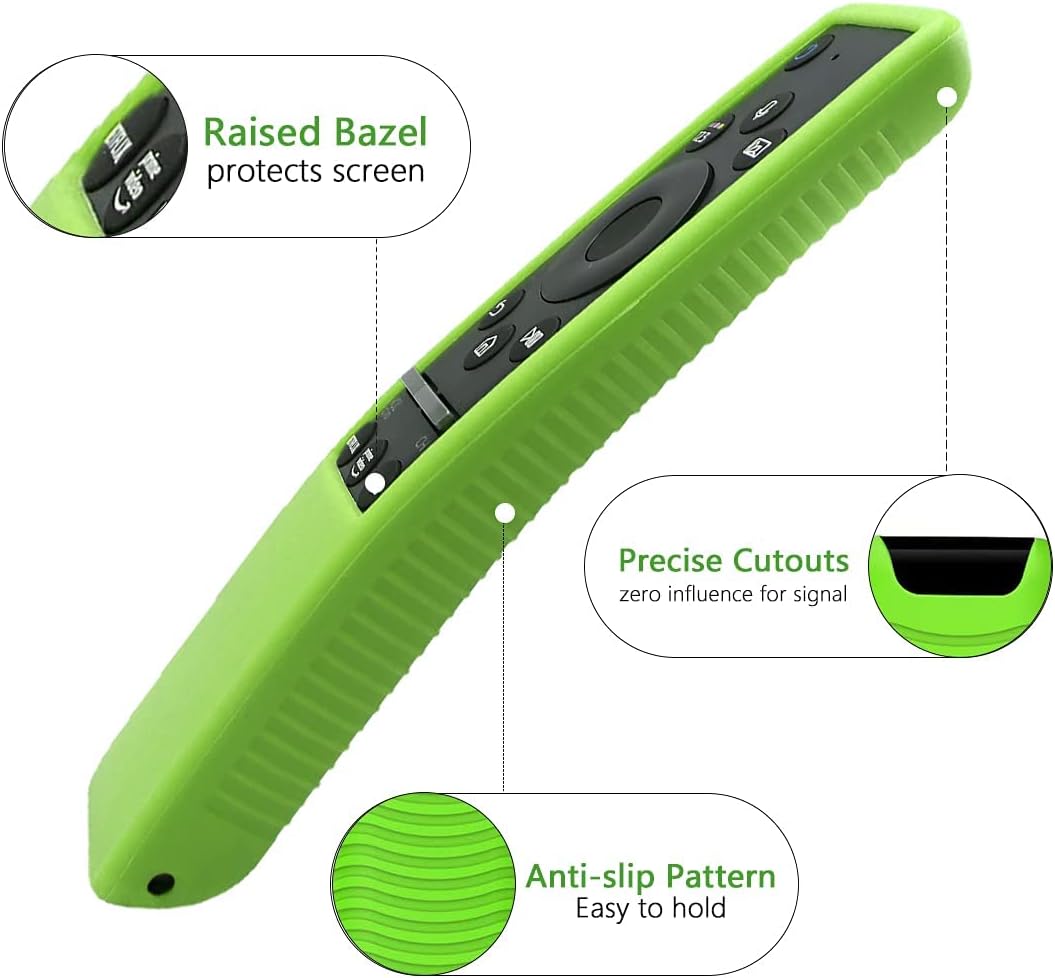
Image 2.3: Design elements of the protective case, including a raised bezel and anti-slip texture.
Key Features:
- Voice Command Recognition: Enables smart and easy control through voice input.
- Dedicated Hotkeys: Quick access buttons for popular streaming services like Netflix, Prime Video, and Samsung TV Plus.
- Protective Silicone Case: Includes a green fluorescent case designed to offer shock protection, prevent loss, and improve grip. The raised bezel protects the remote's screen.
- Flexible Buttons: Constructed with soft, flexible materials for comfortable use and durability, supporting over 100,000 clicks.
- Precise Cutouts: The case features precise cutouts to ensure no interference with the remote's signal or functionality.
- Long-Distance Control: Responsive control up to 32 feet (approximately 10 meters).
3. Setup and Pairing
To use the voice control feature, the remote must be paired with your Samsung Smart TV. Follow these steps:
- Insert Batteries & Turn On TV: Open the battery compartment on the back of the remote. Insert two new AA batteries, ensuring correct polarity. Turn on your Samsung TV.
- Point Remote at TV: Direct the remote control towards the sensor on your TV. The sensor is typically located on the lower right side or centered at the bottom of the TV screen.
- Press and Hold Pairing Buttons: Simultaneously press and hold the Return (
 ) and Extra () buttons on the remote for 4-7 seconds.
 - Wait for Pairing Confirmation: A pairing information message will appear on the lower left portion of your TV screen. Once paired, a confirmation message will be displayed.
Note: If pairing is unsuccessful, repeat the steps. Without pairing, the remote may function for basic controls, but voice control will not be available, and response times may be slower.
Image 3.1: Visual guide for pairing the remote control with your Samsung TV.
4. Operating Instructions
Basic Navigation:
- Use the directional pad (up, down, left, right) to navigate menus and select items.
- Press the Center button to confirm selections.
- Use the Volume Up/Down buttons to adjust audio levels.
- Use the Channel Up/Down buttons to change channels.
Voice Control:
Once paired, press the Microphone button (usually located near the top of the remote) and speak your command clearly into the remote. The voice control feature is only available for Smart TVs with built-in voice control capabilities.
Hotkeys:
Press the dedicated buttons for Netflix, Prime Video, or Samsung TV Plus to directly launch these applications.
5. Battery Installation and Replacement
The remote requires two AA batteries. To install or replace batteries:
- Locate the battery compartment on the back of the remote control.
- Slide the battery cover open.
- Insert two new AA batteries, matching the (+) and (-) terminals correctly as indicated inside the compartment.
- Close the battery cover securely.
Recommendation: Replace both batteries simultaneously to ensure consistent performance. Remove batteries if the remote will not be used for an extended period.
6. Care and Maintenance
- Cleaning: Wipe the remote with a soft, dry cloth. Do not use liquid cleaners or abrasive materials.
- Protection: The included silicone case helps protect the remote from accidental drops and scratches. Ensure the case is properly fitted.
- Storage: Store the remote in a dry place, away from direct sunlight and extreme temperatures.
- Battery Life: If the remote's response becomes sluggish, replace the batteries.
7. Troubleshooting
If you encounter issues with your remote control, refer to the following common problems and solutions:
- Remote Not Responding / Buttons Not Working:
- Ensure batteries are correctly installed and not depleted. Replace with new AA batteries if necessary.
- Re-pair the remote with your TV by following the steps in Section 3. Some functions may require re-pairing after battery replacement or if connection is lost.
- Ensure there are no obstructions between the remote and the TV's sensor.
- Voice Control Not Working:
- Verify that the remote is successfully paired with your TV (refer to Section 3). Voice control requires a paired connection.
- Confirm your Samsung Smart TV model supports built-in voice control.
- Speak clearly and directly into the microphone on the remote.
- Note that only one remote can use the Bluetooth-based voice feature at a time if multiple remotes are present.
- Remote Skips or is Inaccurate:
- This can sometimes indicate low battery power. Replace batteries.
- Ensure the remote is pointed directly at the TV.
- Re-pair the remote to refresh the connection.
8. Specifications
| Feature | Detail |
|---|---|
| Model Numbers | BN59-01329A, BN59-01330A |
| Compatible Remote Models | BN59-01329A, RMCSPT1CP1, BN59-01330A |
| Power Source | 2 x AA Batteries (not included) |
| Special Features | Universal, Voice Search |
| Color | Remote with Green Fluorescent Case |
| Material | ABS (remote), Silicone (case) |
| Item Weight | 2.85 ounces (approx. 80.8 grams) |
| Package Dimensions | 7.32 x 2.52 x 1.02 inches |
| Manufacturer | Geesio |
9. Compatible TV Models
This remote control is compatible with a wide range of Samsung QLED UHD Smart TVs, including but not limited to the following models:
- QN49Q80T
- QN49Q80TAF
- QN50Q80TAF
- QN50Q80TAFXZ
- QN55Q80T
- QN55Q80TAF
- QN65Q800T
- QN65Q800TAF
- QN65Q80TAF
- QN75Q800T
- QN75Q800TAF
- QN75Q80T
- QN75Q80TAF
- QN82Q800T
- QN82Q800TAF
- QN85Q80T
- QN85Q80TA
- QN85Q80TAF
If your remote looks similar to the one pictured, it is likely compatible. For specific compatibility inquiries, please contact Geesio customer support.
10. Warranty and Support Information
Specific warranty details and direct customer support contact information for the Geesio BN59-01329A / BN59-01330A Voice Remote Control were not provided in the product listing. For warranty claims or technical assistance, please refer to the seller's policies or contact Geesio directly through their official channels if available.