
BulbAmerica DT01431
Instruction Manual
Projector Lamp for Hitachi CP-X4042WN
Brand: BulbAmerica
Introduction
This manual provides essential information for the installation, operation, and maintenance of your new BulbAmerica Replacement Lamp for Hitachi CP-X4042WN Projector. This product is designed to deliver optimal brightness, longevity, and performance, ensuring a high-quality image for your projector. Please read these instructions carefully before proceeding with installation to ensure safe and correct usage.
Product Overview
The BulbAmerica Replacement Lamp for Hitachi CP-X4042WN Projector is a complete housing assembly with an original OEM bulb inside, engineered to meet the exact specifications of your projector.

Image 1: Front view of the projector lamp assembly, showing the bulb and its protective housing. This is the primary component for light projection.

Image 2: Side view of the projector lamp assembly, highlighting the robust housing designed for secure fitment within the projector.

Image 3: Top view of the lamp, revealing the original OEM bulb and its internal components, including the mesh reflector.

Image 4: Rear view of the lamp assembly, showing the electrical connectors and mounting points for installation.
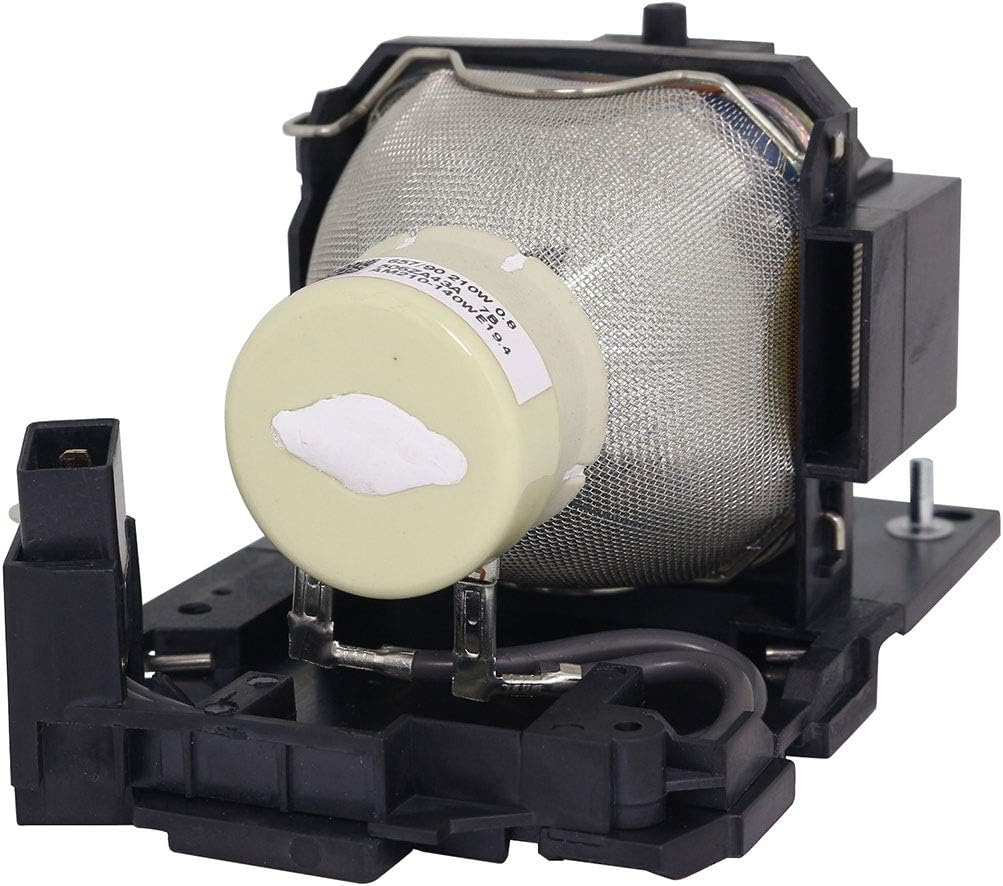
Image 5: Angled view providing a comprehensive look at the bulb within its housing, emphasizing the integrated design.
Setup and Installation
Proper installation is crucial for the performance and longevity of your new projector lamp. Always refer to your projector's specific user manual for detailed instructions, as procedures may vary slightly by model.
- Safety First: Ensure the projector is completely powered off and unplugged from the electrical outlet. Allow the projector to cool down for at least 30 minutes before handling the lamp. Projector lamps operate at high temperatures and can cause severe burns if not cooled.
- Locate Lamp Compartment: Identify the lamp compartment on your Hitachi CP-X4042WN projector. This is typically secured by screws or a latch.
- Remove Old Lamp: Carefully open the lamp compartment cover. Loosen any screws holding the old lamp module in place. Gently pull the handle on the old lamp module to slide it out. Avoid touching the glass part of the old lamp.
- Insert New Lamp: Hold the new BulbAmerica lamp module by its housing. Align it correctly with the slot in the projector. Gently slide the new lamp module into place until it is fully seated. Do not force it.
- Secure Lamp: Tighten any screws that secure the new lamp module. Close the lamp compartment cover and ensure it is securely latched or screwed back into place.
- Reset Lamp Timer: After installation, plug the projector back in and power it on. Navigate to the projector's menu settings to reset the lamp timer. This step is essential for accurate lamp life tracking. Consult your projector's manual for specific instructions on resetting the lamp timer.
Note: Always handle the lamp by its housing. Avoid touching the bulb glass directly, as oils from your skin can reduce lamp life and performance.
Operating Instructions
Once the new lamp is installed and the lamp timer is reset, your projector is ready for operation. The new lamp will provide optimal brightness and color performance.
- Power On: Turn on your Hitachi CP-X4042WN projector as you normally would.
- Image Check: Verify that the projected image is clear, bright, and displays accurate colors.
- Warm-up Period: Allow the lamp to warm up for a few minutes after turning on the projector to achieve full brightness and stable color output.
- Cool-down Period: Always allow the projector to complete its cool-down cycle after turning it off. Do not unplug the projector immediately after powering down, as this can damage the lamp due to insufficient cooling.
Maintenance
Regular maintenance helps extend the life of your projector and its lamp.
- Air Filter Cleaning: Periodically clean or replace the projector's air filter. A clogged filter can lead to overheating, which significantly reduces lamp life. Refer to your projector's manual for filter location and cleaning instructions.
- Proper Shutdown: Always use the projector's proper shutdown procedure, allowing it to cool down completely before unplugging or moving it. Abrupt power cuts can damage the lamp.
- Environmental Conditions: Operate the projector in a clean, dust-free environment with adequate ventilation. Avoid extreme temperatures or high humidity.
Troubleshooting
If you encounter issues after installing your new lamp, consider the following common troubleshooting steps:
- No Image or Dim Image:
- Ensure the lamp module is fully seated and secured in its compartment.
- Check all cables (power, video) are securely connected.
- Verify the lamp timer has been reset.
- Confirm the projector is set to the correct input source.
- Lamp Warning Light On:
- This usually indicates the lamp has reached its end of life, but if it appears with a new lamp, ensure the lamp timer was reset.
- Check for proper ventilation; overheating can trigger warnings.
- Flickering Image:
- Ensure the lamp is securely installed.
- Check for stable power supply to the projector.
If problems persist, refer to your Hitachi CP-X4042WN projector's user manual or contact customer support.
Specifications
| Feature | Detail |
|---|---|
| Brand | BulbAmerica |
| Model Number | DT01431 |
| Compatible Projector Model | Hitachi CP-X4042WN |
| Bulb Type | Genuine Original OEM Bulb (UHP, P-VIP, SHP, NSH) |
| Assembly Type | Housing Assembly with Bulb |
| Item Weight | 1.5 Pounds |
| Package Dimensions | 10 x 10 x 10 inches |
| UPC | 675650327366 |
Warranty Information
The BulbAmerica Replacement Lamp for Hitachi CP-X4042WN projector is covered under a comprehensive warranty to ensure your peace of mind.
- Warranty Period: This product is completely covered under our 180-day warranty from the date of purchase.
- Coverage: The warranty protects against any defective products, ensuring that your lamp performs as expected.
- Return Policy: We offer a 30-day return policy for your convenience.
For warranty claims or returns, please contact customer support with your purchase details.
Customer Support
For any questions, technical assistance, or support regarding your BulbAmerica projector lamp, please contact us directly.
- Manufacturer: BulbAmerica
- Online Store: Visit the BulbAmerica Store on Amazon
- General Inquiries: Refer to the contact information provided with your purchase or on the BulbAmerica official website.
We are committed to offering an easy and safe buying experience and providing peace of mind to all our customers.
Ask a question about this manual
Ask about setup, troubleshooting, compatibility, parts, safety, or missing instructions. Manuals+ will review the question and use this page’s manual context to help answer it.