
1. Introduction
Thank you for choosing the Oversteel KRYPTO 27-inch Full HD Curved Gaming Monitor. This monitor is designed to provide an immersive gaming experience with its 165Hz refresh rate, 1ms response time, and Full HD (1920x1080) resolution. It features a VA panel, 16:9 aspect ratio, and a R1500 curvature for enhanced viewing comfort. The monitor supports AMD FreeSync and NVIDIA G-Sync compatible technologies for smooth, tear-free gameplay. Its frameless design allows for seamless multi-monitor setups, and the rear LED lighting adds a distinct gaming aesthetic. Advanced eye-care technologies like Low Blue Light and Flicker Free are integrated to reduce eye strain during extended use.

Image: Front view of the Oversteel KRYPTO 27-inch curved gaming monitor.
2. Setup Guide
2.1 Package Contents
Before assembly, please ensure all components are present:
- Oversteel KRYPTO Monitor Panel
- Monitor Stand Base
- Monitor Stand Neck
- Power Adapter and Cable
- DisplayPort Cable
- HDMI Cable
- User Manual (this document)
2.2 Assembly
Follow these steps to assemble your monitor:
- Carefully place the monitor panel face down on a soft, clean surface to prevent scratches.
- Attach the stand neck to the monitor panel by aligning the mounting points and securing it with the provided screws.
- Connect the stand base to the stand neck, ensuring it clicks securely into place or is fastened with the designated screw.
- Alternatively, the monitor supports VESA 75x75 mounting for wall or arm installation. Ensure the stand is removed before using a VESA mount.
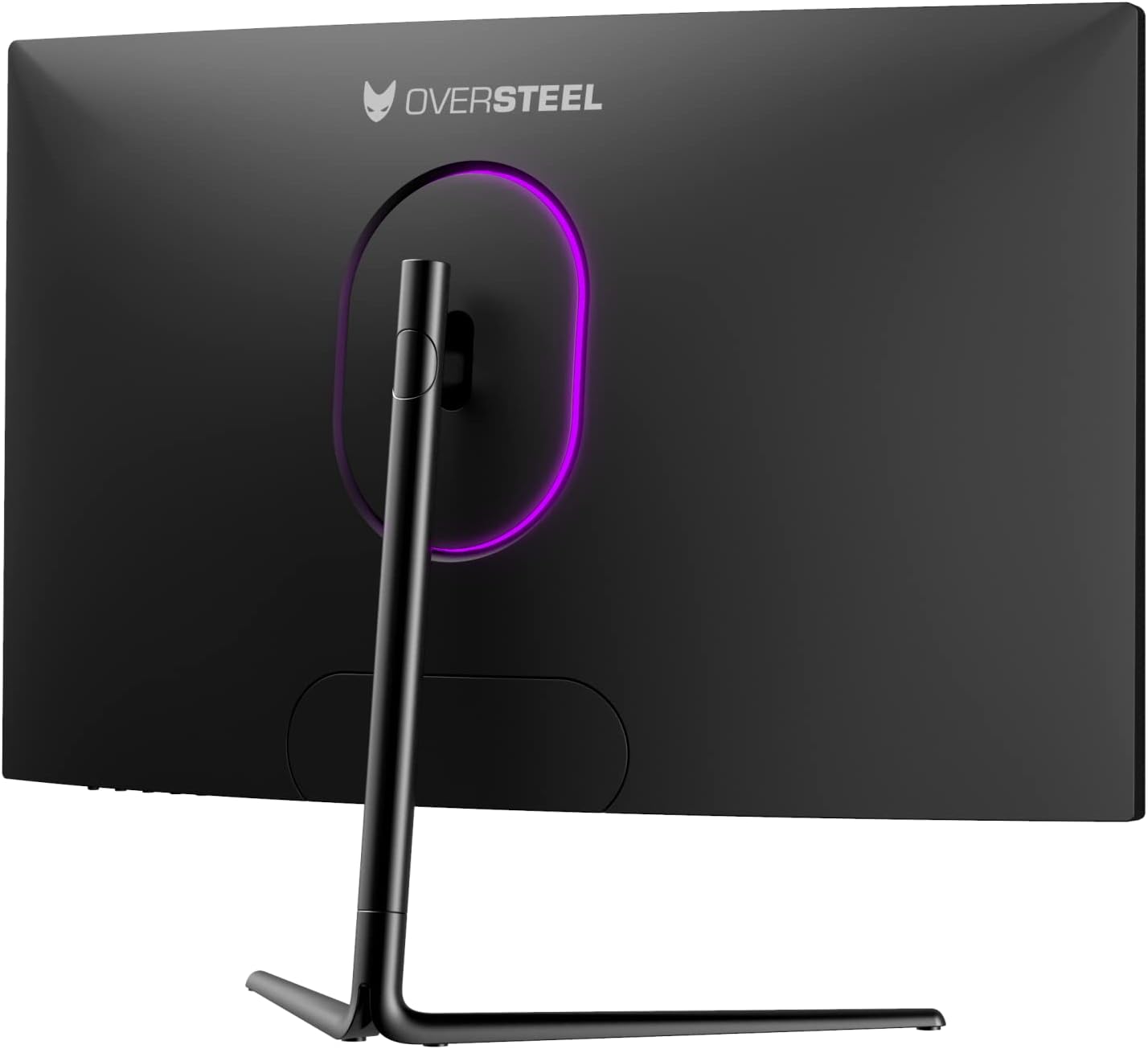
Image: Rear view of the Oversteel KRYPTO monitor with stand.
2.3 Connecting the Monitor
Connect your devices to the monitor using the available ports:
- Power: Connect the power adapter to the monitor's power input and then to a power outlet.
- DisplayPort (DP 1.2): For optimal performance, including 165Hz refresh rate, connect your PC's graphics card to the monitor using the DisplayPort cable.
- HDMI (HDMI 1.4 x2): Connect gaming consoles or other devices using the HDMI ports. Note that HDMI 1.4 may limit refresh rates at higher resolutions.
- Audio Out: Connect external speakers or headphones to the audio output jack.
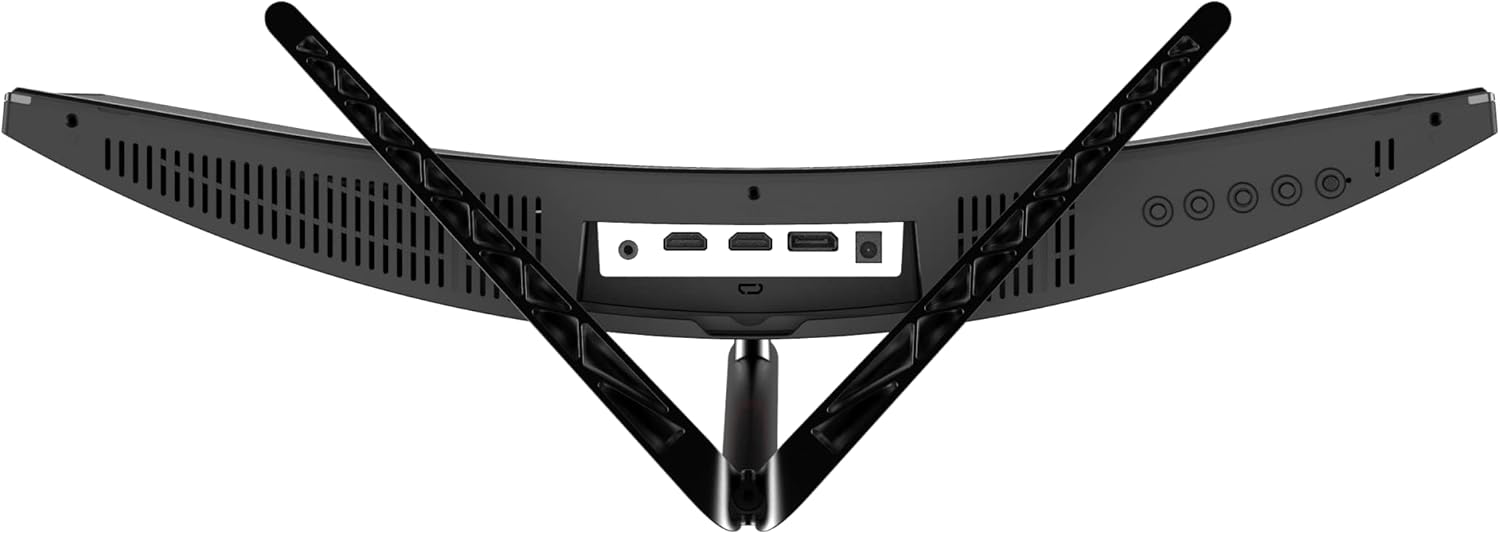
Image: Top-down view of the monitor's connectivity ports.
3. Operating the Monitor
3.1 On-Screen Display (OSD) Navigation
The monitor features a joystick-style button located on the rear for easy navigation of the On-Screen Display (OSD) menu. Press the joystick to open the OSD menu, then move it up, down, left, or right to select and adjust settings.
3.2 Adjusting Display Settings
Within the OSD menu, you can customize various display parameters:
- Brightness/Contrast: Adjust the overall luminance and contrast levels.
- Color Settings: Fine-tune color temperature, gamma, and individual RGB values.
- Input Source: Manually select between DisplayPort and HDMI inputs.
- Refresh Rate: Ensure your system is set to 165Hz for optimal performance. (Refer to your operating system's display settings).
- Picture Mode: Select from preset modes (e.g., Standard, Game, Movie, Text) or customize your own.
3.3 Gaming Features
The Oversteel KRYPTO monitor includes features to enhance your gaming experience:
- AMD FreeSync / NVIDIA G-Sync Compatible: Enable this feature in your graphics card settings to synchronize the monitor's refresh rate with your GPU's frame rate, eliminating screen tearing and stuttering.
- Low Blue Light: Reduces blue light emissions to minimize eye fatigue during prolonged use. Activate this setting in the OSD menu.
- Flicker Free: This technology eliminates screen flickering, providing a more comfortable viewing experience and reducing eye strain.
- Crosshair Overlay: For FPS games, an on-screen crosshair can be enabled via the OSD menu to assist with aiming.
4. Maintenance
Proper care will extend the life of your monitor:
- Cleaning the Screen: Use a soft, lint-free cloth lightly dampened with water or a non-abrasive screen cleaner. Do not spray liquid directly onto the screen.
- Cleaning the Casing: Wipe the monitor casing with a soft, dry cloth. Avoid using strong detergents or solvents.
- Ventilation: Ensure the monitor's ventilation openings are not blocked to prevent overheating.
- Storage: When not in use for extended periods, store the monitor in a cool, dry place, preferably in its original packaging.
5. Troubleshooting
If you encounter issues with your monitor, refer to the table below for common problems and solutions:
| Problem | Possible Cause | Solution |
|---|---|---|
| No image on screen | No power; Incorrect input source; Loose video cable | Check power connection; Select correct input via OSD; Reconnect video cable securely. |
| Image flickering or unstable | Incorrect refresh rate; Cable issue; Graphics driver issue | Set refresh rate to 165Hz in OS display settings; Try a different video cable; Update graphics drivers. |
| Ghosting or motion blur | Overdrive setting; Response time setting | Adjust the monitor's overdrive or response time setting in the OSD menu. |
| No audio from external speakers/headphones | Incorrect audio output selected; Volume too low | Ensure monitor's audio output is selected in OS; Increase volume on monitor and connected device. |
| Dead pixels or stuck pixels | Manufacturing defect | Refer to warranty information. Some pixel policies apply. |
If the problem persists after trying these solutions, please contact Oversteel customer support.
6. Specifications
| Feature | Detail |
|---|---|
| Brand | Oversteel |
| Model Number | NAT-OV-KR27VF16 |
| Screen Size | 27 Inches |
| Resolution | FullHD 1920 x 1080 |
| Refresh Rate | 165 Hz |
| Response Time | 1 Millisecond (MPRT) |
| Panel Type | VA |
| Aspect Ratio | 16:9 |
| Curvature | R1500 |
| Connectivity | 2x HDMI 1.4, 1x DisplayPort 1.2, Audio Out |
| VESA Mount | 75x75 mm |
| Dimensions (with stand) | 70 x 45 x 18 cm |
| Weight (with stand) | 6 kg |
| Special Features | Curved, Frameless Design, Adaptive Sync (FreeSync/G-Sync Compatible), Low Blue Light, Flicker Free |

Image: Monitor dimensions diagram.
7. Warranty and Support
The Oversteel KRYPTO monitor comes with a standard manufacturer's warranty. Please refer to the warranty card included in your product packaging for specific terms and conditions, including coverage period and limitations.
For technical support, warranty claims, or any other inquiries, please visit the official Oversteel website or contact their customer service department. Keep your purchase receipt and product serial number handy when contacting support.
For more information, visit the Oversteel Store on Amazon.


