
1. Introduction
Thank you for choosing the lotmusic Guitar Pedalboard. This pedalboard is designed to organize and power your guitar effects pedals efficiently. Constructed from durable aluminum alloy, it offers a lightweight yet sturdy platform for your setup. Its integrated power supply simplifies cable management and ensures consistent power delivery to your pedals. This manual provides essential information for setting up, operating, and maintaining your pedalboard.
The lotmusic Guitar Pedalboard is suitable for both beginners and professionals, enhancing your musical experience whether on stage or during home practice.
Package Contents:
- Guitar Pedalboard with Built-in Power Supply
- Carrying Bag
- Power Adapter Plug
- 7 Guitar Pedal Cables
- Velcro Tape (Hook and Loop)
- Zip Ties

Figure 1: lotmusic Guitar Pedalboard with all included accessories.
2. Setup
2.1 Attaching Pedals
The pedalboard comes with pre-installed loop-side Velcro on its surface. To attach your effects pedals, apply the hook-side Velcro tape (provided) to the bottom of each pedal. Ensure the pedal's surface is clean and dry before applying the adhesive Velcro for optimal adhesion. Once the Velcro is applied, firmly press each pedal onto the pedalboard in your desired arrangement.

Figure 2: Applying Velcro to the bottom of a guitar pedal for secure attachment.
2.2 Connecting Power
The pedalboard features a built-in power supply. Connect the provided power adapter plug to the 'DC IN 18V' port on the pedalboard's integrated power supply unit. Then, use the included guitar pedal cables to connect your effects pedals to the appropriate output ports (9V, 12V, 18V) on the power supply, matching the voltage requirements of each pedal. Utilize the zip ties to manage and secure cables neatly underneath the pedalboard, preventing clutter.

Figure 3: Detail of the integrated power supply ports on the pedalboard.
2.3 Pedal Arrangement and Stability
The pedalboard features a slight incline design for more convenient and comfortable operation of pedals. The rubber feet ensure stability during use. When arranging pedals, consider the size and input/output locations to optimize space and cable routing. For micro pedals, ensure sufficient space for connections to avoid overcrowding.
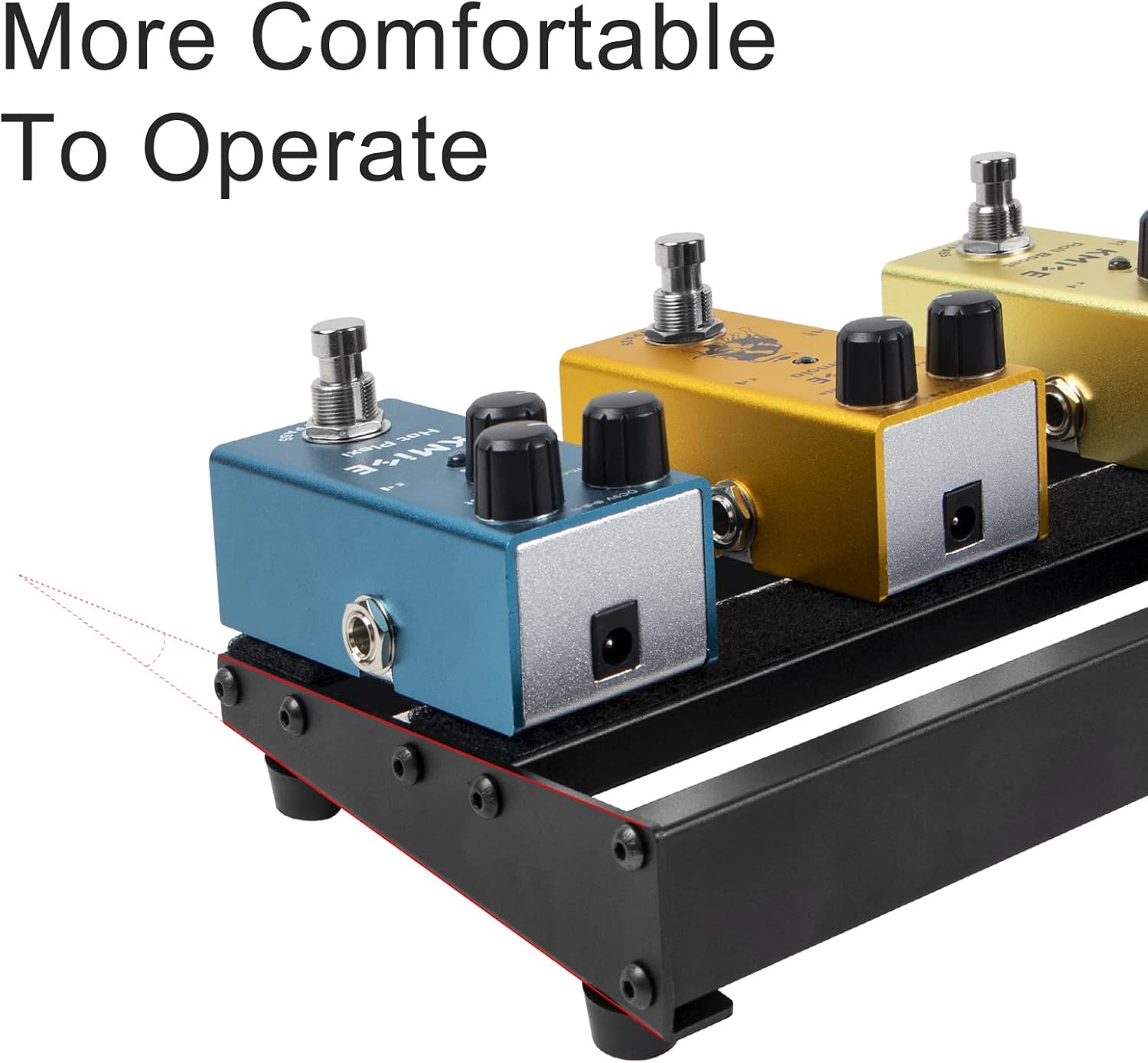
Figure 4: The inclined design of the pedalboard for ergonomic use.
3. Operating the Power Supply
The integrated power supply provides multiple isolated outputs to power various effects pedals. Ensure each pedal is connected to an output port that matches its specific voltage and current requirements to prevent damage.
3.1 Output Specifications:
- DC IN: 18V 2000mA (for powering the pedalboard itself)
- 9V Outputs: Multiple ports with varying current capacities (e.g., 100mA, 300mA, 500mA)
- 12V Output: 200mA
- 18V Output: 200mA
- USB OUT: 5V 500mA (for charging small devices)
Always verify the power requirements of your pedals before connecting them to avoid malfunction or damage. The power supply is designed to provide stable and clean power to your effects chain.
Video 1: Overview of the lotmusic Guitar Pedal Board with Power Supply, demonstrating its features and connectivity.
4. Maintenance
To ensure the longevity and optimal performance of your lotmusic Guitar Pedalboard, follow these simple maintenance guidelines:
- Cleaning: Wipe the aluminum alloy surface with a soft, dry cloth to remove dust and fingerprints. For stubborn dirt, a slightly damp cloth can be used, followed by immediate drying. Avoid abrasive cleaners or solvents.
- Cable Management: Regularly check and re-secure cables with zip ties to prevent strain on connections and maintain a tidy setup.
- Storage: When not in use, store the pedalboard in its provided carrying bag to protect it from dust, moisture, and physical damage.
- Power Supply Care: Ensure the power adapter and cables are free from kinks or damage. Do not expose the power supply unit to liquids.
5. Troubleshooting
If you encounter issues with your pedalboard, consider the following troubleshooting steps:
- No Power to Pedals:
- Verify the main power adapter is securely plugged into both the wall outlet and the pedalboard's 'DC IN 18V' port.
- Check that each pedal's power cable is correctly connected to the appropriate voltage output on the pedalboard.
- Ensure the pedal's power requirements (voltage and mA) match the output of the connected port. Some pedals, especially those with higher current draw (e.g., certain Boss pedals or Wah pedals), may require specific outputs or external power if the integrated supply's output is insufficient.
- Noise/Hum in Audio Signal:
- Ensure all patch cables are securely connected and in good condition.
- Verify that the power supply outputs are isolated. While this pedalboard's supply is designed for isolation, external factors can introduce noise.
- Test pedals individually to identify if a specific pedal is causing the noise.
- Pedals Not Sticking to Velcro:
- Ensure the bottom of your pedals was clean and dry before applying the hook-side Velcro.
- Press pedals firmly onto the pedalboard. If adhesion is still an issue, consider replacing the Velcro strips on the pedals or the pedalboard.
6. Specifications
| Brand | lotmusic |
| Model Number | Vulendu |
| Item Weight | 3.1 pounds |
| Product Dimensions | 19 x 5 x 1.7 inches |
| Body Material | Aluminium Alloy |
| Power Source | Corded Electric |
| Voltage | 9 Volts (various outputs available) |
| Connector Type | 1/4 inch audio |
| Hardware Interface | 1/4-inch Audio |
| Signal Format | Analog |
| Date First Available | October 15, 2021 |
7. Warranty and Support
For warranty information, technical support, or any inquiries regarding your lotmusic Guitar Pedalboard, please refer to the contact information provided with your purchase documentation or visit the official lotmusic website. Keep your proof of purchase for warranty claims.