1. Introduction
This manual provides detailed instructions for the installation, operation, and maintenance of your VIVE COMFORT TP-P-605 Digital Thermostat. This device is designed to provide precise temperature control and enhance comfort in your living space. Please read this manual thoroughly before installation and use to ensure proper function and safety.
2. Safety Information
WARNING: A trained, experienced technician must install this product. Carefully read these instructions. Failure to follow these instructions may cause damage to the product or create a hazardous condition.
- Always turn off power to the heating/cooling system at the main fuse or circuit breaker panel before installing or servicing the thermostat.
- Ensure all wiring connections are secure and comply with local electrical codes.
- Do not short circuit the terminals on the gas valve or at the system control to test the thermostat. This will damage the thermostat and void the warranty.
- This thermostat is designed for 24 Volt systems. Do not use with line voltage systems (120/240V).
3. Package Contents
Verify that your package contains the following items:
- VIVE COMFORT TP-P-605 Digital Thermostat
- Wall mounting plate (sub-base)
- Mounting screws and wall anchors
- User Manual
4. Product Overview
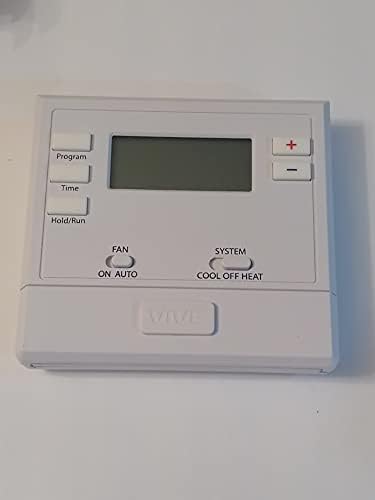
The VIVE COMFORT TP-P-605 is a single-stage, 5/1/1 programmable digital thermostat featuring a clear LCD display and intuitive controls.

Front view of the VIVE COMFORT TP-P-605 Digital Thermostat, showing the LCD screen, program buttons, temperature adjustment buttons, and system/fan mode switches.
Key Features:
- 5/1/1 programmable schedule
- Easy menu-driven programming
- Programming words: Holiday, Wake, Leave, Return, Sleep
- 2 square inch blue backlit LCD display
- Compatible with electric or gas systems
- Separate heating and cooling swing settings
- Auto-recovery from power loss
- Room temperature calibration adjustment
- 5-minute compressor delay protection (selectable on or off)
- Filter change indicator (selectable on or off)
- Separate B & O terminals
- Simple picture label badge system
- Easy-to-wire color-coded terminal blocks
- Universal sub-base for wall mount or junction box installation
- Operates on battery or 24V power
5. Setup and Installation
5.1 Mounting the Thermostat
The thermostat is designed for wall mounting or junction box installation. Ensure the mounting location is away from direct sunlight, drafts, or heat sources that could affect temperature readings.

The backplate of the VIVE COMFORT TP-P-605 Digital Thermostat, showing the wiring terminals and mounting holes.
- Turn off power to your HVAC system at the circuit breaker.
- Remove the old thermostat. Note the wire connections and label them if necessary.
- Separate the front of the new thermostat from its sub-base (mounting plate).
- Position the sub-base on the wall or junction box and mark the mounting holes.
- Drill pilot holes and insert wall anchors if needed.
- Secure the sub-base to the wall using the provided screws.
5.2 Wiring
The TP-P-605 features easy-to-wire color-coded terminal blocks. Refer to the wiring diagram provided with your unit for specific connections. This thermostat supports both battery and 24V hardwire power with battery backup.
Thermostat Application Guide:
| Description | Compatibility |
|---|---|
| Gas or Oil Heat | Yes |
| Electric Furnace | Yes |
| Heat Pump (No Aux or Emergency Heat) | Yes |
| Heat Pump (With Aux or Emergency Heat) | No |
| Multi-Stage Systems | No |
| 2-Wire Hydronic | Yes |
| Cool Only Systems | Yes |
| Floor or Wall Furnace | Yes |
Power Type:
| Description | Compatibility |
|---|---|
| Battery Power (Common Wire) | No |
| Hardwire (Common Wire) with Battery Backup | Yes |
| Battery Backup | Yes |
5.3 Completing Installation
- After wiring, carefully align the thermostat front with the sub-base and snap it into place.
- Restore power to your HVAC system at the circuit breaker.
- The thermostat display should illuminate.
6. Operating Instructions
The VIVE COMFORT TP-P-605 thermostat offers various modes and programming options for optimal comfort and energy efficiency.
6.1 Setting the Time and Day
Use the 'Time' button to access time and day settings. Follow the on-screen prompts to adjust. The blue backlight will assist visibility.
6.2 Selecting System Mode
Use the 'SYSTEM' switch to select your desired operating mode:
- COOL: Activates the cooling system.
- OFF: Turns off both heating and cooling systems.
- HEAT: Activates the heating system.
6.3 Selecting Fan Mode
Use the 'FAN' switch to select your desired fan operation:
- ON: The fan runs continuously.
- AUTO: The fan runs only when the heating or cooling system is active.
6.4 Adjusting Temperature
Use the + and - buttons to increase or decrease the desired temperature setpoint.
6.5 Programming Schedule (5/1/1)
The thermostat allows for 5/1/1 programming, meaning you can set different schedules for weekdays, Saturday, and Sunday. Use the 'Program' button to enter programming mode. The thermostat uses programming words like 'Wake', 'Leave', 'Return', and 'Sleep' to guide you through setting different temperature setpoints for various times of the day.
Refer to the detailed programming instructions in the full manual for step-by-step guidance on setting your personalized schedule.
6.6 Hold/Run Function
The 'Hold/Run' button allows you to temporarily override the programmed schedule (Hold) or resume the schedule (Run).
7. Maintenance
7.1 Battery Replacement
The VIVE COMFORT TP-P-605 thermostat uses AA batteries for power or backup. When the low battery indicator appears on the display, it is time to replace the batteries.
The battery compartment of the VIVE COMFORT TP-P-605 Digital Thermostat, located on the front panel.
- Gently pull the front cover of the thermostat to access the battery compartment.
- Remove the old AA batteries.
- Insert two new AA alkaline batteries, ensuring correct polarity (+/-).
- Close the battery compartment cover.
7.2 Cleaning
Clean the thermostat with a soft, damp cloth. Do not use abrasive cleaners or solvents.
7.3 Filter Change Indicator
The thermostat features a filter change indicator, which can be set to 'on' or 'off'. If enabled, it will remind you when it's time to change your system's air filter.
8. Troubleshooting
If you experience issues with your VIVE COMFORT TP-P-605 thermostat, try the following steps:
- No Display/Blank Screen: Check if the batteries are correctly installed and have sufficient charge. If hardwired, ensure power to the HVAC system is on.
- System Not Responding: Verify that the system mode (HEAT/COOL/OFF) and fan mode (ON/AUTO) are set correctly. Check the circuit breaker for your HVAC system.
- Incorrect Temperature Reading: Ensure the thermostat is not exposed to direct sunlight, drafts, or heat sources. The room temperature calibration adjustment feature can be used to fine-tune readings if necessary (refer to the full manual for instructions).
- Compressor Short Cycling: The 5-minute compressor delay protection is designed to prevent short cycling. Ensure this feature is enabled if you experience frequent on/off cycles.
- Programming Issues: Double-check your programmed schedule. If issues persist, try resetting the thermostat (refer to the full manual for reset procedures).
For further assistance, please contact customer support.
9. Specifications
| Feature | Detail |
|---|---|
| Model | TP-P-605 |
| Manufacturer | TORQSTART (Brand: Poiget / VIVE COMFORT) |
| Color | White |
| Style | Modern |
| Finish | Glossy or Semi-gloss |
| Shape | Rectangular |
| Power Source | Internal Battery (AA) or 24 Volts Hardwire |
| Voltage | 24 Volts |
| Item Weight | 13.8 ounces |
| Display Style | LCD with Blue Backlight |
| Mounting Type | Wall Mount |
| Certification | FCC |
| Programming | 5/1/1 Programmable |
10. Warranty
The VIVE COMFORT TP-P-605 Digital Thermostat comes with a 5-year warranty from the date of purchase. This warranty covers defects in materials and workmanship under normal use. Please retain your proof of purchase for warranty claims. The warranty does not cover damage caused by improper installation, misuse, abuse, or unauthorized modifications.
11. Support
For technical assistance, troubleshooting, or warranty inquiries, please contact VIVE COMFORT customer support:
- Toll Free: 1-888-776-1427
- Website: www.vivecomfort.com
- Hours of Operation: Monday - Friday, 9 AM - 6 PM Eastern Time