
1. Introduction
Thank you for choosing the Weeylite RB08P RGB LED Video Light. This compact and versatile lighting solution is designed for photographers and videographers seeking portable, high-quality illumination with extensive color control. This manual provides essential information for safe and effective operation of your device.
2. Safety Information
- Do not disassemble or modify the product. Unauthorized modifications may cause damage or injury.
- Keep the device away from water, moisture, and flammable gases or liquids.
- Avoid direct eye exposure to the LED light, as it may cause discomfort or damage.
- Do not operate the device in extreme temperatures or high humidity.
- Use only the specified charging cable and power adapter.
- Keep out of reach of children.
3. Package Contents
Please check that all items are included in your package:
- Weeylite RB08P RGB LED Video Light
- Portable Tripod Holder
- USB Charging Cable
- Double Swivel Stand
- Instruction Manual
4. Product Overview
The Weeylite RB08P is a compact and lightweight RGB LED video light featuring a built-in rechargeable battery, adjustable color temperature, full RGB color control, and various scene effects. It is designed for ease of use and portability.
4.1. Components and Controls

Figure 1: Back view of the Weeylite RB08P with labeled controls.
- Power Switch: Turns the device on or off.
- Mode Button (M): Cycles through different lighting modes (CCT, HSI, Scene Effects).
- Setting Button (SET): Selects parameters within a mode for adjustment.
- Increase Button (+): Increases the value of the selected parameter.
- Decrease Button (-): Decreases the value of the selected parameter.
- OLED Display Screen: Shows current settings such as mode, brightness, color temperature, hue, saturation, and battery level.
- 1/4-inch Screw Hole: For mounting on tripods, light stands, or other accessories.
- Micro USB Charging Port: For charging the built-in battery.

Figure 2: Detailed view of the control buttons.

Figure 3: Close-up of the OLED display showing mode, brightness, and color temperature.
5. Setup
5.1. Charging the Battery
The RB08P has a built-in DC3.7V/3000mAh lithium battery. Before first use, fully charge the device.
- Connect the provided USB charging cable to the Micro USB port on the light.
- Connect the other end of the USB cable to a 5V/2A USB power adapter (not included) or a computer USB port.
- The battery icon on the OLED screen will indicate charging status. A full charge typically takes about 3 hours.

Figure 4: Micro USB charging port.
5.2. Mounting the Light
The RB08P offers flexible mounting options:
- Tripod/Light Stand: Use the 1/4-inch screw hole at the bottom or side of the light to attach it to a compatible tripod or light stand.
- Camera Hot Shoe: Attach the included double swivel stand to the 1/4-inch screw hole, then slide the swivel stand's hot shoe adapter into your camera's hot shoe mount.
- Smartphone Holder: The portable tripod holder includes a smartphone clamp. Mount your smartphone into the clamp, and then attach the RB08P light to the tripod for mobile video setups.

Figure 5: Examples of mounting the RB08P with a tripod and smartphone.
6. Operating Instructions
6.1. Power On/Off
Press and hold the Power Switch button (top button on the side) for approximately 2 seconds to turn the light on or off.
6.2. Mode Selection
Press the Mode Button (M) to cycle through the main operating modes:
- CCT Mode (Correlated Color Temperature): For white light adjustment.
- HSI Mode (Hue, Saturation, Intensity): For full RGB color control.
- Scene Effects Mode: For various pre-programmed lighting effects.
6.3. CCT Mode (White Light)
In CCT Mode, you can adjust brightness and color temperature.
- Press the Mode Button (M) until 'CCT' is displayed on the OLED screen.
- Press the Setting Button (SET) to toggle between adjusting Brightness and Color Temperature.
- Use the Increase (+) and Decrease (-) buttons to adjust the selected parameter.
- Brightness: Adjustable from 10% to 100%.
- Color Temperature: Adjustable from 2500K (warm) to 8500K (cool).

Figure 6: Brightness and Bi-color mode adjustments.
6.4. HSI Mode (Full Color)
In HSI Mode, you have full control over hue, saturation, and intensity (brightness).
- Press the Mode Button (M) until 'HSI' is displayed on the OLED screen.
- Press the Setting Button (SET) to toggle between adjusting Hue (0-360°), Saturation (0-100%), and Brightness (10-100%).
- Use the Increase (+) and Decrease (-) buttons to adjust the selected parameter.

Figure 7: HSI Full Color control interface.
6.5. Scene Effects Mode
The RB08P includes 9 pre-programmed scene effects to simulate various lighting environments.
- Press the Mode Button (M) until 'Scene' is displayed on the OLED screen.
- Use the Increase (+) and Decrease (-) buttons to cycle through the 9 available scene effects.
- Some effects may have adjustable parameters (e.g., speed or intensity), which can be selected using the Setting Button (SET) and adjusted with (+) and (-) buttons.

Figure 8: Overview of 9 Scene Light Effects.
Video 1: Demonstration of Weeylite RB08P Full Color RGB Video Light features and various modes.
7. Maintenance
- Cleaning: Use a soft, dry cloth to clean the light. Do not use harsh chemicals or abrasive materials.
- Storage: Store the device in a cool, dry place when not in use. Avoid extreme temperatures.
- Battery Care: For optimal battery life, charge the device at least once every three months if not used regularly.
8. Troubleshooting
- Light not turning on: Ensure the battery is charged. Connect to a power source and try again.
- Light not charging: Check the USB cable and power adapter for damage. Ensure the connection is secure.
- Controls unresponsive: Try turning the device off and on again. If the issue persists, contact customer support.
9. Specifications
| Feature | Specification |
|---|---|
| Product Dimensions | 5.16 x 3.78 x 2.36 inches |
| Item Weight | 16 ounces |
| Battery Type | 1 Lithium Ion battery required (Built-in) |
| Battery Capacity | 3000mAh |
| Battery Life (100% power) | Approx. 1.2 hours |
| Charging Time | Approx. 3 hours |
| Connectivity Technology | USB |
| Hardware Interface | USB |
| Color Temperature Range | 2500K-8500K |
| Brightness Adjustment | 10%-100% |
| CRI | ≥95 |
| TLCI | ≥97 |
| Max Power | 8W |
| Luminance | 630LM |
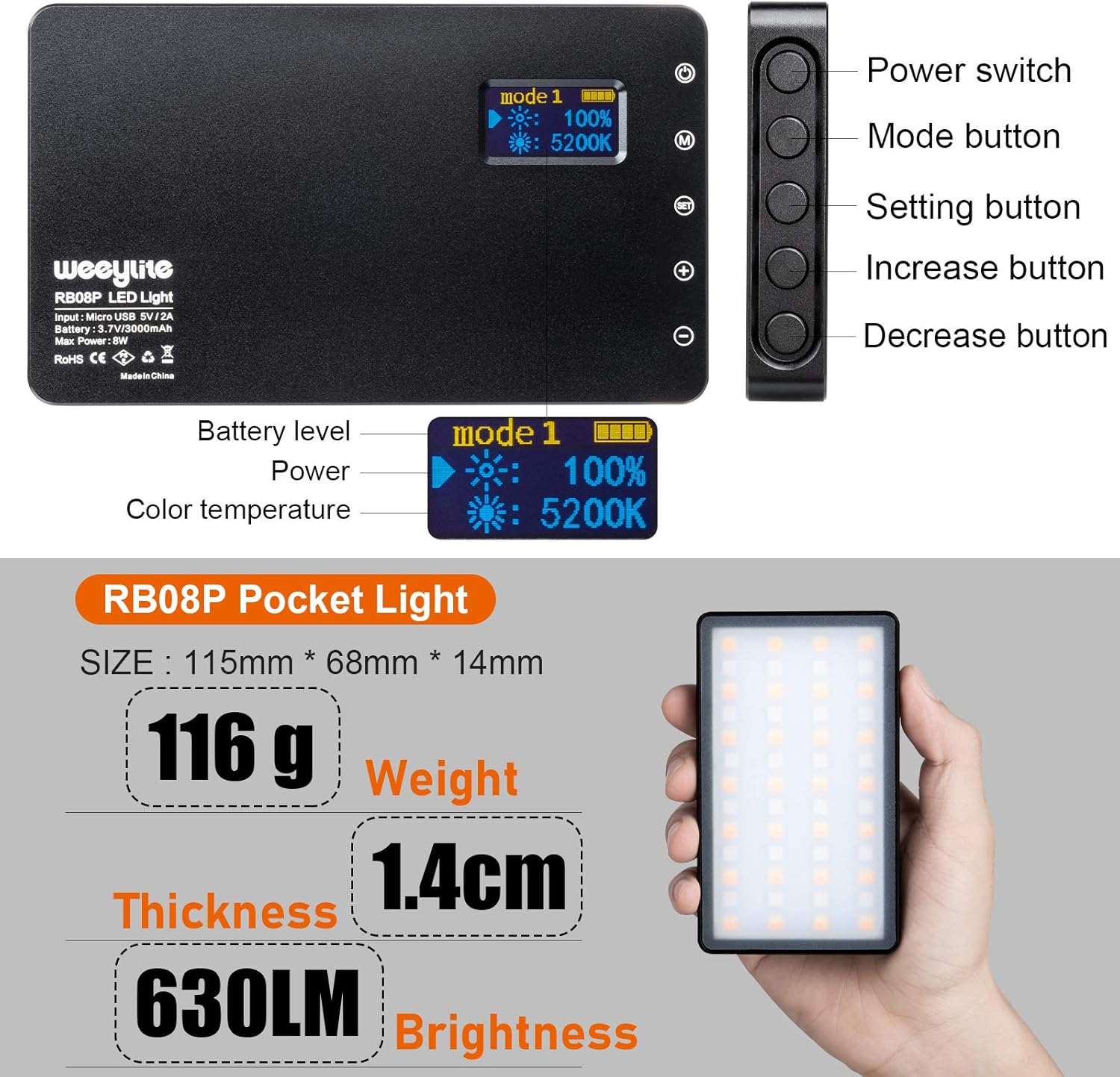
Figure 9: Key physical specifications and brightness.
10. Warranty and Support
For warranty information or technical support, please refer to the official Weeylite website or contact your retailer. Keep your purchase receipt as proof of purchase.

