
1. Product Overview
The WINFLIKE BN59-01010A is a replacement remote control designed for specific Samsung TV models. This remote control offers a direct replacement solution without requiring any programming or complex setup. Simply insert batteries, and it is ready for use.
Compatible Samsung TV Models:
- LA32C450E1
- LA26C450E1
- LA22C450E1
- BN5901010A
- BN59 01010A
This remote control is constructed from durable ABS material and features an ergonomic, lightweight design for comfortable handling.
2. Setup: Battery Installation
The remote control requires two (2) AAA batteries for operation. Batteries are not included with the remote control.
- Locate the battery compartment on the back of the remote control.
- Press down on the tab and slide the battery cover downwards to open it.
- Insert two AAA batteries, ensuring the positive (+) and negative (-) terminals align correctly with the markings inside the compartment.
- Slide the battery cover back into place until it clicks securely.

Image 2.1: Rear view of the remote control with the battery cover removed, illustrating the battery insertion process. Ensure correct polarity when inserting AAA batteries.
3. Operating Instructions
This remote control functions identically to the original Samsung BN59-01010A remote. Point the remote control directly at your Samsung TV's infrared receiver for optimal performance.
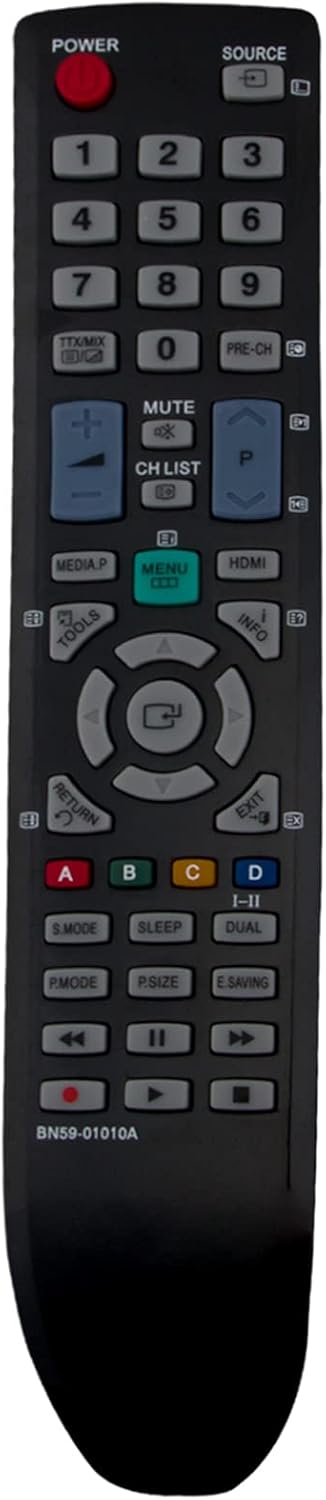
Image 3.1: Front view of the remote control, displaying the layout of all functional buttons.
Key Functions:
- POWER: Turns the TV on or off.
- SOURCE: Selects input sources (HDMI, AV, Component, etc.).
- Number Buttons (0-9): Directly selects channels.
- MUTE: Mutes or unmutes the TV sound.
- CH LIST: Displays the channel list.
- Volume (+/-): Adjusts the volume level.
- Channel (Up/Down): Changes channels sequentially.
- MENU: Accesses the TV's main menu.
- Navigation Pad (Up/Down/Left/Right/Enter): Navigates through menus and confirms selections.
- RETURN: Returns to the previous screen or menu.
- EXIT: Exits the current menu or function.
- MEDIA.P: Accesses media playback functions.
- TOOLS: Opens a quick menu with common functions.
- INFO: Displays information about the current program or input.
- Color Buttons (A, B, C, D): Used for specific functions within certain TV menus or applications.
- Playback Controls (Play, Pause, Stop, Fast Forward, Rewind): Controls media playback.
4. Maintenance
- Battery Replacement: Replace batteries when the remote control's response becomes sluggish or stops working. Always replace both batteries simultaneously with new AAA batteries.
- Cleaning: Clean the remote control with a soft, dry cloth. Do not use liquid cleaners or abrasive materials, as these can damage the remote's surface or internal components.
- Storage: If the remote control will not be used for an extended period, remove the batteries to prevent leakage and potential damage.
5. Troubleshooting
Remote Control Not Responding:
- Check Batteries: Ensure batteries are inserted correctly with the correct polarity (+/-). Replace old or depleted batteries with new ones.
- Line of Sight: Make sure there are no obstructions between the remote control and the TV's infrared receiver.
- Distance: Operate the remote control within its effective range (up to 10 meters).
- TV Compatibility: Verify that your TV model is listed as compatible with the BN59-01010A remote control.
6. Specifications
| Feature | Description |
|---|---|
| Brand | WINFLIKE |
| Model Number | BN59-01010A |
| Compatible Devices | Samsung Televisions (LA32C450E1, LA26C450E1, LA22C450E1, etc.) |
| Connectivity Technology | Infrared (IR) |
| Power Source | 2 x AAA Batteries (not included) |
| Maximum Range | 10 Meters |
| Special Features | Ergonomic, Lightweight design |
| Material | ABS Material |
7. Support and Warranty Information
For any issues or inquiries regarding your WINFLIKE BN59-01010A remote control, please contact the seller or manufacturer. They are committed to providing a satisfactory response within 24 hours for product or service-related concerns.
Specific warranty details were not provided. Please refer to your purchase documentation or contact the seller for warranty terms and conditions.