Product Overview
The bilbil L-Shaped Electric Height Adjustable Standing Desk is designed for home and office use, offering a versatile workspace that can be adjusted to suit individual needs. This desk features a robust construction and intelligent functions to enhance user comfort and productivity.
- Spacious L-Shaped Design: The desk provides a generous tabletop with a length of 59 inches and a width ranging from 24 to 39 inches, accommodating multiple monitors and office essentials.
- Electric Height Adjustment: Easily adjust the desk height between 27 inches and 45 inches using the electric motor, allowing for seamless transitions between sitting and standing positions.
- Sturdy Construction: Supported by a double-beam metal frame, the desk can hold up to 180 lbs, ensuring stability even at its highest setting. The wide T-shaped foot design further enhances stability.
- Intelligent Obstacle Detection: Built-in sensors detect obstacles during movement and automatically lower the desk by 2 cm to prevent damage or injury.
- Durable and Organized: The desktop is water and wear-resistant. Integrated wire collection holes help maintain a tidy workspace. Additional accessories like a hook for headphones and a wire basket for cable management are included.

Figure 1: The bilbil L-Shaped Electric Height Adjustable Standing Desk, showcasing its spacious black L-shaped top and sturdy black frame.
Setup and Assembly
This section provides instructions for assembling your bilbil L-Shaped Electric Height Adjustable Standing Desk. While assembly is straightforward, it requires careful attention to detail. It is recommended for one person to assemble the desk.
Before You Begin
- Unpack all components and verify against the parts list provided in the packaging. If any parts are missing, contact customer support immediately.
- Ensure you have adequate space for assembly.
- While some tools may be included, it is advisable to have a standard set of screwdrivers and an Allen wrench set on hand.

Figure 2: A visual representation of the parts list for the desk assembly. Ensure all components are present before starting.
Assembly Steps
- Attach the Legs to the Desktop: Carefully place the desktop upside down on a soft, clean surface to prevent scratches. Align the leg frames with the pre-drilled holes on the underside of the desktop. Secure them using the provided screws. Do not fully tighten screws until all components are loosely assembled.
- Install the Crossbar/Support Beams: Connect the crossbar or support beams between the leg frames. This provides structural integrity and stability. Ensure proper alignment before securing.
- Mount the Control Box and Motor: Attach the control box and motor to the designated areas on the desk frame, typically near one of the legs. Connect all necessary cables according to the wiring diagram in your physical manual.
- Install the Control Panel: Secure the control panel to the front edge of the desk, usually on the right side, ensuring it is easily accessible. Connect its cable to the control box.
- Attach Foot Pads or Casters: Depending on your preference, attach the leveling foot pads or the optional locking casters to the bottom of the desk legs.
- Install Accessories: Attach the headphone hook and wire basket to the underside of the desk as desired.
- Final Tightening: Once all components are in place and aligned, systematically tighten all screws and bolts to ensure the desk is stable and secure.
- Cable Management: Utilize the integrated wire collection holes and the wire basket to route and organize your cables, keeping your workspace neat.

Figure 3: Illustration of the double-beam construction, highlighting its superior load-bearing capacity and stability compared to single-beam designs.
Operating Instructions
Your bilbil L-Shaped Electric Height Adjustable Standing Desk is equipped with an intuitive control panel for easy height adjustments and memory presets.
Control Panel Functions
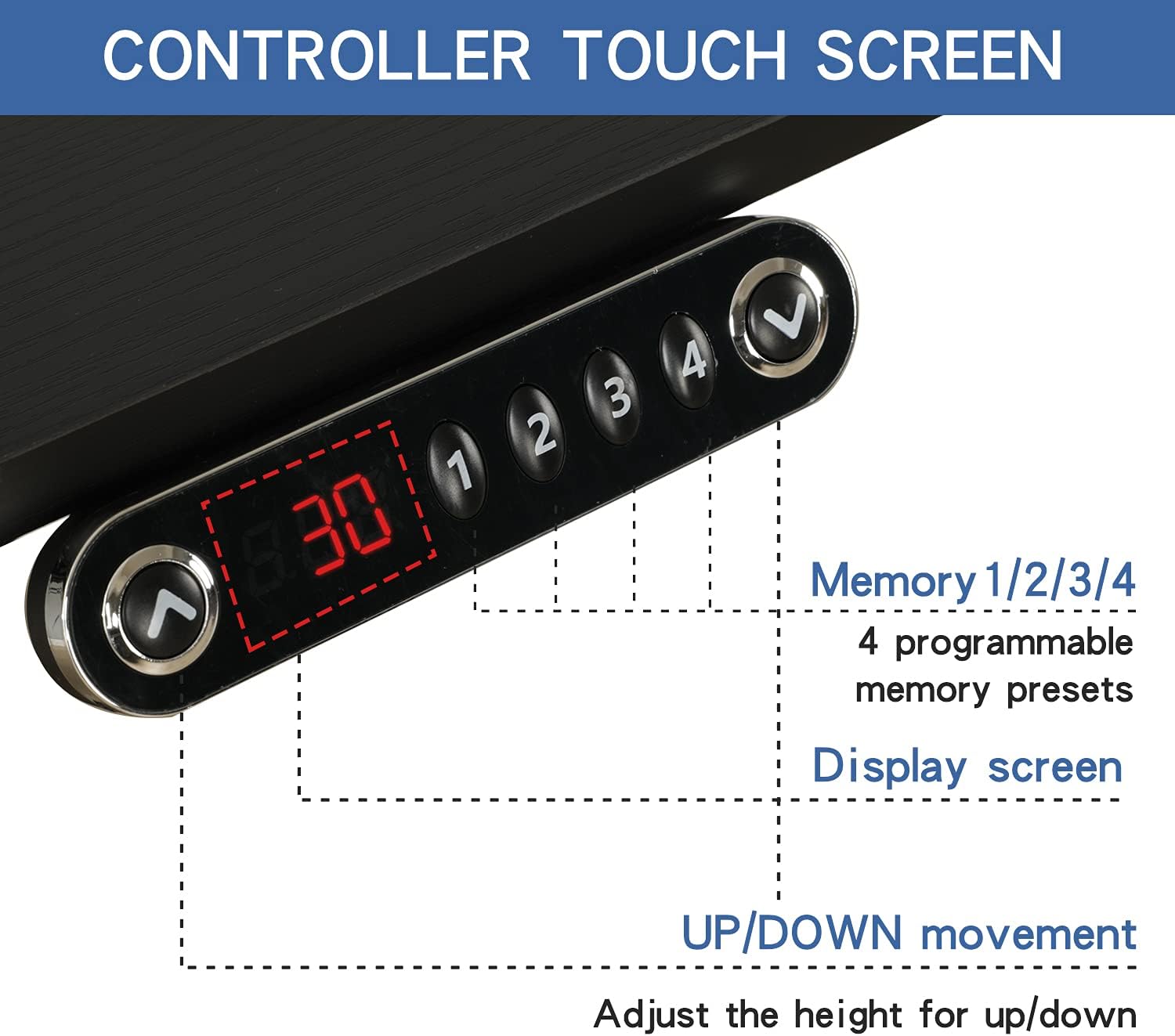
Figure 4: The desk's control panel, featuring a display screen, up/down buttons, and four programmable memory presets.
- Up/Down Buttons (▲ / ▼): Press and hold these buttons to manually adjust the desk height up or down. Release the button to stop at the desired height.
- Display Screen: Shows the current height of the desk in inches.
- Memory Presets (1, 2, 3, 4): Your desk features four programmable memory settings.
- To Save a Height: Adjust the desk to your desired height using the up/down buttons. Press the "M" button (if present, or a similar 'Set' button) followed by the desired number (1, 2, 3, or 4). The display may flash to confirm the setting is saved.
- To Recall a Height: Simply press the corresponding number button (1, 2, 3, or 4). The desk will automatically move to the saved height.
Safety Features
- Anti-Collision System: The desk is equipped with sensitive sensors that detect obstacles in its path. If an obstruction is encountered during height adjustment, the desk will automatically stop and reverse approximately 2 cm to prevent damage or injury.
- Overload Protection: The desk is designed to support a maximum weight of 180 lbs. Exceeding this limit may trigger a safety shutdown or prevent operation.
Maintenance
Proper maintenance ensures the longevity and optimal performance of your bilbil standing desk.
- Cleaning: The desktop is water and wear-resistant. For general cleaning, wipe the surface with a soft, damp cloth. Avoid abrasive cleaners or harsh chemicals that could damage the finish.
- Regular Checks: Periodically check all screws and bolts to ensure they are tight. Loose connections can affect stability and operation.
- Cable Management: Ensure cables are neatly organized and not pinched or tangled, especially during height adjustments.
- Weight Limit: Do not exceed the maximum weight capacity of 180 lbs. Distribute weight evenly across the desktop.

Figure 5: Detailed views of the desk's features, including the high-quality, waterproof tabletop, convenient headphone hook, anti-skid foot pads, and practical wire basket.
Troubleshooting
If you encounter issues with your bilbil standing desk, refer to the following common troubleshooting steps.
Common Issues and Solutions
- Desk Not Moving / Error Code Displayed:
If the desk is unresponsive or displays an error code, a reset may be required. Unplug the power cord from the wall outlet for 20 seconds. Then, plug it back in. The desk should automatically reset, and the display will show "69" upon successful completion of the reset process.
- Desk Wobbles:
Ensure all assembly screws and bolts are securely tightened. Check that the desk is placed on a level surface. Adjust the leveling foot pads if necessary to compensate for uneven floors.
- Motor Noise:
A slight motor sound during adjustment is normal. If the noise is excessive or unusual, ensure no cables or objects are obstructing the motor or lifting mechanism.
- Height Adjustment Inconsistent:
Perform a reset as described above. Ensure the desk is not overloaded beyond its 180 lbs capacity.
If the issue persists after attempting these steps, please contact bilbil customer support for further assistance.
Specifications
| Feature | Detail |
|---|---|
| Brand | bilbil |
| Model | 59 (L-Shaped) Black |
| Product Dimensions (D x W x H) | 40"D x 59"W x 46"H |
| Adjustable Height Range | 27 inches (min) to 45 inches (max) |
| Color | Black |
| Base Material | Metal |
| Top Material Type | Engineered Wood |
| Maximum Weight Recommendation | 180 Pounds |
| Lifting Mechanism | Electric |
| Required Assembly | Yes |
| Recommended Number of People for Assembly | 1 |
| Included Components | Cable Management Tray |
| Special Feature | Electric, Anti-collision System |
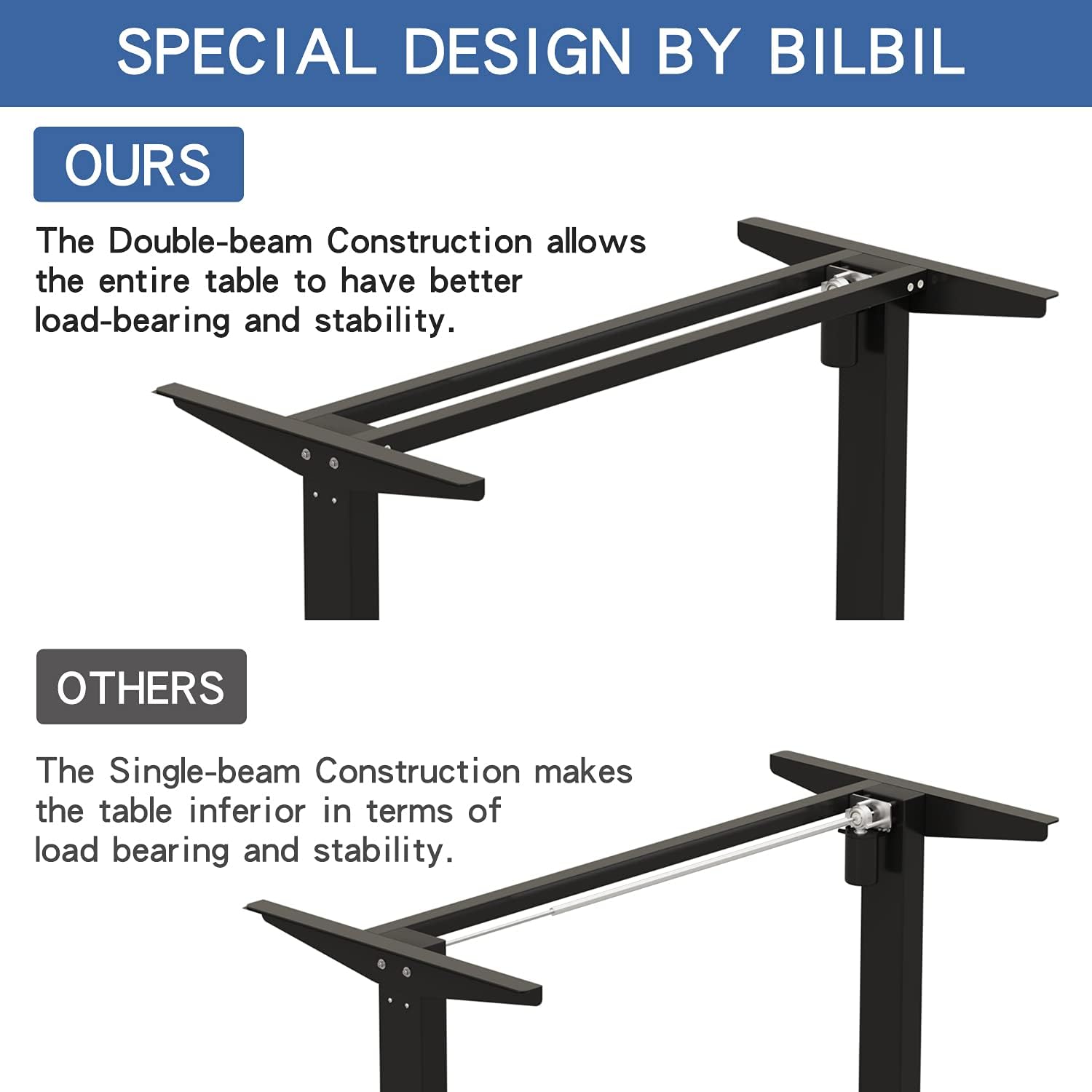
Figure 6: Detailed product dimensions, including length, width, and adjustable height range.
Warranty and Support
Product Warranty
The bilbil L-Shaped Electric Height Adjustable Standing Desk comes with a Limited Warranty. For specific terms and conditions of the warranty, please refer to the documentation included with your product or contact bilbil customer support.
Customer Support
For any questions, assistance with assembly, troubleshooting, or warranty claims, please contact bilbil customer support. You can typically find contact information on the product packaging or through the seller's page on the platform where you purchased the desk.
Seller: BilBil
Returns: This product is eligible for 30-day easy returns. Please refer to the retailer's return policy for details.
Official Product Videos
No official seller videos were found for this product in the provided data. Please refer to the assembly instructions and diagrams for visual guidance.