
1. Introduction
This manual provides instructions for the SymWell General Replacement Remote Control, designed for use with various Yamaha AV receivers. This remote is a pre-programmed, universal replacement and may not offer all functions of your original equipment remote control. Please read this manual carefully before use.
2. Product Overview
The SymWell General Replacement Remote Control is designed to operate a range of Yamaha AV receiver models. Its layout includes dedicated buttons for power, input selection, volume control, and various other functions to manage your audio-visual experience.

Image 1: Front view of the SymWell General Replacement Remote Control. This image displays the full button layout, including power, input selectors, volume, and navigation controls.
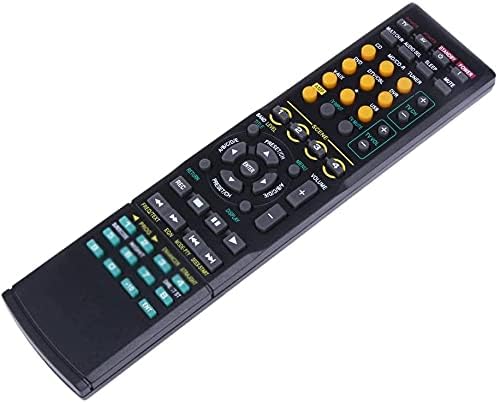
Image 2: Angled view of the SymWell General Replacement Remote Control. This perspective highlights the ergonomic design and the arrangement of buttons from a top-down angle.
3. Setup
3.1 Battery Installation
This remote control requires two AA batteries (not included). Follow these steps to install the batteries:
- Locate the battery compartment cover on the back of the remote control.
- Press down on the tab and slide the cover off.
- Insert two AA batteries, ensuring the positive (+) and negative (-) terminals align correctly with the markings inside the compartment.
- Slide the battery compartment cover back into place until it clicks securely.

Image 3: Back view of the SymWell General Replacement Remote Control with the battery compartment open. This image shows the location for inserting two AA batteries.
4. Operating Instructions
This remote control is pre-programmed for various Yamaha AV receivers. No additional programming is typically required. Point the remote directly at your Yamaha receiver when operating.
4.1 Basic Functions
- Power On/Off: Press the POWER button to turn your receiver on or off.
- Volume Control: Use the VOLUME + and VOLUME - buttons to adjust the audio level.
- Input Selection: Press the dedicated input buttons (e.g., CD, DVD, TUNER, AUX) to switch between different audio/video sources connected to your receiver.
- Mute: Press the MUTE button to temporarily silence the audio. Press again to restore sound.
- Navigation: Use the arrow buttons and ENTER button for menu navigation if supported by your receiver model.
4.2 Compatible Yamaha Receiver Models
This remote control is compatible with, but not limited to, the following Yamaha receiver models:
- RAV172
- RAV301, RAV-301
- RAV302
- RAV240, RAV-240
- HTR-5835SL
- DTX1100
- RAV305, RAV-305
- RX-V630, RXV630
- HTR-5560, HTR5560
- HTR5930
Note: As a universal replacement, some advanced or model-specific functions may not be available or fully operational.
5. Troubleshooting
- Remote not responding:
- Ensure batteries are correctly installed with proper polarity.
- Replace old batteries with new AA batteries.
- Ensure there are no obstructions between the remote and the receiver's infrared sensor.
- Confirm the remote is pointed directly at the receiver.
- Limited functionality:
- This remote is a universal replacement. It may not support all functions of your specific Yamaha receiver model. Basic functions like power, volume, and input selection are generally supported.
- Refer to your receiver's original manual for specific functions not covered by this replacement remote.
6. Specifications
| Brand | SymWell |
| Model | General Replacement Remote |
| Compatible Devices | Various Yamaha AV Receivers (e.g., RAV172, RAV301, HTR-5560) |
| Special Features | Infrared, Pre-Programmed, Universal |
| Battery Type | 2 x AA (not included) |
| Connectivity Technology | Infrared |
| Dimensions | 24.6 x 6.7 x 2.4 cm |
| Weight | 90 g |
7. Important Notes
- Batteries are not included with this product.
- This is a universal replacement remote and may not offer the full range of functions found on your original equipment remote.