1. Introduction
This manual provides comprehensive instructions for the setup, operation, and maintenance of your THE G-LAB Keyz Palladium AZERTY Gaming Keyboard and Kult NITROGEN Atom Gaming Mouse. Please read this manual carefully before using the products to ensure optimal performance and longevity.

Image 1.1: The G-Lab Keyz Palladium Keyboard and Kult NITROGEN Atom Mouse bundle.
2. Product Features
2.1. Keyz Palladium Gaming Keyboard
- Responsive and Silent Typing: Designed for optimized typing speed, precision, and comfort. Features highly reactive and silent keys, offering superior performance compared to standard membrane keyboards.
- RGB Backlighting with 11 Effects: Choose from 11 vibrant RGB lighting modes and customize the keyboard's illumination with 7 available colors. Five profiles allow for easy switching between personalized settings. Backlight can be configured via software or directly using keyboard shortcuts.
- Magnetic Detachable Wrist Rest: Equipped with a magnetic wrist rest for enhanced comfort. Its ergonomic design promotes an ideal hand position, crucial for extended gaming sessions, helping to prevent wrist strain.

Image 2.1: Close-up view of the Keyz Palladium keyboard showcasing its RGB backlighting.

Image 2.2: Detail of the Keyz Palladium keyboard's multicolor RGB LED backlighting, highlighting customization options.
2.2. Kult NITROGEN Atom Gaming Mouse
- Ultra-Precise and Fast: The Kult Nitrogen ATOM mouse ensures extreme precision for maximum in-game efficiency. Its high-performance optical sensor allows DPI adjustment up to 4800 DPI across 6 levels.
- Adjustable Polling Rate: Modify the polling rate up to 125 Hz for exceptional responsiveness. With a maximum acceleration of 8G, this mouse provides perfect tracking of all your rapid movements.
- RGB 16.8 Million Colors: The Kult Nitrogen ATOM offers 16.8 million colors for vibrant and resplendent backlighting. Through its Windows-compatible software, you can choose from 9 backlight effects and adjust brightness and speed.
- 9 Programmable Buttons: Utilize all features of the Kult Nitrogen ATOM mouse with its customization software. Program each of the 9 buttons and save profiles for different games. Assign macros for complex actions with a single click.
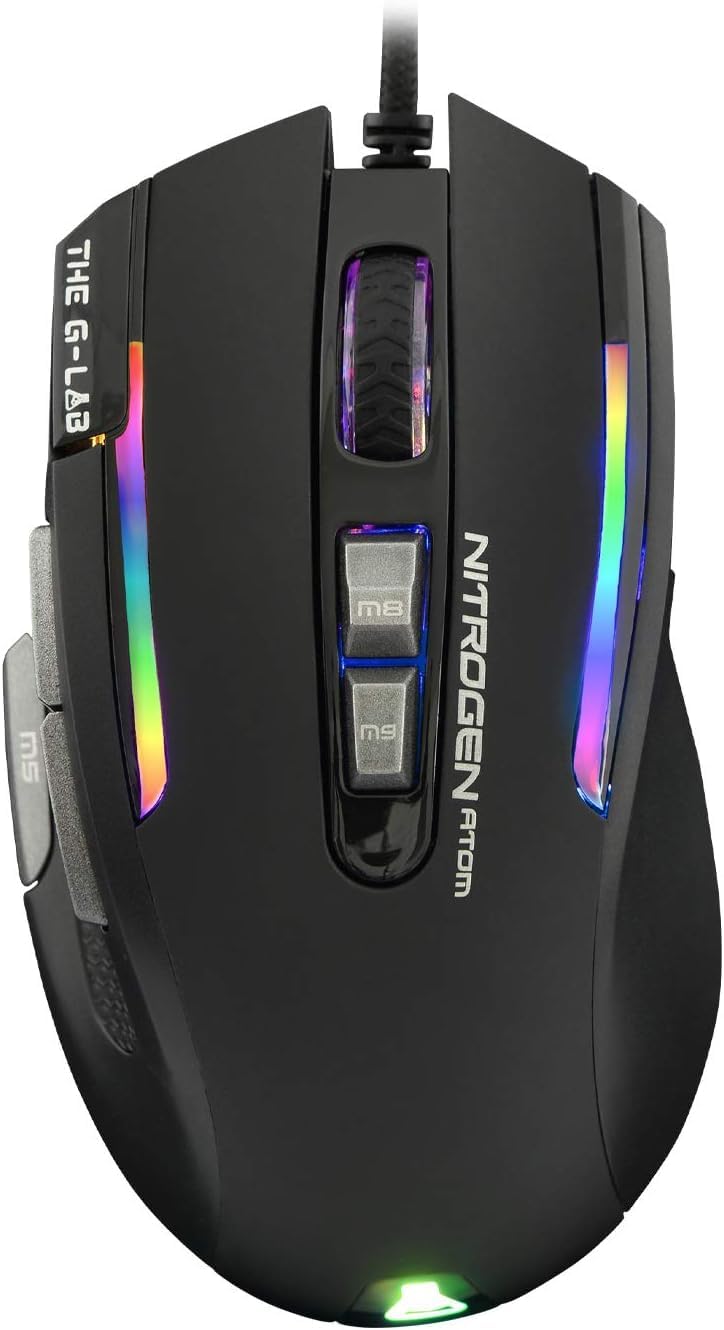
Image 2.3: Close-up view of the Kult NITROGEN Atom mouse.

Image 2.4: Detail of the Kult NITROGEN Atom mouse, highlighting the DPI adjustment button and premium gaming sensor.

Image 2.5: The Kult NITROGEN Atom mouse displaying its full RGB backlight with various light effects.
3. Setup Instructions
3.1. Connecting the Devices
- Connect the Keyboard: Plug the USB connector of the Keyz Palladium keyboard into an available USB port on your computer.
- Connect the Mouse: Plug the USB connector of the Kult NITROGEN Atom mouse into another available USB port on your computer.
- Automatic Driver Installation: Your operating system (Windows, macOS, Linux) should automatically detect and install the necessary drivers for both devices. This process may take a few moments.
3.2. Software Installation (Optional for Advanced Customization)
For advanced customization of RGB lighting, macros, and button assignments, it is recommended to install the dedicated software for each device. The software is typically available for download from THE G-LAB's official website.
- Mouse Software: The Kult NITROGEN Atom mouse software is compatible with Windows operating systems. Install it to access 9 backlight effects, 16.8 million color options, and program the 9 buttons.
- Keyboard Software: The Keyz Palladium keyboard software allows for detailed customization of RGB lighting (11 modes, 7 colors) and profile management.
Note: Ensure your operating system is up to date before installing any software.
4. Operating Instructions
4.1. Keyz Palladium Keyboard Operation
- RGB Lighting Control: Use dedicated keyboard shortcuts (often involving the 'Fn' key combined with other keys like 'F1' to 'F12' or arrow keys) to cycle through 11 lighting modes, adjust brightness, and change colors. Refer to the keyboard's specific key legends for exact combinations.
- Profile Switching: If configured, use designated keys or software to switch between up to 5 custom lighting and macro profiles.
- Wrist Rest Attachment: The magnetic wrist rest can be easily attached or detached from the keyboard's front edge for personalized comfort.
4.2. Kult NITROGEN Atom Mouse Operation
- DPI Adjustment: Use the dedicated DPI button (often located near the scroll wheel) to cycle through 6 sensitivity levels, up to 4800 DPI. This allows for on-the-fly sensitivity changes to suit different tasks or games.
- Programmable Buttons: Utilize the 9 programmable buttons for custom functions, macros, or shortcuts. These are configured via the Kult NITROGEN Atom software.
- RGB Lighting Customization: Adjust the mouse's RGB lighting effects, colors (16.8 million options), brightness, and speed using the dedicated software.
5. Maintenance
Proper maintenance ensures the longevity and optimal performance of your gaming peripherals.
- Cleaning: Regularly clean the keyboard and mouse with a soft, dry, lint-free cloth. For stubborn dirt, slightly dampen the cloth with water or a mild cleaning solution. Avoid harsh chemicals or abrasive materials.
- Keyboard Keys: Use compressed air to remove dust and debris from underneath the keyboard keys.
- Mouse Sensor: Ensure the optical sensor on the underside of the mouse is clean and free from obstructions for accurate tracking.
- Storage: When not in use, store the devices in a clean, dry environment away from extreme temperatures and direct sunlight.
6. Troubleshooting
If you encounter issues with your THE G-LAB Keyz Palladium Keyboard or Kult NITROGEN Atom Mouse, refer to the following common solutions:
- Device Not Recognized:
- Ensure the USB cables are securely plugged into your computer's USB ports.
- Try plugging the devices into different USB ports.
- Restart your computer.
- Check Device Manager (Windows) or System Information (macOS) to see if the devices are listed.
- RGB Lighting Not Working/Incorrect:
- Ensure the lighting is enabled via keyboard shortcuts or the customization software.
- Check for software updates for both the keyboard and mouse.
- Reset the devices to factory settings if possible (refer to software or manufacturer's website for instructions).
- Mouse Tracking Issues:
- Clean the optical sensor on the underside of the mouse.
- Ensure you are using the mouse on a suitable surface (a mouse pad is recommended).
- Adjust DPI settings to a comfortable level.
- Programmable Buttons Not Functioning:
- Verify that the customization software is installed and running.
- Check that the buttons are correctly assigned within the software.
- Ensure you have saved and activated the desired profile.
If problems persist, please contact THE G-LAB customer support for further assistance.
7. Specifications
| Feature | Specification |
|---|---|
| Brand | THE G-LAB |
| Keyboard Model | Keyz Palladium |
| Keyboard Layout | AZERTY |
| Keyboard Connectivity | Wired USB |
| Keyboard Backlight | RGB (11 effects, 7 colors) |
| Keyboard Features | Responsive & Silent Keys, Magnetic Detachable Wrist Rest |
| Mouse Model | Kult NITROGEN Atom |
| Mouse Connectivity | Wired USB |
| Mouse Sensor Type | Optical |
| Mouse DPI | Up to 4800 DPI (6 adjustable levels) |
| Mouse Polling Rate | Up to 125 Hz |
| Mouse Acceleration | 8G |
| Mouse Buttons | 9 Programmable Buttons |
| Mouse Backlight | RGB (16.8 million colors, 9 effects) |
| Software Compatibility | Windows (for mouse customization) |
| ASIN | B09C7ZDFKX |
| Item Model Number | 1b3507a2-6e6a-407c-99c9-49d14d9dac08 |
8. Warranty and Support
For warranty information and customer support, please refer to the official THE G-LAB website or contact your retailer. Standard return policies typically allow for returns within 30 days of purchase, subject to retailer terms.
Information regarding the availability of spare parts is currently not available.
Software updates are not guaranteed beyond the initial release, please check the manufacturer's website for any available updates.


