1. Introduction
The Laptom Pro Smart Dog Bark Collar V1 is designed to provide a humane and effective solution for managing excessive dog barking. Utilizing advanced bark recognition technology, this collar employs dual vibration modes and adjustable sensitivity levels to correct barking behavior without the use of harmful static shock. It is suitable for small, medium, and large dogs and features a durable, waterproof design for versatile use.
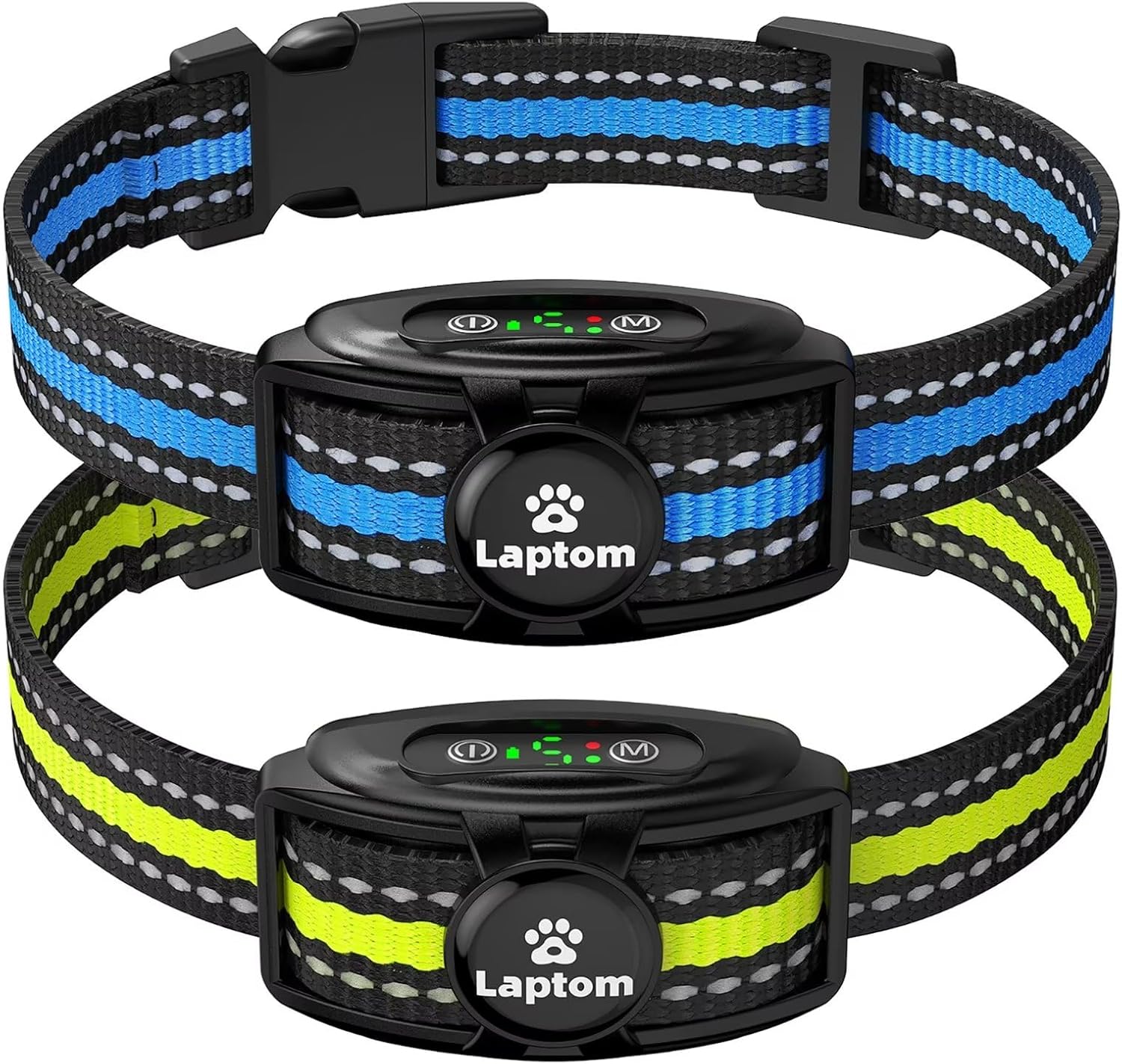
Figure 1: Laptom Pro Smart Dog Bark Collars (Blue & Yellow variants)
2. Product Features
- No Shock Dual Vibration Mode: Offers two humane training modes (Vibration Mode & Strong Vibration Mode) to effectively deter barking without causing pain or harm.
- Advanced Smart Bark Recognition Chip: Equipped with a third-generation chip and anti-false triggering technology, ensuring accurate detection of your dog's bark while filtering out environmental noises.
- USB Rechargeable & High Efficiency Battery: Features a 480mAh lithium battery providing 10-15 days of use on a 2-3 hour charge. Includes overload protection and a low battery alarm.
- Pet-Friendly Design: Lightweight unit with three soft, durable nylon straps (adjustable for neck sizes 8"-21" / 20cm-53cm) and reflective stripes for visibility. Includes three pairs of soft silicone sleeves for comfort and skin protection.
- Adjustable Sensitivity Levels: Five sensitivity levels (1-5) allow customization based on your dog's barking intensity and environment.

Figure 2: Internal Components and Technology
3. Package Contents
Your Laptom Pro Smart Dog Bark Collar V1 package includes the following items:
- 2 x Laptom Pro Smart Dog Bark Collar Units
- 2 x Adjustable Nylon Straps (Blue & Yellow)
- 2 x USB Charging Cables
- 3 Pairs x Soft Silicone Sleeves (for contact points)
- Instruction Manual

Figure 3: Package Contents
4. Setup
4.1 Charging the Collar
- Locate the charging port on the collar unit, usually covered by a rubber flap for waterproofing.
- Connect the provided USB charging cable to the collar unit and a compatible USB power source (e.g., computer, wall adapter).
- The collar's digital display will indicate charging status. A full charge typically takes 2-3 hours.
- Once fully charged, disconnect the cable and ensure the rubber flap is securely closed to maintain IPX7 waterproof integrity.
4.2 Attaching the Strap and Silicone Sleeves
- Thread the nylon strap through the loops on the collar unit.
- Select the appropriate length silicone sleeves for the contact points based on your dog's fur length. Gently push the sleeves onto the contact points until secure.

Figure 4: Collar Unit Overview with Labeled Components
5. Operating Instructions
5.1 Power On/Off
- To turn on: Press and hold the Power button (ⓘ) until the indicator light illuminates.
- To turn off: Press and hold the Power button (ⓘ) until the indicator light turns off.
5.2 Mode Selection
The collar offers two humane training modes:
- Beep + Vibration Mode: Indicated by a green light. The collar will emit a beep followed by vibration upon bark detection.
- Beep + Strong Vibration Mode: Indicated by a red light. The collar will emit a beep followed by a stronger vibration upon bark detection.
To switch between modes, press the Mode button (M).
5.3 Adjusting Sensitivity Levels
The collar has 5 adjustable sensitivity levels. A higher level means the collar is more sensitive to barking and will activate faster.
- To adjust sensitivity: While the collar is on, press the Power button (ⓘ) to cycle through levels 1-5. The digital display will show the current sensitivity level.
6. Wearing the Collar
Proper fit is crucial for the collar's effectiveness and your dog's comfort.
- Position the collar unit centrally on your dog's throat, ensuring the contact points are touching the skin.
- Adjust the nylon strap to ensure a snug fit. You should be able to fit one finger comfortably between the collar and your dog's neck. The collar should not be too loose, as this may prevent proper contact, or too tight, which could cause discomfort.
- The collar is adjustable for neck sizes ranging from 8 inches (20cm) to 21 inches (53cm).
- Use the provided silicone sleeves over the contact points to enhance comfort and protect your dog's skin, especially for dogs with shorter fur.

Figure 5: Proper Collar Fit and Neck Size Guide
7. Maintenance
7.1 Cleaning
- Regularly inspect the collar and contact points for dirt or debris.
- Clean the collar unit and strap with a damp cloth. Avoid using harsh chemicals.
- Ensure the charging port cover is always sealed when not charging to prevent water ingress.
7.2 Battery Care
- Charge the collar when the low battery alarm (blinking green indicator) is active.
- Avoid overcharging. Disconnect the charger once the battery is full.
7.3 Waterproofing
The Laptom Pro Smart Dog Bark Collar is IPX7 waterproof, meaning it can withstand splashes, rain, and snow. However, it is not recommended for prolonged submersion.

Figure 6: IPX7 Waterproof Feature
8. Troubleshooting
- Collar not activating: Ensure the collar is turned on and fully charged. Check that the contact points are making proper contact with your dog's skin. Adjust the sensitivity level to a higher setting if needed.
- False triggering: If the collar activates without your dog barking, try lowering the sensitivity level. Ensure the collar is not too loose, allowing it to rub against other surfaces.
- Dog not responding: Verify the collar is fitted correctly and the contact points are making good contact. Increase the sensitivity level or switch to the Strong Vibration Mode. Consistent training is key.
- Battery not charging: Check the USB cable and power source connections. Ensure the charging port is clean and free of debris.
9. Specifications
| Feature | Specification |
|---|---|
| Model Name | V1 |
| Brand | Laptom Pro |
| Item Weight | 10.5 ounces |
| Battery Type | 1 Lithium Ion battery required |
| Waterproof Rating | IPX7 |
| Neck Girth (Adjustable) | 8" - 21" (20cm - 53cm) |
| Material | Silicone (for contact sleeves) |
| Training Modes | Beep + Vibration, Beep + Strong Vibration |
| Sensitivity Levels | 5 |
10. Safety Information
- Do not leave the collar on your dog for more than 12 consecutive hours to prevent skin irritation.
- Regularly check your dog's neck for any signs of irritation, redness, or sores. If irritation occurs, discontinue use and consult a veterinarian.
- Ensure the collar is fitted correctly; it should be snug enough for the contact points to work but not restrict breathing or movement.
- This device is intended for bark control and training purposes only. Do not use it for aggressive dogs or for any other purpose.
- Keep out of reach of children.
11. Warranty and Support
Specific warranty details are not provided in the product information. For warranty claims, technical support, or further assistance, please refer to the contact information provided with your product packaging or visit the official Laptom Pro website.