Introduction
This manual provides essential information for the operation and maintenance of your MODERNESS 10.1 Inch Android Tablet, Model MDN10013. This device is designed for general computing tasks, media consumption, and access to various applications.
Key features include a 10.1-inch HD IPS touchscreen, a 64-bit Quad-Core processor, 2GB RAM, 32GB internal storage (expandable up to 128GB via microSD), dual cameras (2MP front, 5MP rear), dual speakers, and a 6000mAh battery. It operates on the Android 12 OS with full Google service access.

Image: Front and back view of the MODERNESS 10.1 Inch Android Tablet, showcasing its sleek design and rear camera module.
Setup
Package Contents
- 1 x MODERNESS 10.1 Inch Android Tablet (Model: MDN10013)
- 1 x Power Adapter
- 1 x USB-C Cable
Initial Power On and Configuration
- Charging the Tablet: Before first use, fully charge the tablet using the provided power adapter and USB-C cable. Connect the USB-C cable to the tablet's USB-C port and the other end to the power adapter, then plug the adapter into a wall outlet.
- Powering On: Press and hold the Power On/Off button (refer to the diagram in the "Components" section) until the screen illuminates.
- Initial Setup Wizard: Follow the on-screen instructions to select your language, connect to a Wi-Fi network, and sign in with your Google account. This step is crucial for accessing Google services and the Play Store.
- Storage Expansion: If you wish to expand storage, insert a microSD card into the dedicated microSD card slot. The tablet supports up to 128GB.
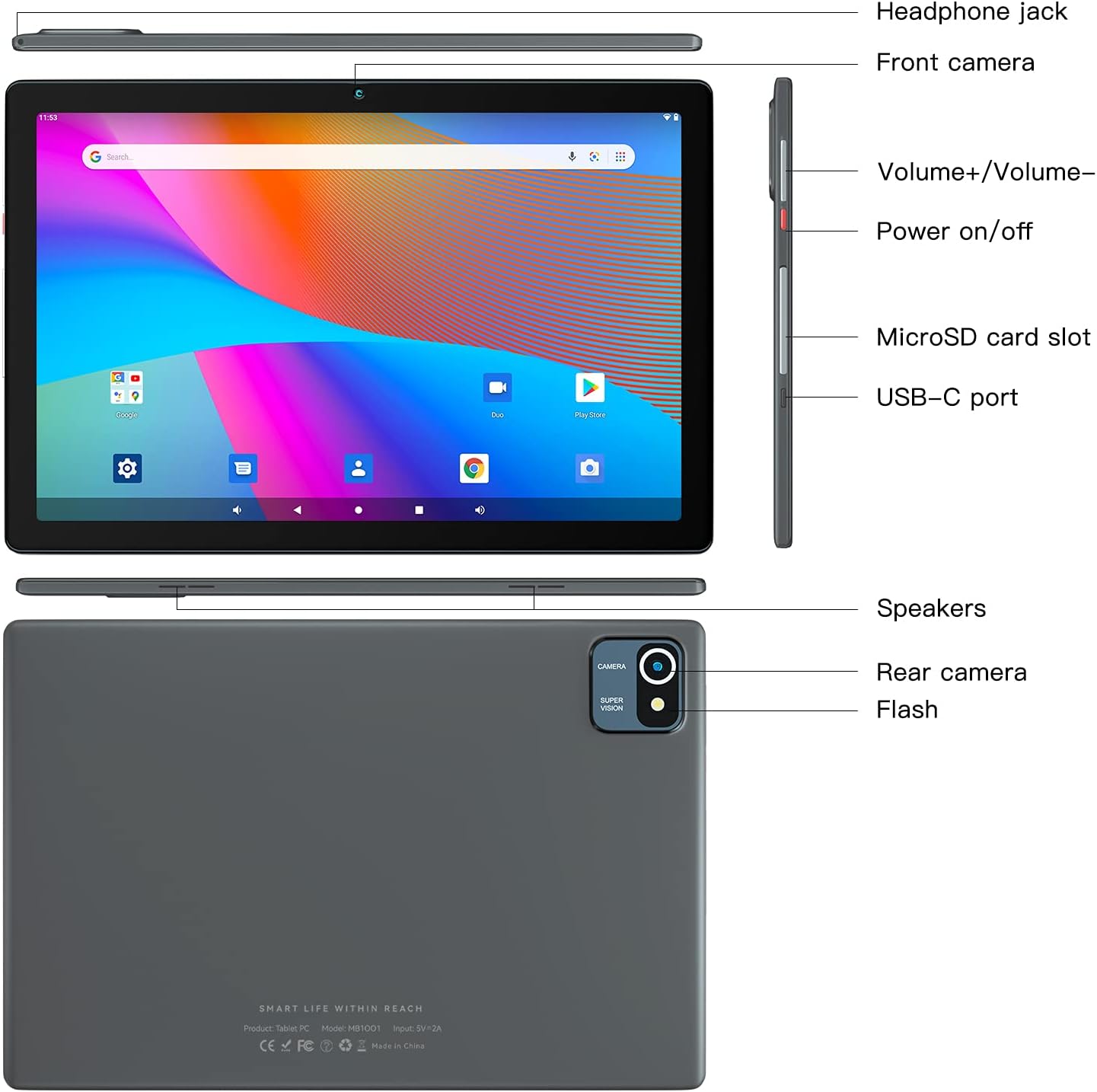
Image: Detailed diagram illustrating the location of the headphone jack, front camera, volume buttons, power button, microSD card slot, USB-C port, speakers, rear camera, and flash on the tablet.
Operating Instructions
Basic Navigation
- Touchscreen: Navigate the interface by tapping, swiping, pinching, and spreading on the 10.1-inch HD IPS touchscreen.
- Home Screen: Access your installed applications and widgets from the home screen.
- Notifications: Swipe down from the top of the screen to view notifications and quick settings.
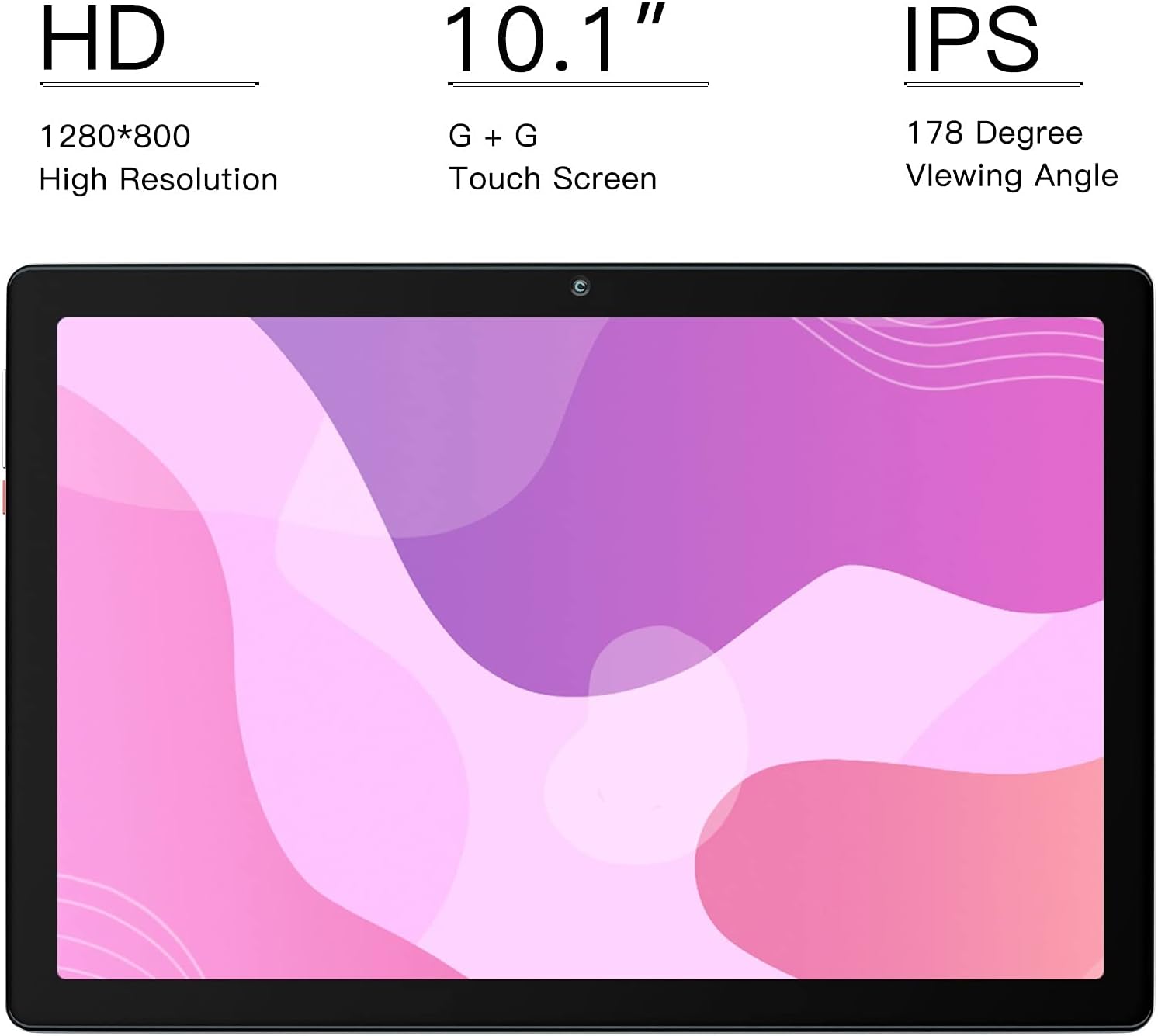
Image: Close-up of the tablet's 10.1-inch HD IPS display, highlighting its 1280x800 resolution and wide 178-degree viewing angle for vibrant visuals.
Connectivity
- Wi-Fi: Connect to wireless networks via the Wi-Fi settings.
- Bluetooth: Pair with Bluetooth devices such as headphones or speakers for wireless audio.
- USB-C: Use the USB-C port for charging and data transfer.
Applications and Google Services
The tablet comes with the latest version of the GMS-certified Android 12 operating system, providing full access to Google services and applications.
- Google Play Store: Download and install a wide variety of applications, games, movies, and books.
- Pre-installed Apps: Utilize apps like Gmail, YouTube, Google Drive, and Maps for productivity and entertainment.

Image: The tablet's screen showcasing the Google Play Store interface and popular application icons, indicating full access to Google services.
Camera Functionality
The tablet features a 2MP front camera and a 5MP rear camera for capturing photos and videos.
- Taking Photos: Open the Camera app and tap the shutter button.
- Recording Videos: Switch to video mode within the Camera app and tap the record button.

Image: A detailed view of the tablet's camera system, highlighting the 2.0 MP front camera and the 5.0 MP rear camera for capturing moments.
Battery Management
The 6000mAh battery provides 4-8 hours of mixed-use. Battery life varies based on settings and usage.
- Optimizing Battery Life: Reduce screen brightness, disable unused wireless features (Wi-Fi, Bluetooth), and close background applications to extend battery life.
- Charging Indicator: The battery icon in the status bar indicates the current charge level and charging status.

Image: An illustrative diagram showing the internal components of the tablet, emphasizing the large 6000mAh battery for extended usage.
Maintenance
- Cleaning: Use a soft, lint-free cloth to clean the screen and body of the tablet. Avoid abrasive cleaners or solvents.
- Software Updates: Regularly check for and install system updates to ensure optimal performance and security.
- Storage Management: Periodically clear unnecessary files and applications to free up storage space and maintain performance.
- Temperature: Avoid exposing the tablet to extreme temperatures (hot or cold) or direct sunlight for prolonged periods.
- Water Resistance: This tablet is not water-resistant. Avoid contact with liquids.
Troubleshooting
| Problem | Possible Solution |
|---|---|
| Tablet does not power on. | Ensure the tablet is fully charged. Press and hold the power button for at least 10-15 seconds to perform a forced restart. |
| Screen is unresponsive. | Restart the tablet. If the issue persists, perform a factory reset (note: this will erase all data). |
| Wi-Fi connection issues. | Check if Wi-Fi is enabled. Restart your router and the tablet. Forget the network and reconnect. |
| Applications are slow or crashing. | Close unused applications. Clear app caches. Ensure sufficient storage space is available. Restart the tablet. |
| Battery drains quickly. | Reduce screen brightness. Disable background app refresh. Turn off Wi-Fi/Bluetooth when not in use. Limit streaming and gaming. |
Specifications
| Feature | Detail |
|---|---|
| Brand | MODERNESS |
| Model Number | MDN10013 |
| Operating System | Android 12 |
| Screen Size | 10.1 Inches |
| Screen Resolution | 1280 x 800 pixels (HD IPS) |
| Processor | 1.6 GHz Quad-Core Cortex A53 (64-bit) |
| RAM | 2 GB |
| Internal Storage | 32 GB ROM |
| Expandable Storage | Up to 128 GB with microSD |
| Rear Camera | 5 MP |
| Front Camera | 2 MP |
| Battery | 6000 mAh Lithium Ion |
| Wireless Connectivity | Wi-Fi (802.11bgn), Bluetooth |
| Color | Gray |
| Item Weight | 1.19 pounds |
Warranty and Support
MODERNESS offers a 1-year return and exchange service for this product. For any questions or concerns regarding your tablet, please contact our customer support team.
We aim to reply to all inquiries within 24 hours. Please refer to your purchase documentation for specific contact details or visit the official MODERNESS website for the most up-to-date support information.
We are continuously optimizing and updating our products to provide the best user experience.