
1. Introduction and Overview
The Luabby Smart ESP-WROOM-32U is a powerful, generic Wi-Fi, Bluetooth (BT), and Bluetooth Low Energy (BLE) Microcontroller Unit (MCU) module. It is designed to support a wide variety of applications, ranging from low-power sensor networks to more demanding tasks such as voice encoding, music streaming, and MP3 decoding.
A key distinguishing feature of the ESP-WROOM-32U, compared to the ESP-WROOM-32D, is the integration of a U.FL connector. This connector allows for the attachment of an external antenna, providing flexibility in antenna placement and potentially improving wireless performance in specific applications.
This instruction manual provides essential information for the proper setup, operation, and maintenance of your ESP-WROOM-32U module. While some information may also apply to the ESP-WROOM-32D, this document specifically focuses on the 'U' variant and its unique features.
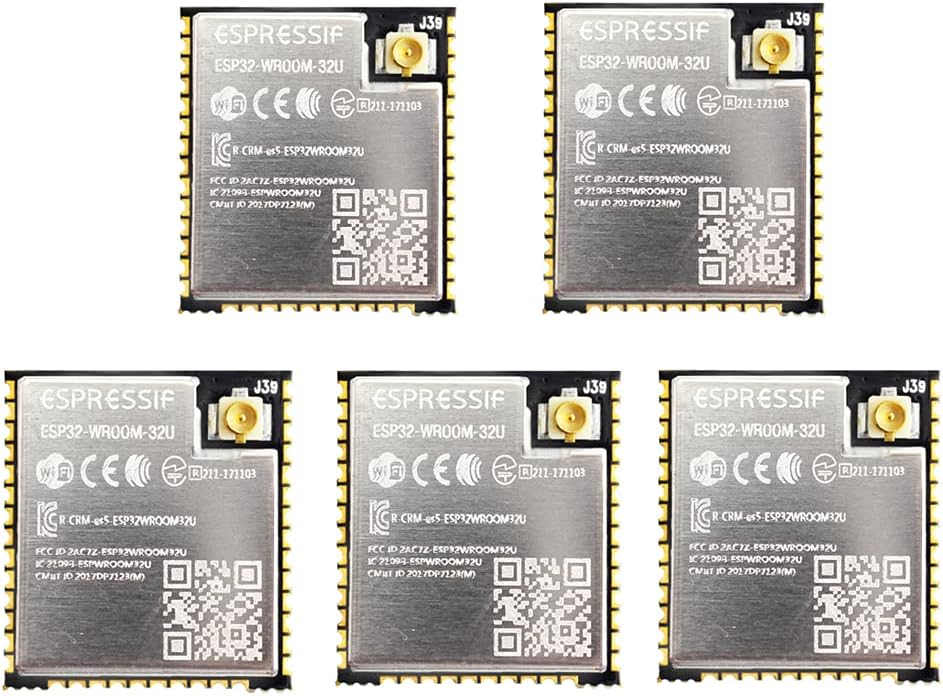
Figure 1: Overview of multiple ESP-WROOM-32U modules. Each module features an Espressif logo, Wi-Fi and CE markings, and a U.FL connector for an external antenna.

Figure 2: Detailed view of an ESP-WROOM-32U module. The image clearly shows the U.FL connector, various regulatory marks (Wi-Fi, CE, FCC ID), and a QR code.
2. Setup and Integration
Proper setup is crucial for the stable operation of the ESP-WROOM-32U module. This section outlines the steps for physical integration and initial configuration.
2.1 Physical Integration
The ESP-WROOM-32U is designed for surface-mount integration onto a Printed Circuit Board (PCB). Adhere to the recommended PCB land pattern and physical dimensions for optimal performance and reliability.
- Power Supply: Ensure a stable 3.3V power supply is provided to the module's VCC pins. Refer to the module's datasheet for specific voltage and current requirements.
- Antenna Connection: Connect a compatible 2.4 GHz external antenna to the U.FL connector. Ensure the connection is secure to prevent signal loss.
- GPIO Connections: Connect the General Purpose Input/Output (GPIO) pins as required by your application.

Figure 3: Physical Dimensions of ESP-WROOM-32U. This diagram provides precise measurements in millimeters for top, side, and bottom views, essential for PCB design and enclosure fitting.

Figure 4: Recommended PCB Land Pattern for ESP-WROOM-32U. This diagram shows the suggested layout for solder pads and vias on a PCB, crucial for proper module mounting and thermal management.
2.2 Development Environment
To program the ESP-WROOM-32U, you will need to set up a suitable development environment. Espressif provides the ESP-IDF (Espressif IoT Development Framework), which is the official development framework for ESP32 series chips.
- Install ESP-IDF: Follow the official Espressif documentation to install the ESP-IDF on your operating system. This includes toolchains, compilers, and libraries.
- IDE Integration: Integrate ESP-IDF with your preferred Integrated Development Environment (IDE), such as Visual Studio Code with the Espressif IDF Extension, or Eclipse.
- USB-to-Serial Converter: A USB-to-serial converter (e.g., FTDI, CP210x) is typically required to connect the module to your computer for flashing firmware and serial communication.
3. Operating the Module
Once the module is physically integrated and the development environment is set up, you can begin programming and operating the ESP-WROOM-32U.
- Firmware Upload: Use the ESP-IDF tools (e.g.,
esptool.py) or your IDE's built-in functionality to compile and flash your application firmware to the module. - Wi-Fi Connectivity: Utilize the Wi-Fi libraries within ESP-IDF to configure the module for station mode (connecting to an access point), access point mode (creating its own network), or a combination of both.
- Bluetooth/BLE Functionality: Implement Bluetooth Classic or Bluetooth Low Energy (BLE) features using the provided APIs for device communication, data transfer, and advertising.
- Peripheral Control: Program the GPIO pins to interact with external sensors, actuators, and other peripherals.
- Low-Power Modes: Leverage the ESP32's extensive low-power features to optimize battery life for energy-sensitive applications.
4. Maintenance
To ensure the longevity and reliable performance of your ESP-WROOM-32U module, follow these maintenance guidelines:
- Handling: Always handle the module with care, preferably using anti-static precautions (e.g., ESD wrist strap) to prevent damage from electrostatic discharge.
- Storage: Store unused modules in their original anti-static packaging in a dry, temperature-controlled environment. Avoid exposure to extreme temperatures, humidity, or direct sunlight.
- Cleaning: If necessary, gently clean the module's surface with a soft, dry, lint-free cloth. Avoid using liquid cleaners or solvents, which can damage components.
- Environmental Conditions: Operate the module within its specified environmental limits (temperature, humidity) as detailed in the official Espressif datasheet.
5. Troubleshooting
This section addresses common issues you might encounter during the setup and operation of your ESP-WROOM-32U module.
5.1 Power and Boot Issues
- Module Not Powering On:
- Verify the 3.3V power supply is stable and correctly connected.
- Check for any short circuits on the PCB.
- Ensure proper grounding.
- Module Not Booting:
- Confirm the strapping pins (GPIO0, GPIO2, etc.) are correctly configured for boot mode (e.g., normal boot or firmware download).
- Check for any external components interfering with the boot process.
5.2 Firmware Upload Problems
- Upload Fails or Times Out:
- Ensure the USB-to-serial converter drivers are installed and the correct COM port is selected.
- Verify the baud rate settings in your flashing tool.
- Check that the module is in download mode (usually by holding a boot button while resetting or powering on).
- Inspect connections between the converter and the module (TX, RX, GND, VCC).
- Incorrect Firmware Behavior:
- Confirm you are flashing the correct firmware image for your application.
- Check for compilation errors or warnings in your code.
5.3 Wireless Connectivity Issues
- Wi-Fi/Bluetooth Not Connecting:
- U.FL Antenna: Ensure the external U.FL antenna is securely connected and is a compatible 2.4 GHz antenna. A loose or incorrect antenna will severely degrade performance.
- Verify Wi-Fi SSID and password are correct in your firmware.
- Check for strong interference from other 2.4 GHz devices.
- Ensure the module is within range of the access point or Bluetooth device.
- Confirm that the Wi-Fi/Bluetooth stack is correctly initialized in your code.
- Poor Signal Strength:
- Relocate the antenna for better line-of-sight.
- Consider a higher-gain external antenna if needed.
- Minimize obstructions between the module and the target device/access point.
6. Specifications
The following table details the key specifications for the Luabby Smart ESP-WROOM-32U module. Note that while the product is identified as ESP-WROOM-32U, some general specifications may refer to the broader ESP32-WROOM-32 series, including the ESP32-WROOM-32D variant, which lacks the U.FL connector.
| Feature | Detail |
|---|---|
| Brand | Luabby Smart |
| Model Number | ESP32-WROOM-32U (Note: Product specifications sometimes list ESP32-WROOM-32D as a general series identifier) |
| Product Dimensions | 1 x 0.71 x 0.08 inches (approx. 25.4 x 18.0 x 2.0 mm) |
| Item Weight | 0.071 ounces (approx. 2.0 grams) |
| Manufacturer | Espressif |
| ASIN | B09C4QP93V |
| Connectivity Technology | Wi-Fi |
| Wireless Communication Standard | 802.11abg, Bluetooth, Radio Frequency |
| Date First Available | February 29, 2020 |
| Memory Options | Available in 4M, 8M, 16M flash variants (this product is 8M) |
| Antenna Connector | U.FL Connector for external antenna |
7. Warranty and Support
For specific warranty information regarding your Luabby Smart ESP-WROOM-32U module, please refer to the purchase documentation or contact your retailer. General technical support and resources for the ESP32 series are extensively available from Espressif Systems, the chip manufacturer.
You can find additional information and support by visiting the Luabby Smart Store on Amazon or the official Espressif documentation website.