
1. Product Overview
The Honeywell Air Purifier Air Touch P2 Large is designed to improve indoor air quality by filtering various airborne pollutants. This manual provides essential information for the safe and efficient operation and maintenance of your air purifier.

Image 1.1: Honeywell Air Purifier Air Touch P2 Large, front view.
Key Features:
- 4-Stage Filtration: Includes Pre-Filter, H13 HEPA Filter, Nano Silver ION Anti H1N1 Layer, and Activated Carbon Filter.
- High Coverage: Effective for areas up to 853 sq. ft. with a CADR of up to 550 m³/h.
- Pollutant Removal: Removes 99.99% of micro allergens and airborne pollutants, including PM 10 and PM 2.5.
- Smart Control: Wi-Fi enabled with the "Honeywell Air Touch" App and Amazon Alexa compatibility.
- Real-Time Monitoring: Features a real-time PM2.5 level indicator.
- Quiet Operation: Low noise level of 23dB/A at low speed.
- Additional Features: Child Lock Button, UV LED for bacteria reduction, and Sleep mode with 1, 2, 4, or 8-hour automatic shut-off timer.
2. Setup
2.1 Unpacking
- Carefully remove the air purifier and all packaging materials from the box.
- Ensure all components are present: 1 Air Purifier, Air Touch P2 Model, User Manual.
2.2 Filter Installation
The air purifier utilizes a 4-stage filtration system. Ensure all filters are correctly installed before first use.

Image 2.1: Diagram illustrating the 4-stage filtration process including Pre-Filter, Nano-Silver Anti-Bacterial Filter, Activated Carbon Filter, and H13 HEPA Filter.
- Open the filter compartment cover, typically located on the back or side of the unit.
- Remove any protective plastic wrapping from each filter.
- Insert the filters in the correct order as indicated by markings on the filters or inside the compartment. The typical order is Pre-Filter, Nano-Silver Anti-Bacterial Filter, Activated Carbon Filter, and then the H13 HEPA Filter.
- Close the filter compartment cover securely.
2.3 Placement
- Place the air purifier on a flat, stable surface.
- Ensure there is adequate space (at least 20 cm) around the air inlet and outlet for optimal air circulation.
- Avoid placing the unit near heat sources, direct sunlight, or in areas with high humidity.
2.4 Power Connection
- Plug the power cord into a suitable electrical outlet.
3. Operating Instructions
3.1 Power On/Off
- Press the Power button on the control panel to turn the unit on or off.
3.2 Operating Modes
- Auto Mode: The purifier automatically adjusts fan speed based on real-time PM2.5 levels.
- Manual Fan Speed: Select desired fan speed (e.g., Low, Medium, High) for continuous operation.
- Sleep Mode: Reduces fan speed and dims display lights for quiet operation during sleep. Can be set with 1, 2, 4, or 8-hour automatic shut-off timer.
3.3 PM2.5 Level Display
The unit features a real-time PM2.5 level indicator, providing immediate feedback on air quality.
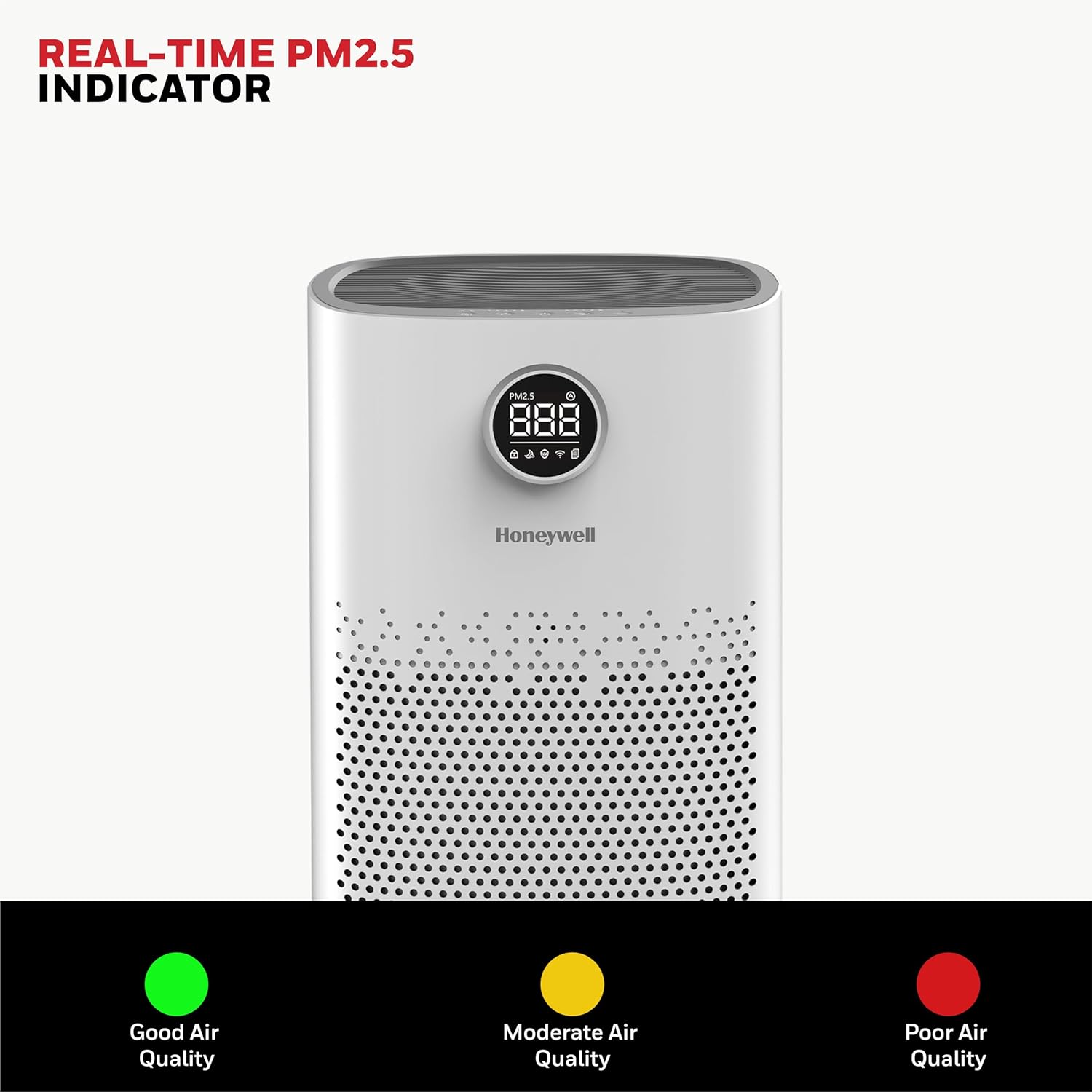
Image 3.1: Real-time PM2.5 indicator showing air quality levels (Good, Moderate, Poor).
3.4 Smart Control (Wi-Fi & Alexa)
Connect your air purifier to the "Honeywell Air Touch" App via Wi-Fi for remote control and monitoring. The device is also compatible with Amazon Alexa for voice commands.

Image 3.2: Air purifier with Wi-Fi connectivity and a smartphone displaying the Honeywell Air Touch app interface.

Image 3.3: A person interacting with the air purifier using voice commands via Alexa.
3.5 Child Lock
- Activate the Child Lock feature to prevent accidental changes to settings. Refer to the specific button on your control panel for activation/deactivation.
3.6 Air Purification Cycle
The air purifier performs an advanced purification cycle approximately every 12 minutes to maintain consistent air quality.

Image 3.4: Graphic illustrating the air purification cycle occurring every 12 minutes.
4. Maintenance
4.1 Filter Replacement
The filter life is up to 9000 hours or approximately 1 year, depending on usage and air quality. Replace filters when the filter reset indicator illuminates.
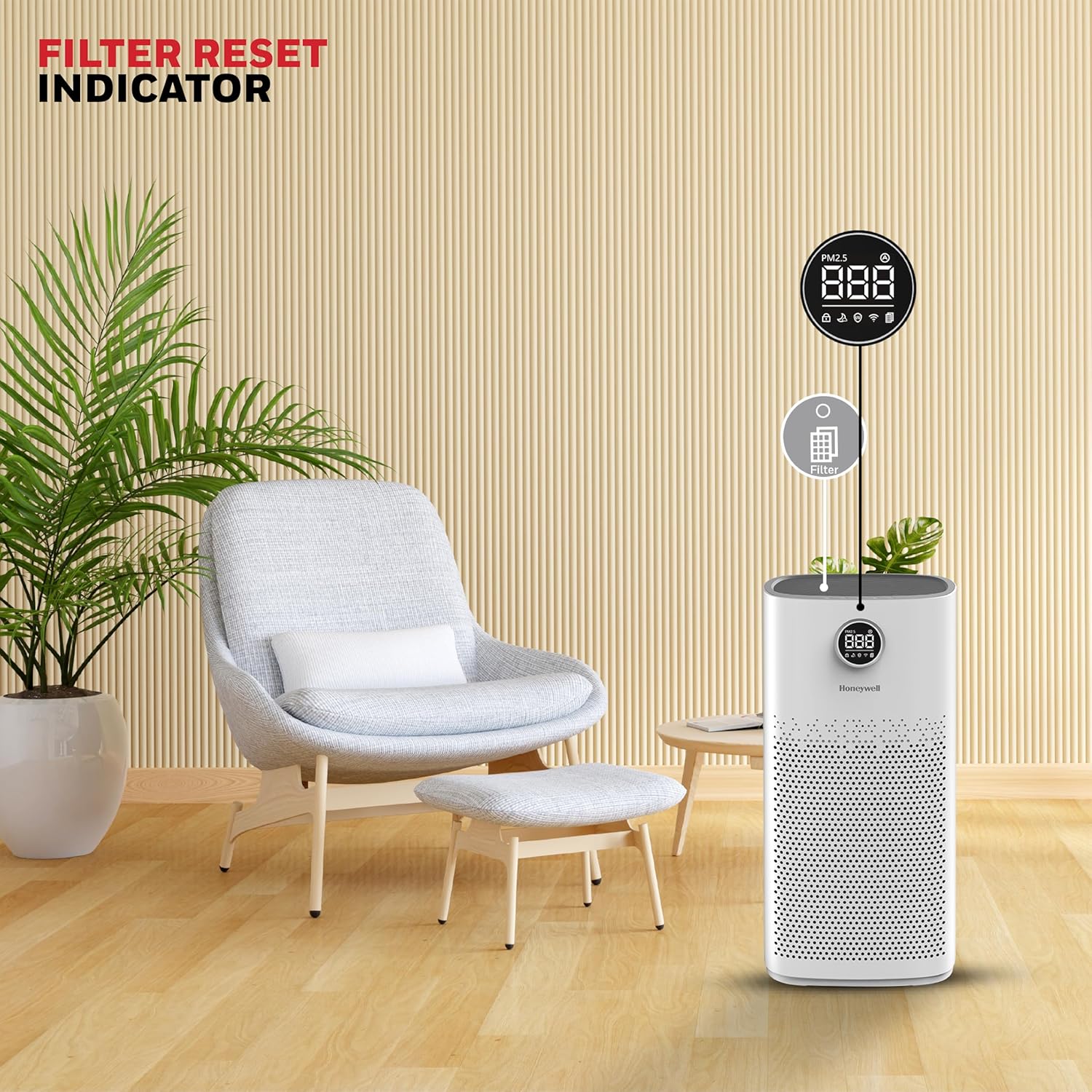
Image 4.1: Close-up of the air purifier's display showing the filter reset indicator.
- Turn off and unplug the air purifier before replacing filters.
- Open the filter compartment and remove the old filters.
- Install new, genuine Honeywell replacement filters, ensuring correct orientation.
- Close the filter compartment.
- Press and hold the Filter Reset button (if available) or follow app instructions to reset the filter life indicator.
4.2 Cleaning the Exterior
- Wipe the exterior of the unit with a soft, dry cloth.
- Do not use abrasive cleaners or solvents.
4.3 UV LED Maintenance
The UV LED helps kill harmful bacteria. No user maintenance is typically required for the UV LED itself.

Image 4.2: Graphic showing the air purifier emitting UV light to sterilize the air and reduce bacteria.
5. Troubleshooting
Common Issues and Solutions:
| Problem | Possible Cause | Solution |
|---|---|---|
| Unit does not power on. | No power, loose connection. | Ensure power cord is securely plugged into a working outlet. Check circuit breaker. |
| PM2.5 display shows high readings (e.g., "AQ1 at 500") constantly. | Air quality sensor obstruction or malfunction. | Clean the PM2.5 sensor (refer to detailed cleaning instructions in the full manual). If the issue persists, contact customer support. |
| Unit does not restart after a power cut. | Some models may not have an auto-restart function. | Manually power on the unit after a power outage. |
| Unusual noise during operation. | Loose filter, foreign object, fan issue. | Check if filters are properly seated. Inspect for any obstructions. If noise persists, contact support. |
| Air quality not improving. | Clogged filters, incorrect mode, room size. | Check and replace filters if needed. Ensure unit is in an appropriate mode (e.g., Auto or High fan speed). Verify room size is within the purifier's coverage area. |
For more detailed troubleshooting, please refer to the complete user manual or contact customer support.
6. Specifications

Image 6.1: Product dimensions of the Honeywell Air Purifier Air Touch P2 Large (26D x 26.3W x 52.4H Centimeters).
| Specification | Detail |
|---|---|
| Model Number | HC000021/AP/P2 |
| Color | White |
| Product Dimensions | 26D x 26.3W x 52.4H Centimeters |
| Floor Area Coverage | 853 Square Feet |
| CADR | Up to 550 m³/h |
| Filtration Type | H13 HEPA, Activated Carbon, Nano Silver ION Anti H1N1 Layer, Pre-Filter |
| Particle Retention Size | 0.1 Micron |
| Noise Level | 23 Decibels (at low speed) |
| Controller Type | Amazon Alexa, Wi-Fi App |
| Item Weight | 5.5 Kilograms |
| Power Source | Corded Electric |
| Country of Origin | China |
7. Warranty & Support
The Honeywell Air Purifier Air Touch P2 Large comes with a 2-Year Manufacturer Warranty.
Customer Support:
For assistance, please contact our customer support team:
- Phone: 022-238 535 35 (Monday to Friday, 10 AM to 7 PM)
- Email: Support@honeywellconnection.com
Image 7.1: Honeywell customer support details, including phone number and email.
8. Product Video Overview
Watch this official product video for a visual overview of the Honeywell Air Purifier Air Touch P2 Large features and benefits.
Video 8.1: Official product overview video for the Honeywell Air Purifier Air Touch P2 Large, highlighting its features and functionality.