
eartec office EAR200
eartec office EAR200 In-Ear Headset User Manual
Model: EAR200
Introduction
Thank you for choosing the eartec office EAR200 In-Ear Headset. This lightweight and discreetly styled headset is designed for comfort and clear communication in various professional environments. Its in-ear design makes it ideal for users who prefer not to wear traditional headband headsets. This manual provides essential information on setup, operation, maintenance, and troubleshooting to ensure optimal performance of your EAR200 headset.

Image: The eartec office EAR200 in-ear headset, showing the earpiece, microphone boom, and the quick disconnect (QD) cable with its connector.
Safety Information
- Do not expose the headset to extreme temperatures, humidity, or corrosive substances.
- Avoid dropping or subjecting the headset to strong impacts.
- Keep out of reach of children and pets.
- Do not attempt to disassemble or modify the headset. This will void the warranty.
- Use only with compatible devices as specified.
- Prolonged listening at high volume levels may cause hearing damage. Adjust volume to a comfortable level.
Package Contents
Please check the package for the following items:
- eartec office EAR200 In-Ear Headset
- Quick Disconnect (QD) Cable
- Three (3) pairs of different sized silicone ear tips (Small, Medium, Large)
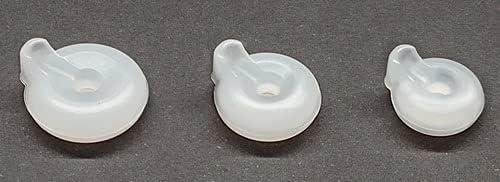
Image: Three silicone ear tips of varying sizes (small, medium, large) provided for a customized fit.
Setup
Connecting the Headset
- Identify the Quick Disconnect (QD) plug on your EAR200 headset cable.
- Connect the QD plug to the corresponding QD port on your compatible desk phone or PC adapter cable (e.g., Plantronics QD compatible cable). Ensure a secure connection.
- Connect the other end of the adapter cable to your phone's headset port or your computer's USB/3.5mm jack, as appropriate for your setup.
Image: The eartec office EAR200 headset with its quick disconnect cable, illustrating how the headset connects to the phone system via the QD interface.
Wearing the Headset
- Select the ear tip size that provides the most comfortable and secure fit for your ear. Gently attach it to the headset's earpiece.
- Position the headset so the earpiece sits comfortably in your ear. The ear hook should rest securely behind your ear.
- Adjust the microphone boom so that the microphone is positioned approximately 1-2 cm from the corner of your mouth for optimal voice pickup. The microphone features noise cancellation, so precise positioning is key for clear outgoing audio.

Image: A person wearing the eartec office EAR200 headset, demonstrating the correct placement of the earpiece and microphone boom for comfortable and effective use.

Image: A detailed view of how the silicone ear tip attaches to the eartec office EAR200 headset's earpiece, ensuring a secure and comfortable fit.
Operating Instructions
Making and Receiving Calls
Once connected, your EAR200 headset will function as your primary audio device for calls. Use your phone's or computer's interface to dial numbers, answer incoming calls, and end calls. The headset provides clear digital sound for both incoming and outgoing audio.
Microphone Adjustment
The EAR200 features a noise-cancelling microphone. For optimal performance, ensure the microphone is positioned close to your mouth (approx. 1-2 cm) and aligned with the corner of your mouth. This helps to isolate your voice and reduce background noise for the listener.

Image: A close-up view of the eartec office EAR200 headset, highlighting the adjustable microphone boom and the earpiece design.
Volume Control
Volume adjustments are typically controlled via your connected phone or computer. Refer to your device's user manual for specific instructions on adjusting call volume.
Maintenance
- Cleaning: Gently wipe the headset and cable with a soft, dry, lint-free cloth. For ear tips, they can be carefully removed and washed with mild soap and water, then thoroughly dried before reattaching. Do not use harsh chemicals or abrasive materials.
- Storage: When not in use, store the headset in a clean, dry place away from direct sunlight and extreme temperatures. Avoid tangling the cable.
- Handling: Always hold the plug when disconnecting the cable, rather than pulling on the cord itself.
Troubleshooting
| Issue | Possible Cause | Solution |
|---|---|---|
| No sound from headset | Loose connection; incorrect device settings; headset not selected as audio output. | Ensure QD cable is securely connected. Check phone/PC audio settings to confirm headset is selected. Increase volume on device. |
| Microphone not working | Microphone muted; incorrect device settings; microphone not positioned correctly. | Check if microphone is muted on your device. Verify microphone input settings on your phone/PC. Adjust microphone boom closer to your mouth. |
| Poor sound quality (static, muffled) | Loose connection; interference; damaged cable. | Reconnect the QD cable. Move away from other electronic devices that may cause interference. Inspect cable for damage. |
| Headset feels uncomfortable | Incorrect ear tip size; improper wearing. | Try a different size ear tip. Adjust the headset's position on your ear until comfortable. |
Specifications
| Feature | Detail |
|---|---|
| Model Name | in-the-ear-headset |
| Model Number | EAR200 |
| Form Factor | In-ear |
| Connectivity Technology | Wired (Quick Disconnect) |
| Headphone Jack | Plantronics QD (requires compatible adapter cable) |
| Microphone Form Factor | Built-in, Boom Microphone |
| Microphone Technology | Unidirectional, Noise-Cancelling |
| Impedance | 32 Ohm |
| Sound Control | Passive Noise Reduction |
| Material | Plastic, Aluminum, Faux Leather |
| Special Features | Microphone included, Detachable cable, 3 different size ear tips, Noise cancellation, Lightweight |
| Compatible Devices | VoIP/Digital Phones (Mitel MiVoice 8528, 8568, 4220, 4222, 4223, 4224, 4223, 4225 & 5380, Polycom, Yealink, Cisco, Avaya, Panasonic, Nortel, Siemens, Unify, Gigaset, NEC, Toshiba, ShoreTel, Ascom, Grandstream, Snom, Apple, Samsung, Digium, Alcatel Lucent, LG-Nortel, Ericssion-LG, Fanvil) |
| Recommended Uses | Calling, Business, Professional |
Warranty and Support
Your eartec office EAR200 headset comes with a 12-month warranty from the date of purchase, covering manufacturing defects. Additionally, a 28-day money-back guarantee is offered.
For warranty claims, technical support, or any questions regarding your product, please contact your retailer or the eartec office customer service. Refer to your purchase documentation for specific contact details.
Please retain your proof of purchase for warranty purposes.
Ask a question about this manual
Ask about setup, troubleshooting, compatibility, parts, safety, or missing instructions. Manuals+ will review the question and use this page’s manual context to help answer it.