
Vokpu BTK10
User Manual for Vokpu Star Night Light 3 in 1 LED Galaxy Projector
Model: BTK10
Introduction
Thank you for purchasing the Vokpu Star Night Light 3 in 1 LED Galaxy Projector. This versatile device combines a galaxy projector, a Bluetooth speaker, and a timer function to create a captivating and relaxing atmosphere in any room. With multiple color options, dynamic projection, and sound-activated modes, it is perfect for bedrooms, game rooms, home theaters, parties, and more.

Image: The Vokpu Star Night Light 3 in 1 LED Galaxy Projector, showcasing its compact design, remote control, and a vibrant projection of stars and ocean waves on a ceiling.
Package Contents
- Vokpu Star Night Light Projector (Model: BTK10)
- Remote Control
- USB Cable (for power)
- User Manual
Setup
Power Connection:
Connect the provided USB cable to the DC 5V input port on the projector. Plug the other end of the USB cable into a compatible USB power adapter (not included) or a USB port on a computer. Ensure the power source provides 5V and at least 2A for optimal performance.

Image: A close-up of the projector's side, highlighting the USB port, power button, and various control buttons for light and sound functions.
Placement:
Place the projector on a stable, flat surface such as a table. For best projection results, position the projector in the center of the room or area where you wish to display the galaxy and ocean wave effects. Avoid placing it where the light beam can directly enter eyes.
Remote Control Battery:
Ensure the remote control has working batteries. If not, insert or replace batteries as needed (battery type typically AAA, check remote for specific requirements).
Operating Instructions
Power On/Off
Press the Power ON/OFF button on the projector or the remote control to turn the device on or off.
Light Projection Modes
The projector offers 10 combinations of lighting modes with 4 primary colors (red, green, blue, white) to create 20 kinds of multicolored or single-color effects. You can choose between ocean wave projection, star projection, or a combination of both.

Image: A visual representation of the ten distinct color modes available for the galaxy projector, ranging from single colors to mixed hues.
Adjusting Brightness
Use the brightness control buttons on the remote or the projector to adjust the intensity of the light. There are typically 3 levels of brightness (e.g., 30%, 60%, 100%).
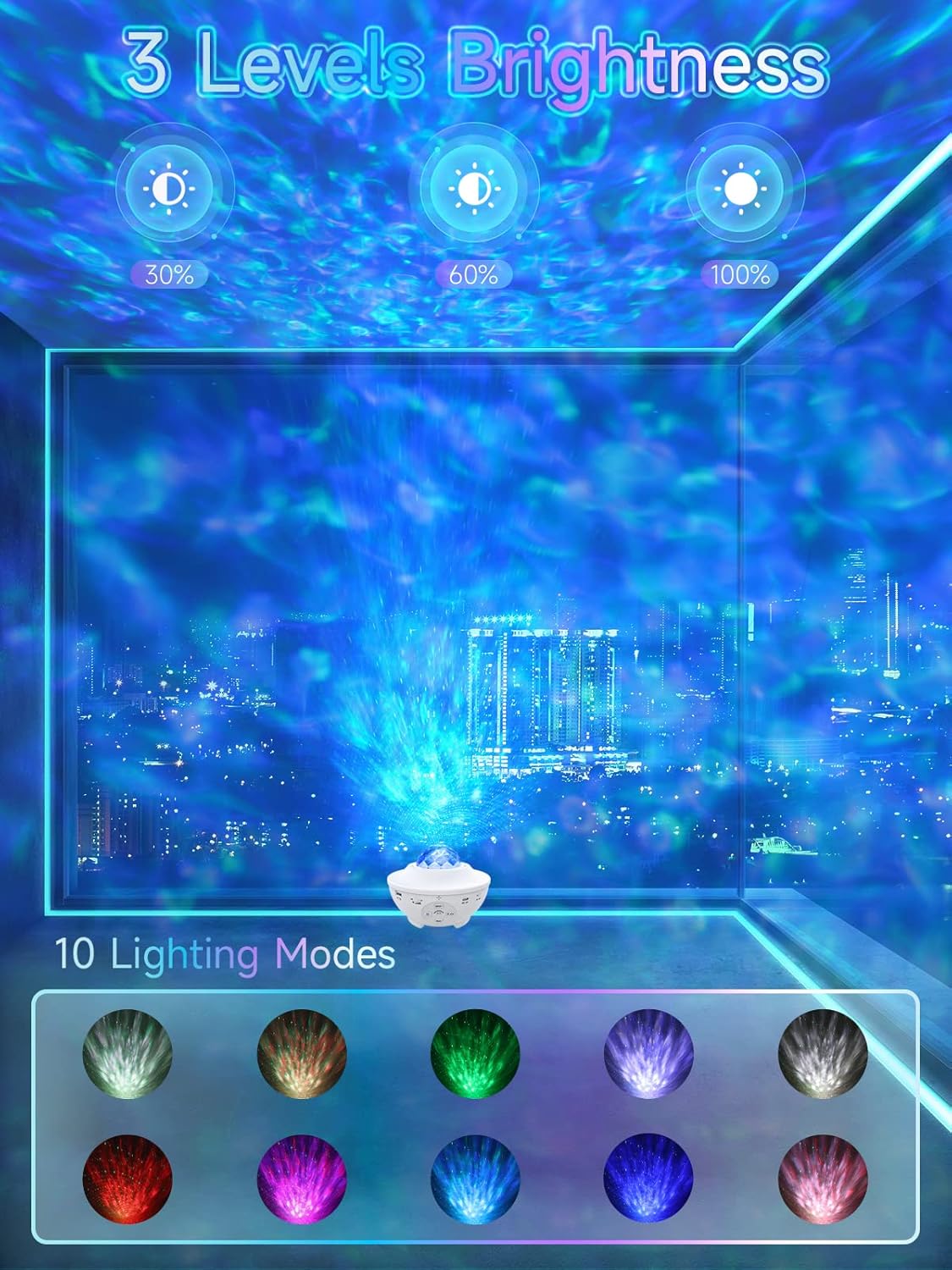
Image: An illustration showing three distinct brightness levels for the projected light, labeled 30%, 60%, and 100%.
Dynamic Projection Speed
The remote control allows you to change the rotating speed of the ocean wave and star effects, creating dynamic visual experiences.
Bluetooth Speaker Function
The projector features a built-in Bluetooth speaker (BTK10) that allows you to play music from your smartphone or other Bluetooth-enabled devices. It also supports music playback via a USB disk.
Bluetooth Connection:
Turn on the projector. Enable Bluetooth on your smartphone or device. Search for "BTK10" in your device's Bluetooth settings and pair with it. Once connected, you can play your favorite music through the projector's speaker.

Image: A person's hands interacting with a smartphone, showing the Bluetooth settings screen, with the projector visible in the background, indicating a successful Bluetooth connection for music playback.
USB Disk Playback:
Insert a USB disk containing audio files into the USB port on the projector. The projector will automatically detect and play music from the USB disk.
Enjoy high-quality music playing while watching the aurora nebula and cloud galaxy at night, creating a romantic and soothing atmosphere.
Video: This video demonstrates the various features of the Vokpu Galaxy Projector, including its 10 dynamic color projections, Bluetooth compatibility for playing music, sound-activated flicker mode, USB disk readability, and auto-off timer function, showcasing how it creates a romantic starry night ambiance.
Sound Activated Mode
When the voice control function is activated, the ocean wave projector light will flash and change colors according to the rhythm of music or sounds like clapping your hands or stamping your feet. This feature is ideal for parties, birthdays, dancing, and other lively events, creating a dynamic disco or party effect.

Image: Three arched panels showing different light projections (blue, green, red, yellow, white) with sound wave indicators, demonstrating the sound-activated flicker mode where lights change with music or claps.
Timer Function
The projector includes a built-in timer for convenience, allowing you to set it to automatically turn off after a specified period.
- 1-hour timer
- 2-hour timer
- Turn off timer (continuous operation)

Image: A sleeping child in a room illuminated by the projector, with icons indicating the 1-hour, 2-hour, and "Time Off" timer options.
Remote Control Usage
The included remote control provides full functionality to customize your experience:
- Turn the lamp on/off.
- Change lighting modes and colors.
- Adjust brightness.
- Cycle through light effects.
- Start/stop motion.
- Adjust volume for Bluetooth/USB playback.
- Set the 1h/2h timer.

Image: A hand holding the remote control, demonstrating its use to change the lighting effects projected onto a wall filled with bottles, showcasing the versatility of the remote.
Maintenance
Cleaning:
Wipe the projector with a soft, dry cloth. Do not use abrasive cleaners or solvents, as they may damage the surface.
Storage:
When not in use, store the projector in a cool, dry place away from direct sunlight and extreme temperatures.
Handling:
Handle the projector with care. Avoid dropping it or subjecting it to strong impacts, which could damage internal components.
Troubleshooting
| Problem | Possible Cause | Solution |
|---|---|---|
| Projector does not turn on. | No power supply or loose connection. | Ensure the USB cable is securely connected and the power adapter is working. Try a different USB port or adapter. |
| Lights are dim or not projecting clearly. | Low brightness setting or obstruction. | Increase brightness using the remote or projector buttons. Ensure the projection lens is clean and unobstructed. |
| Bluetooth not connecting. | Projector not in pairing mode or device too far. | Ensure the projector is on and in Bluetooth mode. Check your device's Bluetooth settings. Move your device closer to the projector. |
| Remote control not working. | Dead batteries or obstruction. | Replace remote control batteries. Ensure there are no obstructions between the remote and the projector's IR receiver. |
| Sound activated mode not responding. | Voice control function not enabled or insufficient sound. | Activate the voice control function via the remote. Ensure there is sufficient music or sound for the sensor to detect. |
Specifications
| Feature | Detail |
|---|---|
| Model Number | BTK10 |
| Brand | Vokpu |
| Dimensions (L x W x H) | 6.45" x 6.45" x 6.45" (164mm Diameter) |
| Item Weight | 1.36 pounds |
| Material | Acrylonitrile Butadiene Styrene (ABS) |
| Color | White |
| Light Source Type | LED |
| Wattage | 5 Watts |
| Voltage | 120 Volts (AC) |
| Power Source | Corded Electric |
| Mounting Type | Table Mount / Tabletop |
| Special Features | Color changing, Sound activated, Remote control, Flashing effects, Bluetooth Speaker, Timer |
| Usage | Indoor use (Bedroom, Game Room, Home Theatre, Parties) |
Warranty and Support
This product comes with a 12-month warranty service from the seller. For any issues, questions, or support needs, please contact the seller directly through your purchase platform. Please provide your order number and a detailed description of the issue for prompt assistance.
For further assistance, you may also refer to the official Vokpu website or contact their customer service if available.
Ask a question about this manual
Ask about setup, troubleshooting, compatibility, parts, safety, or missing instructions. Manuals+ will review the question and use this page’s manual context to help answer it.