
EnergyCell Slim 2
EnergyCell Slim 2 Portable Power Bank
User Manual
Introduction
Thank you for choosing the EnergyCell Slim 2 Portable Power Bank. This compact and efficient power bank is designed to provide reliable power on the go for your mobile devices. Please read this manual carefully to ensure proper usage and to maximize the lifespan of your device.

Image: The EnergyCell Slim 2 Portable Power Bank, showcasing its sleek blue cylindrical design with a silver band and a power button, along with output and input ports at one end.
What's in the Box
The package includes the following items:
- 1 x EnergyCell Slim 2 Portable Power Bank (5000mAh)
- 1 x Micro USB Charging Cable
- 1 x Storage Bag
- 1 x User Manual

Image: The contents of the product package, including the blue Slim 2 power bank, a white Micro USB cable, and the user manual, all neatly arranged next to an open cardboard box.
Product Overview
The EnergyCell Slim 2 is designed for portability and efficiency. Key features include:
- Ultra-Compact Design: Measuring only 1.8 x 1.26 x 3.9 inches and weighing 99g, it is highly portable.
- High Capacity: 5000mAh battery provides ample power for daily use.
- Fast Charging: 2.1A output for quick device charging and 2A input for rapid power bank recharge.
- Advanced Safety Features: Built-in protection against overheating, overcharge, overcurrent, and short circuits.
- LED Light Display: Indicates battery status.
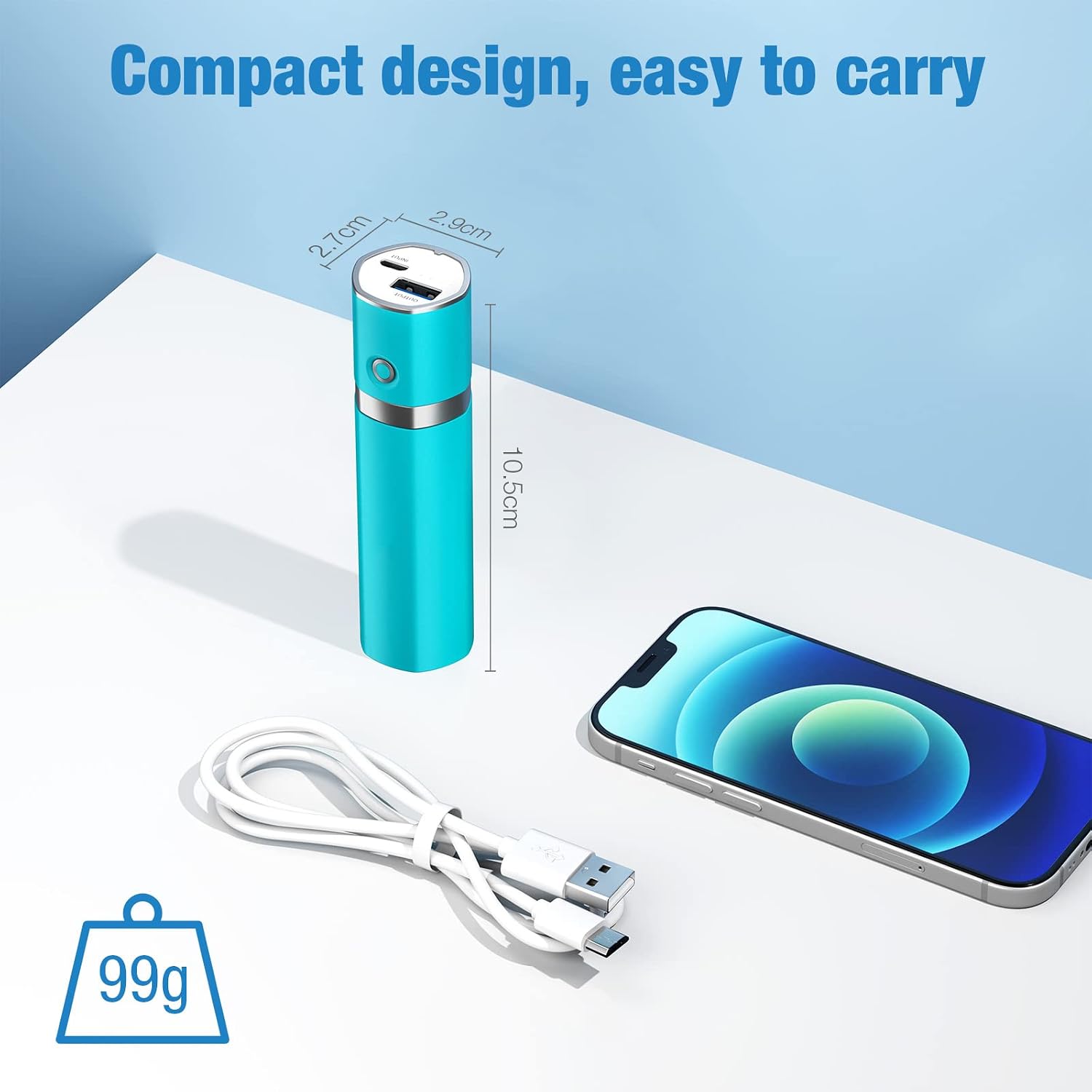
Image: A visual representation of the Slim 2 power bank's compact size, showing its dimensions (2.7cm diameter, 2.9cm diameter, 10.5cm length) next to a smartphone and a charging cable, emphasizing its light weight of 99g.

Image: The Slim 2 power bank easily fitting into a jeans pocket, demonstrating its ultra-compact and portable design.

Image: An exploded view diagram highlighting the internal components and security features of the power bank, including the frosted protective shell, high-quality batteries, safety circuit, short circuit protection, and LED light display.
Setup: Charging the Power Bank
Before first use, fully charge your EnergyCell Slim 2 power bank.
- Connect the provided Micro USB cable to the INPUT port on the power bank.
- Connect the other end of the Micro USB cable to a USB wall adapter (not included) or a computer's USB port. For fastest charging, use a 2A USB adapter.
- The LED indicators on the power bank will illuminate to show the charging progress. All LEDs will be solid when fully charged.
Note: A 2A adapter can fully charge the power bank in approximately 3 hours. A 1A adapter will take longer, around 5.5 hours.

Image: The Slim 2 power bank connected to a wall adapter via its Micro USB input port, illustrating the charging process and highlighting the faster charging time with a 2A adapter compared to a 1A adapter.
Operating Instructions
Charging Your Device
- Connect your device's charging cable (e.g., USB-A to Lightning, USB-A to USB-C, or USB-A to Micro USB) to the OUTPUT port on the power bank.
- Connect the other end of the cable to your mobile device.
- The power bank will automatically begin charging your device. The LED indicators will show the remaining battery level of the power bank.
- To stop charging, simply disconnect your device from the power bank.
Tip: The 2.1A output automatically detects your device to provide the fastest possible charging speed.

Image: The Slim 2 power bank connected to a smartphone, demonstrating its 2.1A high-efficiency output and faster charging capability compared to a 1A power bank.

Image: A person using the Slim 2 power bank to charge their smartphone while working at a desk, illustrating convenient on-the-go charging.

Image: The 5000mAh power bank positioned among various electronic devices such as a smartphone, tablet, and smartwatch, demonstrating its wide compatibility.
Maintenance and Care
- Store the power bank in a cool, dry place, away from direct sunlight and extreme temperatures.
- Avoid dropping or subjecting the power bank to strong impacts.
- Do not expose the power bank to water or other liquids.
- Clean the power bank with a soft, dry cloth. Do not use harsh chemicals or abrasive materials.
- If not used for extended periods, charge the power bank at least once every three months to maintain battery health.
Troubleshooting
| Problem | Possible Cause | Solution |
|---|---|---|
| Power bank not charging | Cable not connected properly; faulty cable/adapter; power bank fully charged. | Ensure cable is securely connected. Try a different cable or adapter. Check LED indicators; if all are solid, it's fully charged. |
| Device not charging from power bank | Power bank is depleted; faulty cable; device incompatibility. | Recharge the power bank. Try a different charging cable. Ensure your device is compatible with USB charging. |
| Slow charging | Using a low-power adapter (for power bank); using a low-quality cable; device drawing less current. | Use a 2A adapter for charging the power bank. Use a high-quality charging cable. Some devices inherently charge slower. |
| Power bank gets hot during use | Normal operation; excessive load; poor ventilation. | Slight warmth is normal. Ensure adequate ventilation. If excessively hot, disconnect and contact support. |
Specifications
| Feature | Detail |
|---|---|
| Model Name | Slim 2 |
| Battery Capacity | 5000 mAh |
| Input | Micro USB, 5V/2A (Max) |
| Output | USB-A, 5V/2.1A (Max) |
| Dimensions (L x W x H) | 3.9 x 1.8 x 1.26 inches (10.5 x 4.57 x 3.2 cm) |
| Weight | 3.49 ounces (99g) |
| Color | Blue |
| Manufacturer | JiangXi Beston Electronic Science and Technology Co.,Ltd |
| ASIN | B09BZ5RV1S |
Warranty Information
EnergyCell products are manufactured with high-quality materials and undergo rigorous testing. This product comes with a standard manufacturer's warranty. For specific warranty terms and conditions, including duration and coverage, please refer to the warranty card included in your product packaging or visit the official EnergyCell website.
Please retain your proof of purchase for warranty claims.
Customer Support
For any questions, technical assistance, or support inquiries regarding your EnergyCell Slim 2 Portable Power Bank, please contact our customer service team.
- Online Support: Visit the official EnergyCell website for FAQs, product registration, and support contact forms.
- Email Support: Refer to your product packaging or the official website for the most current customer service email address.
When contacting support, please have your product model (Slim 2) and ASIN (B09BZ5RV1S) ready.
Ask a question about this manual
Ask about setup, troubleshooting, compatibility, parts, safety, or missing instructions. Manuals+ will review the question and use this page’s manual context to help answer it.