
1. Introduction
Thank you for choosing the Crompton Greaves Instaserve 2000 W Induction Cooktop. This manual provides essential information for the safe and efficient operation, maintenance, and troubleshooting of your new appliance. Please read it thoroughly before first use and keep it for future reference.
2. Safety Instructions
To prevent injury to yourself and others or damage to your appliance, please observe the following safety precautions:
- Electrical Safety: Ensure the cooktop is connected to a properly grounded electrical outlet with the correct voltage (230 Volts). Do not use extension cords or adapters.
- Cookware Compatibility: Use only induction-compatible cookware. Non-magnetic pots and pans will not heat.
- Hot Surface: The ceramic plate may remain hot after cooking. Avoid touching the surface immediately after use.
- Ventilation: Ensure adequate ventilation around the cooktop. Do not block air vents.
- Children and Pets: Keep the appliance out of reach of children and pets.
- Flammable Materials: Do not place flammable materials near or on the cooktop.
- Overheat Protection: The cooktop is equipped with overheat protection. If it overheats, it will automatically shut off.
- Cleaning: Always unplug the cooktop before cleaning. Do not immerse the appliance in water.
3. Product Overview
The Crompton Greaves Instaserve Induction Cooktop is designed for efficient and convenient cooking. Key features include:
- 2000 Watts power for fast heating.
- 7 pre-set Indian Menu options for versatile cooking.
- Wider cooking surface to accommodate larger utensils.
- User-friendly design with easy-to-operate controls.
- Energy-efficient operation with less power consumption.
- Automatic Shut-Off and Overheat Protection for safety.
- LED Display for clear information.
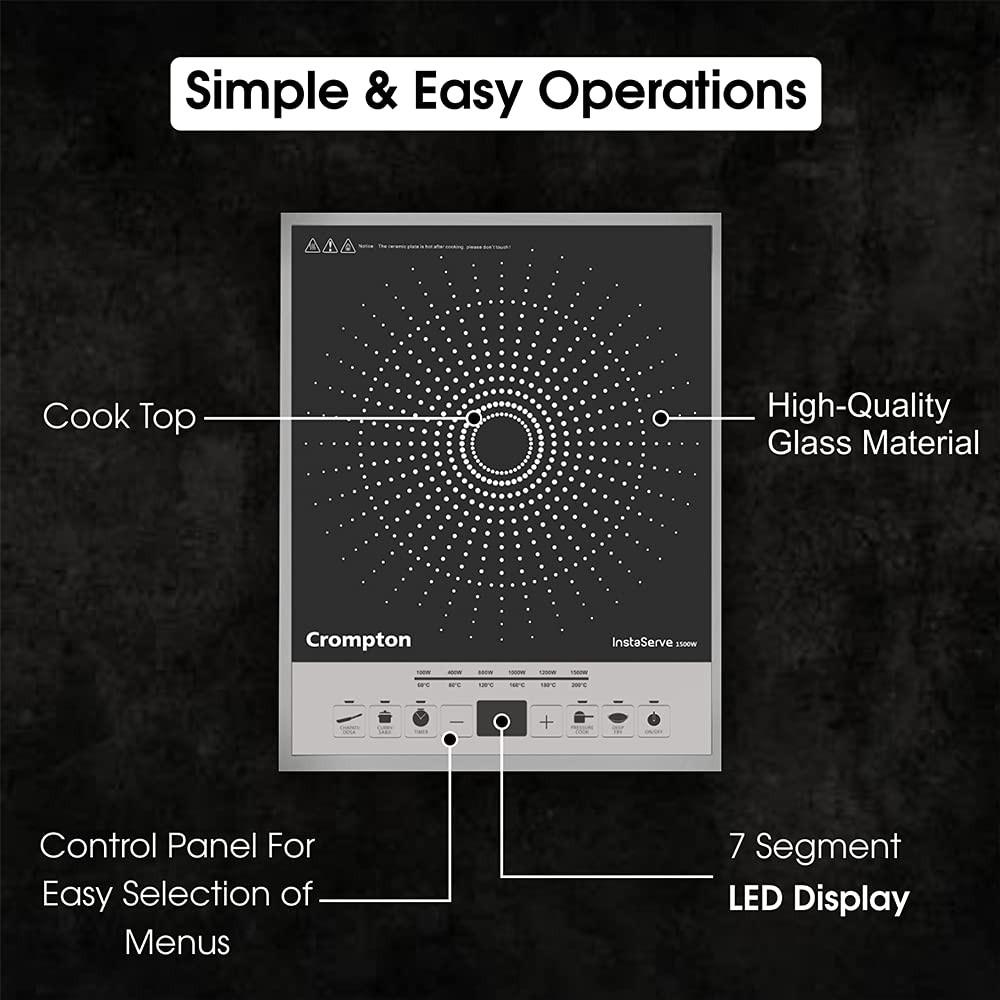
Figure 3.1: Overview of the Cooktop and Control Panel. The image shows the cooktop with a high-quality glass material cooktop surface, a control panel for easy menu selection, and a 7-segment LED display.

Figure 3.2: Internal view highlighting the copper coil. The copper coil enhances durability and its wires are resistant to corrosion, contributing to the longevity of the appliance.
4. Setup
- Unpacking: Carefully remove the induction cooktop from its packaging. Retain the packaging for future transport or storage.
- Placement: Place the cooktop on a stable, flat, and heat-resistant surface. Ensure there is sufficient space around the appliance for proper ventilation (at least 10-15 cm from walls or other objects).
- Power Connection: Plug the power cord into a standard 230 Volt, 50 Hz AC electrical outlet. Ensure the outlet is properly grounded.
- Initial Cleaning: Before first use, wipe the ceramic surface with a soft, damp cloth.
5. Operating Instructions
Operating your Crompton Instaserve Induction Cooktop is straightforward:
- Power On: Place an induction-compatible pot or pan centrally on the cooktop surface. Press the 'ON/OFF' button to turn on the appliance. The LED display will illuminate.
- Select Function: Choose a cooking function using the dedicated buttons on the control panel. The cooktop features 7 preset Indian menu options.
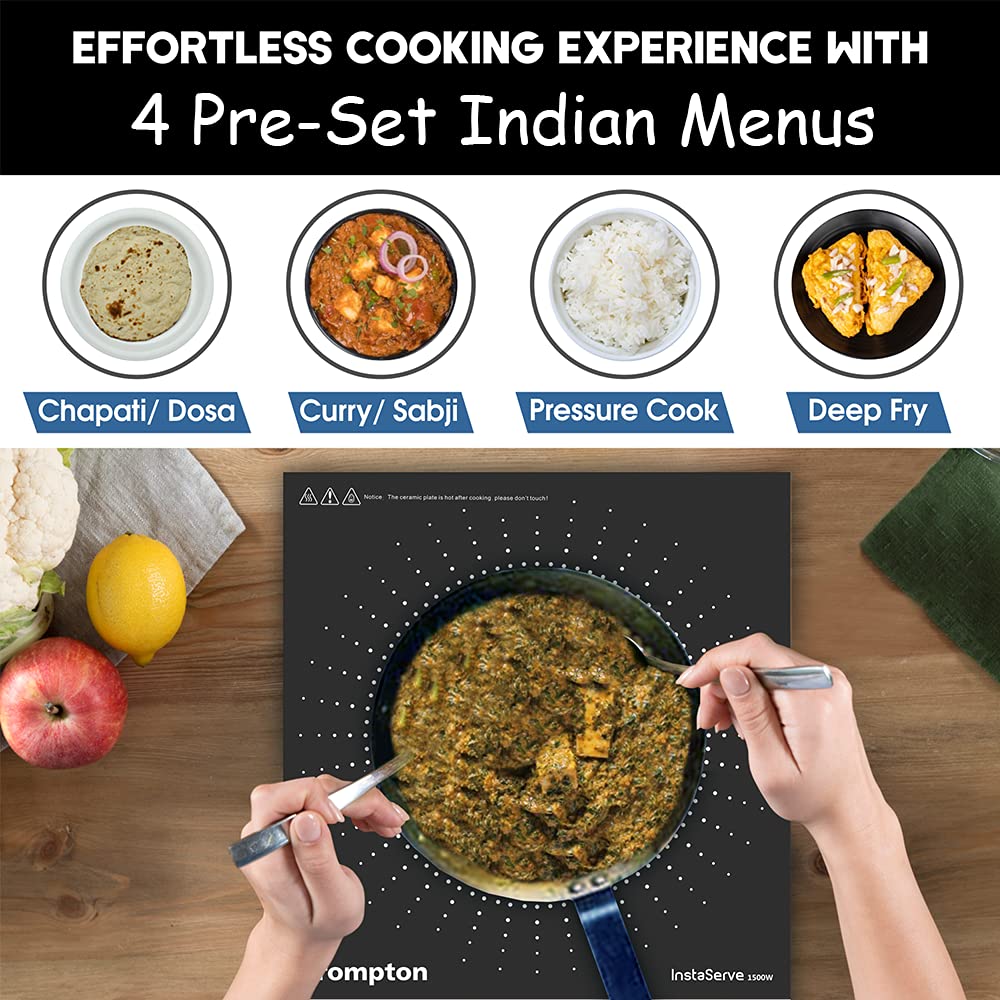
Figure 5.1: Example of preset menu options. The image displays options such as Chapati/Dosa, Curry/Sabji, Pressure Cook, and Deep Fry, demonstrating the versatility for various Indian dishes.
- Adjust Power/Temperature: Use the '+' and '-' buttons to adjust the power level (8 power levels available) or temperature as needed for your cooking. The LED display will show the current setting.
- Cooking: The cooktop will begin heating the cookware. Monitor your food as it cooks.
- Automatic Shut-Off: The cooktop features an automatic shut-off function for safety and energy saving. It will turn off after a period of inactivity or if no compatible cookware is detected.
- Overheat Protection: If the internal temperature becomes too high, the cooktop will automatically shut down to prevent damage.
- Power Off: After cooking, press the 'ON/OFF' button to turn off the appliance. Unplug the cooktop from the power outlet when not in use.

Figure 5.2: Illustration of the wider cooking surface. The image shows dimensions of 280mm and 270mm, indicating ample space to support bigger utensils for various cooking needs.
6. Maintenance and Cleaning
Proper maintenance ensures the longevity and performance of your induction cooktop:
- Cleaning the Surface: After each use, allow the cooktop to cool completely. Wipe the ceramic glass surface with a soft, damp cloth and a mild detergent. For stubborn stains, use a non-abrasive ceramic cooktop cleaner.
- Control Panel: Wipe the control panel with a soft, dry cloth. Do not use excessive water or harsh chemicals.
- Ventilation Openings: Periodically check and clean the ventilation openings to ensure they are free from dust and debris.
- Storage: When not in use for an extended period, store the cooktop in a dry, clean place, preferably in its original packaging.
- Do Not Immerse: Never immerse the cooktop in water or any other liquid.
7. Troubleshooting
If you encounter issues with your induction cooktop, refer to the following common problems and solutions:
| Problem | Possible Cause | Solution |
|---|---|---|
| Cooktop does not turn on. | No power supply; Cooktop not plugged in; Power button not pressed. | Check power cord connection; Ensure power outlet is functional; Press the 'ON/OFF' button. |
| No heating/Cookware not detected. | Non-induction compatible cookware; Cookware not centered; Cookware too small. | Use induction-compatible cookware; Center the cookware on the heating zone; Use cookware with a base diameter of at least 12 cm. |
| Cooktop shuts off during operation. | Overheat protection activated; No cookware detected for too long; Power fluctuation. | Allow cooktop to cool down; Ensure cookware is present and compatible; Check power supply stability. |
| Unusual noise during operation. | Normal fan operation; Cookware material. | A slight humming sound from the cooling fan is normal. Some cookware may produce a faint buzzing sound, which is also normal. |
If the problem persists after attempting these solutions, please contact customer support.
8. Specifications
Detailed specifications for the Crompton Greaves Instaserve Induction Cooktop:
- Model Number: INDUCTION13
- Brand: Crompton
- Colour: Black and Silver
- Material: Plastic
- Wattage: 2000 Watts
- Voltage: 230 Volts
- Controls Type: Push Button
- Burner Type: Induction
- Heating Elements: 7 (referring to preset menu options)
- Product Dimensions: 11D x 10W x 12H Centimeters (Note: These dimensions seem unusually small for a cooktop, please refer to product packaging for exact measurements if critical.)
- Item Weight: 1.92 kg (1920 Grams)
- Special Features: 7 Preset Menus, 8 Power Levels, Automatic Shut-Off, LED Display, Overheat Protection
- Power Source: Corded Electric
- Recommended Uses: Boiling, Cooking, Food Warming, Frying, Simmering
9. Warranty and Support
Your Crompton Greaves Instaserve Induction Cooktop comes with a warranty. Please refer to the included warranty card for details regarding the warranty period and terms and conditions.
For technical assistance, service, or warranty claims, please contact Crompton customer support:
- Manufacturer: Crompton Greaves Consumer Electricals Limited
- Address: Equinox Business Park, 1st Floor, Tower 3, LBS Marg, Kurla (W), Mumbai 400070, Maharashtra, India
- Phone: +91 22 6167 8499


