
Fit4Less 1000W Pure Sine Wave Power Inverter
Fit4Less 1000W Pure Sine Wave Power Inverter User Manual
Model: 1000W Pure Sine Wave Power Inverter (bdc89c9d-1e2c-47d2-b17d-3f62f1d0c6af)
1. Introduction
This manual provides essential information for the safe and efficient operation of your Fit4Less 1000W Pure Sine Wave Power Inverter. This device converts 12V DC power from a battery into 110V AC power, suitable for a wide range of electronic devices and appliances. Its pure sine wave output ensures compatibility with sensitive electronics, providing stable and clean power.
Please read this manual thoroughly before installation and use to ensure proper function and to prevent damage to the unit or connected devices.
2. Product Overview
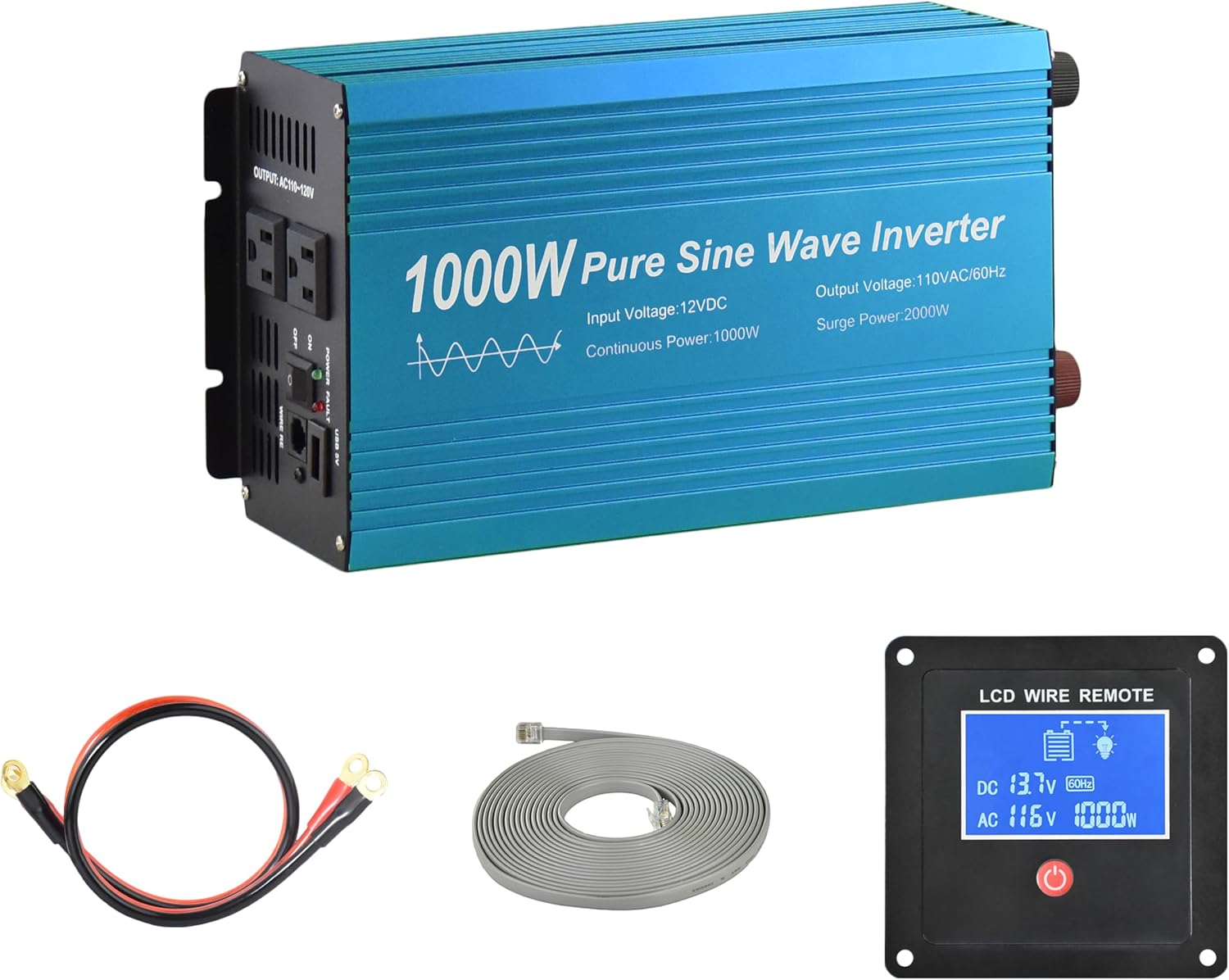
Figure 2.1: Fit4Less 1000W Pure Sine Wave Power Inverter and included components (battery cables, LCD remote).
2.1 Key Features
- Continuous rated power: 1000W, Surge power: 2000W.
- Equipped with two standard American AC sockets.
- Features a DC 5V 2 Amp USB Output for charging mobile devices.
- Includes an LCD Wired Remote Control Kit with a 16-foot cable for convenient operation.
- Designed with a new circuit board and high-speed cooling fan for extended continuous operation.
- Comes with a set of 2-foot OFC (Oxygen-Free Copper) battery cables for direct connection.
2.2 Components and Controls

Figure 2.2: Front and rear panel connections of the inverter.
The inverter features clearly labeled ports and indicators for ease of use:
- Front Panel: Power indicator light, Fault indicator light, USB Port, Remote Control port, Power Switch, AC Receptacles (110V/60Hz).
- Rear Panel: Positive DC Terminal (red), Negative DC Terminal (black), Cooling Fan, Earth wire connection point.
3. Setup and Installation
Proper setup is crucial for the safe and effective operation of your power inverter. Ensure all connections are secure and correct before powering on the unit.
3.1 Connecting to a Power Source
- Prepare Cables: Use the provided OFC battery cables. Ensure the inverter's power switch is in the OFF position.
- Connect to Inverter: Connect the red (positive) cable to the positive DC terminal on the inverter and the black (negative) cable to the negative DC terminal. Tighten securely.
- Connect to Battery: Connect the other end of the red (positive) cable to the positive terminal of your 12V DC battery and the black (negative) cable to the negative terminal. Ensure a strong, clean connection.
- Grounding: For safety, connect the earth wire terminal on the inverter to a proper ground point (e.g., vehicle chassis or earth ground).
Important Safety Note:
- Always ensure sufficient DC power supply. For continuous high power output, it is recommended to use a larger capacity battery or keep your car engine running.
- Inductive loads (e.g., refrigerators, coffee machines, vacuum cleaners) require 3-10 times their rated power to start. Verify the inverter's surge power capacity is sufficient for your intended inductive loads.
- The inverter has built-in protections (overload, low voltage, over voltage, output short, over temperature shut off) to prevent damage.
3.2 Connecting the LCD Wired Remote Control

Figure 3.1: Connecting the LCD Wired Remote Control.
The LCD wired remote control allows for convenient power management and monitoring. Connect the remote's cable to the dedicated Remote Control port on the inverter's front panel. To use the remote, the manual ON/OFF switch on the inverter MUST be in the OFF position.
4. Operating Instructions
Once properly set up, operating your inverter is straightforward.
4.1 Powering On/Off
- Using the Inverter Switch: Flip the red power switch on the inverter's front panel to the ON position. The power indicator light will illuminate.
- Using the LCD Remote: Ensure the inverter's manual switch is OFF. Press and hold the power button on the LCD remote for approximately 3 seconds to turn the inverter ON or OFF. The LCD screen will display operational status.
4.2 Connecting Appliances

Figure 4.1: Examples of devices suitable for the 1000W inverter.
Plug your AC appliances into the 110V AC receptacles on the inverter. For USB charging, use the 5V 2A USB port. Always ensure the total wattage of connected devices does not exceed the inverter's continuous power rating (1000W) and consider surge power requirements for motor-driven appliances.
4.3 Demonstration: Inverter Driving a Vacuum Cleaner
Video 4.1: A demonstration of the 1000W inverter successfully powering a vacuum cleaner, showcasing its capability with inductive loads. The LCD remote displays real-time power consumption.
5. Maintenance
To ensure the longevity and optimal performance of your inverter, follow these general maintenance guidelines:
- Keep Clean: Regularly clean the exterior of the inverter, especially the cooling fan vents, to prevent dust buildup which can hinder airflow and cause overheating.
- Check Connections: Periodically inspect all cable connections (battery terminals, inverter terminals) to ensure they are tight and free from corrosion. Loose connections can lead to power loss or overheating.
- Storage: When not in use for extended periods, store the inverter in a cool, dry place away from direct sunlight and moisture.
6. Troubleshooting
If you encounter issues with your inverter, refer to the following common problems and solutions:
| Problem | Possible Cause | Solution |
|---|---|---|
| Inverter does not power on. | Loose battery connections, low battery voltage, inverter switch OFF, remote switch not activated (if manual switch is OFF). | Check and tighten all battery connections. Ensure battery voltage is within 10-15V. Verify inverter's manual switch is ON, or if using remote, ensure manual switch is OFF and remote is activated. |
| Inverter shuts off or displays "OST" (Output Short) error. | Overload, short circuit in connected appliance, over temperature. | Reduce the load by unplugging some appliances. Check connected appliances for short circuits. Allow the inverter to cool down if it's hot. The inverter's internal fuses protect against damage from overload or short circuits. |
| Connected appliance does not work or works intermittently. | Appliance requires more power than inverter can provide (especially inductive loads), faulty appliance, incorrect voltage/frequency setting. | Verify the appliance's wattage and surge requirements. Ensure it is compatible with a 1000W pure sine wave inverter. Test the appliance with a standard wall outlet if possible. |
| Cooling fan is constantly running or very loud. | High internal temperature due to heavy load or poor ventilation. | Ensure adequate ventilation around the inverter. Reduce the load if possible. The fan is designed to activate as needed to maintain optimal operating temperature. |
If problems persist after attempting these solutions, please contact customer support.
7. Specifications
| Attribute | Value |
|---|---|
| Continuous Power | 1000W |
| Max Power | 1200W |
| Surge Power | 2000W |
| Input Voltage | DC12V (10-15V) |
| Output Voltage | 110-120Vac 60Hz |
| Output Waveform | Pure Sine Wave |
| THD (Total Harmonic Distortion) | ≤4% |
| Efficiency (Full load) | 85% |
| No Load Current Draw | ≤0.8A |
| USB Output | DC 5V 2A |
| Protections | Overload, low voltage, over voltage, output short, over temperature shut off |
| Cooling | Thermal controlled cooling Fan (High speed) |
| Product Dimensions | 11.81 x 5.91 x 3.54 inches |
| Item Weight | 5.5 pounds |
| Manufacturer | E-Lion Electronics |
8. Warranty and Support
For warranty information, please refer to the product packaging or contact the retailer where the product was purchased. Specific warranty terms may vary.
For technical support or further assistance, please contact Fit4Less customer service through their official website or the contact information provided with your purchase.
Ask a question about this manual
Ask about setup, troubleshooting, compatibility, parts, safety, or missing instructions. Manuals+ will review the question and use this page’s manual context to help answer it.