
Ordtop i21L
Ordtop i21L Wireless Earbuds User Manual
Model: i21L | Brand: Ordtop
Introduction
Thank you for choosing the Ordtop i21L Wireless Earbuds. These earbuds are designed to provide a high-quality audio experience with advanced features such as Bluetooth 5.3 connectivity, deep bass, noise reduction, and a secure earhook design, making them ideal for sports and daily use. This manual will guide you through the setup, operation, and maintenance of your new earbuds.

Figure 1: Ordtop i21L Wireless Earbuds in their charging case.
What's in the Box
Please check the package contents to ensure all items are present:
- 2x Wireless Sports Earbuds (Left and Right)
- 1x Lightweight Charging Case
- 1x USB-C Cable
- 1x Original Ear Caps (Medium, pre-installed)
- 2x Spare Ear Caps (Small/Large)
Setup
1. Charging the Earbuds and Case
Before first use, fully charge the earbuds and the charging case. The case features a dual LED power display to show the battery status.
- Connect the provided USB-C cable to the charging port on the case and a power source.
- The LED display on the case will show the charging percentage.
- Place the earbuds into the charging case. The LED bars for each earbud (L/R) will flash while charging and turn off when fully charged.
- A full charge for the case takes approximately 1.5 hours. Earbuds provide up to 8 hours of playtime on a single charge, and the charging case provides up to 48 hours of total playtime.

Figure 2: Charging case with dual LED digital display showing battery levels.
2. Pairing with Your Device
The Ordtop i21L earbuds utilize Bluetooth 5.3 technology for a stable and fast connection.
- Ensure your device's Bluetooth is turned on.
- Open the charging case and take out both earbuds. They will automatically power on and pair with each other.
- On your device, search for Bluetooth devices and select "i21L" from the list to connect.
- Once connected, you will hear a confirmation tone, and the earbuds will be ready for use.

Figure 3: Earbuds automatically pairing with a device upon removal from the case.

Figure 4: Illustration of the advanced Bluetooth 5.3 chip for stable connection.
3. Wearing the Earbuds
The i21L earbuds feature a unique earhook design for a secure and comfortable fit, especially during physical activity.
- Identify the Left (L) and Right (R) earbuds.
- Gently place the earbud into your ear canal and adjust the flexible earhook over the top of your ear until it feels secure and comfortable.
- Experiment with the different sized ear caps (S/M/L) included in the box to find the best fit for optimal sound quality and comfort.
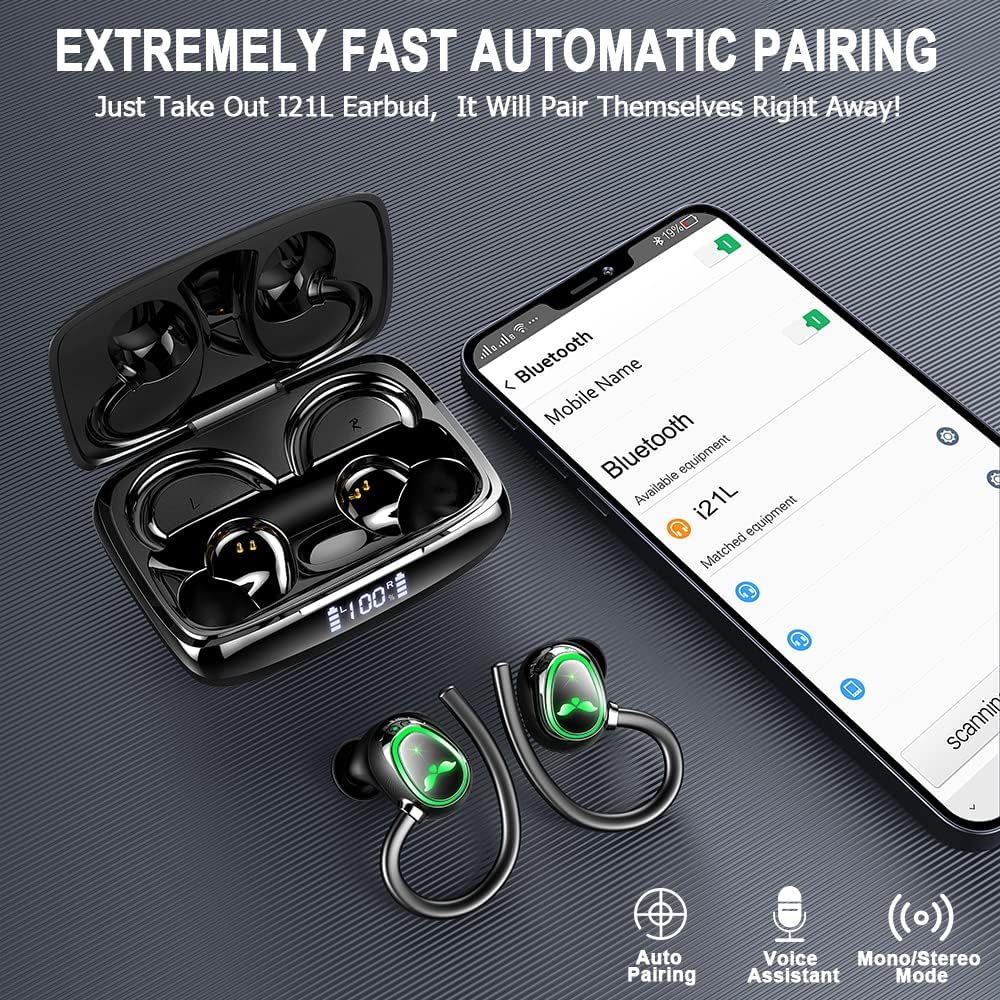
Figure 5: Proper wearing of the earbud with the earhook for secure fit during sports.
Operating Instructions
Touch Controls
The i21L earbuds feature touch control sensors for easy management of music and calls. Refer to the diagram below for specific functions:
Figure 6: Diagram illustrating the touch control functions of the earbuds.
- Play/Pause: Single tap on either earbud.
- Next Song: Press and hold the Right earbud for 1 second.
- Previous Song: Press and hold the Left earbud for 1 second.
- Volume Up: Double tap the Right earbud.
- Volume Down: Double tap the Left earbud.
- Answer/End Call: Single tap on either earbud.
- Reject Call: Press and hold either earbud for 2 seconds.
- Activate Voice Assistant (Siri/Google Assistant): Triple tap on either earbud.
Mono and Stereo Mode
The earbuds can be used together for a stereo experience or independently in mono mode.
- Stereo Mode: Use both earbuds for immersive sound.
- Mono Mode: Use only one earbud (left or right) while the other is in the charging case or powered off. This is useful for awareness of surroundings or extending battery life.
Call Functionality
The earbuds are equipped with dual microphones and CVC8.0 noise reduction technology to enhance call clarity.
- Answer/End calls using the touch controls as described above.
- Ensure the microphone is not obstructed for optimal call performance.
Maintenance
Cleaning
Regular cleaning helps maintain sound quality and prolong the lifespan of your earbuds.
- Use a soft, dry, lint-free cloth to wipe the earbuds and charging case.
- Gently remove ear caps and clean any earwax or debris from the earbud mesh using a small, soft brush or cotton swab.
- Do not use abrasive cleaners, alcohol, or chemical solvents.
Water Resistance (IP7)
The earbuds are IP7 waterproof, meaning they are protected against immersion in water up to 1 meter for up to 30 minutes. This makes them suitable for workouts and light rain.
- Do not intentionally submerge the earbuds for extended periods or in deep water.
- Ensure the earbuds are dry before placing them back into the charging case to prevent damage to the charging contacts.

Figure 7: Earbuds demonstrating IP7 waterproof capabilities against rain, sweat, and splashes.
Storage
When not in use, store the earbuds in their charging case to protect them and keep them charged.
- Store in a cool, dry place away from extreme temperatures.
- Avoid dropping or subjecting the case and earbuds to strong impacts.
Troubleshooting
If you encounter issues with your Ordtop i21L earbuds, try the following troubleshooting steps:
| Problem | Possible Solution |
|---|---|
| Earbuds not pairing with device. |
|
| Only one earbud working. |
|
| Poor sound quality or no sound. |
|
| Charging case not charging. |
|
| Call quality issues (e.g., others can't hear you). |
|
Specifications
Key technical specifications for the Ordtop i21L Wireless Earbuds:
| Feature | Detail |
|---|---|
| Model Name | i21L |
| Brand | Ordtop |
| Connectivity Technology | Wireless (Bluetooth) |
| Bluetooth Version | 5.3 |
| Bluetooth Range | 10 Meters |
| Audio Driver Size | 14.2 Millimeters |
| Frequency Range | 20 Hz - 20,000 Hz |
| Earbud Playtime (Single Charge) | 8 Hours |
| Total Playtime with Charging Case | Up to 48 Hours |
| Charging Time (Earbuds/Case) | 1.5 Hours |
| Charging Port | USB-C |
| Water Resistance Level | IP7 Waterproof |
| Control Method | Touch |
| Noise Control | Active Noise Cancellation (CVC8.0) |
| Earbud Weight | 4 Grams (each) |
| Earpiece Shape | Hook |
| Compatible Devices | All devices with Bluetooth connection |

Figure 8: Internal view highlighting the 14.2mm dynamic driver and CVC 8.0 noise canceling technology.
Warranty and Support
For warranty information or technical support, please refer to the product packaging or contact Ordtop customer service directly. Keep your purchase receipt as proof of purchase.
For further assistance, you may visit the official Ordtop store on Amazon: Ordtop Store.