
Introduction
This manual provides essential instructions for the safe installation, operation, and maintenance of your HPC Fire Push Button Flame Sensing Gas Fire Pit Kit (Model: TOR-PENTA18FPPK-FLEX-LP). This kit features an 18-inch pan, a 12-inch Penta Torpedo Burner, and is designed for propane applications with a bulk tank. It includes a battery-powered spark ignition system and an automatic flame sensor for enhanced safety and convenience. Please read this manual thoroughly before installation and use.
Safety Information
WARNING: Improper installation, adjustment, alteration, service, or maintenance can cause injury or property damage. Read the installation, operating, and maintenance instructions thoroughly before installing or servicing this equipment.
- Always ensure adequate ventilation.
- Do not store or use gasoline or other flammable vapors and liquids in the vicinity of this or any other appliance.
- Keep children and pets away from the fire pit during operation and while cooling down.
- Never leave the fire pit unattended when in use.
- This product contains chemicals known to the State of California to cause cancer and birth defects or other reproductive harm (Proposition 65 Warning).
- For outdoor use only.
- Installation and service must be performed by a qualified installer, service agency, or gas supplier.
Setup and Installation
The HPC Fire Pit Kit is designed for integration into a custom fire pit enclosure. Professional installation by a certified gas technician is highly recommended to ensure safety and compliance with local codes.
Components Overview:
- 18" Round Flat Pan: Provides a stable base for the burner and media.
- 12" Penta Torpedo Burner: Features innovative Torpedo nozzles for a taller, more natural flame.
- Flexible Gas Line: Allows for accommodating installation and connection to the control box.
- Sealed Control Box: Houses the ignition system and flame sensor.
- Wire Mesh Guard: Protects the gas line from clogs.
- Battery-Powered Spark Ignition System: For effortless control.
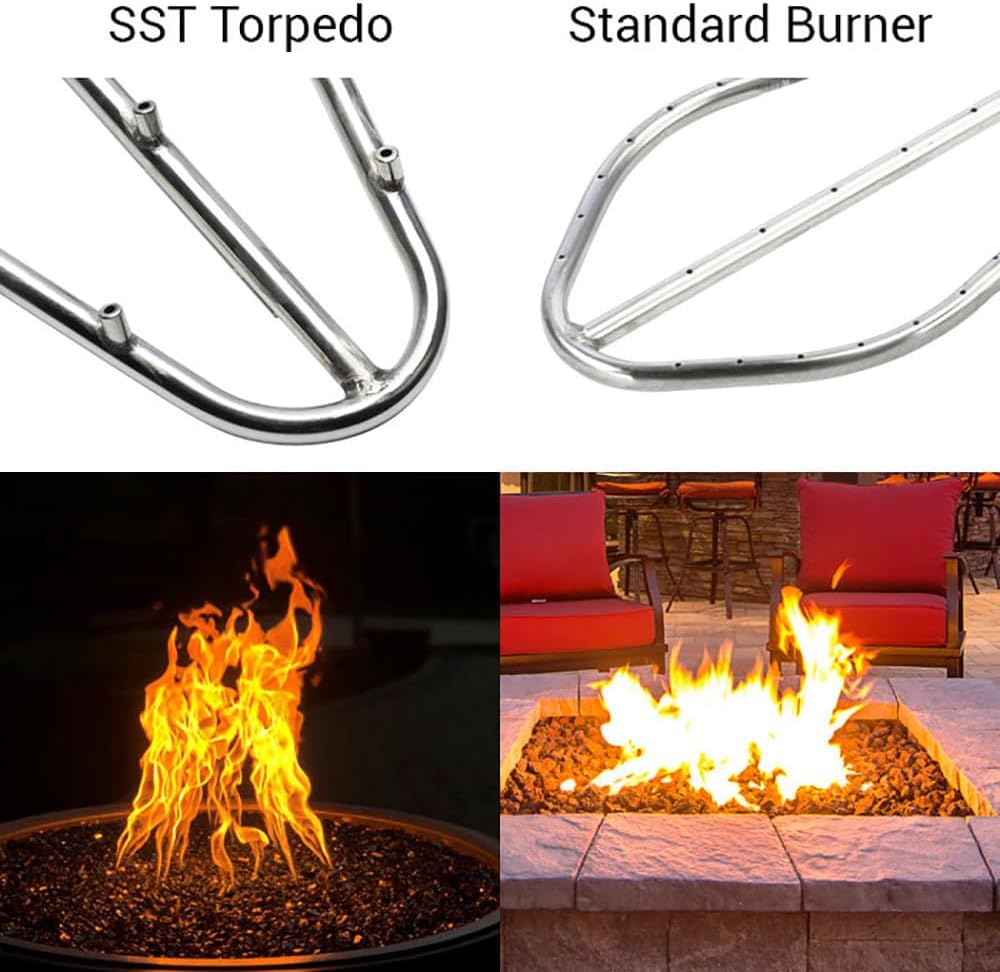
Image: Comparison of the SST Torpedo Burner (left) with a Standard Burner (right). The Torpedo burner features specialized nozzles designed to produce a taller, more robust flame pattern, mimicking a natural wood fire.
Installation Steps (Summary - Refer to full installation guide for details):
- Prepare Enclosure: Ensure your fire pit enclosure meets all structural and ventilation requirements.
- Position Pan and Burner: Place the 18" pan with the 12" Penta Torpedo Burner into the designated opening in your fire pit structure.
- Connect Gas Line: Connect the flexible gas line from the burner to the sealed control box, and then to your propane supply (bulk tank). Ensure all connections are tight and leak-free.
- Install Control Box: Mount the sealed control box in an accessible yet protected location, typically on the side of the fire pit enclosure.
- Insert Battery: Install the required battery (typically AA or AAA, check control box for specifics) into the spark ignition system within the control box.
- Leak Test: Perform a thorough leak test on all gas connections using a non-corrosive leak detection solution.
- Add Fire Media: Once all connections are secure and tested, add your desired fire media (e.g., lava rock, fire glass) over the burner, ensuring not to obstruct the ignition point or burner ports.
Operating Instructions
This fire pit kit features a push-button ignition and an automatic flame sensing system for safe and easy operation.

Image: The control panel for the HPC Fire Pit Kit, showing the "Igniter Push to Spark" button, "Pilot Light Full Push" knob, and "Main Burner ON/OFF" control. A hand is shown pressing the igniter button.
To Ignite the Fire Pit:
- Open Gas Supply: Ensure the main gas supply valve to the fire pit is fully open.
- Activate Pilot Light: Push and hold the "Pilot Light Full Push" knob on the control panel.
- Ignite Spark: While holding the pilot knob, repeatedly press the "Igniter Push to Spark" button until the pilot flame ignites. You should hear a clicking sound and see a small flame at the pilot.
- Hold Pilot: Continue to hold the "Pilot Light Full Push" knob for approximately 30-60 seconds after the pilot ignites. This allows the thermocouple (flame sensor) to heat up and confirm the pilot flame.
- Turn Main Burner ON: Slowly release the pilot knob. If the pilot remains lit, turn the "Main Burner" knob to the "ON" position to ignite the main burner. Adjust the flame height as desired.
- Flame Sensor: The automatic flame sensor will continuously monitor the pilot flame. If the pilot flame extinguishes for any reason, the sensor will automatically close the gas valve to prevent gas leakage.
To Turn OFF the Fire Pit:
- Turn Main Burner OFF: Rotate the "Main Burner" knob to the "OFF" position. The main flames will extinguish.
- Turn Pilot OFF: Push and turn the "Pilot Light" knob to the "OFF" position. The pilot flame will extinguish.
- Close Gas Supply: For extended periods of non-use, close the main gas supply valve to the fire pit.
Maintenance
Regular maintenance ensures the longevity and safe operation of your HPC Fire Pit Kit.
- Cleaning: Periodically clean the stainless steel pan and burner with a mild soap and water solution. Rinse thoroughly and dry to prevent water spots. Avoid abrasive cleaners.
- Burner Ports: Ensure burner ports are free from debris. Use a soft brush or compressed air to clear any obstructions.
- Wire Mesh Guard: Inspect the wire mesh guard for any blockages or damage. Clean as necessary to ensure proper gas flow.
- Ignition Battery: Replace the battery in the spark ignition system annually, or if the igniter spark becomes weak. Refer to the control box for battery type and replacement instructions.
- Gas Connections: Annually inspect all gas connections for signs of wear or leaks. Re-perform a leak test if any connections are disturbed.
- Covering: When not in use, especially during inclement weather, cover the fire pit to protect components from environmental elements.
Troubleshooting
If you encounter issues with your fire pit, refer to the following common troubleshooting steps. For persistent problems, contact a qualified service technician.
| Problem | Possible Cause | Solution |
|---|---|---|
| Pilot light does not ignite. |
|
|
| Pilot light ignites but goes out when knob is released. |
|
|
| Main burner does not ignite from pilot. |
|
|
| Low flame height. |
|
|
Specifications
| Feature | Detail |
|---|---|
| Model Number | TOR-PENTA18FPPK-FLEX-LP |
| Brand | HPC |
| Fuel Type | Liquefied Petroleum Gas (Propane) |
| Pan Size | 18 inches (Diameter) |
| Burner Type | 12 inch Penta Torpedo Burner |
| Ignition System | Push Button, Battery-Powered Spark Ignition with Flame Sensing |
| Material | 304 Stainless Steel |
| Product Dimensions | 8"D x 18"W x 14.75"H |
| Item Weight | 32 Pounds |
| UPC | 691023120419 |
| Manufacturer | Hearth Products Controls |
Warranty Information
For detailed warranty information regarding your HPC Fire Pit Kit, please refer to the official HPC website or contact their customer service directly. Warranty terms typically cover manufacturing defects and may vary by component.
Customer Support
Should you require further assistance, technical support, or replacement parts, please contact Hearth Products Controls (HPC) customer service. Contact information can typically be found on the manufacturer's official website or on the product packaging.
Always provide your product model number (TOR-PENTA18FPPK-FLEX-LP) when contacting support.


